Replayer hotkeys
Is it possible to navigate through hands by arrows just like in other managers? Left and right to go through the hand and Ctrl+arrows to jump to another hand
2 Replies
Hotkeys are working, but in some weird way. You need firstly press any button in down panel of replayer with LMB, then you CAN navigate between buttons with left and right arrow keys on your keyboard, then press Enter when needed and action will be performed. The problem is while navigating you don`t see at which button is focus right now, it's not highlighted in any way. Also there is no way to switch to next tourney, you should close replayer, press on next tourney in the list, scroll down to a first hand and open replayer again. There a lot tourneys in spins and this is a problem. In general even with possible navigation it's inconvenient, bc far more easier to just press N button for switching to the next hand, than press few times arrow keys and Enter.
And one more thing, if you went to and end of action or last hand of tourney- navigation stops to work and you should again press with LMB.
Hotkeys are working, but in some weird way. You need firstly press any button in down panel of replayer with LMB, then you CAN navigate between buttons with left and right arrow keys on your keyboard, then press Enter when needed and action will be performed. The problem is while navigating you don`t see at which button is focus right now, it's not highlighted in any way. Also
Hello, if this question is about Hand2Note 3, unfortunately there will be no more changes or new features added.
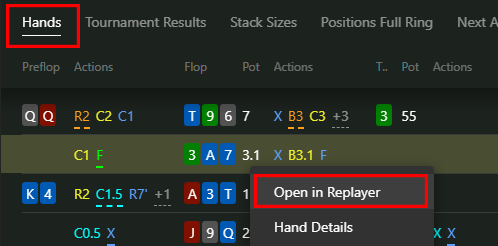
In Hand2Note 4 you can open the Hands tab in Reports, and open Replayer, in the list you will see hands from all tournaments in a row.
If you need to highlight the active button, try pressing TAB several times: