H2N4 problem when start ((
System.IO.FileNotFoundException: Could not find file 'C:\Users\Avokado\AppData\Roaming\Hand2Note\Databases\Hand2Note\stats\stats.data'.
File name: 'C:\Users\Avokado\AppData\Roaming\Hand2Note\Databases\Hand2Note\stats\stats.data'
at Microsoft.Win32.SafeHandles.SafeFileHandle.CreateFile(String fullPath, FileMode mode, FileAccess access, FileShare share, FileOptions options)
at Microsoft.Win32.SafeHandles.SafeFileHandle.Open(String fullPath, FileMode mode, FileAccess access, FileShare share, FileOptions options, Int64 preallocationSize, Nullable`1 unixCreateMode)
at System.IO.Strategies.OSFileStreamStrategy..ctor(String path, FileMode mode, FileAccess access, FileShare share, FileOptions options, Int64 preallocationSize, Nullable`1 unixCreateMode)
at System.IO.File.Open(String path, FileMode mode, FileAccess access, FileShare share)
at Hand2NoteCore.Common.Files.OpenFileForReadWriteShared(String file)
at Hand2NoteCore.FileFragmentsStream..ctor(String file, IList`1 byteRanges)
at Hand2NoteCore.ChunksHelper.ToFileFragmentsStream[T](PagedObjectPlacement placement, Chunks`1 chunks)
at Hand2NoteCore.ChunksHelper.LoadChunk[T](PagedObjectPlacement pagedObjectPlacement, Chunks`1 chunks)
at Hand2NoteCore.ChunksHelper.TryLoad[T](Chunks`1 chunks, Int64 itemId, T& result)
at Hand2NoteCore.StatsDatabaseHelper.LoadStatsResults(StatisticsDatabase database, Int32 playerId)
at Hand2NoteCore.DatabaseHelper.GetStatResultsByGameType(Int32 playerDatabaseId, Database database)
at Hand2NoteCore.DatabaseHelper.GetStatResultsByGameType(PlayerId& playerId, Database database)
at Hand2NoteCore.DatabaseHelper.GetStatResultsForGameType(PlayerId playerId, Int32 gameTypeProfileId, Database database)
at Hand2NoteCore.PlayerPopupHelper.<>c__DisplayClass30_0.
at System.Linq.Enumerable.SelectIListIterator`2.ToList()
at Hand2NoteCore.Huds.ComputedHudHelper.GetStatResultById(IEnumerable`1 statResultById, UInt16 maxStatShortId)
at Hand2NoteCore.PlayerPopupHelper.GetStatResultById(IPlayerOrAlias playerId, PopupContext context, Int32 gameTypeProfileId)
at Hand2NoteCore.Reports.PlayerStatisticsHelper.GetInitialStatisticsReport(App app, IPlayerOrAlias playerOrAlias, GameTypeProfile gameTypeProfile, StatProfile statProfile, DateFilter dateFilter)
at Hand2NoteCore.Reports.PlayerStatisticsHelper.TryGetInitialStatisticsReportFromLastOpenedConfig(App app, LastOpenedStatisticsReport lastOpenedReport, StatisticsReport& result)
at Hand2NoteCore.Reports.PlayerStatisticsHelper.GetInitialStatisticsReport(App app)
at Hand2NoteCore.AppHelper.LoadInitialReports(App app)
at Hand2NoteCore.AppHelper.LoadApplication(AppLoader loader, ILogger logger, IHudIpcChannel hudIpcChannel, ITableWindowsProvider tableWindowsProvider, AppClipboard clipboard, IServiceProvider serviceProvider, AppLoadingObserver observer, Version applicationVersion)
at Hand2NoteApp.Windows.Program.Start(String[] args)
at Hand2NoteApp.Windows.Program.<>c__DisplayClass0_0.
at System.Windows.Application.<.ctor>b__1_0(Object unused)
at System.Windows.Threading.ExceptionWrapper.InternalRealCall(Delegate callback, Object args, Int32 numArgs)
at System.Windows.Threading.ExceptionWrapper.TryCatchWhen(Object source, Delegate callback, Object args, Int32 numArgs, Delegate catchHandler)
at System.Windows.Threading.DispatcherOperation.InvokeImpl()
at MS.Internal.CulturePreservingExecutionContext.CallbackWrapper(Object obj)
at System.Threading.ExecutionContext.RunInternal(ExecutionContext executionContext, ContextCallback callback, Object state)
--- End of stack trace from previous location ---
at System.Threading.ExecutionContext.RunInternal(ExecutionContext executionContext, ContextCallback callback, Object state)
at MS.Internal.CulturePreservingExecutionContext.Run(CulturePreservingExecutionContext executionContext, ContextCallback callback, Object state)
at System.Windows.Threading.DispatcherOperation.Invoke()
at System.Windows.Threading.Dispatcher.ProcessQueue()
at System.Windows.Threading.Dispatcher.WndProcHook(IntPtr hwnd, Int32 msg, IntPtr wParam, IntPtr lParam, Boolean& handled)
at MS.Win32.HwndWrapper.WndProc(IntPtr hwnd, Int32 msg, IntPtr wParam, IntPtr lParam, Boolean& handled)
at MS.Win32.HwndSubclass.DispatcherCallbackOperation(Object o)
at System.Windows.Threading.ExceptionWrapper.InternalRealCall(Delegate callback, Object args, Int32 numArgs)
at System.Windows.Threading.ExceptionWrapper.TryCatchWhen(Object source, Delegate callback, Object args, Int32 numArgs, Delegate catchHandler)
at System.Windows.Threading.Dispatcher.LegacyInvokeImpl(DispatcherPriority priority, TimeSpan timeout, Delegate method, Object args, Int32 numArgs)
at MS.Win32.HwndSubclass.SubclassWndProc(IntPtr hwnd, Int32 msg, IntPtr wParam, IntPtr lParam)
at MS.Win32.UnsafeNativeMethods.DispatchMessage(MSG& msg)
at System.Windows.Threading.Dispatcher.PushFrameImpl(DispatcherFrame frame)
at System.Windows.Application.RunDispatcher(Object ignore)
at System.Windows.Application.RunInternal(Window window)
at Hand2NoteApp.Windows.Program.Main(String[] args)
3 Replies
WebView 2 https://go.microsoft.com/fwlink/p/?LinkI...
did not help
Hello,
Could you try to delete these folders ("reports" and "stats") from the folder where your database is stored, by default here C:\Users\AppData\Roaming\Hand2Note\Databases:
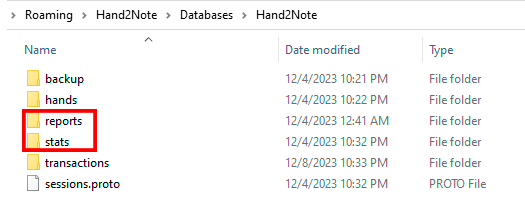
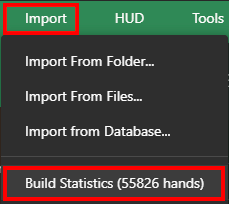
Then launch Hand2Note and click on Build Statistics:
If it doesn't help, you'll have to delete the entire database, unfortunately. But you will be able to restore your played hands by importing the following folders C:\Hand2Note4Hh\ and C:\MyHandsArchive_H2N4\ to new database.
Hello, Could you try to delete these folders ("reports" and "stats") from the folder where your database is stored, by default here C:\Users\AppData\Roaming\Hand2Note\Databases: Then launch Hand2Note and click on Build Statistics: If it doesn't help, you'll have to delete the entire database, unfortunately. But you will be able to restore your played hands by importing the fo
Величезне дякую, допомогло!


