HUD freezes randomly for Pokerrrr2
Hello,
In Pokerrrr2 (LDPlayer), H2N4 and the HUD work, then they don't. Once it stops working, you have to reboot LDPlayer. Sometimes it works all night, but a lot of the time it stops randomly. Any thoughts what could be going on? I find it distracting to continually have to check if H2N4 is collecting data or not.
Thanks.
11 Replies
Hello, could you please update Hand2Note 4 following these instructions:
1. Close all poker rooms.
2. Restart Hand2Note
.3. Click on Updates section and install the latest updates in these tabs:
Hand2Note
Rooms Integration
Pokerrr
If updates are not installed for some reason, most likely the module is running in the background, you can try to find all Hand2Note related processes in Task Manager and force close, or just reboot your PC.
If all the latest updates are installed, try reinstalling Hand2Note:
If you need to save all your settings, you should backup your Config and Notes using this feature:
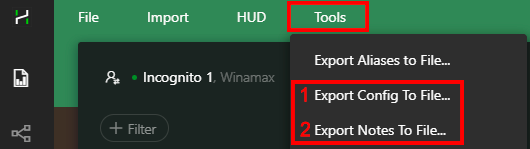
(Make sure to keep the backup files in a safe folder)
Marked hands have to be copied manually from C:\Program Files\Hand2Note4\MarkedHands.
Now you can proceed to uninstall the program:
1. Uninstall Hand2Note 4 through the Windows Settings -> Apps & features (Control Panel).
2. After uninstalling there are still remaining files in Hand2Note folder, you have to delete them manually. By default it is C:/Program Files/Hand2Note4.
3. Download the latest version of the installer and install. https://h2n.blob.core.windows.net/hand2n...
4. Try to launch Hand2Note 4 in the default configuration and check if it helped.
5. If the issue is solved, you can try to restore your settings:
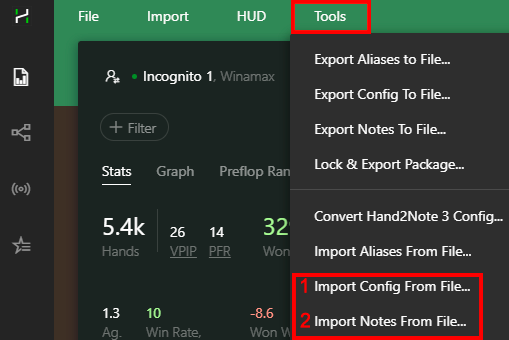
Hello,
I've tried these suggestions. However, the HUD still randomly freezes (lets say every 20-80 hands or so). The only fix I have is to reboot the table. Also note, I usually play 2-3 tables.
Any other thoughts or suggestions?
Thanks!
Hello, could you please record a short video demonstrating the issue you're experiencing? Here are the steps you should follow:
1. Delete any old logs from this folder: C:\Program Files\Hand2Note4\logs
2. Launch Hand2Note and start a regular playing session.
3. In the video, ensure to display your PC's time and show the table titles while playing so that we can correlate them with your logs.
4. Once you've finished the session, zip the logs folder located at: C:\Program Files\Hand2Note4\logs
5. Send the zipped logs folder along with the video to [email][email protected][/email]
Please also specify the time codes where where the HUD stops updating.
Ok, I can do that. One more note; I have to hit "import/Build Statistics" (and it notes how many hands I have to import) in order to get hands to load into HUD.
Could you please demonstrate this issue on video as well?
Here is a screenshot. I'll take a video tonight.
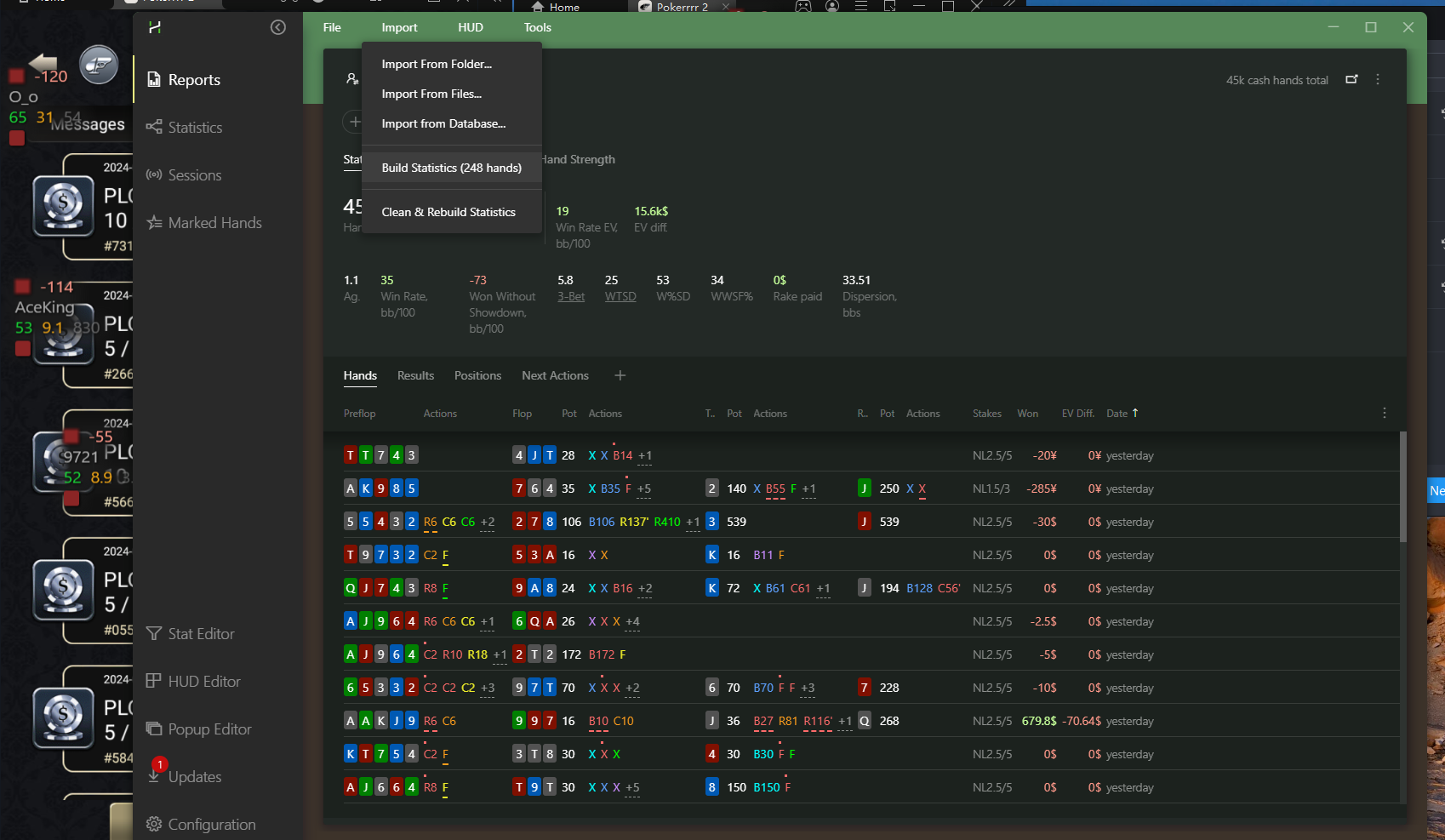
I've sent the log files and the videos too.
Thanks.
Thank you for your passing on my issue to the developers. I understand that it may take some time.
Meanwhile, I still have a paid subscription to Hand2Note (version 3). I get similar issues, although the difference is usually the HUD updates for a while and then stops. I'll use H2N3 for my next session. Is there anything I should to fix this?
Thanks.
Hello,
Usually updates are released for both Hand2Note versions at once. But if you have similar issues or any other issues in Hand2Note 3, please record a new video for us to forward it to the developers.
Before recording the video, please make sure you are using the latest version 3.3.1.62:
https://hand2note3.hand2note.com/Help/pa...
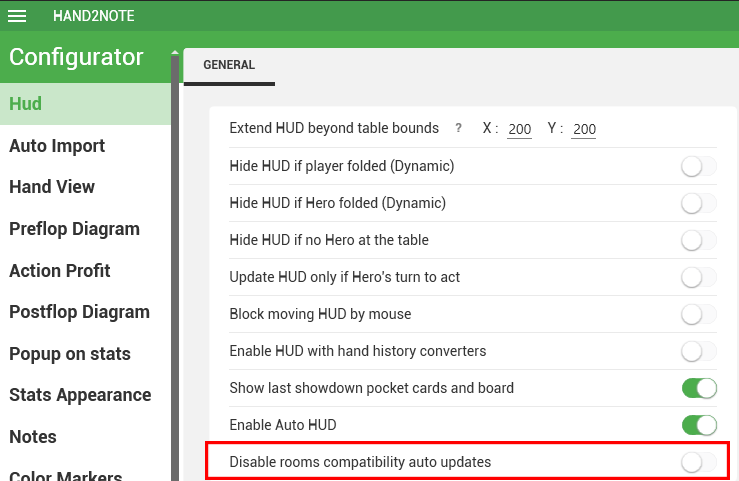
Also make sure you have disabled the "Disable rooms compatibility auto updates" option in Configuration-> HUD then restart Hand2Note
Is there any way to import H2N4 hands into H2N3?
Hello,
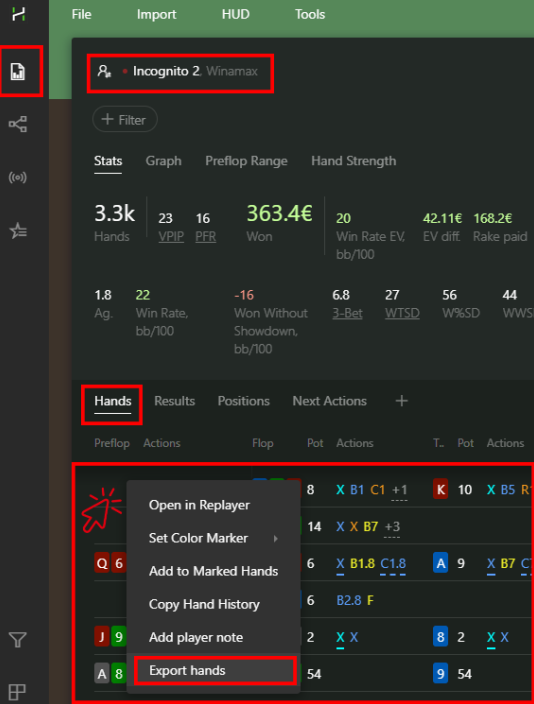
You can export hands from Hand2Note 4 and then import them into Hand2Note 3. To do this, could you please follow these steps:
1. Open Reports.
2. Select the desired Nickname or Alias.
3. Go to the Hands tab.
4. Right-click anywhere and select Export Hands.
5. Then, import them into Hand2Note 3
The old version only supports the format of certain rooms: PS, Winamax, 888, Ipoker, WPN. Unfortunately, hands from other rooms and applications played through Hand2Note 4 cannot be imported.
For all other rooms, the format was changed to support all modern game types. Hand2Note 3 does not support the new hand format, unfortunately.