Import Players From File (Aliases with H2N4)
Hello,
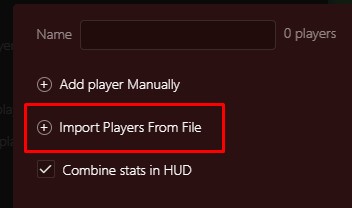
Which kind of files are you accepting with this feature? I can't find any documentation about it.
I've a txt file with a list of player name, but it's not working.
Thanks.
3 Replies

Hello, Which kind of files are you accepting with this feature? I can't find any documentation about it.I've a txt file with a list of player name, but it's not working.Thanks.
Auto detects Hero from your own Hand History while importing IIRC
Hello, Which kind of files are you accepting with this feature? I can't find any documentation about it.I've a txt file with a list of player name, but it's not working.Thanks.
Hello,
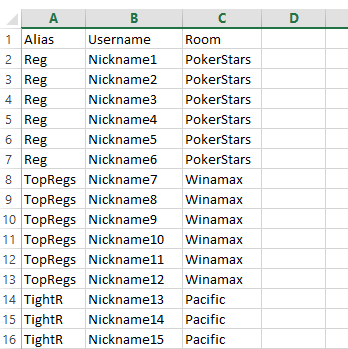
You should use CSV (comma delimited) format for you files to import.
There are two ways to import nicknames from CSV into Alias settings:
1. Go to Configuration -> Aliases -> +Add alias... -> Import Players From File
This way you can add several nicknames to one Alias.
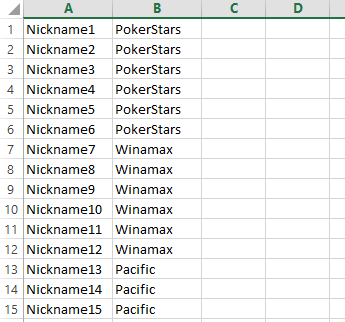
2. Using Tools -> Import Aliases From File
This way helps you to add multiple Aliases at once from one file.
Hello,You should use CSV (comma delimited) format for you files to import. There are two ways to import nicknames from CSV into Alias settings: 1. Go to Configuration -> Aliases -> +Add alias... -> Import Players From File This way you can add several nicknames to one Alias. 2. Using Tools -> Import Aliases From File This way helps you to add multiple Aliases at once from one
Awesome, thank you!

