PC suddenly shutdown and lost all my hands and database
Seriously, wtf? What should I do? Start from 0 and that's it? Solutions provided to rebuild the database don't work, my Pokerstars hands folder it's empty, I lost it all. Software is not serious. w t f...
1 Reply
Hello,
We apologize for the issues you encountered while using Hand2Note 4. The program is currently in beta testing, and there are some bugs that can currupt the database. For this reason, participation in the testing is completely free, and no subscription or key is required for it to work.
The most common causes of database corruption are:
1. Forced termination of Hand2Note while playing or while building statistics.
2. Shutting down the PC without closing Hand2Note.
The developers should fix most of the bugs in Hand2Note 4 by the final release, including improvements to the stability of the database.
Could you try to open Configuration -> Databases and check if perhaps you have a new database created.And try switching to the old one:
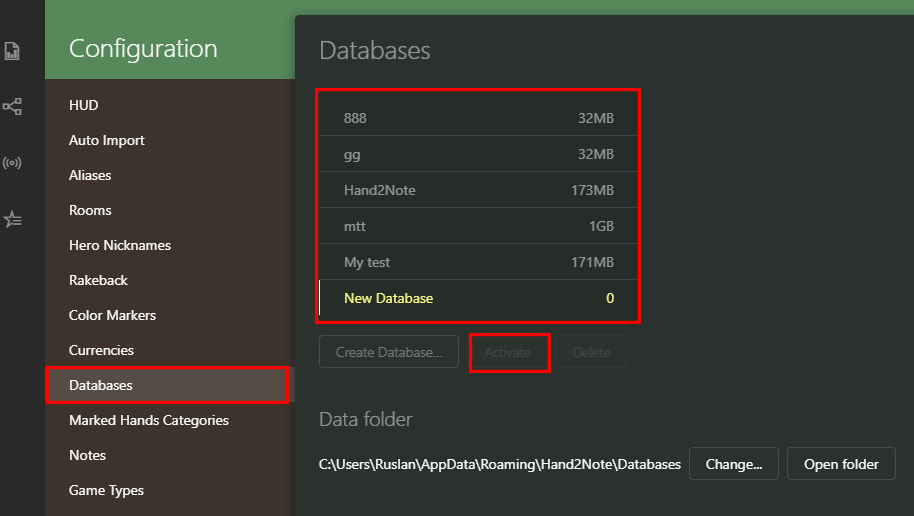
If you get an error message that the database cannot be loaded, you can try to restore it:
You should close Hand2Note and try to delete these folders ("reports" and "stats") from the folder where your corrupted database is stored, by default here C:\Users\AppData\Roaming\Hand2Note\Databases\Corrupted database:
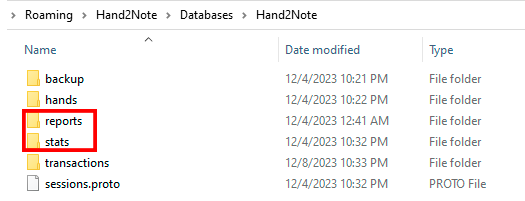
Then launch Hand2Note -> try to switch to the corrupted database -> click on Build Statistics:
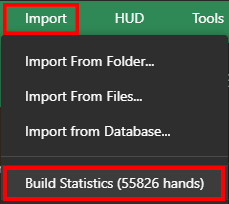
If it doesn't help, you'll have to delete the entire database, unfortunately. But you can restore your played hands by importing the following folders C:\Hand2Note4Hh\ and C:\MyHandsArchive_H2N4\ to your new database.


