Compact HUD
Compact HUD
I've been using H2N4 for a while and I love it. The only problem I have is that my HUD takes up a lot of space because the space between the stats is so big. Is there a way to reduce the space between stats and make the HUD more compact?
Thank you.
Reply...
1 Reply
Hello,
1. First, try reducing the HUD scaling in Configuration -> HUD:
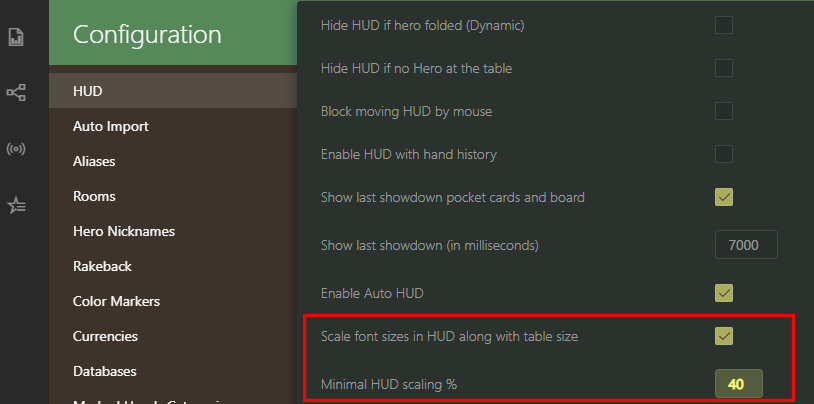
Example:

2. Disable the Show stat sample in HUD option; this will remove small numbers, significantly reducing the size of the HUD:
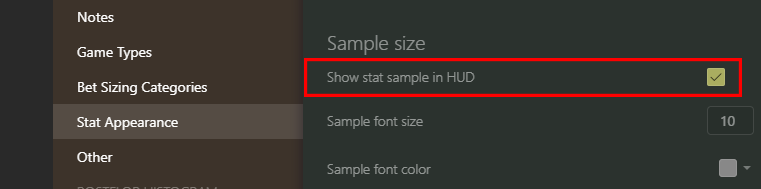
Example:

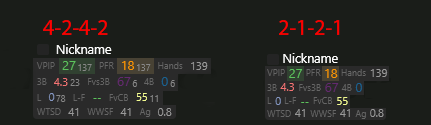
3. Open the HUD Editor -> Click File -> Switch Profile -> Select your HUD, then select all cells and reduce the Padding (Left / Top / Right / Bottom):
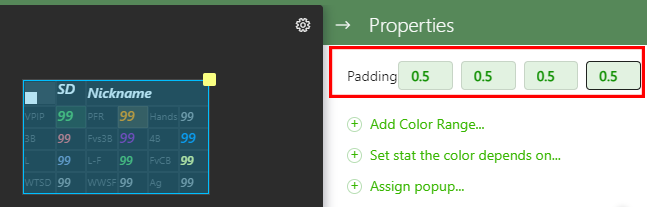
Example:
1
like
Loading

Reply...

