extremely high ram usage
hand2note takes 8gb of ram
webview2 1gb without playing, more when I play.
Is it possible to lower it?
2 Replies
Hello!
Actually, Hand2Note 4 has no limitations on resource usage. If needed, Hand2Note can utilize all available RAM to improve performance - whether it is 16, 32, or even 128 GB. Using 70-80% of RAM is normal behavior. However, this should not lead to any lag.
The system manages memory dynamically - if more memory is required by other apps or tasks, it will automatically clean up unused data.
Just to clarify, if this is actually causing any lags or performance issues for you?
yes it lags at time when I open a new table; at times a poker room crashed.
Or sometimes when I have chrome open to listen to some music.
I have 16gb or ram.
I guess that if I restart the program it goes down again, right?
Or maybe the DB big? or the HUD with a lot of stats?
You can try reduce the number of CPU threads and stats used for building statistics.
In Hand2Note 4.1, statistics are now built for the entire Config rather than just the HUD/Popup selected in Configuration -> Game Types, as was the case in version 4.0 or Hand2Note 3. This change can significantly impact performance, especially with complex Configs, as well as increase the database size several times.
1. Close all poker sites.
2. Go to Configuration -> Other.
4. Decrease the value under Max threads for building stats. (Set it to 4 for 16GB RAM)
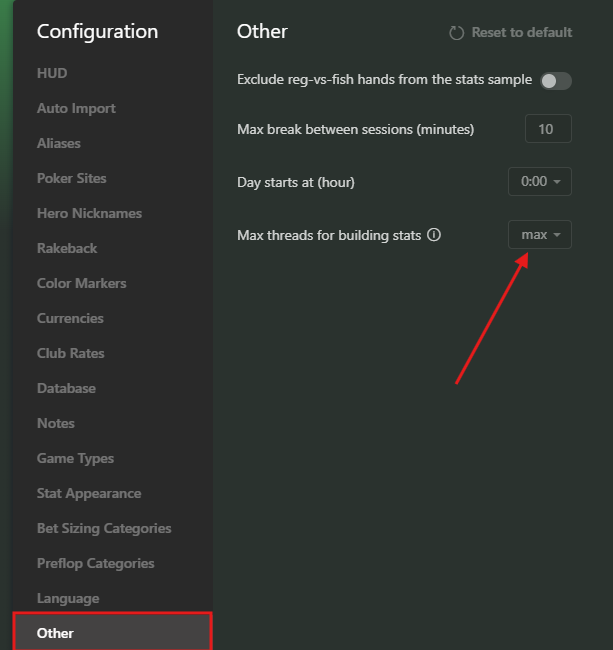
5. Check the number of stats in the Config by clicking on Configuration -> Delete unused stats. Try deleting unnecessary profiles with stats.
Be sure to backup the Config before deleting unused stats.

6. Rebuild the statistics after deleting stats and making changes to the configuration.
7. Disable the option is Single player for all Aliases in Configuration.
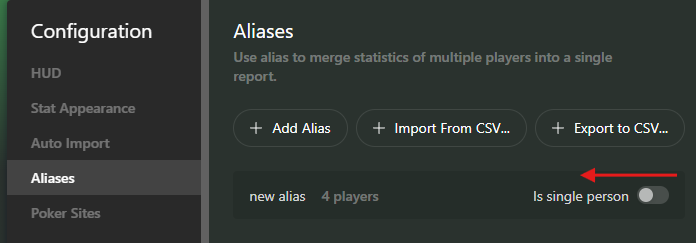
These adjustments should reduce memory usage, improve performance during statistics building and gameplay and reduce the database size.


