How to select HUD profile on H2N4?
Hi, i downloaded the trial version of H2N4 and i downloaded the MTT MDA package that i bought.
I see the different profiles on H2N4, but i don't see how to decide which one to use when i'm playing.
How to select it?
I went to Configuration --> Game Type, but i dont't find where to choose between profiles
1 Reply
Hello!
In Game Types, you no longer have to select a specific HUD or popup profile, as all HUD profiles will work across your game types configuration.
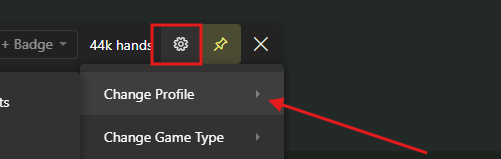
To choose a General Popup, simply click on the popup settings and select the desired profile:
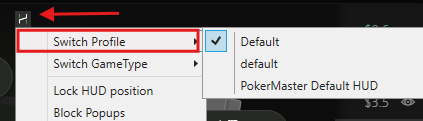
2. To select a HUD profile, just click on the Hand2Note icon.
If you need a specific HUD profile to be displayed on different poker rooms, you should create multiple profiles in Configuration -> Game Types.
To do this, please follow these steps:
1. Select the Cash or Tournaments tab.
2. Then click on the + to add a new Game Type profile.
3. Select the poker room, such as PokerStars or iPoker.
4. You can create multiple profiles for each room – the list will be sorted automatically.
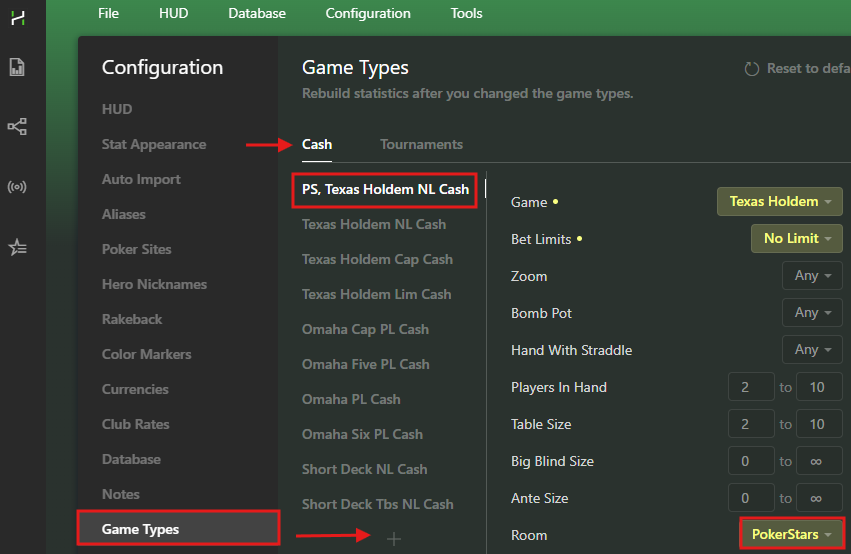
5. Additionally, you can add a general Game Type profile for all other rooms. For example, if you want one HUD to be displayed on PokerStars and a different one on all other rooms, just create 2 profiles:
- one for PokerStars
- and another one without selecting any poker room.
6. After making changes, you will have to rebuild the statistics: Database -> Clean & Rebuild Statistics.
7. Then, during gameplay, simply click on the H2N icon and select the desired HUD profile.
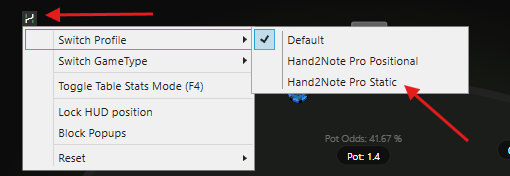
The selected profile will be remembered for each Game Type. So, if you select a static HUD while playing on PokerStars, it will automatically be saved. Selecting a different profile while playing on any other room will display a different HUD.


