HUD from H2N 3 to H2N 4
Hi, I have an HUD/pop up since H2N 3 that work perfectly, im traveling right now, so I download H2N 4 on my laptop, and I cant see my HUD anymore, maybe its normal so in case I took the raw files of the HUD/pop up on my computer, but I can see that the files are not de same format as H2N 4, so I cant find a way to import it ... ?
Any sugestions ?
Im loging with the good account, the package apear in my H2N, but I dont have the HUD or pop up
1 Reply
Hello!
Thanks for contacting Hand2Note Support.
That's true; you should convert your Hand2Note 3 config to Hand2Note 4 via a special option. Could you please follow these steps to do it properly?
1. Click on Configuration -> and select Convert Hand2Note 3 Config
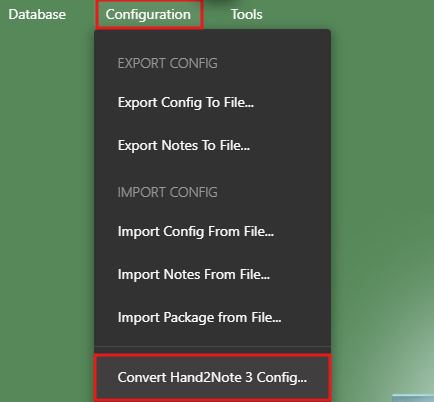
2. Select the folder where your Hand2Note 3 is installed; by default it is here: C:/Program Files/Hand2Note4.1
3. Now have to wait until converting is finished, usually it's less than a minute, depends on the number of stats in your Hand2Note 3 profiles.
4. When finished, it is necessary to restart Hand2Note 4.


