Auto-update for 888
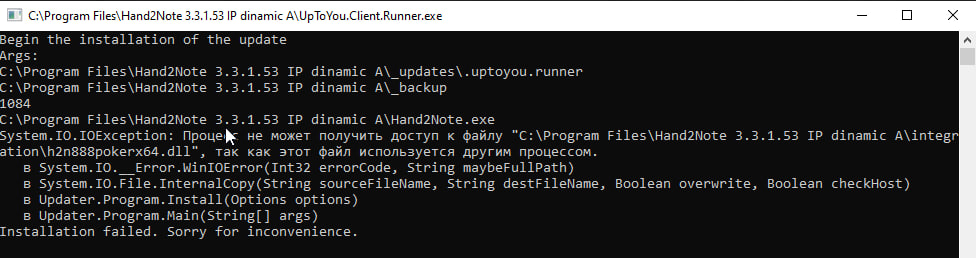
Hello, why can't I update for the 888? It says it's busy with another process.
1 Reply
You may need to try reinstalling Hand2Note so that the HUD starts working again on 888.
Could you please follow these steps:
1. Save your settings, and copy your folders "Config" and "Notes":
https://hand2note3.hand2note.com/Hel...M...
2. Uninstall Hand2Note via the Control Panel.
3. After the uninstallation has finished, please manually delete all files from the install directory (the default folder is located in:
C:\Program Files\Hand2Note\.
4. Download and reinstall Hand2Note using the latest installer:
https://h2n-uptoyou.azureedge.net/ma...e...
5. Run Hand2Note with the default config (do not restore your config folder), enter your serial key in the program, and check if the issue persists.
Additionally, please make sure that this option is enabled: "Enable HUD with hand history converter."
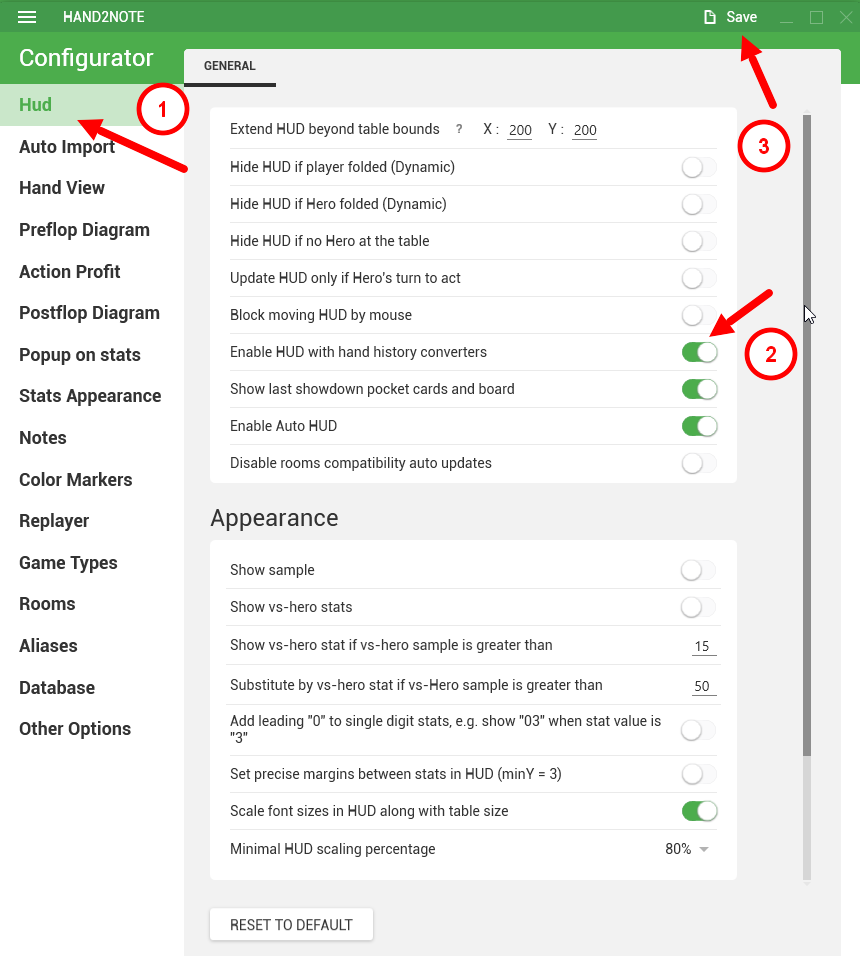
6. If everything is fine and the HUD has appeared, close Hand2Note, and you can then move your configuration folders, "Config" and "Notes" back:
C:\Program Files\Hand2Note\
Your database won't be removed, no worries!


