Questions about h2n version 4

- In h2n version 3, there was an option while playing to click on a white square on the hud and see a list of notes of villains largest hands that reached showdown in that session.
Is it possible in hand2note vers 4 to see villain's largest hands of that session?
- How to assign a certain HUD and a certain main popup to a poker site?
- When generating stats, h2n version 4 does it for all huds and stats, or only for the huds and stats that are assigned to be used on poker sites?
If stats are generated for all huds, is it recommended to delete all unused huds and stats?
- The size of the hand replayer in h2n 4 is very small with barely visible numbers and letters. Is it possible to resize the replayer?
Thank you.
6 Replies
- How to assign a certain HUD and a certain main popup to a poker site?
Its possible to select the hud and popup at the table. But the problem is playing on multiple sites with a hud for each.
Selecting one hud will activate that hud for each site.
And 1 question regarding the "Vs-User" statistic.
The default 3bet stat works very well and is correct (checking the replays one by one)
Hero screenname is also entered correct in H2n.
The matrix showing a villain's 3bet range works very well (I verified by checking the hand replays)
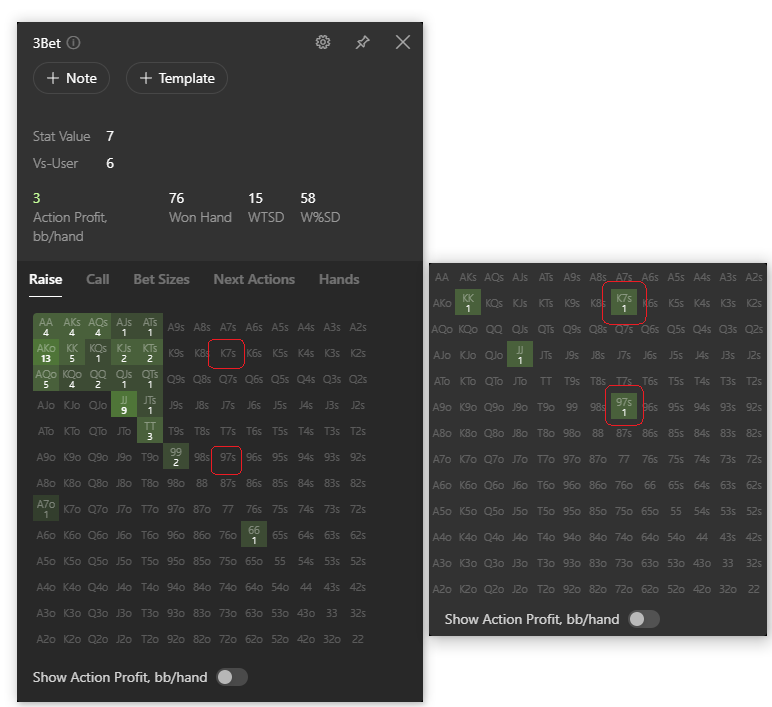
But the 3bet matrix vs-user is incorrect. It indeed shows hands between villain and user, but a preflop 3bet did not take place in all hands.
This is a screenshot of a villain's overall 3bet and his 3bet vs user... And one of the hands from the 3bet vs user matrix, where there was no 3bet.
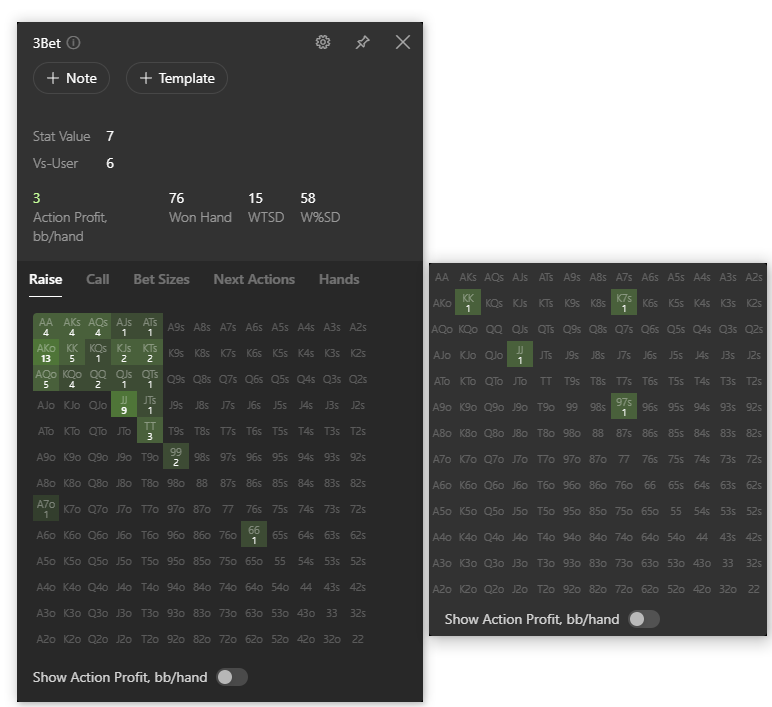

Is there something I can do to get the "Vs user" matrix to show correct hands?
Hello!
1. "In h2n version 3, there was an option while playing to click on a white square on the hud and see a list of notes of villains largest hands that reached showdown in that session.
Is it possible in hand2note vers 4 to see villain's largest hands of that session?"
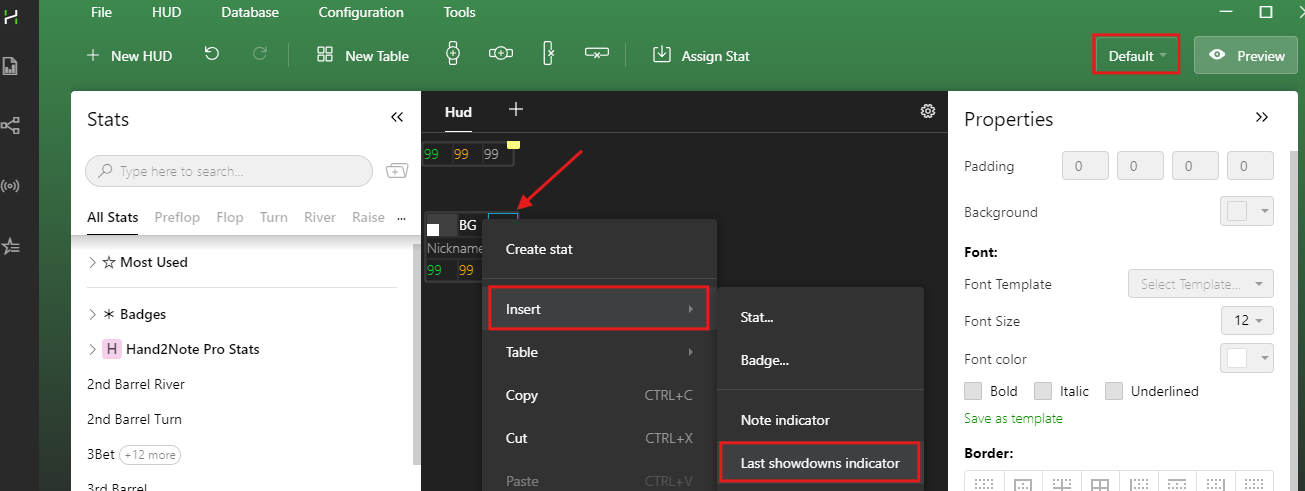
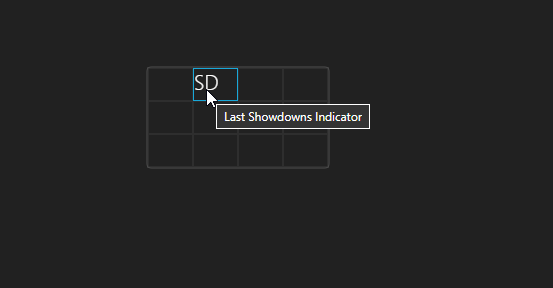
This is now a separate option in the HUD called “Last Showdown Indicator.”
1. Open the HUD Editor.
2. Select your HUD Profile.
3. Right-click on an empty cell in the HUD table
4. From the menu, go to Insert and select Last Showdowns Indicator.
2. "How to assign a certain HUD and a certain main popup to a poker site?"
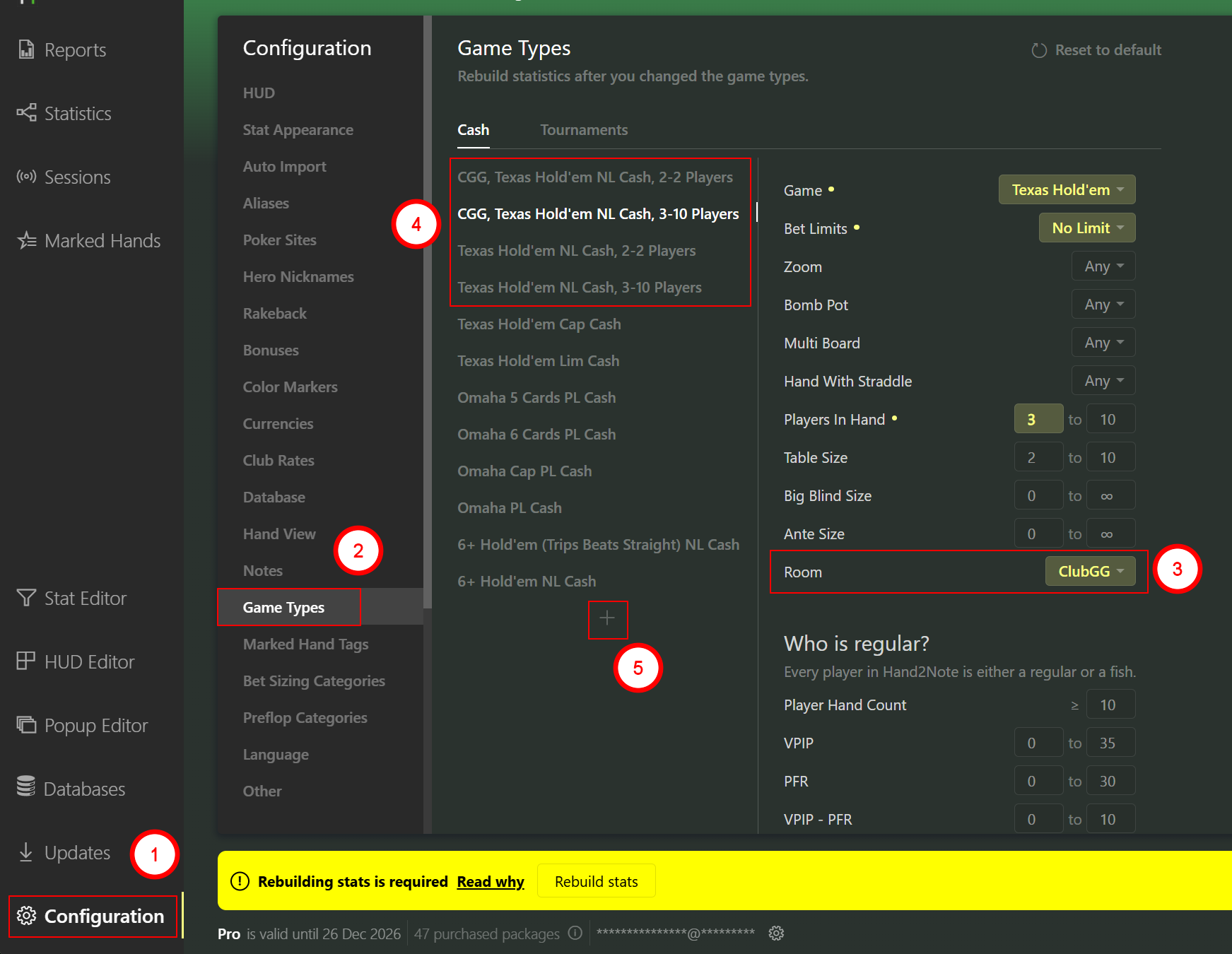
You need to create separate Game Types for the poker rooms where you want to use a different HUD.
Example:
You are playing on PokerStars, WPN, Coin, and Club GG.
You want to use a dynamic HUD for Club GG and a static HUD for the other rooms.
In this case, you should create a separate game type and select Club GG for it. All other rooms will remain under a shared game type and will use the same HUD settings, since they belong to the same type.
3. "When generating stats, h2n version 4 does it for all huds and stats, or only for the huds and stats that are assigned to be used on poker sites?
If stats are generated for all huds, is it recommended to delete all unused huds and stats?"
That’s correct. In Hand2Note 4.1, when the database is built, statistics are generated for all HUD and Popup profiles, including stats that are both used and unused.
Because of this, you can switch to any profile at any time.
If you would like to save space and reduce the size of your database, you can delete unused stats and then rebuild the database.
This will remove all statistics that are not included in any HUD or Popup profile.
Additionally, we always recommend creating a backup of your configuration before deleting anything:
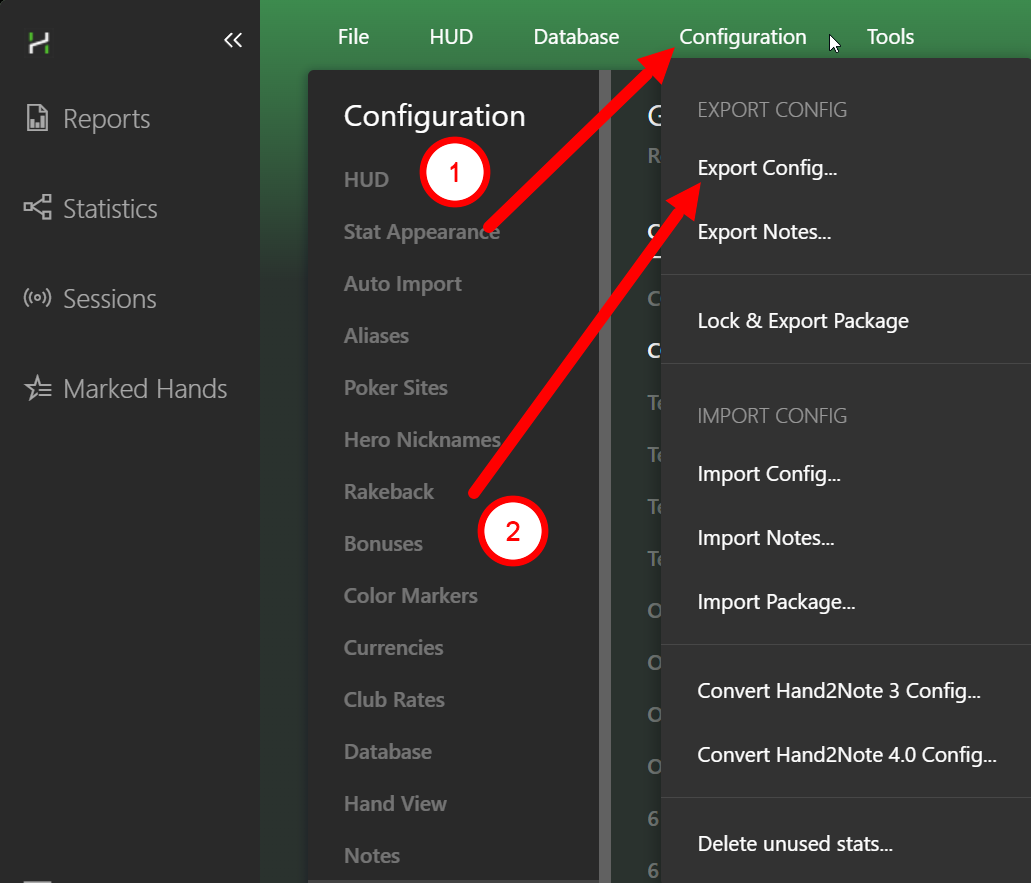
This option will create a file containing an exact copy of your "Config", including all profiles, stats, and settings.
If you ever need to restore something, you will always have this file available.
4. "The size of the hand replayer in h2n 4 is very small with barely visible numbers and letters. Is it possible to resize the replayer?"
Could you please clarify in more detail what you mean by the size of the "Replayer"?
If possible, please send a screenshot. The screenshot will help us better understand the issue.
5. "And 1 question regarding the "Vs-User" statistic."
Could you please email us the hand history for this hand, preferably in a .txt file?
[email][email protected][/email]
This will allow us to check whether this specific hand is really causing issues with the 3Bet statistic.
If everything is correct with the hand itself, we will then try to identify why it is being included in the 3Bet chart on your side.
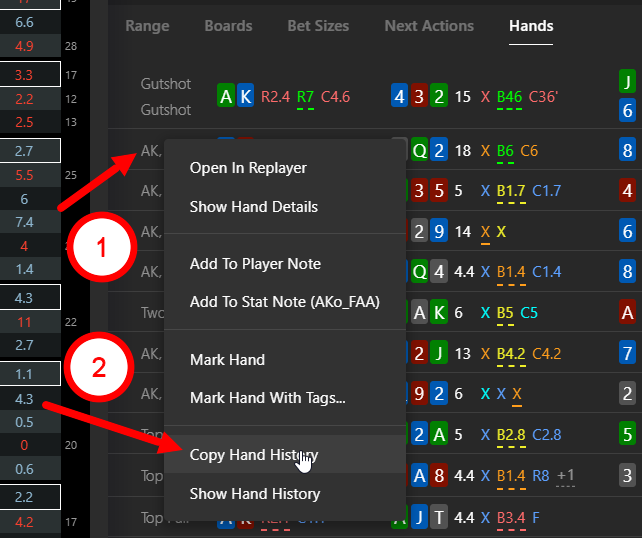
Please write questions 4 and 5 here, I think many people will be interested.
Thank you for the fast and very helpfull responce.
Could you please clarify in more detail what you mean by the size of the "Replayer"?
If possible, please send a screenshot. The screenshot will help us better understand the issue.
I managed to solve this issue. I was clicking on this play icon and a very small replayer would popup and I could not resize that replayer.

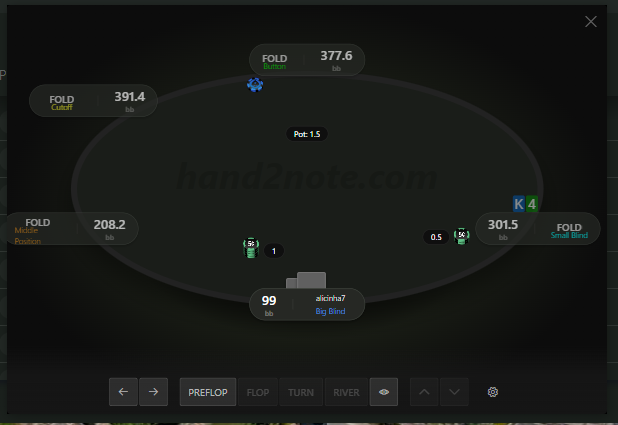
I solved the problem by double clicking on the hand. After double clicking a normal replayer would open and I could resize that replayer.
This will allow us to check whether this specific hand is really causing issues with the 3Bet statistic.
If everything is correct with the hand itself, we will then try to identify why it is being included in the 3Bet chart on your side.
So I am using the default 3bet and 4bet stat and the default popup. The 3bet and 4bet stats work very well and there is no problem with them or with their matrixes.
My nickname is also correctly entered in h2n in the "hero nickname" configuration window.
The problem is the matrix in the 3bet and 4bet popup when trying to see the "Vs-user" 3bet and "Vs-user" 4bet statistic. In these screenshots we can see that when we click the vs-user matrix, new hands would appear that are not in the overall 3bet and 4bet matrix (which is impossible). These new hands that appear in the vs-user matrix are played between hero and villain, but they are not 3bet and 4bet hands.

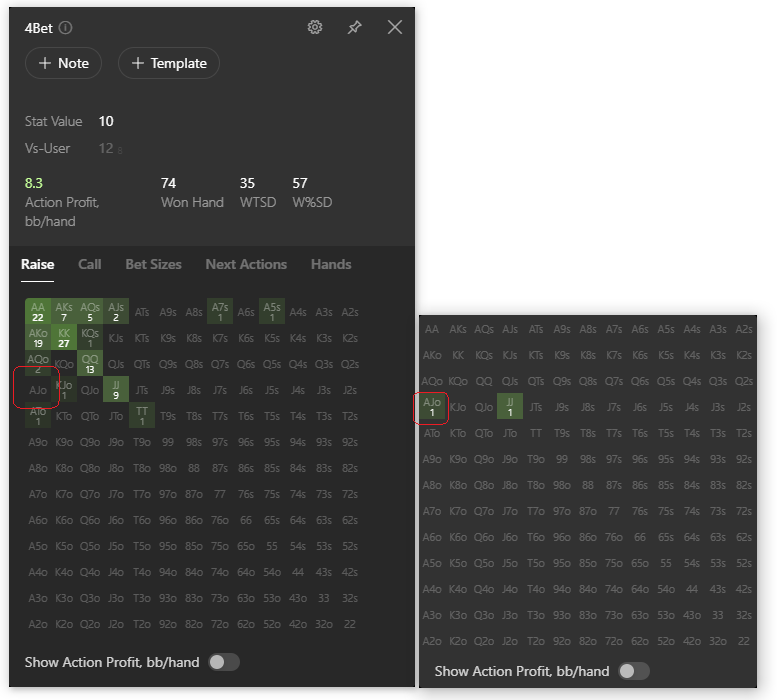

Thank you for the fast and very helpfull responce.I managed to solve this issue. I was clicking on this play icon and a very small replayer would popup and I could not resize that replayer. I solved the problem by double clicking on the hand. After double clicking a normal replayer would open and I could resize that replayer.So I am using the default 3bet and 4bet stat and t
Thank you! We have checked and can confirm that this is indeed a bug. Hand2Note correctly displays the alternative actions for the stat, but the color shown is incorrect.
We have already reported this to our developers. We hope it will be fixed or improved in one of the upcoming updates!


