h2n.dll crashes Unity-based clients during Mono assembly loading
Summary
When Hand2Note 4.1 is running alongside a Unity-based poker client (CoinPoker), the client crashes immediately at startup with an UNKNOWN native crash inside mono_assembly_load_from_full. The crash happens before any managed C# code executes.
Environment
Hand2Note version: 4.1
OS: Windows 10 (10.0.19041)
Poker client: CoinPoker (Unity 2022.3.62f1, Mono scripting backend)
GPU: NVIDIA GeForce GTX 1650, driver 32.0.15.9159
Graphics API: Direct3D 11.0
What happens
Hand2Note injects h2n**********.dll (loaded from D:\integration\h2n**********.dll) into the CoinPoker process. The injected DLL spawns a thread inside the process. That thread calls into Unity's embedded Mono runtime (mono-2.0-bdwgc.dll) while Mono is still in the middle of its own assembly loading phase (Begin MonoManager ReloadAssembly). The concurrent access causes an ACCESS_VIOLATION crash.
Exact crash stack from Player.log
Crashing thread (Mono main thread):
0x00007FFF91CC1575 (mono-2.0-bdwgc) mono_assembly_load_from_full
0x00007FFF91CC147E (mono-2.0-bdwgc) mono_assembly_load_from_full
Concurrent thread spawned by h2n**********.dll:
0x00007FF80C701E88 (h2n**********) [no symbols]
0x00007FF80C70102A (h2n**********) [no symbols]
0x00007FF818C47374 (KERNEL32) BaseThreadInitThunk
0x00007FF818F1CC91 (ntdll) RtlUserThreadStart
The BaseThreadInitThunk + RtlUserThreadStart at the bottom of the h2n********** stack confirms this is a new thread created by your DLL inside our process.
Timeline
Unity starts
→ "Begin MonoManager ReloadAssembly" ← Mono starts loading assemblies
→ h2n**********.dll injected
→ h2n********** spawns thread
→ h2n********** thread calls mono_assembly_load_from_full ← RACE
→ ACCESS_VIOLATION crash
→ No managed C# code ever runs
The crash occurs approximately 300–400ms into startup, consistently before the splash screen appears.
Why this is a bug in h2n**********
mono_assembly_load_from_full is not thread-safe when called concurrently from an external thread during Mono's own initialization phase. Unity's embedded Mono does not expect outside callers during MonoManager ReloadAssembly. The crash is 100% reproducible when Hand2Note is running and does not occur when Hand2Note is closed.
Requested fix
One of the following would resolve the crash:
Delay injection until after the Unity process signals that Mono initialization is complete (e.g. wait for the main window to become visible and responsive, or wait for a named event/mutex that the client could expose)
Skip Mono API calls if the host process is a Unity game (detectable by the presence of UnityPlayer.dll in the module list)
Synchronize with Mono's loader lock before calling mono_assembly_load_from_full from the injected thread
Workaround for users (until fixed)
Close Hand2Note before launching CoinPoker, then reopen Hand2Note after the table is fully loaded.
1 Reply
Hello!
Could you please check the following:
1. All programs are running as administrator.
2. The entire Hand2Note folder and poker room folders are added to Windows Defender exclusions. Smart App Control is disabled.
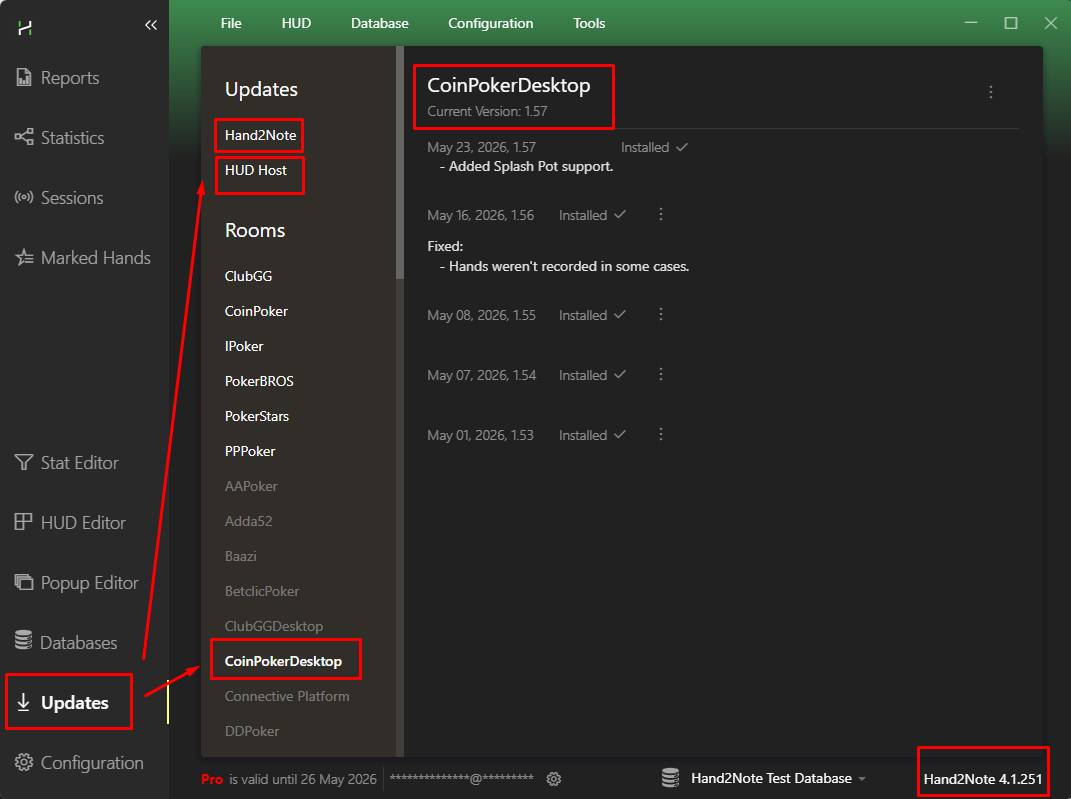
Could you please ensure that you have installed all necessary updates.
Hand2Note → 4.1.251
HUD Host → 4.37
CoinPoker Desktop → 1.57
If the updates are not installed, could you please do these following steps:
1. Close all poker rooms.
2. Install the updates.
3. Restart Hand2Note.
If all the points above are correct, then the issue occurs because of corrupted files.
If you have an additional antivirus installed besides Defender, please uninstall it before reinstallation.
Could you please reinstall Hand2Note 4.1:
1. Disable Windows Defender and VPN.
2. Add the entire Hand2note 4.1 folder to Windows Defender [exclusions](https://support.microsoft.com/en-us/wind...)
3. Uninstall Hand2Note 4.1 through the Control Panel.
4. Delete the folder C:/Program Files/Hand2Note4.1
5. Download the latest [installer file](https://hand2note4-1.azureedge.net/Hand2...)
6. Run Hand2Note and the poker rooms as administrator.
‼️ If you need to make a backup of your settings, copy the following folders before deleting in step 4: Config, Notes.


