Do you even PLO Bro...?

Intro
Sup Bitches. I've been about the forums for a while now and pretty much sucked the life out of anything good that SSPLO has to offer without giving anything back... apart from the occasional trolling and high level advanced racism. I've posted in and failed 3 yearly PLO goal threads. Virtually decimated the post count in the SSPLO LC thread on a monthly basis and now moved up HSPLO LC to cause some tumbleweed in there as well. Overall, its been very successful. I could go on forever in my usual ranty online poker caricature fashion... but **** that ****, its 2014.
As its coming up to my fifth anniversary on 2p2... I feel like, hey, why not give something back to SSPLO???? We have class in this forum, why not show some every 5 years.
Spoiler
Spoiler
Spoiler
Spoiler
Spoiler
Spoiler
Spoiler
Spoiler
insertpictureofmyballs.jpeg
Spoiler

Customary Tops AJ Lee gif
Top's Plorange Composition Data Table Tops - what the **** are you talking about?
- I'm basically rambling about an Excel data table that will allow you to better understand PLO hand forms. Its mostly going to be useful for beginners transitioning from 2 card to 4 card. I'm not going to just post the spreadsheet up in here, I will walk you through how to make your own version of it and then maybe post some other stuff -- if I can be arsed. IMO this makes sense as it reduces regs/vets from creating their own versions, some of them will -- but TBH if they need to and have the time for it -- then they must be pretty dog piss at PLO and could do with some diverse thinking.
Prerequisites
- You need to be able to Copy & Paste
- Anything Excel 2007+ should be good to go
- Google + some deductive logic
Hands will be split by the below segments, I'm happy to add formulas for any extras, but they need to make sense to add. There will be overlaps with the range segments -- if you know how to use autofilter in Excel you can exclude combine and filter the below at your own convenience. its just basic rational deduction.
Hand Form: Parallels
- Single Pair
- Double Pair
- Trips
- Quads
- Rundown
- 3Rundown
- 2Rundown
Hand Forms; Gappers
- Top-Gapper
- 2Top-Gapper
- 3Top-Gapper
- Mid-Gapper
- 2Mid-Gapper
- 3Mid-Gapper
- Bot-Gapper
- 2Bot-Gapper
- 3Bot-Gapper
- Dual-Bot-Gapper (i.e. AKJ9)
Hand Forms; Broadways
- Suited Ace
- Suited King
- Suited King+
- Suited Queen
- Suited Queen+
- Broadways
- Broadways-9+
Hand Forms; Skin Texture All of the above ranges + combo ranges can also be filtered by the below textures, plus you can exclude 2-A blockers in the segments if you like as well - to see how this can affect certain range-segments.
- Double Suited
- Single Suited
- 3Card Suited
- Monotone
- Rainbow
Walk Through
First thing you need to do is obtain a text list of "PPT hand ordering" from the PPT blog, google is your friend, if you can't find it then fu... gtfo of my thread... your meant to be a poker player. Reevaluate your life if you can't find it, dumb**** !!
Step 1: Open Excel. Select the PPT Ordered list and copy. Paste it in to Cell A2 (you may need to paste as Unitext or just Values).
Step 2: Press Ctrl+F, you want to find all "(" and replace with "[" and the same for ")" with "]", use the replace tab. NOT FIND!! It will tell you X changes have taken place.
Step 3: Add the below column headings to each column, right click cell > format alignment to rotate the text horizontally to fit on screen.
Spoiler

Step 4: Cell B2 type 1, double click the small box in the bottom right hand corner of the highlighted cell - this auto populates 1-16432.
Step 5: Cell C2 type =B2/MAX(B:B) - double click the small square again
Step 6: Press ALT+F11 to open VBA, paste the following code.
[code]Public Function Contains(Text As String, Cell As Range) As String
If InStr(1, Cell.Value, Text, vbTextCompare) Then '//case insensitive
Contains = "T"
Else
Contains = "F"
End If
End Function[/code]
Step 7: In Cell D2 paste =Contain("A",A2) autopopulate the rest of the cells, do the same up to column P, changing the card rank respectively.
Step 8: place a "[" in all 16K cells for column Q
Step 9: Copy and paste the below formulas for each respective column. And autopopulate using double click. Use your brain, your a ****ing poker player.
R2 [code]=LEN(A2)-LEN(SUBSTITUTE(A2,Q2,""))[/code]
S2 [code]=IF(R2=2,"T","F")[/code]
T2 [code]=IF(R2=1,"T","F")[/code]
U2 [code]=LEFT((COUNTIF(A2,"*[???]*")>0),1)[/code]
V2 [code]=LEFT(AND((LEFT(A2,1)="["),(RIGHT(A2,1)="]"),(R2=1)),1)[/code]
W2 [code]=IF(R2=0,"T","F")[/code]
X2[code] =LEN($A$2)-LEN(SUBSTITUTE($A$2,X1,""))[/code]
Y2[code]=LEN(A2)-LEN(SUBSTITUTE(A2,$Y$1,""))[/code]
Z2[Code] =LEN(A2)-LEN(SUBSTITUTE(A2,$Z$1,""))[/code]
AA2[code]=LEN(A2)-LEN(SUBSTITUTE(A2,$AA$1,""))[/code]
AB2[code]=LEN(A2)-LEN(SUBSTITUTE(A2,$AB$1,""))[/code]
AC2[code]=LEN(A2)-LEN(SUBSTITUTE(A2,$AC$1,""))[/code]
AD2[code] =LEN(A2)-LEN(SUBSTITUTE(A2,$AD$1,""))[/code]
AE2[code]=LEN(A2)-LEN(SUBSTITUTE(A2,$AE$1,""))[/code]
AF2[code]=LEN(A2)-LEN(SUBSTITUTE(A2,$AF$1,""))[/code]
AG2[code]=LEN(A2)-LEN(SUBSTITUTE(A2,$AG$1,""))[/code]
AH2[code] =LEN(A2)-LEN(SUBSTITUTE(A2,$AH$1,""))[/code]
AI2[code] =LEN(A2)-LEN(SUBSTITUTE(A2,$AI$1,""))[/code]
AJ2[code]=LEN(A2)-LEN(SUBSTITUTE(A2,$AJ$1,""))[/code]
AK2[code]=LEFT((COUNTIF(X2:AJ2,"2")=1),1)[/code]
AL2[code] =LEFT((COUNTIF(X2:AJ2,"2")=2),1)[/code]
AM2[code] =LEFT((COUNTIF(X2:AJ2,"3")=1),1)[/code]
AN2 [code]=LEFT((COUNTIF(X2:AJ2,"4")=1),1)[/code]
AO2 [code]=LEFT(OR((AND((SUM(X2:AA2)=4),(X2=1),(Y2=1),(Z2=1),(AA2=1))),(AND((SUM(Y2:AB2)=4),(Y2=1),(Z2=1),(AA2=1),(AB2=1))),(AND((SUM(Z2:AC2)=4),(Z2=1),(AA2=1),(AB2=1),(AC2=1))),(AND((SUM(AA2:AD2)=4),(AA2=1),(AB2=1),(AC2=1),(AD2=1))),(AND((SUM(AB2:AE2)=4),(AB2=1),(AC2=1),(AD2=1),(AE2=1))),(AND((SUM(AC2:AF2)=4),(AC2=1),(AD2=1),(AE2=1),(AF2=1))),(AND((SUM(AD2:AG2)=4),(AD2=1),(AE2=1),(AF2=1),(AG2=1))),(AND((SUM(AE2:AH2)=4),(AE2=1),(AF2=1),(AG2=1),(AH2=1))),(AND((SUM(AF2:AI2)=4),(AF2=1),(AG2=1),(AH2=1),(AI2=1))),(AND((SUM(AG2:AJ2)=4),(AG2=1),(AH2=1),(AI2=1),(AJ2=1))),(AND((SUM(AH2:AJ2,X2)=4),(AH2=1),(AI2=1),(AJ2=1),(X2=1)))),1)[/code]
AP2 [code]=IF(AO2="F",(LEFT(OR((AND(X2>=1,Y2>=1,Z2>=1)),(AND(Y2>=1,Z2>=1,AA2>=1)),(AND(Z2>=1,AA2>=1,AB2>=1)),(AND(AA2>=1,AB2>=1,AC2>=1)),(AND(AB2>=1,AC2>=1,AD2>=1)),(AND(AC2>=1,AD2>=1,AE2>=1)),(AND(AD2>=1,AE2>=1,AF2>=1)),(AND(AE2>=1,AF2>=1,AG2>=1)),(AND(AF2>=1,AG2>=1,AH2>=1)),(AND(AG2>=1,AH2>=1,AI2>=1)),(AND(AH2>=1,AI2>=1,AJ2>=1)),(AND(AI2>=1,AJ2>=1,X2>=1))),1)),"F")[/code]
AQ2 [code]=IF(AP2="F",(LEFT(OR((AND(X2>=1,Y2>=1)),(AND(Y2>=1,Z2>=1)),(AND(Z2>=1,AA2>=1)),(AND(AA2>=1,AB2>=1)),(AND(AB2>=1,AC2>=1)),(AND(AC2>=1,AD2>=1)),(AND(AD2>=1,AE2>=1)),(AND(AE2>=1,AF2>=1)),(AND(AF2>=1,AG2>=1)),(AND(AG2>=1,AH2>=1)),(AND(AH2>=1,AI2>=1)),(AND(AI2>=1,AJ2>=1)),(AND(AJ2>=1,X2>=1))),1)),"F")[/code]
AR2 [code]=LEFT(OR((AND(X2=1,Z2=1,AA2=1,AB2=1)),(AND(Y2=1,AA2=1,AB2=1,AC2=1)),(AND(Z2=1,AB2=1,AC2=1,AD2=1)),(AND(AA2=1,AC2=1,AD2=1,AE2=1)),(AND(AB2=1,AD2=1,AE2=1,AF2=1)),(AND(AC2=1,AE2=1,AF2=1,AG2=1)),(AND(AD2=1,AF2=1,AG2=1,AH2=1)),(AND(AE2=1,AG2=1,AH2=1,AI2=1)),(AND(AF2=1,AH2=1,AI2=1,AJ2=1)),(AND(AG2=1,AI2=1,AJ2=1,X2=1))),1)[/code]
AS2 [code]=LEFT(OR((AND(X2=1,AA2=1,AB2=1,AC2=1)),(AND(Y2=1,AB2=1,AC2=1,AD2=1)),(AND(Z2=1,AC2=1,AD2=1,AE2=1)),(AND(AA2=1,AD2=1,AE2=1,AF2=1)),(AND(AB2=1,AE2=1,AF2=1,AG2=1)),(AND(AC2=1,AF2=1,AG2=1,AH2=1)),(AND(AD2=1,AG2=1,AH2=1,AI2=1)),(AND(AE2=1,AH2=1,AI2=1,AJ2=1)),(AND(AF2=1,AI2=1,AJ2=1,X2=1))),1)[/code]
AT2 [code]=LEFT(OR((AND(X2=1,AB2=1,AC2=1,AD2=1)),(AND(Y2=1,AC2=1,AD2=1,AE2=1)),(AND(Z2=1,AD2=1,AE2=1,AF2=1)),(AND(AA2=1,AE2=1,AF2=1,AG2=1)),(AND(AB2=1,AF2=1,AG2=1,AH2=1)),(AND(AC2=1,AG2=1,AH2=1,AI2=1)),(AND(AD2=1,AH2=1,AI2=1,AJ2=1)),(AND(AE2=1,AI2=1,AJ2=1,X2=1))),1)[/code]
AU2 [code]=LEFT(OR((AND(X2=1,Y2=1,AA2=1,AB2=1)),(AND(Y2=1,Z2=1,AB2=1,AC2=1)),(AND(Z2=1,AA2=1,AC2=1,AD2=1)),(AND(AA2=1,AB2=1,AD2=1,AE2=1)),(AND(AB2=1,AC2=1,AE2=1,AF2=1)),(AND(AC2=1,AD2=1,AF2=1,AG2=1)),(AND(AD2=1,AE2=1,AG2=1,AH2=1)),(AND(AE2=1,AF2=1,AH2=1,AI2=1)),(AND(AF2=1,AG2=1,AI2=1,AJ2=1)),(AND(AG2=1,AH2=1,AJ2=1,X2=1))),1)[/code]
AV2 [code]=LEFT(OR((AND(X2=1,Y2=1,AB2=1,AC2=1)),(AND(Y2=1,Z2=1,AC2=1,AD2=1)),(AND(Z2=1,AA2=1,AD2=1,AE2=1)),(AND(AA2=1,AB2=1,AE2=1,AF2=1)),(AND(AB2=1,AC2=1,AF2=1,AG2=1)),(AND(AC2=1,AD2=1,AG2=1,AH2=1)),(AND(AD2=1,AE2=1,AH2=1,AI2=1)),(AND(AE2=1,AF2=1,AI2=1,AJ2=1)),(AND(AF2=1,AG2=1,AJ2=1,X2=1))),1)[/code]
AW2 [code]=LEFT(OR((AND(X2=1,Y2=1,AC2=1,AD2=1)),(AND(Y2=1,Z2=1,AD2=1,AE2=1)),(AND(Z2=1,AA2=1,AE2=1,AF2=1)),(AND(AA2=1,AB2=1,AF2=1,AG2=1)),(AND(AB2=1,AC2=1,AG2=1,AH2=1)),(AND(AC2=1,AD2=1,AH2=1,AI2=1)),(AND(AD2=1,AE2=1,AI2=1,AJ2=1)),(AND(AE2=1,AF2=1,AJ2=1,X2=1))),1)[/code]
AX2 [code]=LEFT(OR((AND(X2=1,Y2=1,Z2=1,AB2=1)),(AND(Y2=1,Z2=1,AA2=1,AC2=1)),(AND(Z2=1,AA2=1,AB2=1,AD2=1)),(AND(AA2=1,AB2=1,AC2=1,AE2=1)),(AND(AB2=1,AC2=1,AD2=1,AF2=1)),(AND(AC2=1,AD2=1,AE2=1,H2=1)),(AND(AD2=1,AE2=1,AF2=1,AH2=1)),(AND(AE2=1,AF2=1,AG2=1,AI2=1)),(AND(AF2=1,AG2=1,AH2=1,AJ2=1)),(AND(AG2=1,AH2=1,AI2=1,X2=1))),1)[/code]
AY2 [code]=LEFT(OR((AND(X2=1,Y2=1,Z2=1,AD2=1)),(AND(Y2=1,Z2=1,AA2=1,AE2=1)),(AND(Z2=1,AA2=1,AB2=1,AF2=1)),(AND(AA2=1,AB2=1,AC2=1,AG2=1)),(AND(AB2=1,AC2=1,AD2=1,AH2=1)),(AND(AC2=1,AD2=1,AE2=1,AI2=1)),(AND(AD2=1,AE2=1,AF2=1,AJ2=1)),(AND(AE2=1,AF2=1,AG2=1,X2=1))),1)[/code]
AZ2 [code]=LEFT(OR((AND(X2=1,Y2=1,AA2=1,AC2=1)),(AND(Y2=1,Z2=1,AB2=1,AD2=1)),(AND(Z2=1,AA2=1,AC2=1,AE2=1)),(AND(AA2=1,AB2=1,AD2=1,AF2=1)),(AND(AB2=1,AC2=1,AE2=1,AG2=1)),(AND(AC2=1,AD2=1,AF2=1,AH2=1)),(AND(AD2=1,AE2=1,AG2=1,AI2=1)),(AND(AE2=1,AF2=1,AH2=1,AJ2=1)),(AND(AF2=1,AG2=1,AI2=1,X2=1))),1)[/code]
BB2 [code]=LEFT((ISNUMBER(FIND("]", A2, FIND("A", A2, FIND("[",A2))))),1)[/code]
BC2 [code]=LEFT((ISNUMBER(FIND("]", A2, FIND("K", A2, FIND("[",A2))))),1)[/code]
BD2 [code]=LEFT(OR(((ISNUMBER(FIND("]",A2,FIND("A",A2,FIND("[",A2)))))=TRUE),((ISNUMBER(FIND("]",A2,FIND("K",A2,FIND("[",A2)))))=TRUE)),1)[/code]
BE2 [code]=LEFT((ISNUMBER(FIND("]", A2, FIND("Q", A2, FIND("[",A2))))),1)[/code]
BF2 [code]=LEFT(OR(((ISNUMBER(FIND("]",A2,FIND("A",A2,FIND("[",A2)))))=TRUE),((ISNUMBER(FIND("]",A2,FIND("K",A2,FIND("[",A2)))))=TRUE),((ISNUMBER(FIND("]", A2, FIND("Q", A2, FIND("[",A2)))))=TRUE)),1)[/code]
BG2 [code]=LEFT((COUNTIF(D2:G2,"T")=4),1)[/code]
BH2 [code]=LEFT((COUNTIF(D2:I2,"T")=4),1)[/code]
Its been over 3 years since I used this so there maybe be some errors in some formulas that I forgot about, but i'll happily fix if you notice them. You may wish to copy pure values (ie no formulas) and paste into a new sheet/spreadsheet to speed up filtering when playing around with ranges.
Please enjoy and remember, this is aimed at serious beginners and transitioners... regs/vets/trolls fu if you want to flame me for sharing strat w noobs, fu your mom too and your sister at the same time with dildo up yo ass. Beginners, pm me for my address to send your moms and sisters for the weekend whilst you figure out how to do this. Mods - I did it for the glory, not just tell people to f themselves.
Much ♥ Tops
3 Replies
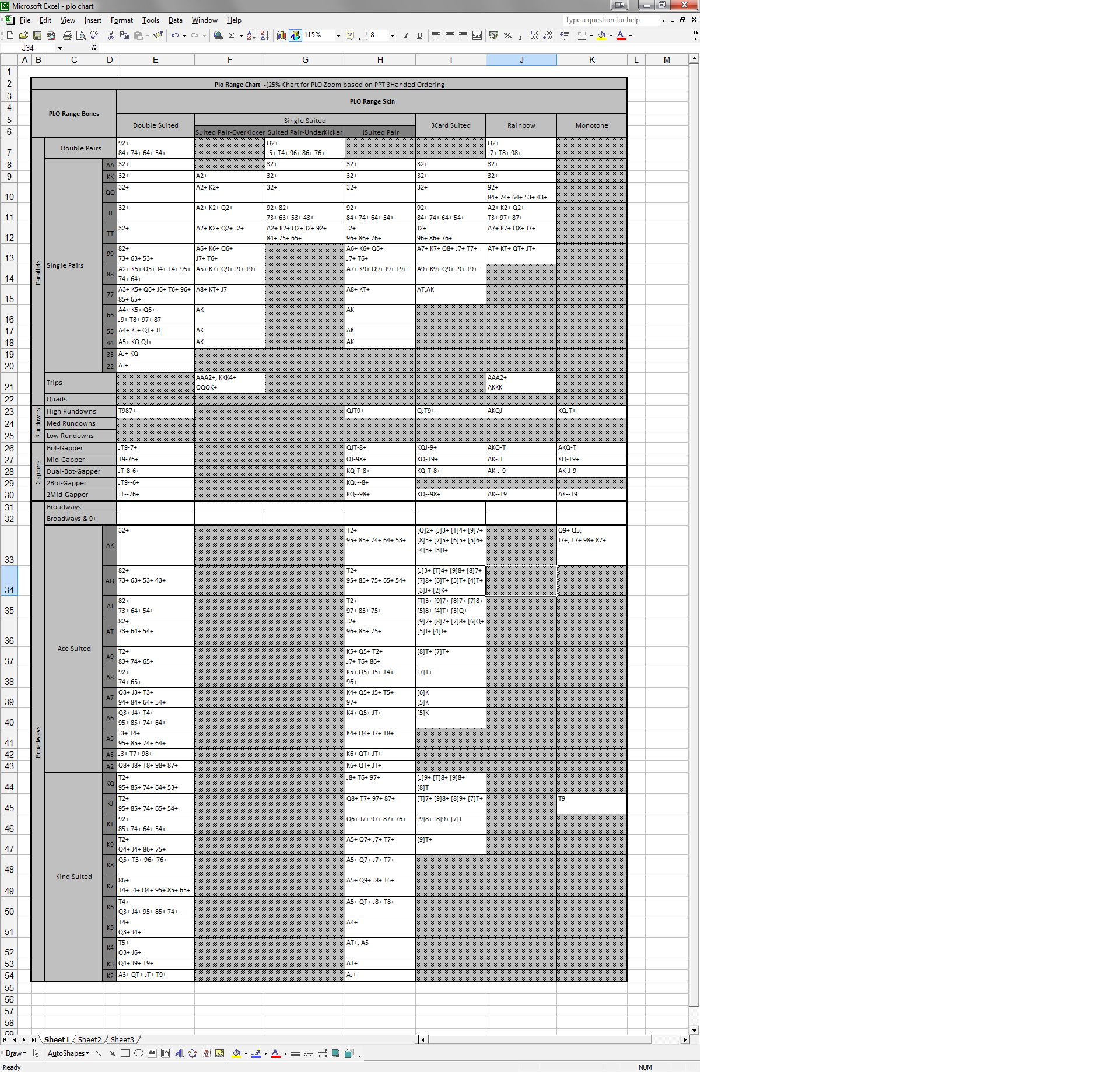
for the person that wanted charts. bumped for anyone else interested, dm if you need some support setting it up. I need to rebuild it. Looking for a chart I posted, can't find it.
I'm selling out
- insertedchartofmyballs.jpeg
- only took me Y years
- I'm soo sad to learn propokertools.com doesn't exist anymore
Oh now, you wanna talk, huh?
Ok found it chart I built. Lets discuss. bet bet bet Fred gets active now.
Coaching on Chart
I'm offering mentoring and coaching now, $200 p/h. paid via bitcoin. I'll try to get listed via upswing and rio but if that's a headache I'll just work through 2p2 publicly.
my bitcoin address will be posted via coaching thread.
give me time to get my **** together please, I'm not really building a stable to play poker from Asia until 2026, but 2025 January looking to srsly help some people out.
Spoiler
And bring back poker 2003.
- if your an established poster with an avatar & over 2000 posts, dm only is fine
- everyone else, public posts only, except below, go figure, its only deduction
- if you have no avatar and less than 1000 posts, beginners forum and then come back to me, and ship me 1/2 a bitcoin for changing your life
- if you have avatar and less than 100 posts, see above
- if you have less than 100 posts, see above
- if you have a sexy avartar and less than 359 posts, we can talk
- Scammers, if yo sister is hawt, break rules, exceptions will be made
Mods - I did it for the glory, not just tell people to f themselves.
Much ♥ Tops


