GTO+/CardRunnersEV?

This is the support thread for CardRunnersEV, which is hand EV analysis software.
The feature in your original screenshot was for aggregate reports, whereas the feature in the video is for a turn report.
It's indeed possible to do this for turn reports, but I don't see how it could be made practically applicable for an aggregate report.
Sure, I was referring to the turn-river reports... I understand this isn't a priority, and if you give me the choice, I'd expect a trainer update long before this.
But it's a tool worth considering, imho!
I tried opening a gto file today and I get a message " Sorry, the trial version can only load savefiles that were created by another trial version"
I received a new key via email and the the program accepts the key and tells me to restart the program, so I close it and reopen it only to have the original message pop up. Not sure what to do. Restarting the computer didnt help.

Hello,
Just a few suggestions:
in the "Display Resutls in Graph" window, when we click on a header, of the spreadsheet like table the results are then displayed in descending order but when we click again on the same header we except to order the data is ascending order but nothing happens.
I use a lot this window and it would be helpful to be able to sort the results by descending or ascending order by clicking once more on a header.
Also when we want to remove some flops for keeping for example only the ones with 100% Big bets or 100% Checks or anything else, the only way I can find is to right click one by one the ones I want to eliminate which takes a lot of time especially if you have hundreds of flops. It would be cool to be able the make some Shift+click or Ctrl+click to select multiple rows like in any spreadsheet softwares.
Alternatively, we could have some options in the flop filters to select the flops with some values from min X to max X for certains columns but perhaps it is more complicated to implement because the colums are changing depending on your game tree inputs...
I have no idea if these suggestions have been made before, but it would be very useful for me 😀
I tried opening a gto file today and I get a message " Sorry, the trial version can only load savefiles that were created by another trial version"
I received a new key via email and the the program accepts the key and tells me to restart the program, so I close it and reopen it only to have the original message pop up. Not sure what to do. Restarting the computer didnt help.
Ok, could you please contact support (https://www.gtoplus.com/contact/)?
We will provide you with an alternative method to activate the software.
Alternatively, your activation email should contain a gtokey.dat file.
Storing this file in the same directory as GTO.exe should also activate the software.
Typically, this directory will be C:\Program Files\GTO.
Hello,Just a few suggestions:in the "Display Resutls in Graph" window, when we click on a header, of the spreadsheet like table the results are then displayed in descending order but when we click again on the same header we except to order the data is ascending order but nothing happens.I use a lot this window and it would be helpful to be able to sort the results by descendin
Ok, thank you for the feedback.
I will make a note for future development.
Scylla,
Is it possible to have a turn report similar to pio where we can see the % of betting/checking in a graphical way? Or does this already exist?
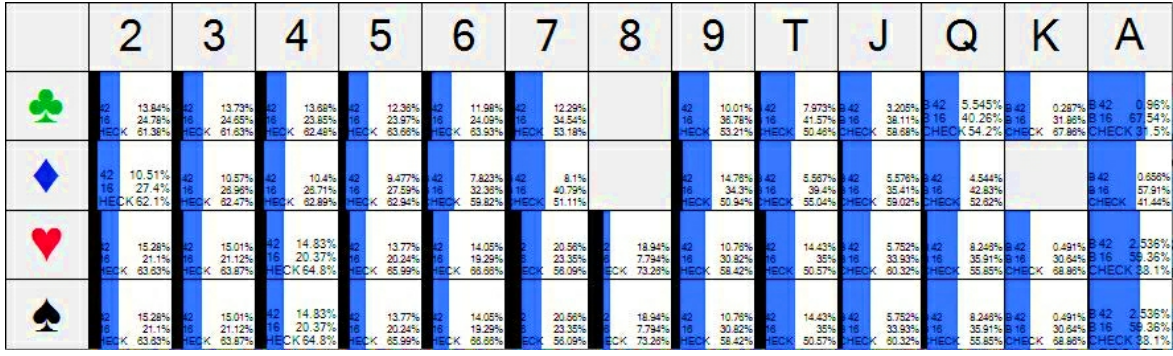
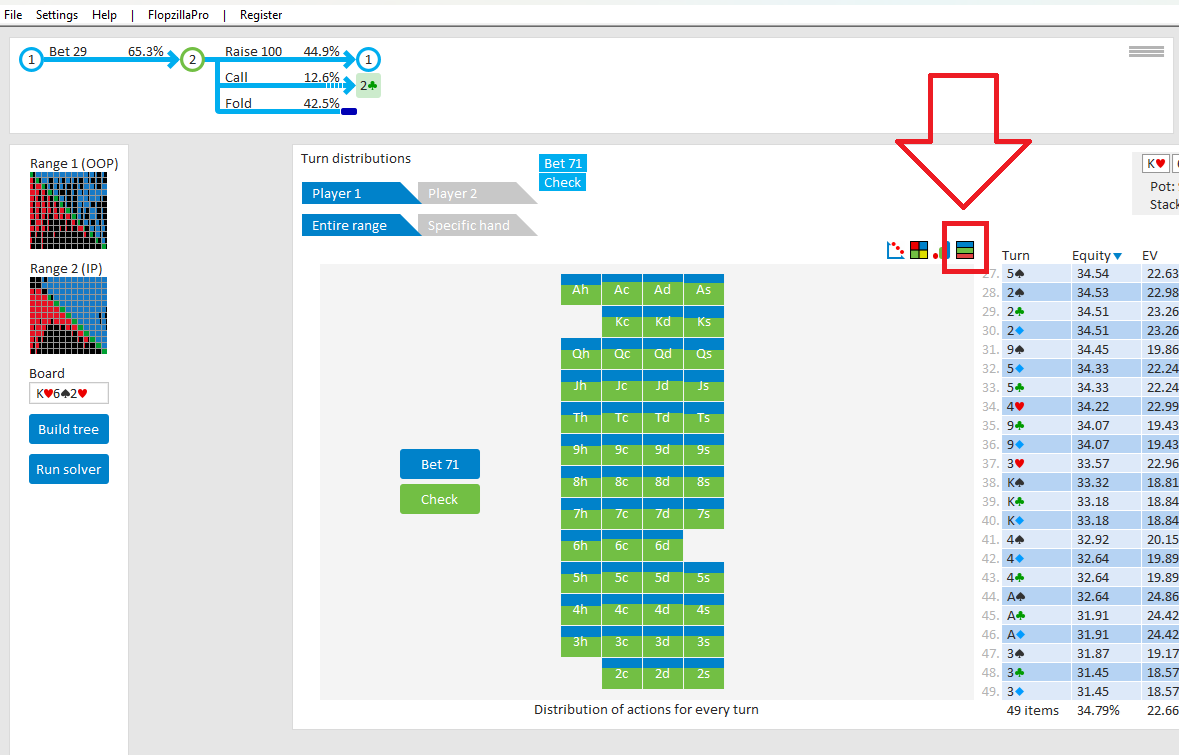
Ahh I see
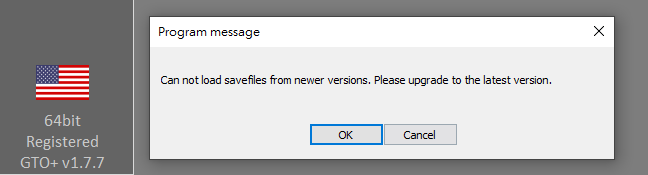
I am trying to load others sims file but getting this error message while having the latest version of GTO+, have also tried the sable 1.7.4, same error message, what should I do?
Thanks Scy!
I am trying to load others sims file but getting this error message while having the latest version of GTO+, have also tried the sable 1.7.4, same error message, what should I do?Thanks Scy!
It sounds as if the sim was created by a version more recent than v174.
Can you try v177?
Go here for download: https://www.gtoplus.com/download/
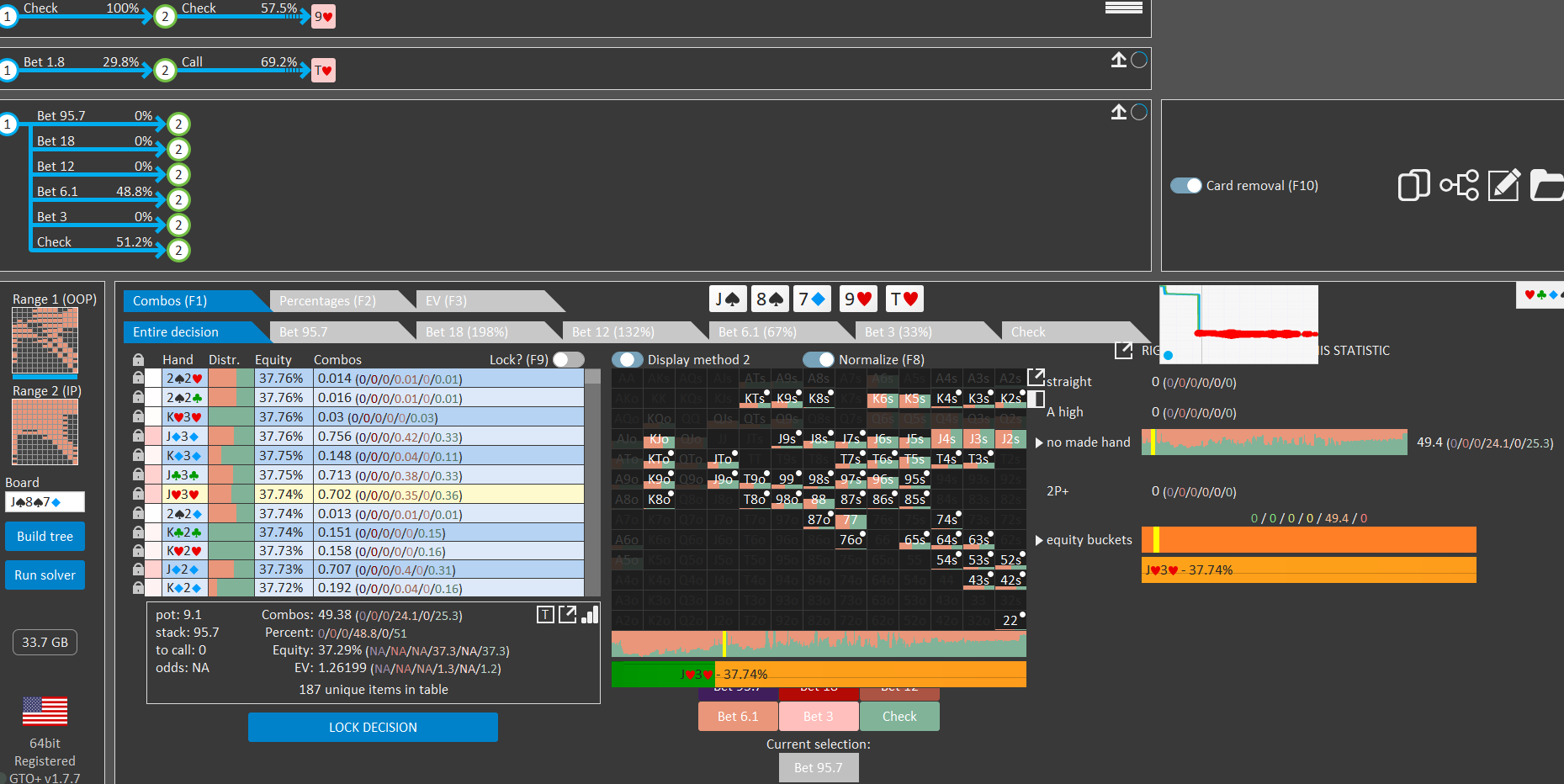
Scy, why on this example group show that? J9 is a two pair, but its mark as nothing, Kx is top pair but also.. mark as nothing
Where can I take a complete GTO+ course? tanks
We offer a comprehensive video manual on our website: https://www.gtoplus.com/videos/.
This guide covers all the features and functionalities of GTO+.
The first video provides a general overview, while the subsequent videos delve into specific subjects in greater detail.
Additionally, there are several commercial alternatives available through third-party vendors.
I'm unsure whether I’m permitted to post links here, so please reach out to us via our contact form for more information: https://www.gtoplus.com/contact/.
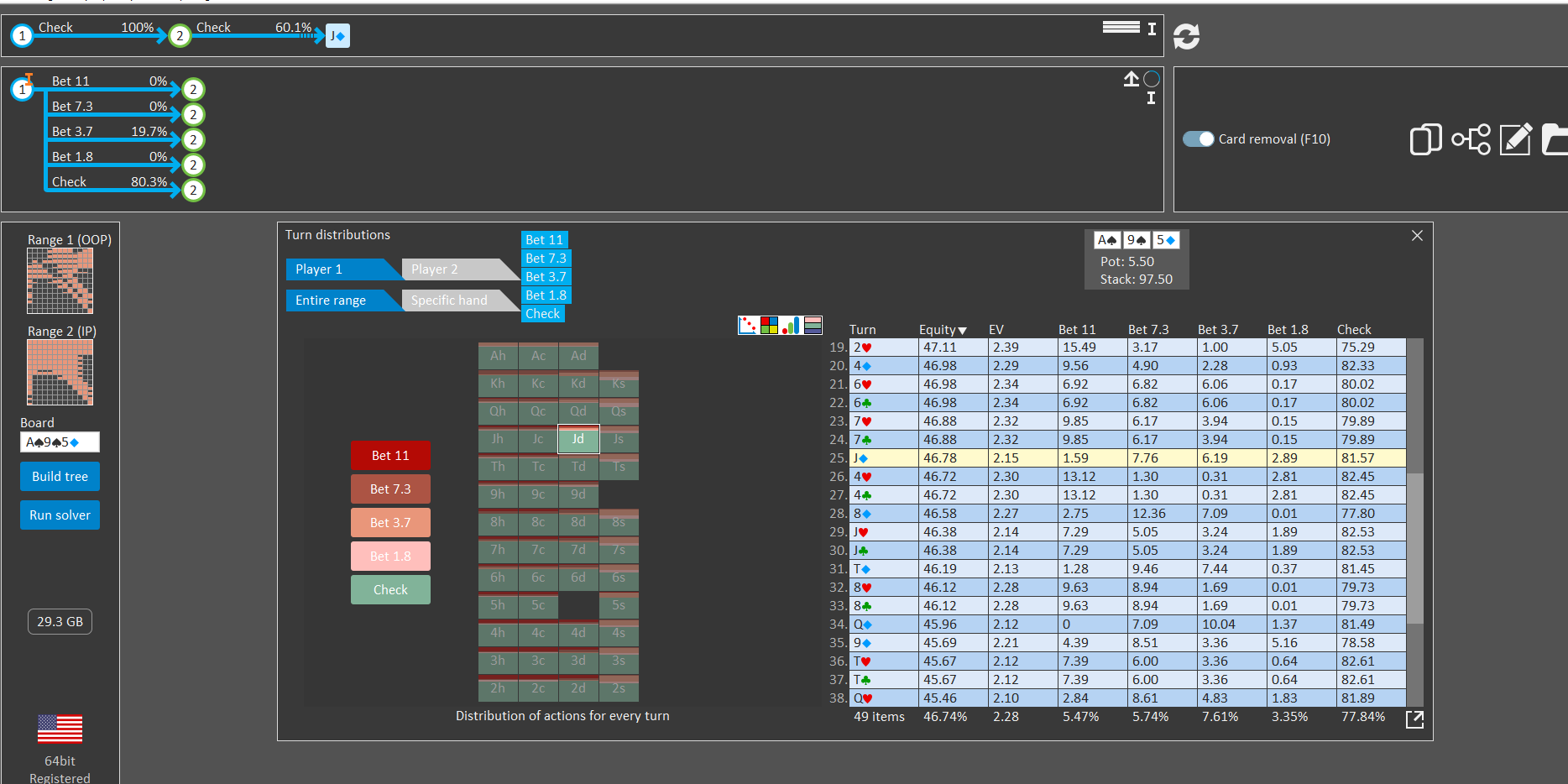
Is there a way to update the turn report when we make a nodelock/change?
If not, its possible to add for nexts updates?
Image example:
I set incentives to pick a single sizing, but the turn Ag Report doesn't update.
Is there a way to update the turn report when we make a nodelock/change?If not, its possible to add for nexts updates?Image example:I set incentives to pick a single sizing, but the turn Ag Report doesn't update.
Technically this is a bit tricky, but I'll make a note for us to look into it when we have the time.
Scylla,
I have been playing with Apply groups to selection in the starting range editor. What was the original intention of this feature?
Why do the cells not allow display method to work to display the cells as their actual % in range?
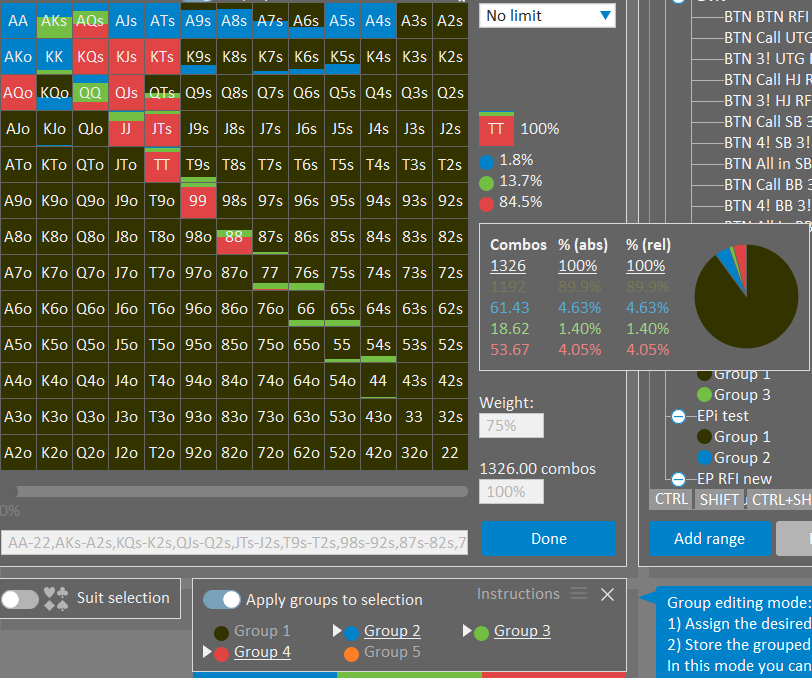
I am using the editor, for display purpose only, to include the original range like EP RFI and also the responses to 3! like, 4!, Call, Fold to create a chart that is easy to see for study purposes all actions vs 3!. Is there a way to enter this range automatically with group selections. For example EP RFI, TT 100%, 4! 1.8%, Call 13.7%, fold 84.5% without having to enter the splits individually?
Also is there a way to see the splits in cell vertically like in the editor instead of horizontal
This shot shows RFI range with blue for 4!, green for call, and red for fold.
Scy, how are you?
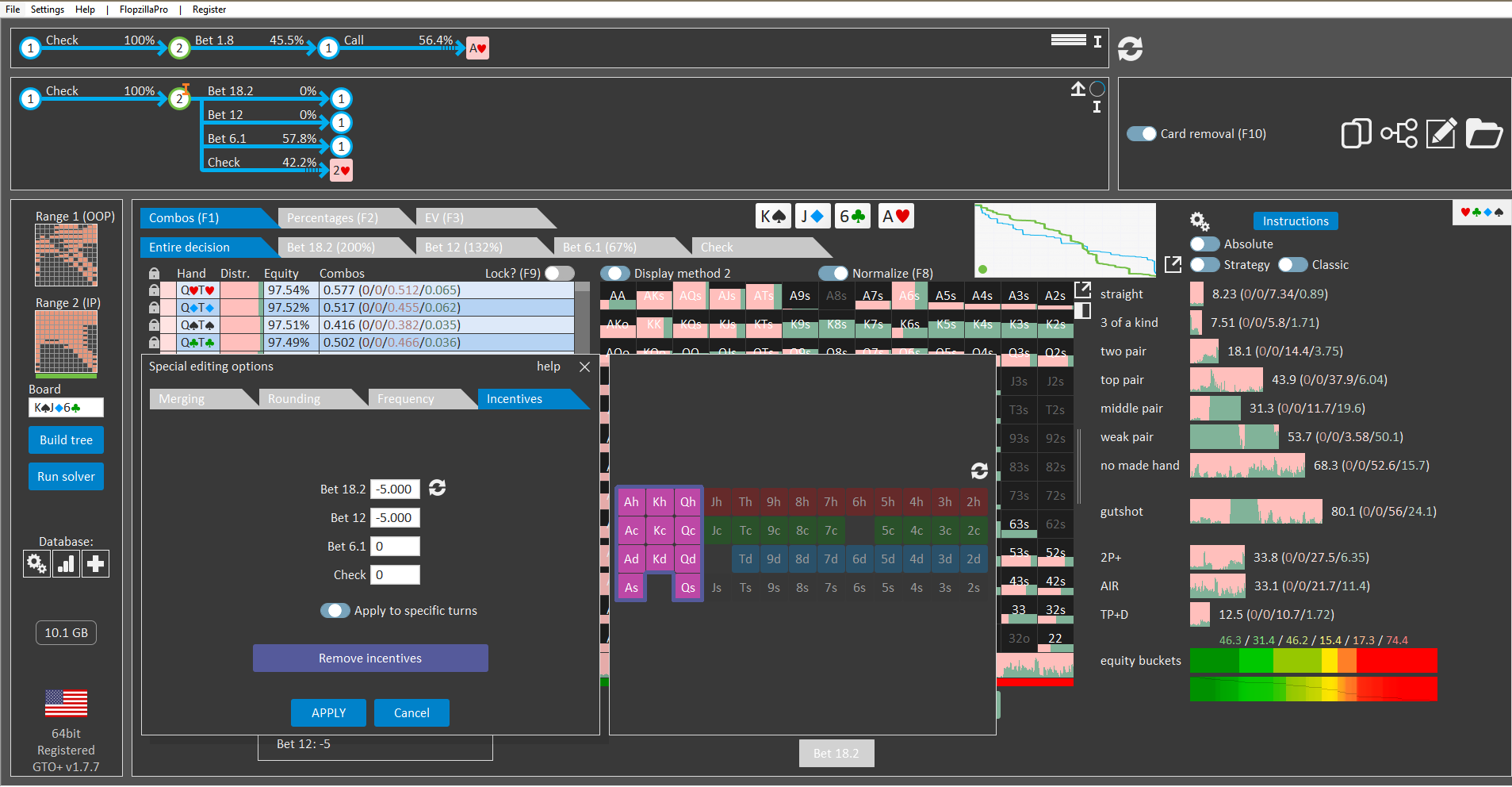
In the image, I applied incentives to a group of turns. Now, the idea is to be able to "resolve" them all at once when I press the "resolve turns" button.
For now, I'd have to do it 1x1... could you consider adding that option?
Scy, how are you?In the image, I applied incentives to a group of turns. Now, the idea is to be able to "resolve" them all at once when I press the "resolve turns" button.For now, I'd have to do it 1x1... could you consider adding that option?
We can technically implement this, but creating customization for the 'Resolve' icon that is easily understood by other users would be the real challenge here.
Scylla,I have been playing with Apply groups to selection in the starting range editor. What was the original intention of this feature?Why do the cells not allow display method to work to display the cells as their actual % in range?I am using the editor, for display purpose only, to include the original range like EP RFI and also the responses to 3! like, 4!, Call, Fold to cr
You appear to be using group 1 (which is coloured black) to represent folded hands.
This throws off the displaying of the percentages.
Is there a way to enter this range automatically with group selections. For example EP RFI, TT 100%, 4! 1.8%, Call 13.7%, fold 84.5% without having to enter the splits individually?
Do you mean that you have a set of written down ranges that you're looking to import?
We do offer imports for external formats (that have grouped ranges).
So if you can send a sample to support, then I'll check if we can offer an import.
Also is there a way to see the splits in cell vertically like in the editor instead of horizontal
This shot shows RFI range with blue for 4!, green for call, and red for fold.
I'll make a note to add a switch for the display.
Scylla,
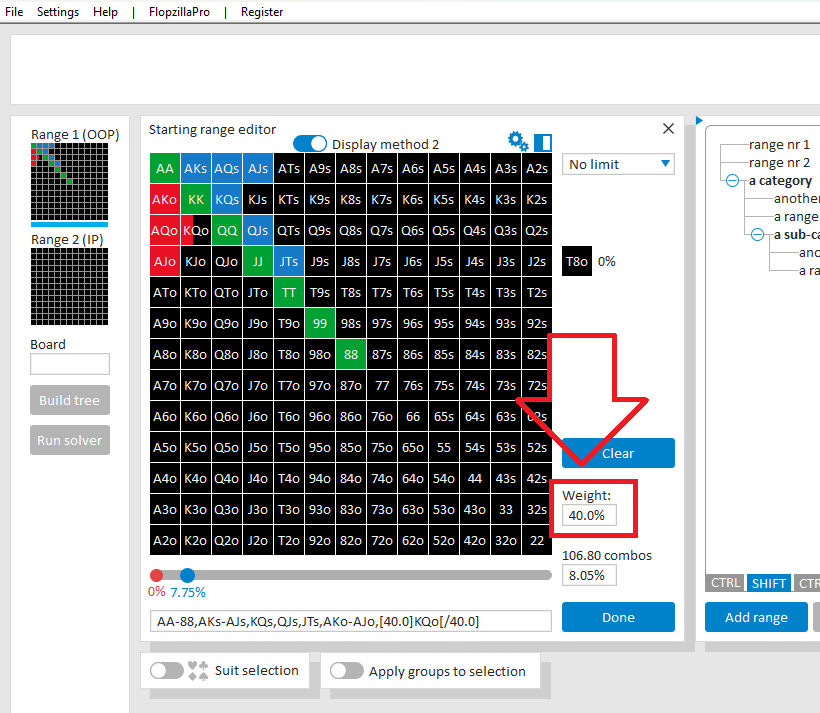
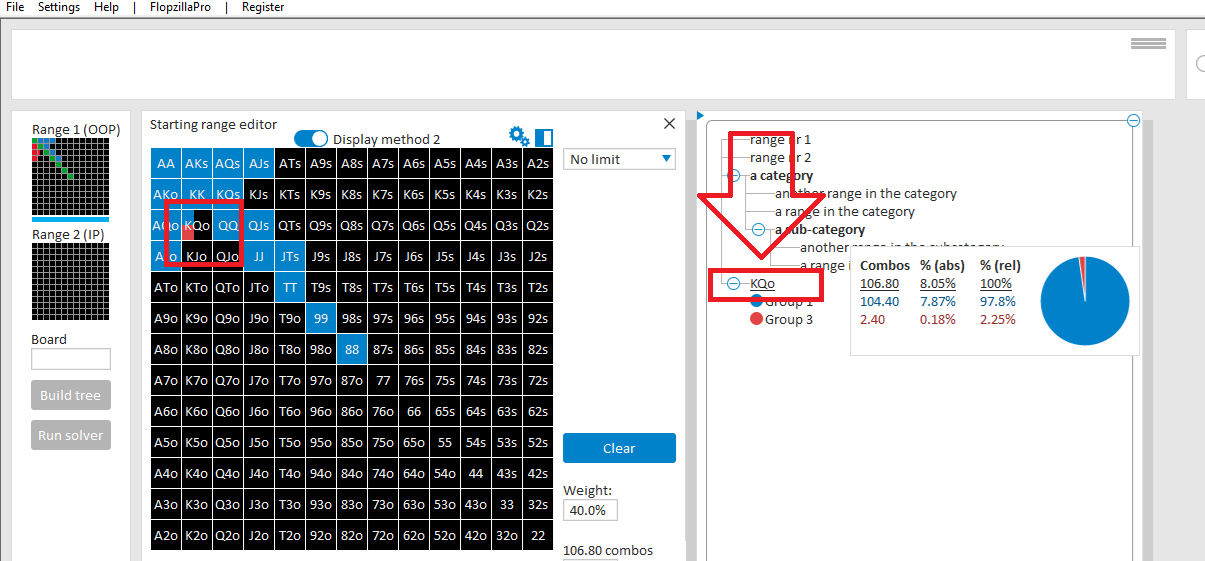
It doesn't seem possible to apply Black 000 000 000 to a portion of a cell by including it in the apply groups section. How would I represent a cell that is 100% blue but only is present in 40% in our range? In the example I used a color close to black but as you mentioned it throws off out percentages. I would prefer to see the range displayed as entered where KQo is only present 40% and then be able to color code that percentage.
[Uploading Image...]
Scylla, It doesn't seem possible to apply Black 000 000 000 to a portion of a cell by including it in the apply groups section. How would I represent a cell that is 100% blue but only is present in 40% in our range? In the example I used a color close to black but as you mentioned it throws off out percentages. I would prefer to see the range displayed as entered where KQo is o
For this:
Step 1: You need to first enter the weighted range in the matrix.
Step 2: After that, assign groups to this range.
Step 1: Enter a weighted range
To set a weight to a hand in your range:
1. Set the desired weight in the field "Weight" (see the screenshot below) (you can also use your mouse wheel)
2. Click on KQo
You have now entered a weighted range.
Step 2: Assign groups to the range
Once the weighted range is set, you can assign groups to the hands.
1. Select the appropriate group for each hand.
2. Save the grouped range to your Predefs.
The grouped range will now display correctly when hovered over.

I'd like to purchase your software using crypto, is that possible?
We don't offer crypto ourselves, but some of our resellers do.
Can you please contact us via our contact form?
We'll provide you with the appropriate links.


