888/Party/StarsCaption

This is the support thread for 888/Party/StarsCaption, multi-purpose utilities for the 888, bwin.party, Poker Stars site
For 888poker.es users
I made some fixes to add a partial support for the latest 888poker es-4-8.41-1-17 client version
Please let me know if it works for you
I hope everything will work there (except reading of nicknames - I can try to fix this but I will need some help from you to do it)
Hello, is there is a way to make multiple bets HUDs positioning nicely to each other, with mouse its impossible to place them as on screen from other program.
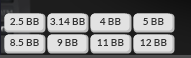
Thanks in advance.
Hello, is there is a way to make multiple bets HUDs positioning nicely to each other, with mouse its impossible to place them as on screen from other program. Thanks in advance.
Hi
There is no way to place them like this automatically, but you can align them by editing the coordinates manually here:
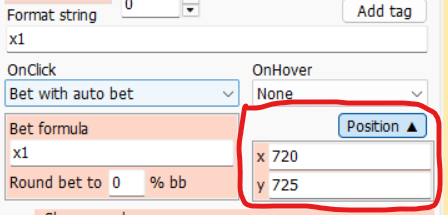
(you can set the same y coordinate for each button in a line, and the same x coordinate in column)
Yes, I see on virustotal that McAfee has a false positive on this version (unfortunately this happens from time to time with various antiviruses).
I just sent a false alarm report via
, I hope they remove it soon
For now you can try to add PCaption.exe to exclusions in McAfee settings, or try install one of previous versions, you can find it here.
I hope it's ok now:
New WSOP MI update broke some stuff.
Seems to be working well. Thank you.
Hello, is there is a way to change border color of the HUD?
888 and Stars
Thanks.
Having issues with the WSOP update still. The convert chips seems to be resetting between hands unpredictably and the ingame betting buttons either show 0s or the numbers count "up" with out me touching the betting buttons.
Having issues with the WSOP update still. The convert chips seems to be resetting between hands unpredictably and the ingame betting buttons either show 0s or the numbers count "up" with out me touching the betting buttons.
Hi
Please try this version, I hope it's fixed there:
Hi
I made some changes in StarsCaption, you can find them in this version:
1. HUD / Table panels / Frame color
Now HUD panels (if they don't have an invisible background) have thin borders.
By default, the border color matches the background color and is therefore not visible, but you can set a separate color for it
2. HUD / Table panels / Frame color / Background / Rounded
This option enables rounded corners for the panel (again, this is only relevant for panels with a visible background)
3. HUD / Table panels / Fixed width
Allows you to set a fixed width for the panel, regardless of the size of the text in it. To display the text in such a panel in the center, enable Align ↔ / Center
The actual width of the panel will also depend on the value of the Border width option, since Fixed width actually sets the width of the area for rendering the text, and the border will be added to it from all sides, as before.
4. HUD / Table panels / Group
Attaches the panel to the previous HUD panel (i.e. to the one that is one line higher in the list).
When moving any of these panels with the right mouse button (or left button + Ctrl) on the table, both the master and slave panels will move. You can attach another panel to the slave panel, thus creating sets of grouped panels. Note that the first panel in the group does not have the Group checkbox checked (it is not attached to anyone), while all the others have it checked.
At the same time, changing the panel coordinates using the Position option does not move the other panels, which allows you to adjust the relative position of the panel in the group without detaching it.
5. Added arrows to the Table panels coordinate editing fields:
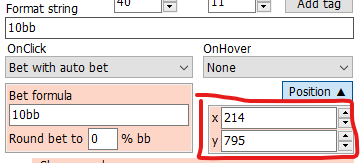
This allows you to move the panel around the table by placing the mouse cursor in one of these fields and turning the wheel up and down there (if you want to precisely move the panel to a certain point, this can be convenient)
6. HUD / Table panels / Clone panel / Right + Bottom
Now when you click on the Clone panel button, the following menu appears:
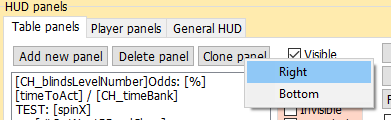
With its help, you can clone a panel selected in the list, placing a copy to the right or below the copied panel. Copying will work relatively correctly if the Auto scale HUD option is enabled - otherwise, the size of the panel will greatly depend on the actual size of the table and, most likely, you will have to adjust its location visually.
When copying a panel to the right, its coordinates will be more accurate if the Fixed width option is enabled for this panel (otherwise there will be some inaccuracy associated with the discreteness of font scaling on different table sizes).
All of the above options are primarily intended to simplify the creation of groups of betting buttons, although you can use them for other purposes as well. For example, with their help, you can quickly create such a group:
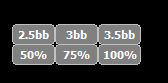
At first I made one button with the following settings:
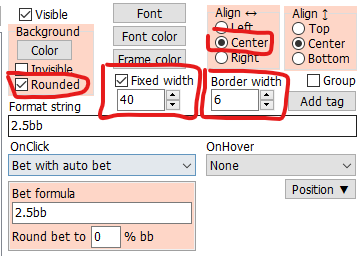
I also set the background color to gray (Background / Color) and the frame color to white (Frame color)
Then I clicked Clone panel / Right, changed the title and formula to 3bb and enabled Group for the resulting copy.
Then I made another copy for 3.5bb and made copies for all three buttons using Clone panel / Bottom (for the 50% button, I didn't forget to enable Group again)
All six buttons are moved with the mouse as one group.
Perhaps I will add some more templates in the future for generating buttons that will generate formulas with titles at once and simplify button setup for different situations, but overall I hope that this option is already somewhat more convenient than what was before.
I haven't made any of these options for Player panels yet. If there is a request, I will probably add something in the future.
7. In Table manager 2 / Table types / Reset to default added 888 NLH type (March 2025)
Most of 888 clients (but not 888poker.com) have recently been updated to the new version, and now there is a different Window class for tables. They should work with this Table type (I haven't checked, but I hope I didn't make any mistakes)
8. In addition, I added a menu that appears if you right-click on the Reset to default button:
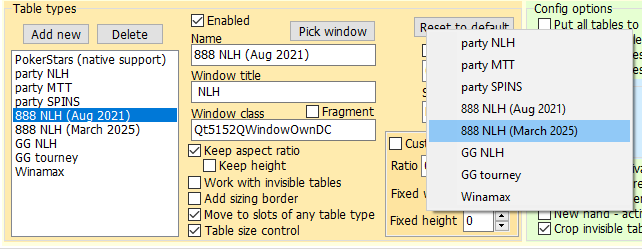
From this menu you can add default types one by one, without resetting the entire list.
If you already have a custom table list and want to add a new table type for 888, right-click on the Reset to default button and select this table type. It will be added to the list, while the other types will be saved.
Perhaps in one of the next versions I will redesign both this button and the method for calling the menu, now it is not very obvious how to call it, and the Reset to default option is too radical in most cases.
Wow, this looks great, will test it when ill have some time, big thanks to you !!!
Did a quick test, and everything seems to work apart of "Frame Colour" - it seems that its not changing color of the HUD border or im in wrong menu to change it?
Also, adding this to Player Panels would be great as well, as positions panels is always on and if they would be looking better that would be great for eyes 😃
Wow, this looks great, will test it when ill have some time, big thanks to you !!!
Did a quick test, and everything seems to work apart of "Frame Colour" - it seems that its not changing color of the HUD border or im in wrong menu to change it?
There are three colors here:

Font color (white)
Background / Color (gray)
Frame color (green)
Do you mean something else?
There is no "Frame color" for Player panels now, but I'll try to add them in future versions.
As for [pos] tag - Background / Color doesn't work for them, there is a separate option to configure this tag, you can find it here:
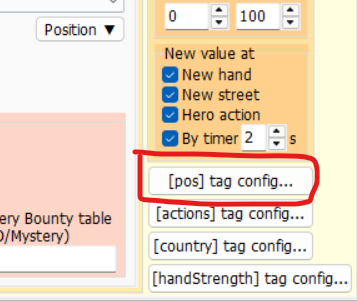
and the description is

There are three colors here: Font color (white)Background / Color (gray)Frame color (green)Do you mean something else?There is no "Frame color" for Player panels now, but I'll try to add them in future versions.As for [pos] tag - Background / Color doesn't work for them, there is a separate option to configure this tag, you can find it here: and the description is
.
Yeah is that what i mean, i've chosen:
Font color -Black
Background -Gray
Frame color - Black
Broder Width 5
And it looks like that

There is settings ive set
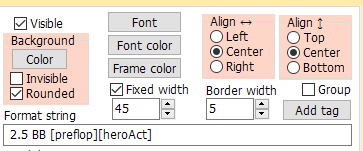
Yeah is that what i mean, i've chosen:Font color -BlackBackground -GrayFrame color - BlackBroder Width 5And it looks like that There is settings ive set
Yes, I see that the frame is not visible here. Try to select black manually through the advanced settings (with R=0 G=0 B=0). Some options close to black may be perceived by the program as transparent color.
Here I have a black frame:

Yes, I see that the frame is not visible here. Try to select black manually through the advanced settings (with R=0 G=0 B=0). Some options close to black may be perceived by the program as transparent color.Here I have a black frame:
I tried it didnt work, i tried to use ORANGE color and it works, but the thing with "Border widht" is not working, even if i choose that width 10 border width is still about 1 (on picture "Border width is 5)

PS
If i increase border widht it enlarges whole HUD
That would be great, as you can see its so thick that on my monitor i rarely see that border..
Hi
Slightly reworked and expanded what was added in the previous version
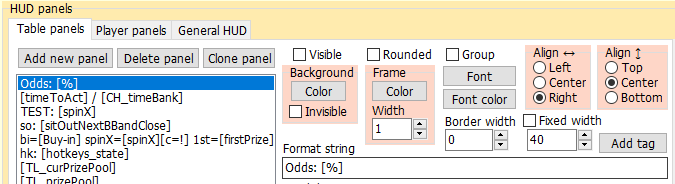
You can use Frame / Width option now.
On the left are buttons with Frame / Width 1, on the right - Frame / Width 4:
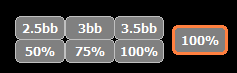
Rounded, Frame / Color and Frame / Width also added to Player panels.


