HUD not working on Coinpoker
After the update hud is not working. Any idea when it will work again?
Hello, I use the free version of h2N 3 on Coinpoker. Is it possible to have the same HUD as Pokerstars, for example?
For low limit games, it would not be worth getting the pro version for now.
The free version on Coinpoker would be interesting for low limit MTTs.
Hello!
Sorry, Hand2Note 3 requires an active ASIA or PRO plan for CoinPoker room.
You can consider our new promotion in Hand2Note 4 for small stakes. We offer a significant discount (up to 84%) and it works with CoinPoker with no issue!
You can read more about it here: https://hand2note.com/Blog/News/small-stakes-discounts
Hi - on coinpoker, Hand2note seems to be all over the place with the HUD, displaying on wrong players, and the stats displaying then disappearing. is this expected?
Olá, na versão free do H2N3 não consigo jogar na Coinpoker? eu uso no PS por exemplo e funciona, no momento jogo micros e não compensaria pagar a versão Pro.
Thanks for the reply!
Yes, our latest update supports CoinPoker hands requested from the room support!
Hello! May I ask if there’s an estimated timeline for a macOS version of Hand2Note 4 supporting coinpoker? I still cannot auto-import data.
My 30-day trial will elapse unused because Mac isn’t supported—would it be possible to reset it once the Mac build is released? Thank you!
Thanks for the reply!
Yes, our latest update supports CoinPoker hands requested from the room support!
Hello! May I ask if there’s an estimated timeline for a macOS version of Hand2Note 4 supporting coinpoker? I still cannot auto-import data.
My 30-day trial will elapse unused because Mac isn’t supported—would it be possible to reset it once the Mac build is released? Thank you!
Thanks for your reply! Unfortunately, on macOS we currently only support poker sites that save hand histories locally on your computer. Due to limitations in macOS system and API behavior, we aren’t yet able to provide a stable import from other sites—including CoinPoker—but we are actively working on it.
We don’t have an exact release date for the macOS build with CoinPoker support yet. As soon as it’s available, we’ll announce it to all users.
I cannot even begin to figure out how to get H2N to auto capture for coinpoker.... im at a complete loss. Is there a good instruction video or something common that people miss?
It imported all the info from the coinpoker support text file and gave me some stats, but the buy in info is all definitely incorrect and I don't even know where to begin.
please help, i really need to record my hands to get coaching asap
I cannot even begin to figure out how to get H2N to auto capture for coinpoker.... im at a complete loss. Is there a good instruction video or something common that people miss? It imported all the info from the coinpoker support text file and gave me some stats, but the buy in info is all definitely incorrect and I don't even know where to begin.please help, i really need to
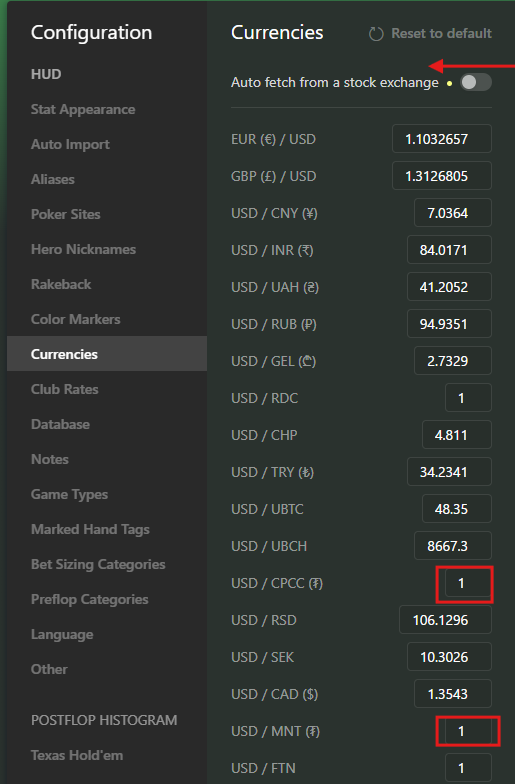
Hello, could you set the exchange rate to 1 for both USD/CPCC and USD/MNT. After that, rebuild the statistics: Database -> Clean & Rebuild Statistics. Most likely fix your issue.
Why isn't HUD showing up on my macbook?
Hello!
Unfortunately, on macOS, HUD is only supported on PokerStars, 888, WPN and Winamax. Support for other rooms will be added in the future.
At the moment, there is no way to make the HUD work on CoinPoker. However, importing hand histories downloaded from Coinpoker should work.
Hi.
My hud stopped working a couple of days ago. And the autoimport is still working, hands are being imported and displayed in reports tab.
I am using Hand2Note 3.3.1.69, Pro plan.
Both h2n3 and Coinpoker are run as adminstrator.
I've tried shutting down antivirus and it doesn't help.
Hi.
My hud stopped working a couple of days ago. And the autoimport is still working, hands are being imported and displayed in reports tab.
I am using Hand2Note 3.3.1.69, Pro plan.
Both h2n3 and Coinpoker are run as adminstrator.
I've tried shutting down antivirus and it doesn't help.
I have the same problem on Ipoker and CoinPoker
Hi.
My hud stopped working a couple of days ago. And the autoimport is still working, hands are being imported and displayed in reports tab.
I am using Hand2Note 3.3.1.69, Pro plan.
Both h2n3 and Coinpoker are run as adminstrator.
I've tried shutting down antivirus and it doesn't help.
Unfortunately, after the latest updates, some users have started experiencing HUD issues in several poker rooms. Our developers are already working on resolving this problem.
As one possible workaround, please check whether the following option is enabled in the settings: “Enable HUD support via converter.”
This has helped some players. If it helps in your case as well, you can leave this option enabled permanently, as it usually improves Hand2Note 3 stability.
If this does not help, please try performing a clean reinstallation of Hand2Note from scratch. This resolved the issue for some users. If you’d like, we can send you detailed step-by-step instructions, or you can follow our standard guides here:
https://hand2note3.hand2note.com/Help/ru...
https://hand2note3.hand2note.com/Help/ru...
https://hand2note3.hand2note.com/Help/ru...
As a last resort, you may need to wait for upcoming updates. We sincerely hope that new updates will be released very soon.
“Enable HUD support via converter.”
It helped, but only on Ipoker. CoinPoker still doesn't shows hud =(
“Enable HUD support via converter.”
It helped, but only on Ipoker. CoinPoker still doesn't shows hud =(
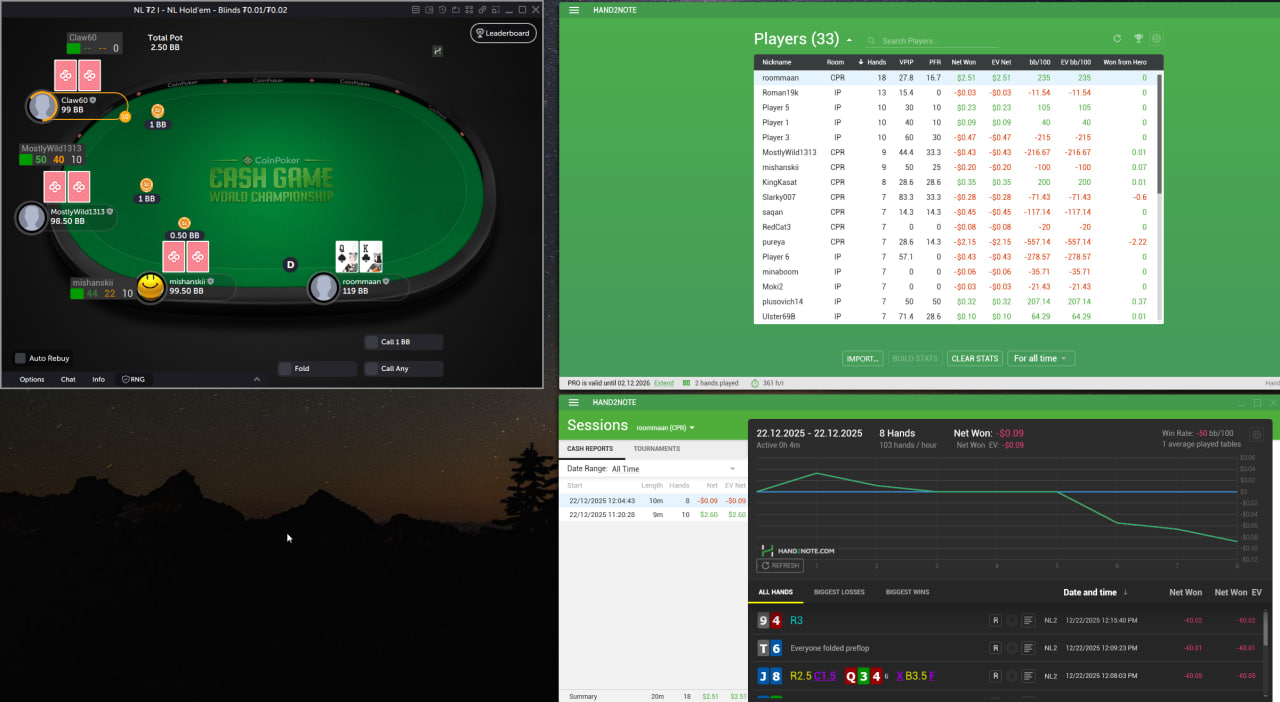
For some players, both the HUD and hand importing in Hand2Note 3 are working correctly with CoinPoker version 1.0.0.8.
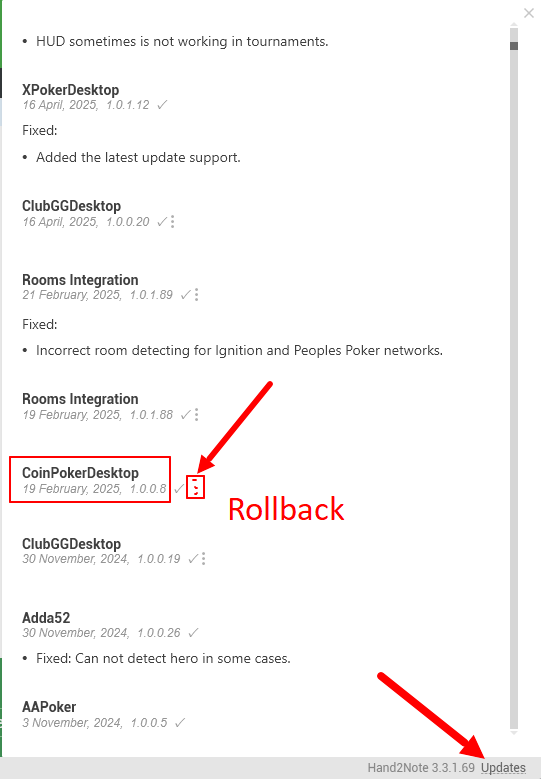
Additionally, please disable Auto updates.
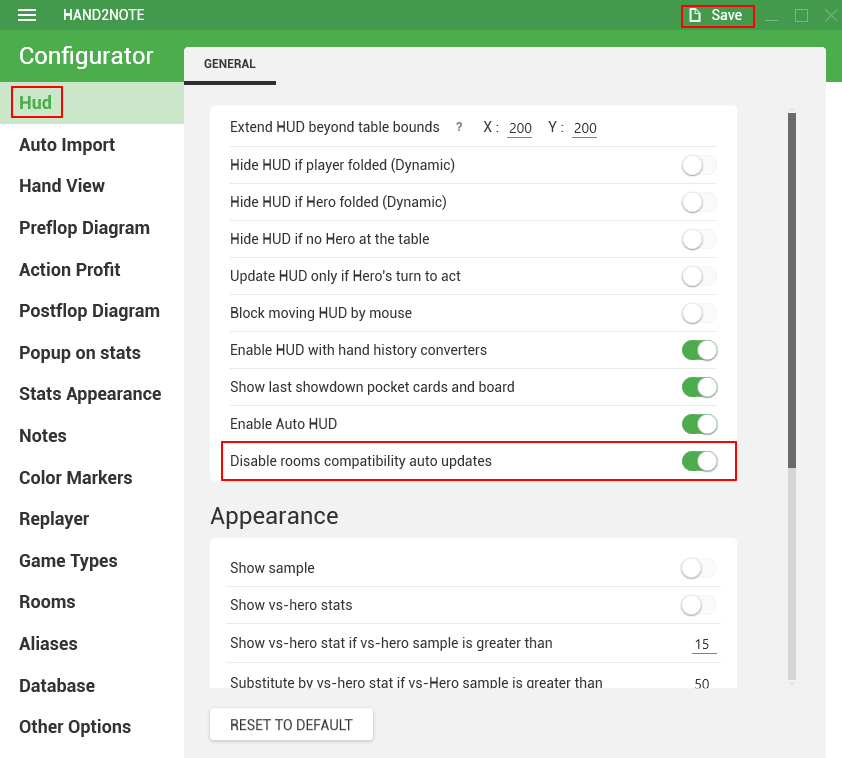
You can first try Rollback to a previous version and then launching the applications in the correct order:
1. Launch Hand2Note 3 as administrator.
2. Launch CoinPoker as administrator.
If rolling back to the previous version does not help, you can try reinstalling CoinPoker and check again.
If reinstalling CoinPoker also does not help and rolling back the update didn’t resolve the issue either, please try reinstalling Hand2Note.
Reinstalling Hand2Note does not require rebuilding or deleting your database.
If none of the steps help, unfortunately you will need to wait until our developers release a new version.


