Hand2Note v4.0.0.154 stuck on loading

Hi, I'm currently stuck on the initial loading screen when trying to open Hand2Note. The software doesn't go past the loading page and just stays there indefinitely. I've already tried restarting my computer and reinstalling the software, but the problem persists. I'm using Hand2Note v4.0.0.154 if thath's relevant.
Is there any fix for this issue? I’d appreciate any help!
Thanks in advance.
8 Replies
Me and all players I know have the same issue. It would be great to see official reaction from h2n R&D. I have a question for, dear creators of h2n: Do you really think that anybody subscribe yout product after you have just ruined the database for beta version without any warnings and explanation of what to do???

Same problem here, stuck on the loading screen. Any solution?

same, stuck on loading screen since saturday evening!
same problem all the weekend
Same. I thought it had something to do with the power outage I had while running the program but now I see what's going on. That's not the way to treat your beta testers. I understand it can't be free forever but as someone already said here, you blocked us the access to our database without any warning. How can you then expect us to buy your paid version? And, in case we subscribe to the paid version, how are we supossed to export all the stats, hud etc. we created? I hope you solve the problem soon
Hello!
We're sorry for the delay with an answer.
The thing is that our old Beta-version Hand2Note 4.0 has been shut down yesterday. It's no longer available for use.
Your hands and settings are safe. You can import them to a new Hand2Note 4.1 using this instruction: https://hand2note.com/Help/how-to-migrate-to-hand2note-4
If you face any difficulties, you can contact us on [email protected]
Hello!We're sorry for the delay with an answer.The thing is that our old Beta-version Hand2Note 4.0 has been shut down yesterday. It's no longer available for use. Your hands and settings are safe. You can import them to a new Hand2Note 4.1 using this instruction: https://hand2note.com/Help/how-to-migrat...If you face any difficulties, you can contact us on [email]
Are you guys trolling us? How can we import anything if we can't open the beta version anymore? And the instruction you linked it literally says: "The most important rule: Do NOT manually copy your Config directory. Use export and import instead."
Thanks for noticing! We have an outdated instructions on our website. Sorry for misguiding you first.
To migrate your settings, click on Configuration -> Convert Hand2Note 4.0 Config. You should specify the path where Hand2Note 4.0 is installed (C:\Program Files\Hand2Note4\):
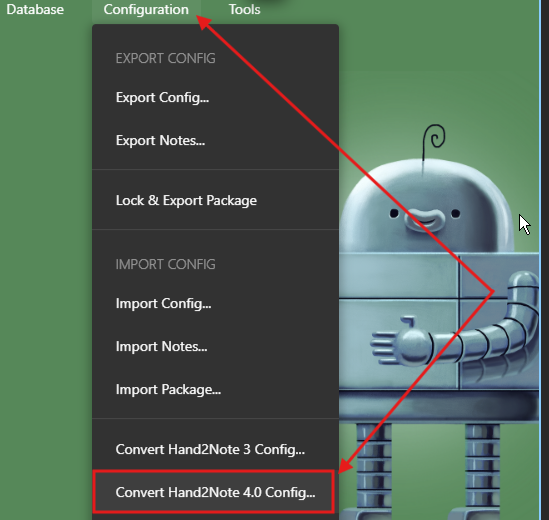
You can restore your hands from the archive folder. Hand2Note has two separate folders where original hand histories from your gameplay are archived:
C:\MyHandsArchive_H2N4 — This folder contains processed hand histories from PokerStars, iPoker, Winamax, WPN, 888, and Party, which require auto-import configuration.
C:\Hand2Note4Hh — This folder contains hand histories from all other poker rooms and Asian apps. These rooms do not have static hand histories, they are imported from memory during the game. You can import them using the one-time import option.
You can also import directly from the Hand2Note 4.0 database:
Click on Database -> Import from Database.
Select Hand2Note 4 as the database source.

In the second menu, click on Databases to see a list of available databases and select your old one: - If your database does not appear in the list, click Select Database Folder and manually set the path to your old database folder


