Hand2note not starting/loading

since today whenever I try to start H2N it keeps on the window that says "Loading" forever
i have version v.4.0.0.154
Is this a known issue and how can i fix this?
7 Replies
Hello!
We're sorry for the delay with an answer.
The thing is that our old Beta-version Hand2Note 4.0 has been shut down yesterday. It's no longer available for use.
Your hands and settings are safe. You can migrate them to Hand2Note 4.1. Please read more about this version in our website: https://hand2note.com/Blog/News/hand2note-release-and-black-friday-discounts
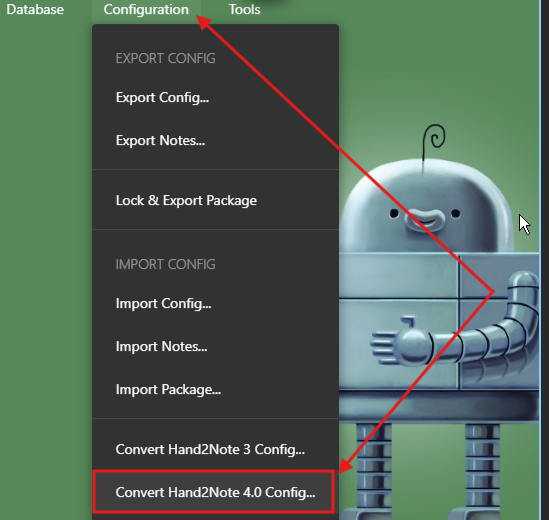
To migrate your settings, click on Configuration -> Convert Hand2Note 4.0 Config. You should specify the path where Hand2Note 4.0 is installed (C:\Program Files\Hand2Note4\):
You can restore your hands from the archive folder. Hand2Note has two separate folders where original hand histories from your gameplay are archived:
C:\MyHandsArchive_H2N4 — This folder contains processed hand histories from PokerStars, iPoker, Winamax, WPN, 888, and Party, which require auto-import configuration.
C:\Hand2Note4Hh — This folder contains hand histories from all other poker rooms and Asian apps. These rooms do not have static hand histories, they are imported from memory during the game. You can import them using the one-time import option.
You can also import directly from the Hand2Note 4.0 database:
Click on Database -> Import from Database.
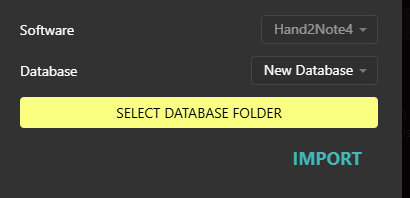
Select Hand2Note 4 as the database source.

In the second menu, click on Databases to see a list of available databases and select your old one: - If your database does not appear in the list, click Select Database Folder and manually set the path to your old database folder
Hi,
Also having problems. The new hand to note has imported some of my old hands but it isn't importing any new ones when I sit down at a table.
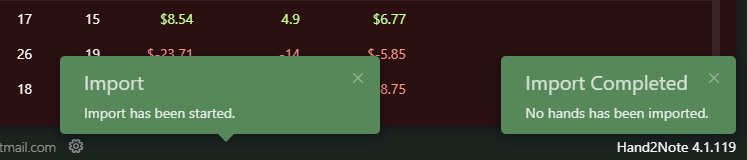
I changed the import database to Hand2Note4 and the second option to the folder I used to import my hands to but still no Hands are being imported for some reason.
Hello JackTen, please dont hijack my thread with other problems but create your own because my issue still isnt resolved
@ H2N
You say my settings are safe because I can migrate my settings this way: To migrate your settings, click on Configuration -> Convert Hand2Note 4.0 Config
But how can I reach this menu when H2N wont even start?
Thanks for the reply Slugant!
We're sorry we didn't make that clear in our previous reply. For now, our new Hand2Note 4.1 is available and you can fully migrate to it using the instructions we've sent above (your hands, HUDs, popups, etc.).
If there is anything else we can help you with, just let us know!
Hello!We're sorry for the delay with an answer.The thing is that our old Beta-version Hand2Note 4.0 has been shut down yesterday. It's no longer available for use.Your hands and settings are safe. You can migrate them to Hand2Note 4.1. Please read more about this version in our website: https://hand2note.com/Blog/News/hand2not...To migrate your
The hand2note 4 doesn't open. It just stays on loading screen. How can I migrate my config, hud, etc.?
Sorry for the wait!
The instructions above should be done in Hand2Note 4.1. It automatically migrates all your config from Hand2Note 4.0. If you face any difficulties with migrating your config, just let us know!
We would be glad to help you!
I did it and now the program doesnt work or it works toooo slow. Can I fix it? or is there a way to restart the configuration and only migrate the hud from h2n4?


