critical error
Hi, HUD doesn't show up and when I want to open HUD editor or Popup editor I get this message:
System.Windows.Markup.XamlParseException: The invocation of the constructor on type 'Hand2NoteCore.PopupHudEditor.EditorPropertiesView' that matches the specified binding constraints threw an exception. ---> System.Security.VerificationException: Method Hand2NoteCore.Common.MultyEntityExtensions.GetEntities: type argument 'Hand2NoteCore.Model.Filter' violates the constraint of type parameter 'T'.
at Hand2NoteCore.PopupHudEditor.DisplayOptionsViewModel.SetModel(DisplayOptions model)
at Hand2NoteCore.PopupHudEditor.DisplayOptionsViewModel..ctor(DisplayOptions model)
at Hand2NoteCore.PopupHudEditor.EditorPropertiesView..ctor()
--- End of inner exception stack trace ---
at System.Windows.Markup.XamlReader.RewrapException(Exception e, IXamlLineInfo lineInfo, Uri baseUri)
at System.Windows.Markup.WpfXamlLoader.Load(XamlReader xamlReader, IXamlObjectWriterFactory writerFactory, Boolean skipJournaledProperties, Object rootObject, XamlObjectWriterSettings settings, Uri baseUri)
at System.Windows.Markup.WpfXamlLoader.LoadBaml(XamlReader xamlReader, Boolean skipJournaledProperties, Object rootObject, XamlAccessLevel accessLevel, Uri baseUri)
at System.Windows.Markup.XamlReader.LoadBaml(Stream stream, ParserContext parserContext, Object parent, Boolean closeStream)
at Hand2NoteCore.PopupHudEditor.EditorWindow..ctor()
at Hand2NoteCore.Common.NavigationMenuViewModel.A.a()
at MS.Internal.Commands.CommandHelpers.CriticalExecuteCommandSource(ICommandSource commandSource, Boolean userInitiated)
at System.Windows.Controls.Primitives.ButtonBase.OnClick()
at System.Windows.Controls.Button.OnClick()
at System.Windows.Controls.Primitives.ButtonBase.OnMouseLeftButtonUp(MouseButtonEventArgs e)
at System.Windows.RoutedEventArgs.InvokeHandler(Delegate handler, Object target)
at System.Windows.RoutedEventHandlerInfo.InvokeHandler(Object target, RoutedEventArgs routedEventArgs)
at System.Windows.EventRoute.InvokeHandlersImpl(Object source, RoutedEventArgs args, Boolean reRaised)
at System.Windows.UIElement.ReRaiseEventAs(DependencyObject sender, RoutedEventArgs args, RoutedEvent newEvent)
at System.Windows.UIElement.OnMouseUpThunk(Object sender, MouseButtonEventArgs e)
at System.Windows.RoutedEventArgs.InvokeHandler(Delegate handler, Object target)
at System.Windows.RoutedEventHandlerInfo.InvokeHandler(Object target, RoutedEventArgs routedEventArgs)
at System.Windows.EventRoute.InvokeHandlersImpl(Object source, RoutedEventArgs args, Boolean reRaised)
at System.Windows.UIElement.RaiseEventImpl(DependencyObject sender, RoutedEventArgs args)
at System.Windows.UIElement.RaiseTrustedEvent(RoutedEventArgs args)
at System.Windows.Input.InputManager.ProcessStagingArea()
at System.Windows.Input.InputManager.ProcessInput(InputEventArgs input)
at System.Windows.Input.InputProviderSite.ReportInput(InputReport inputReport)
at System.Windows.Interop.HwndMouseInputProvider.ReportInput(IntPtr hwnd, InputMode mode, Int32 timestamp, RawMouseActions actions, Int32 x, Int32 y, Int32 wheel)
at System.Windows.Interop.HwndMouseInputProvider.FilterMessage(IntPtr hwnd, WindowMessage msg, IntPtr wParam, IntPtr lParam, Boolean& handled)
at System.Windows.Interop.HwndSource.InputFilterMessage(IntPtr hwnd, Int32 msg, IntPtr wParam, IntPtr lParam, Boolean& handled)
at MS.Win32.HwndWrapper.WndProc(IntPtr hwnd, Int32 msg, IntPtr wParam, IntPtr lParam, Boolean& handled)
at MS.Win32.HwndSubclass.DispatcherCallbackOperation(Object o)
at System.Windows.Threading.ExceptionWrapper.InternalRealCall(Delegate callback, Object args, Int32 numArgs)
at System.Windows.Threading.ExceptionWrapper.TryCatchWhen(Object source, Delegate callback, Object args, Int32 numArgs, Delegate catchHandler)
Inner exception
System.Security.VerificationException: Method Hand2NoteCore.Common.MultyEntityExtensions.GetEntities: type argument 'Hand2NoteCore.Model.Filter' violates the constraint of type parameter 'T'.
at Hand2NoteCore.PopupHudEditor.DisplayOptionsViewModel.SetModel(DisplayOptions model)
at Hand2NoteCore.PopupHudEditor.DisplayOptionsViewModel..ctor(DisplayOptions model)
at Hand2NoteCore.PopupHudEditor.EditorPropertiesView..ctor()
2 Replies
Hello!
Could you please zip and send your logs folder: C:\Program Files\Hand2Note4.1\logs to [email protected]?
If the file size is too large, you can upload it to any file-sharing site and send a link.
After that, please reinstall your Hand2Note using the instructions below:
If you need to save all your settings, you should back up your Config and Notes using this feature:
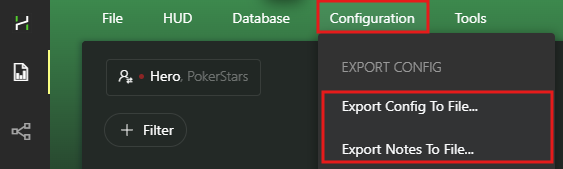
(Make sure to keep the backup files in a safe folder.)
Now you can proceed to uninstall the program:
1. Uninstall Hand2Note 4 through the Windows Settings -> Apps & features (Control Panel).
2. After uninstalling, there are still remaining files in the Hand2Note folder; you have to delete them manually. By default it is C:/Program Files/Hand2Note4.1
3. Download the latest version of the installer and install https://hand2note4-1.azureedge.net/Hand2Note4Installer.exe
4. Try to launch Hand2Note 4 in the default configuration and check if it helped.
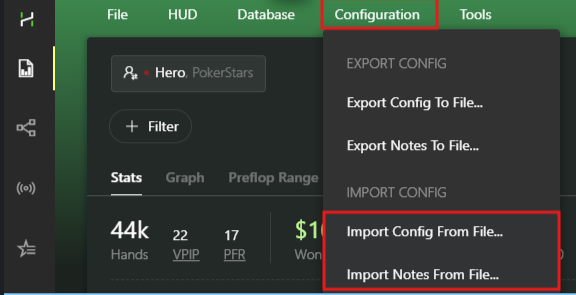
5. If the issue is solved, you can try to restore your settings:
works again, thanks


