GTO+/CardRunnersEV?

This is the support thread for CardRunnersEV, which is hand EV analysis software.
I think one thing is unrelated to the other.I've been asking Scylla for a while to make it easy to navigate the hand played, given the available options. It should be more like the replayers in PT4, H2N, etc. I'd like a flop/turn/river button panel with the ability to fast-forward or rewind based on actions, unlike the current video replayer where we have to wait for it to "loa
Ok, I’ve added your feedback to our notes, just in case it was missed previously.
If you have any other suggestions regarding the trainer, you can post them here or send them to us via our contact form or by email.
Please note that this text was edited and structured with the help of ChatGPT.
The suggestions outlined here are not intended to be taken as a literal or final implementation, but rather as conceptual ideas to help identify what is currently missing in the Trainer and to explore possible directions for improving the interface and user experience.
The goal of this proposal is to provide clear examples and use cases that can inspire practical and technically feasible solutions within the existing GTO+ ecosystem.
Suggested Trainer Improvements for GTO+
* More Advanced Error Filters & Improved Hand Review Navigation
* Add deeper error filtering (by street, action type, sizing, EV loss, frequency deviation).
* Improve hand navigation when reviewing sessions (faster street-to-street navigation, jump to mistake, clearer action history).
*Allow grouping mistakes by concept (e.g. flop XR, turn over-bluff, river under-defense).
Hand Notes System
*Enable users to take notes on hands played in the trainer.
*Notes should be saved and searchable (by spot, board texture, action type).
* Useful for tagging recurring leaks or concepts to review later.
Frequency Mix Error Feedback
* Add explicit feedback when the mistake is related to incorrect mixing frequencies, not just EV loss.
* Example: “Correct action: Bet 60% / Check 40%. You over-bet this action by +25%.”
Specific Spot Selection & Street Depth Control
*Allow highly specific spot selection (e.g. practice Flop Check-Raise spots only).
*Let the user choose how far the hand plays out:
- Only flop decisions
- Flop + turn
- Full hand (to river)
Example: Train flop XR decisions without being forced to play turn/river if not desired.
Range Locking in Play vs Database
* Add the ability to lock player ranges when playing vs the database.
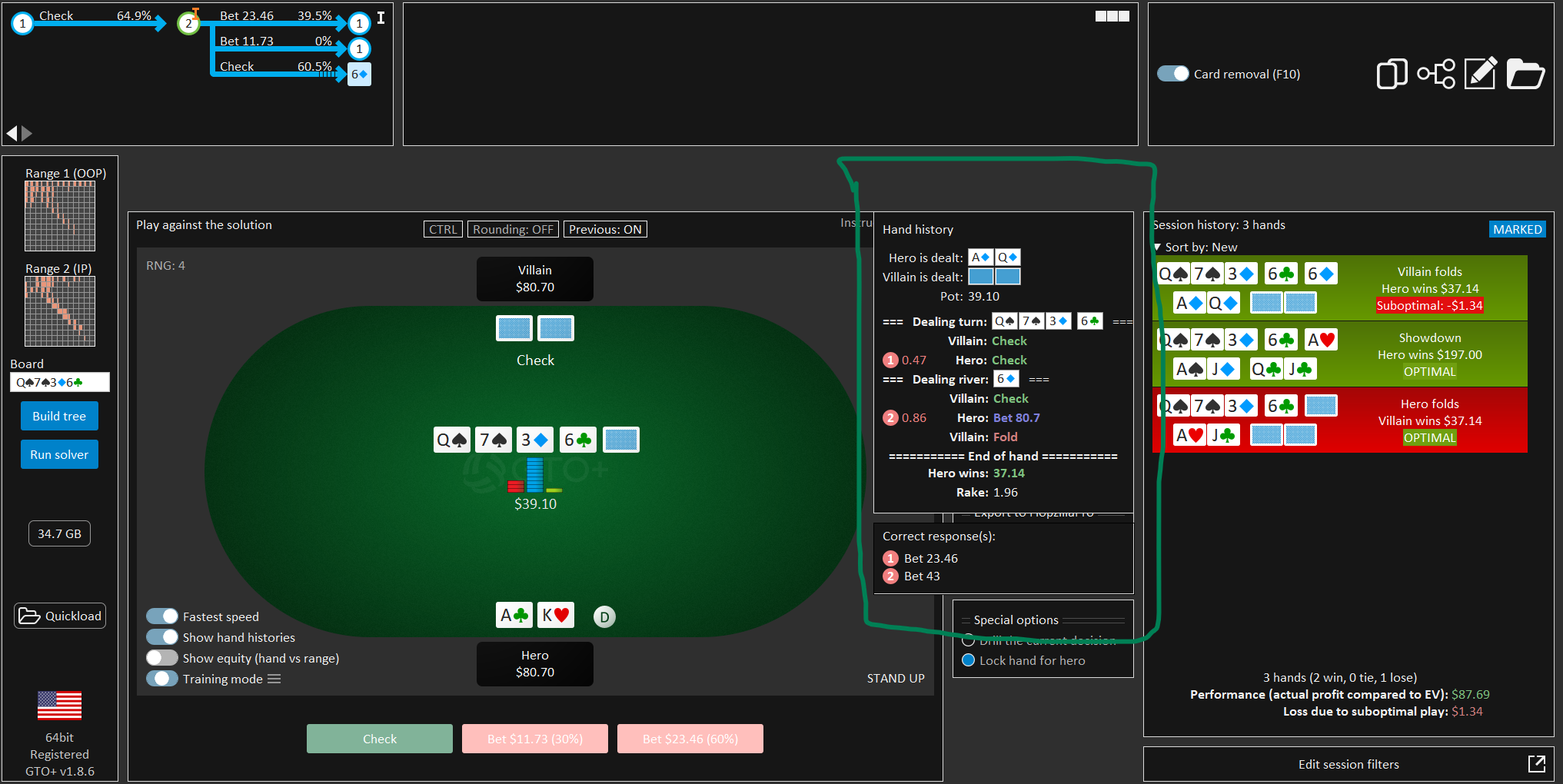
Example & UX Improvement Proposal – Error Review Navigation
As shown in the example above, when reviewing a hand in the Trainer it is possible to clearly identify where the error occurred, but the current workflow makes it cumbersome to navigate back to the exact decision point in the hand.
Suggested improvements:
Clickable Error → Jump to Spot
When an error is displayed in the hand review or session history, allow the user to click directly on the error.
This action should instantly navigate to the exact node/street/action where the mistake happened in the spot tree.
Mini Range Matrix Preview in Hand Review
Add a small range matrix thumbnail (similar to the one used in the “How the range plays” browser) next to the error.
This would allow users to immediately see how the hand fits into the overall strategy at that node (correct frequency, alternative actions, etc.).
Direct Link to Strategy Browser (Optional Mode)
As an alternative or additional option, clicking the error could open the Strategy Browser directly at the relevant node, showing:
The exact board
Action sequence
Solver-approved strategy and frequencies
This view would be ideal for deeper analysis and note-taking.
Seamless Return to Trainer
If the user is redirected to the Strategy Browser, there should be a simple and clear way to return to the Trainer and continue practicing (e.g. “Back to Trainer” button).
This avoids breaking the training flow while still allowing in-depth review.
Integrated Note-Taking from Errors
From either the error view or the browser view, allow users to attach notes directly to the spot (e.g. “Over-bluffing this river after XR”).
These notes should later be accessible from:
The Trainer
The Browser
Future reviews of similar spots
ADD:
* RNG MORE VISIBLE
* BB/$ Toogle - Table Change
* Action Buttons = Action Colours from matrix
Please note that this text was edited and structured with the help of ChatGPT.The suggestions outlined here are not intended to be taken as a literal or final implementation, but rather as conceptual ideas to help identify what is currently missing in the Trainer and to explore possible directions for improving the interface and user experience.The goal of this proposal is to p
Ok, thank you for the feedback.
I have made a note of your post, and we'll use it for reference at a later point.
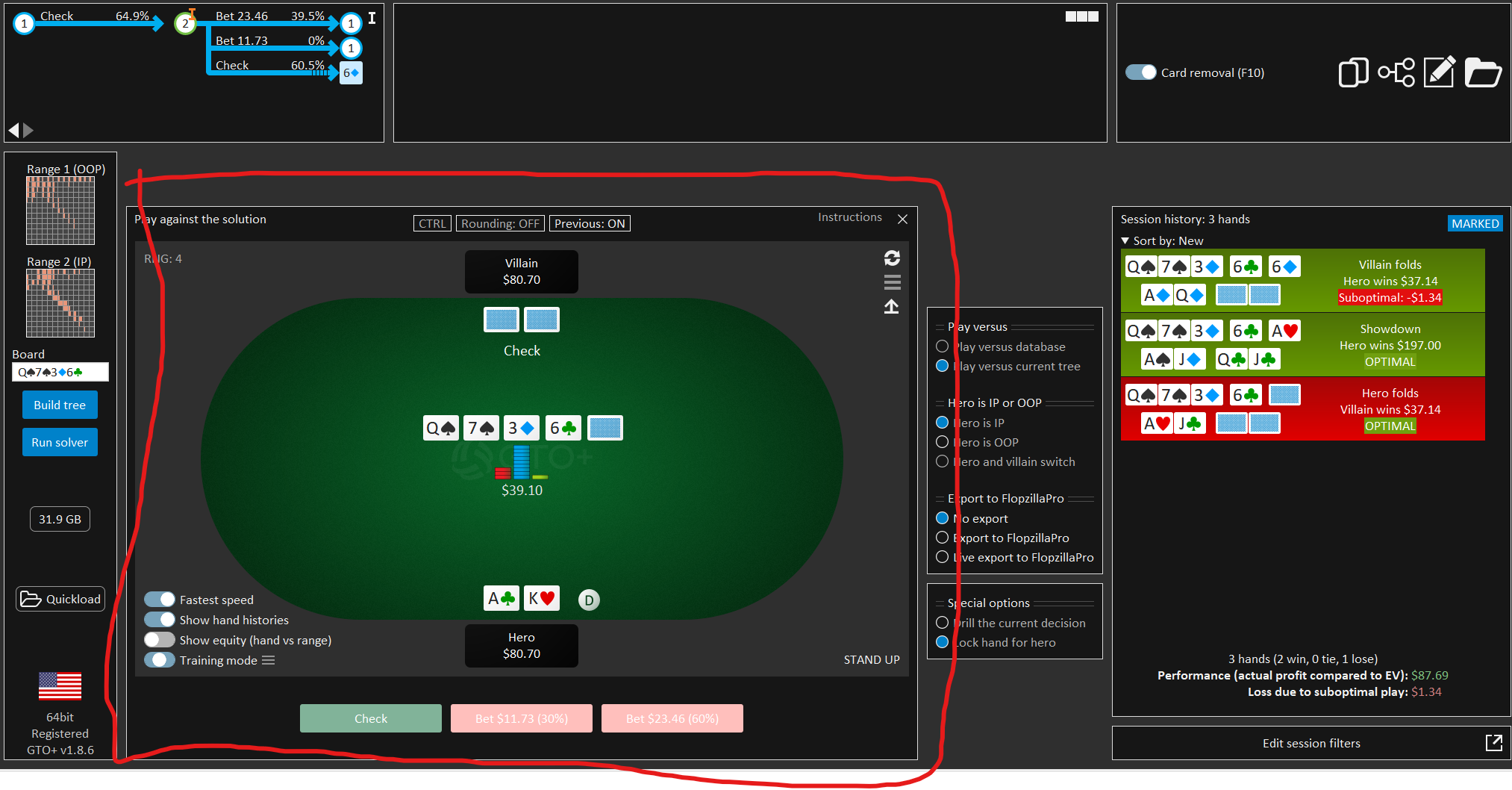
Perhaps this cannot be done, but if there were a way to make the trainer window movable/exportable, like the RvR window, it would be much more convenient to use the solver + trainer, and it would leave room to add add-ons for hands history and other requests.
One more thing to think about, isn't it? The possibility of playing several spots, for example 3BP BBvBTN /SBvBTN (different gto2 files placed in the same folder) to better simulate a real gaming experience, or also the same spots with different SPRs to see the behavior/differences of the strategies
When working with locked GTO solutions, we don’t always have access to the pure GTO solution unless the user first runs an unlocked solve and then performs a second solve with locks applied. While the feature that you're requesting could be supported under certain restrictions, I think that the resulting workflow may turn out to be too cumbersome.
As for locking individual hands, locking a hand requires two steps — first setting the desired strategy, and then locking it. If either step is missed, the lock won’t work as intended. With ranges consisting of hundreds of hands, it often becomes nearly impossible to keep track of which hands have been properly set and locked. We experimented with this in earlier versions, but after some trial and error found it too error-prone. Personally, I feel that it's also not entirely clear what the practical benefit is. Forcing certain hands to bet often just causes the overall strategy to rebalance in a completely different way. This feature is included in CREV, but we decided not to include it in GTO+.
Perhaps this cannot be done, but if there were a way to make the trainer window movable/exportable, like the RvR window, it would be much more convenient to use the solver + trainer, and it would leave room to add add-ons for hands history and other requests.
I think what we'll end up doing is to make the trainer full screen in the main window.
With an option to export any spot to an external window.
When viewing the trainer, the strategy itself won't be visible - unless the user chooses to display it.
One more thing to think about, isn't it? The possibility of playing several spots, for example 3BP BBvBTN /SBvBTN (different gto2 files placed in the same folder) to better simulate a real gaming experience, or also the same spots with different SPRs to see the behavior/differences of the strategies
This should already be available, given that you can play versus any database that you have created.
I'm not sure whether we can offer training versus different .gto2 files, given that, if the files are extremely large, the loading times may become intrusive.
Hi , i'm confused with Go all in feature
i've set go ai if remainng bet below 67% of pot
otr there is a pot 55 and stacks are 73 . But GTO+ wipes all betts and only goes AI
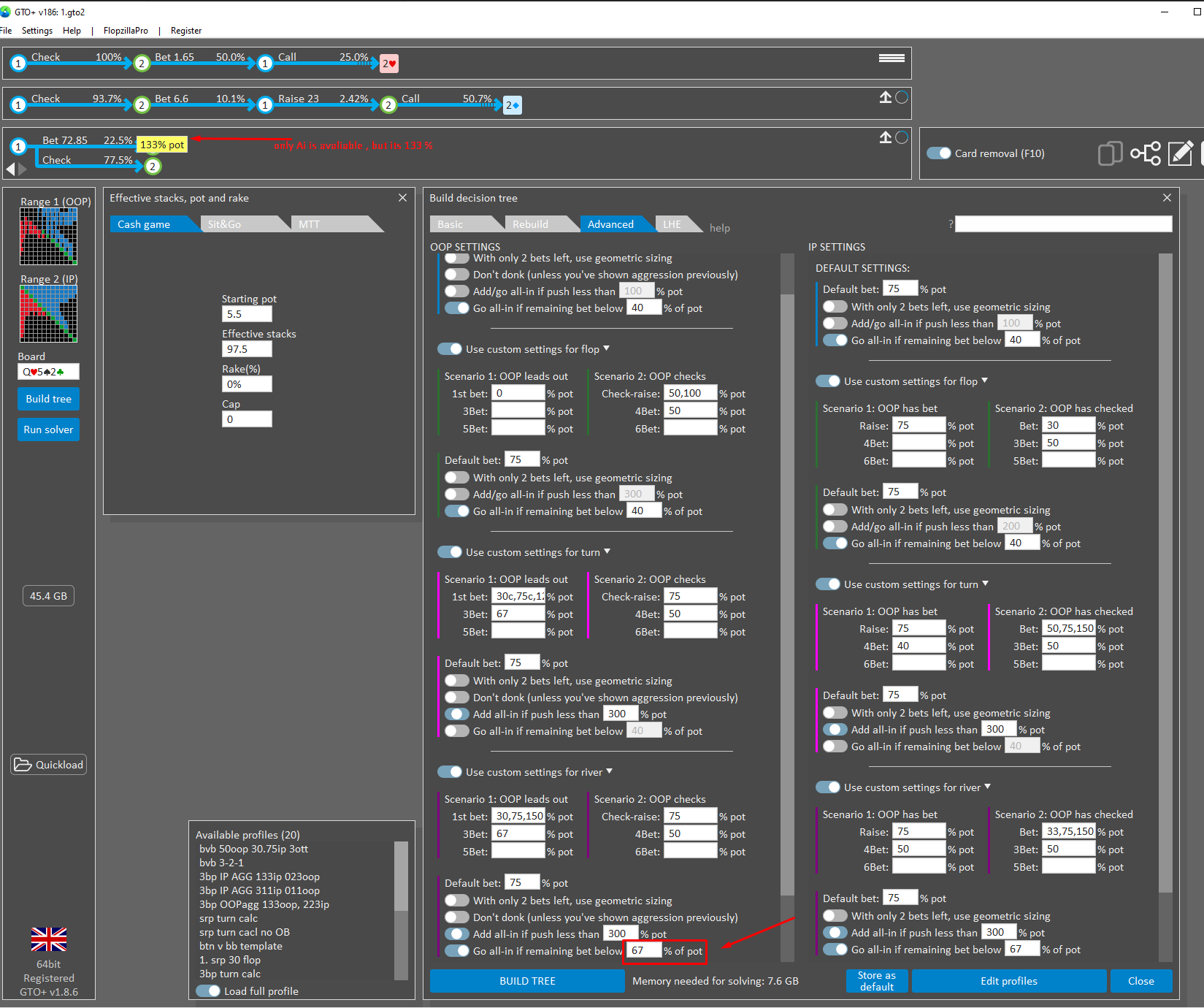
Do i misunderstand this option? I expected to leave AI only if for ex pot is 100 and stack is 65
What does this option mean?
This option means that if you bet, get raised all-in, and are effectively committed to calling anyway, then you may as well push all-in yourself. The value of 67% is a bit too high here — a value of around 35% would generally make more sense.
Current settings
The pot at this point is 54.8.
The stack is 72.85.
Let’s look at a bet of 30%, which comes out to 16.4.
After betting and being called, the pot becomes 87.6, with remaining stacks of 56.45.
The remaining stack is now about 65% of the pot.
With the push threshold set at 67%, the stack is therefore pushed all-in.
So with the current setting, the threshold is a bit too high, causing the player to push all-in even though they’re not really committed yet.
Intended use
Instead, let’s say the threshold were set to 35%.
The bet of 30% would then be treated as a regular bet.
A bet of 75% would be 41, resulting in a pot of 136.8 after a call, with remaining stacks of 32.
Here, with a threshold of 35%, the player would push all-in, since they are effectively committed to calling a raise of 32 anyway.
So for this option, you should enter a value that represents an all-in bet size you would be willing to call with almost any hand.
Hi scylla,
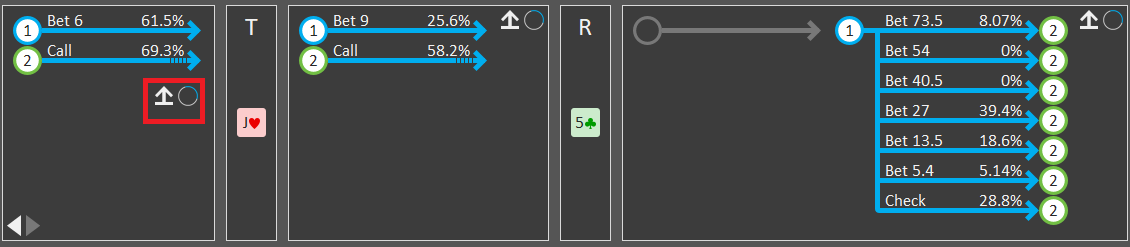
Is it possible to add the ability to jump to the current node while trying to edit a tree? For example I want to edit this specific river node as the game tree above indicates but navigating through the tree to this specific branch so I can edit him is really annoying, i'm editing trees alot of times to examine EV changes and other differences and if I could just navigate to a specific node in the main tree and then just click on "Edit Tree" button and then click on another button to automatically navigate in the imported game tree to this specific node as in the game tree above it would be great.
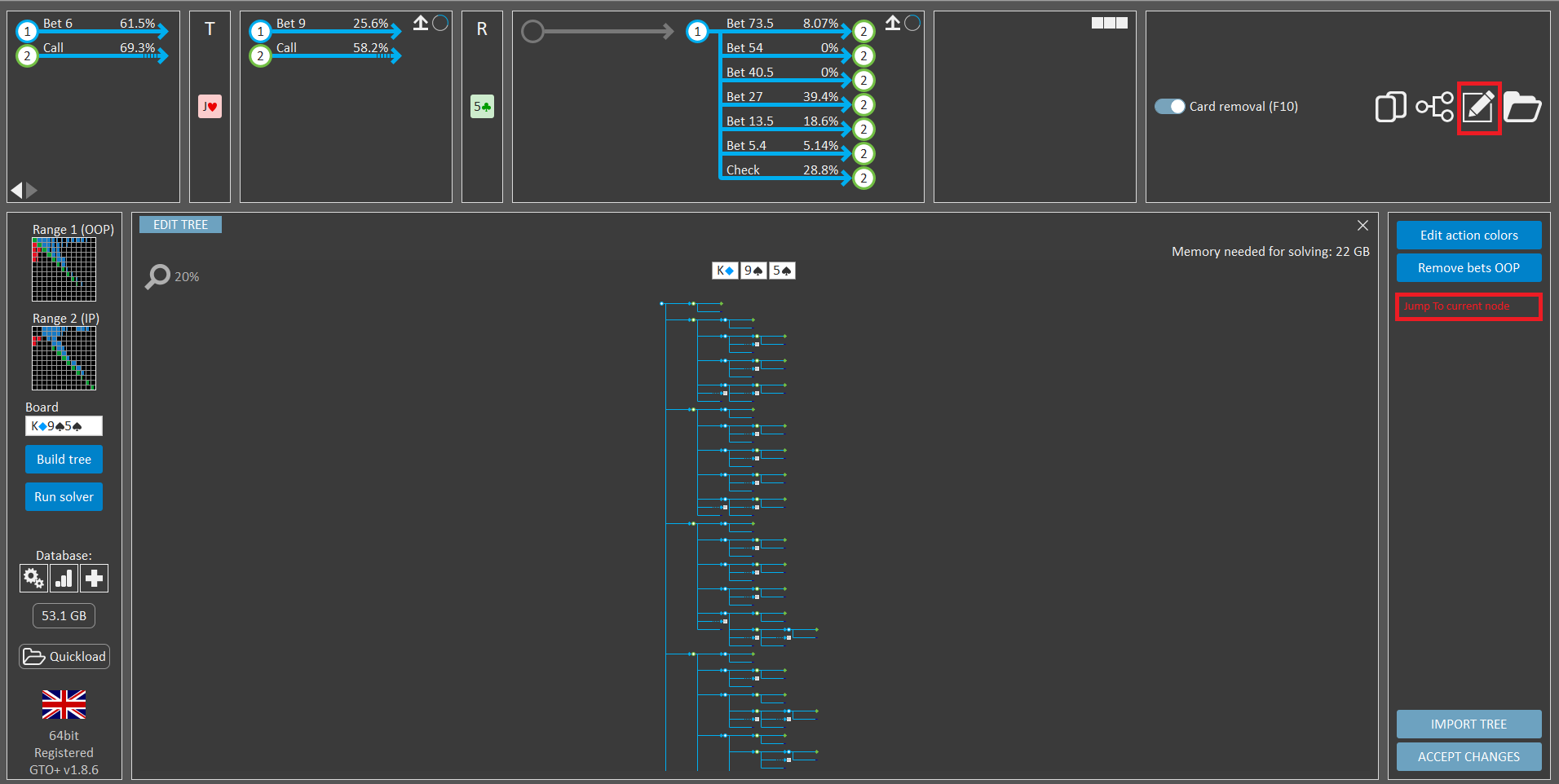
Also, is it possible to add solve subtree and export button for flop nodes? there are cases when I nodelock specific flop scenarios and therefore the subtree strats from flop became much smaller than the root node tree which makes it easier to solve it using this button than to run the solver for the whole tree (in some cases I can't even solve the whole tree because I have sims that ran on a server having more RAM than in my computer, so having the ability to solve just a subtree starting flop flop would be very useful). Also having the ability to export flop scenarios to different window would be useful when we want to compare the GTO sim and the nodelocked sim for the same node, I know I can just re open the sim in different window but it's not ideal
Thanks!
Hi scylla,
Is it possible to add the ability to jump to the current node while trying to edit a tree? For example I want to edit this specific river node as the game tree above indicates but navigating through the tree to this specific branch so I can edit him is really annoying, i'm editing trees alot of times to examine EV changes and other differences and if I could just navigate to a specific node in the main tree and then just click on "Edit Tree" button and then click on another button to automatically navigate in the imported game tree to this specific node as in the game tree above it would be great.
Also, is it possible to add solve subtree and export button for flop nodes? there are cases when I nodelock specific flop scenarios and therefore the subtree strats from flop became much smaller than the root node tree which makes it easier to solve it using this button than to run the solver for the whole tree (in some cases I can't even solve the whole tree because I have sims that ran on a server having more RAM than in my computer, so having the ability to solve just a subtree starting flop flop would be very useful). Also having the ability to export flop scenarios to different window would be useful when we want to compare the GTO sim and the nodelocked sim for the same node, I know I can just re open the sim in different window but it's not ideal
Thanks!
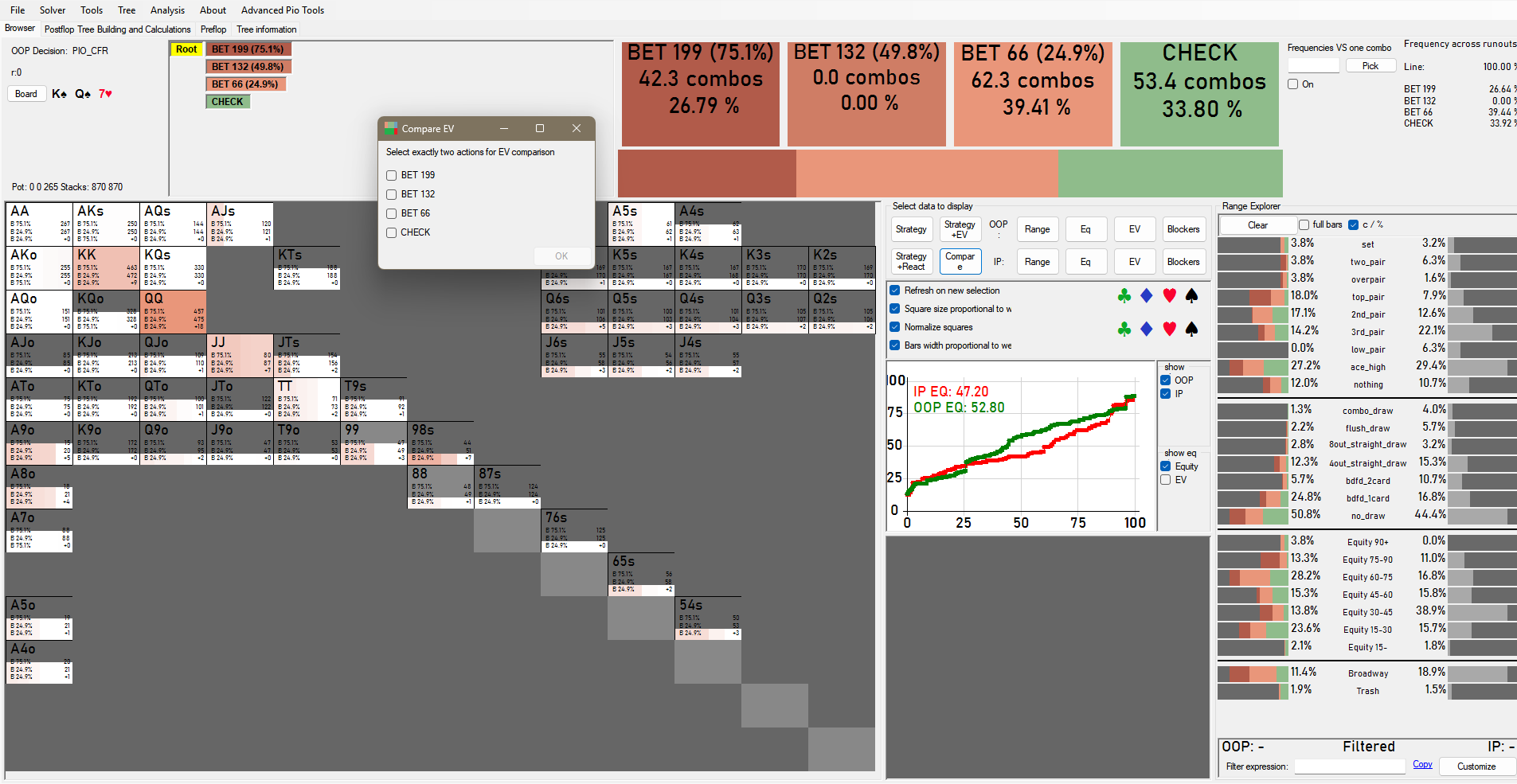
Is it possible to add EV comparison between different strategic options?
Many thanks for that detailed explanation !
Hi scylla,Is it possible to add the ability to jump to the current node while trying to edit a tree? For example I want to edit this specific river node as the game tree above indicates but navigating through the tree to this specific branch so I can edit him is really annoying, i'm editing trees alot of times to examine EV changes and other differences and if I could just navi
thats true. It takes some time to dig into
It's realy nice to fix a tree and be able to resolve a street with a "donut"
Otherwise if we detach a tree to antoher window and edit betsizes in treebuilder , than every recalc is only with a button 'start' in main screen
Hi scylla,Is it possible to add the ability to jump to the current node while trying to edit a tree? For example I want to edit this specific river node as the game tree above indicates but navigating through the tree to this specific branch so I can edit him is really annoying, i'm editing trees alot of times to examine EV changes and other differences and if I could just navi
Ok, I think that we can consider an auto-open for the selected decision.
Also, is it possible to add solve subtree and export button for flop nodes? there are cases when I nodelock specific flop scenarios and therefore the subtree strats from flop became much smaller than the root node tree which makes it easier to solve it using this button than to run the solver for the whole tree (in some cases I can't even solve the whole tree because I have sim
This may be difficult to offer, as it likely wouldn’t be immediately clear to most users how the function works.
Also having the ability to export flop scenarios to different window would be useful when we want to compare the GTO sim and the nodelocked sim for the same node, I know I can just re open the sim in different window but it's not ideal
I think that we can offer an "Export" option on the flop, just like we currently have for the turn/river.
Hi scylla,Is it possible to add the ability to jump to the current node while trying to edit a tree? For example I want to edit this specific river node as the game tree above indicates but navigating through the tree to this specific branch so I can edit him is really annoying, i'm editing trees alot of times to examine EV changes and other differences and if I could just navi
On second thought, a possible workaround would be to export the active ranges for the line to FlopzillaPro, and then export the ranges back.
Next, rebuild the tree using Build tree → Rebuild (tab) → Rebuild with current settings.
After that, use the editor to remove all lines that don’t lead to the line you’re interested in.
It does take a few steps, but this should allow you to get a reasonable impression of whether such a feature would provide what you’re looking for.
On second thought, a possible workaround would be to export the active ranges for the line to FlopzillaPro, and then export the ranges back.Next, rebuild the tree using Build tree → Rebuild (tab) → Rebuild with current settings.After that, use the editor to remove all lines that don’t lead to the line you’re interested in.It does take a few steps, but this should al
I have Flopzilla pro but what about those who don't have?
Anyway I tried it and it's even more complicated than just manually navigating through the tree and editing the specific node I want to edit, if there could be any automation for that process and just jump to the current active node in the original game tree as I suggested it would be great.
I have Flopzilla pro but what about those who don't have
Anyway I tried it and it's even more complicated than just manually navigating through the tree and editing the specific node I want to edit, if there could be any automation for that process and just jump to the current active node in the original game tree as I suggested it would be great.
It appears that I quoted the wrong part of your post earlier.
I was referring to the request below, regarding exporting a flop subtree.
My suggested workaround should allow you to approximate the same result in the current release, provided that you have access to FlopzillaPro.
At the very least, it should help you verify whether such a feature would work for your purposes.
The request to have the editor automatically open the active decision is something we can definitely look into.
Also, is it possible to add solve subtree and export button for flop nodes? there are cases when I nodelock specific flop scenarios and therefore the subtree strats from flop became much smaller than the root node tree which makes it easier to solve it using this button than to run the solver for the whole tree (in some cases I can't even solve the whole tree because I have sim
A huge thread, so sorry if this question has been asked. Can you configure 7 max ante, like coin poker sim situations?
A huge thread, so sorry if this question has been asked. Can you configure 7 max ante, like coin poker sim situations?
GTO+ is designed for heads-up postflop analysis.
Antes are posted before the flop, so they don’t affect the postflop calculations directly.
As long as you set the correct postflop pot size, there should be no issue including antes in the calculations.
GTO+ is designed for heads-up postflop analysis.
Antes are posted before the flop, so they don’t affect the postflop calculations directly.
As long as you set the correct postflop pot size, there should be no issue including antes in the calculations.
https://gyazo.com/3568fb0fd78c3c46e1b944...
Scy
I believe I've requested this feature before. Piosover has the ability to analyze frequencies by hand group through different runouts (you can customize stats)
You mentioned to me previously that it wasn't possible... my question is, why not?
If this could also be aligned with the Aggregate Database reports (let's say all KXX boards, for exmple how often players bet with A-highs with or without backdoors, etc.), it would be incredible.
GTO+ is designed for heads-up postflop analysis.Antes are posted before the flop, so they don’t affect the postflop calculations directly.As long as you set the correct postflop pot size, there should be no issue including antes in the calculations.
https://gyazo.com/3568fb0fd78c3c46e1b944...Scy I believe I've requested this feature before. Piosover has the ability
Due to the holidays, I have some personal obligations for the coming days.
So let me get back to you on this either tomorrow or the day after.
Due to the holidays, I have some personal obligations for the coming days.
So let me get back to you on this either tomorrow or the day after.
Scy. merry Xmas 😀
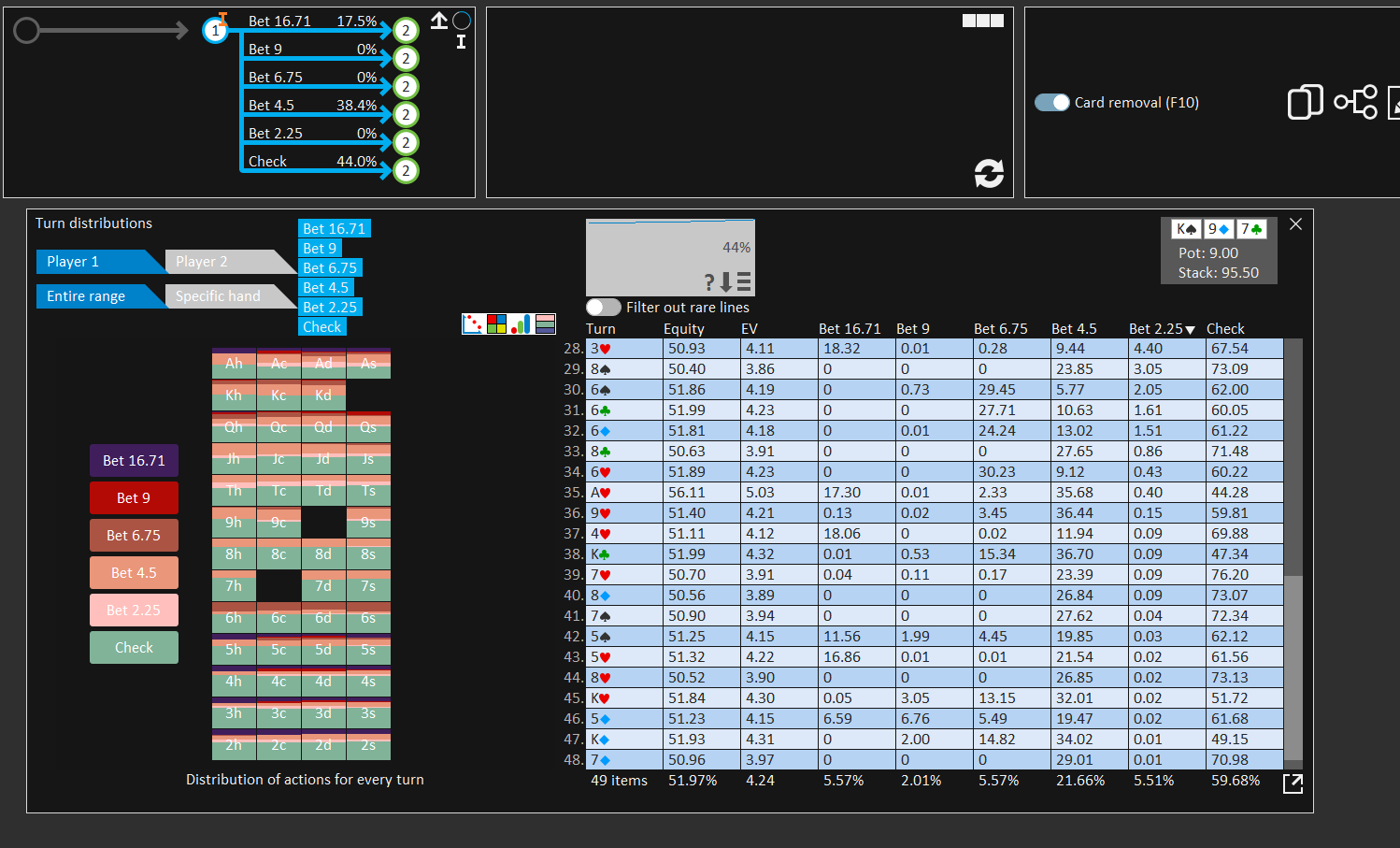
Is it possible, after applying incentives to all turns, to recalculate them all at once, even knowing the wait time is high? Something similar to what works on the river from the Agg report.
Also, it would be great if, once we apply incentives and recalculate, it update the runouts with the new frequencies. This is essential.
Thanks in advance!
Hi scylla,
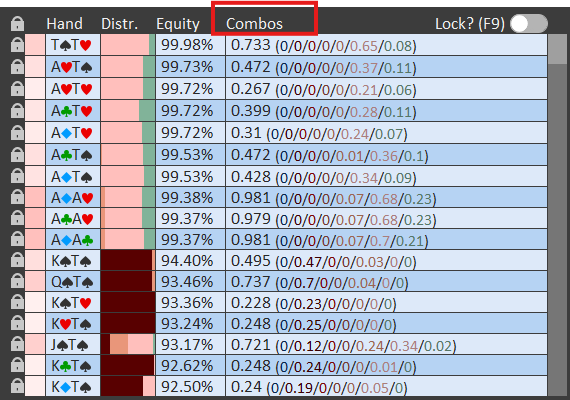
is it possible to add an ability to sort the main table by the attribute we looking for? for exmaple when I look for combos and the matrix has very low represntation of combos I want to check which combo has the biggest weight in the range but the table is always sorted by equity. Same goes for EV, when I want to examine which combo has the biggest EV it's not comfortable to scan the table manually rather than just sort it by EV\combos weight. If for example we could sort the table by EV when we are at the EV or by combos weight when we are on the combos tab it would be very convenient. For example pressing on the combos tab will just sort it by weight instead of equity when desired and then pressing on the equity will bring it back to be sorted by equity:
Thanks!


