HUD not working on Coinpoker
After the update hud is not working. Any idea when it will work again?
Hello!
The recent update on CoinPoker caused some issues with HUD working. We're about to release an update fixing that. so it won't take long.
We apologize for the inconvenience.
Thank you for the reply!
We've released an update for Hand2Note 3. Could you please check if you have an updated Hand2Note to the latest version 3.3.1.67?
Also make sure you have disabled the "Disable rooms compatibility auto updates" option in Configuration-> HUD then restart Hand2Note

You can also manually check the update in the Updates tab in the right-bottom corner!
Thanks for the reply. I did everything u wrote above.
hud seems to be popping up on some tables on some not, id say 50/50.
On some it keeps on changing its positioning constantly.
Any help?
Thanks for the reply. I did everything u wrote above.
hud seems to be popping up on some tables on some not, id say 50/50.
On some it keeps on changing its positioning constantly.
Any help?
what it is, the hud on that table keeps displaying the hud that is not being displayed on the table to it's direct right for a brief while and it goes back and forth. So stats from that table and the table to its right back and forth but only on that one table.
Do you have an ETA for when the same update will be made for H2N 4?
it seems to work now correctly on h2n 3
Sorry for the delay with an answer.
Glad to hear that it works on Hand2Note 3! As for Hand2Note 4, we've updated this version too.
Probably, you're referring to Hand2Note 4.0 Beta. Unfortuntaely, this version isn't supported anymore since we released Hand2Note 4.1. So, Hand2Note 4.0 didn't receive this update.
You're right, I was thinking of the 4.0 beta, thank you for the info, understandable why it won't be updated. I do have one last question though:
Is there any way to move my Coin Poker hands from H2n4 beta to H2n3? I've tried exporting them as .txt files and importing the output folder into h2n3 but nothing happens after selecting the output folder via the 'Import Files' btn. While I've read that Coin hands cannot be added to H2N as .txt files, I just want to confirm that this is still not possible even if the .txt file comes from H2n4.0?
You're right, I was thinking of the 4.0 beta, thank you for the info, understandable why it won't be updated. I do have one last question though: Is there any way to move my Coin Poker hands from H2n4 beta to H2n3? I've tried exporting them as .txt files and importing the output folder into h2n3 but nothing happens after selecting the output folder via the 'Import Files' btn. W
Thanks for the reply!
Hand2Note 4 uses a different enhanced system of hands importing. It's more flexable and allows to support a huge amount of game types.
Unfortunately, this format isn't compatible with Hand2Note 3, so you can't import hands to it, sorry.
My equipment work well, except lost a hand
was there any update, that caused the hud to not work in h2n3? i came back after some time away from poker and the hud doesn't start again.
Hello!
Could you please check if your Hand2Note is updated to the latest version 3.3.1.67 ?
Also make sure you have disabled the "Disable rooms compatibility auto updates" option in Configuration-> HUD then restart Hand2Note
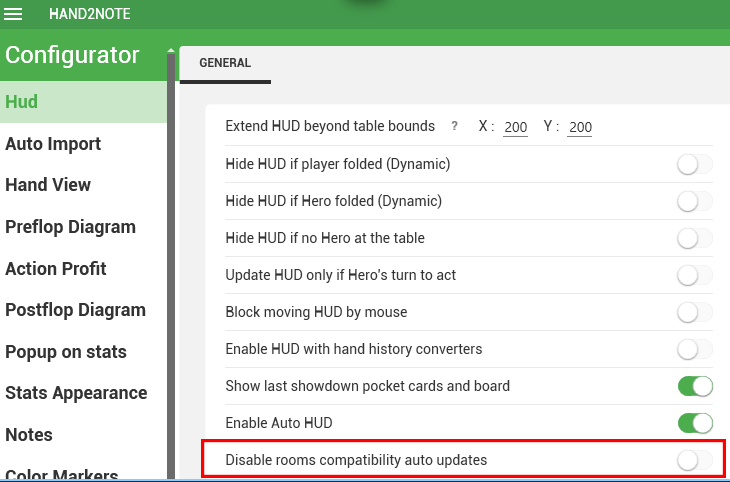
Please, let us know if that helps!
hi,
i did disable the option. but for me no hud is displayed and no session data recorded. on the import site the recording works.
Thanks for checking!
Please note that Hand2Note requires an active ASIA or PRO plan to work with CoinPoker.
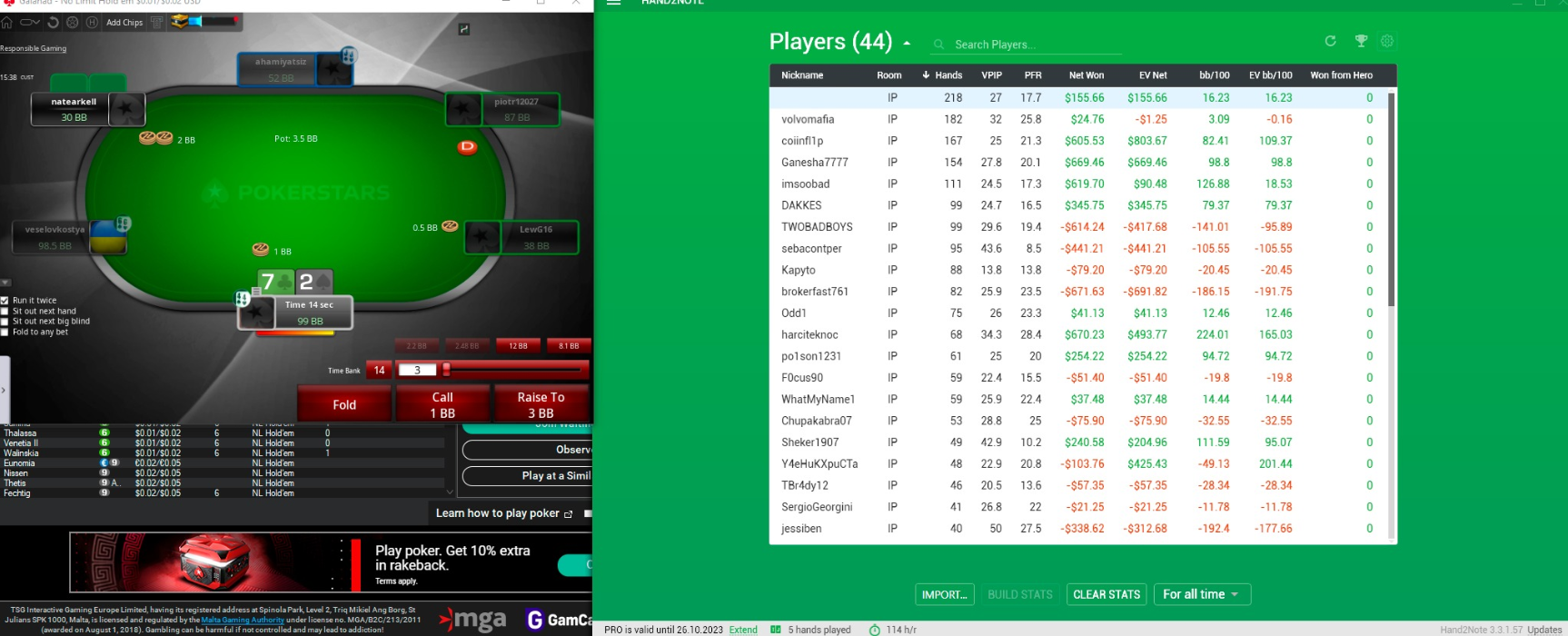
If you have one of these plans, please, take a screenshot where we can see your table and the main window of Hand2Note while playing and send it to [email protected]. Make sure to screenshot full windows with all borders in the frame.
Example:
hello, sorry for stupid question but i'm new both to COIN, Hand2note and mac. where i can find on mac folder with coinpoker hand history to set up auto import folder ?
hello, sorry for stupid question but i'm new both to COIN, Hand2note and mac. where i can find on mac folder with coinpoker hand history to set up auto import folder ?
Hello!
No worries! Feel free to ask any question!
Unfortunately, HUD in Hand2Note 4 for macOS works in a test mode for now. CoinPoker isn't supported yet. Supported rooms are the following: PokerStars, 888, WPN, and partially Winamax (except Zoom tables).
Thank you for feedback, but the hand History and statistics in the app are possible from coin or your app doesnt support it at all?
+1 customer for low stakes or light version of H2N. may u can prioritize it?
can't afford full version with my low volume either.

does H2N3 require a hh converter to work with coin poker?
Nevermind, it works but I am having issues with the HUD. Hands are imported and stats get incremented but the HUD does not display. Using H2N3 3.3.1.67 and disable rooms compatibility auto updates is disabled.
Hello!
Could you please try to follow the next steps:
1. Close all the tables.
2. In the Configuration -> Game Types, click Reset to default and then click on Save settings.
3. Select your custom HUD and Popup profiles in your game type and then click the Save settings. For example:
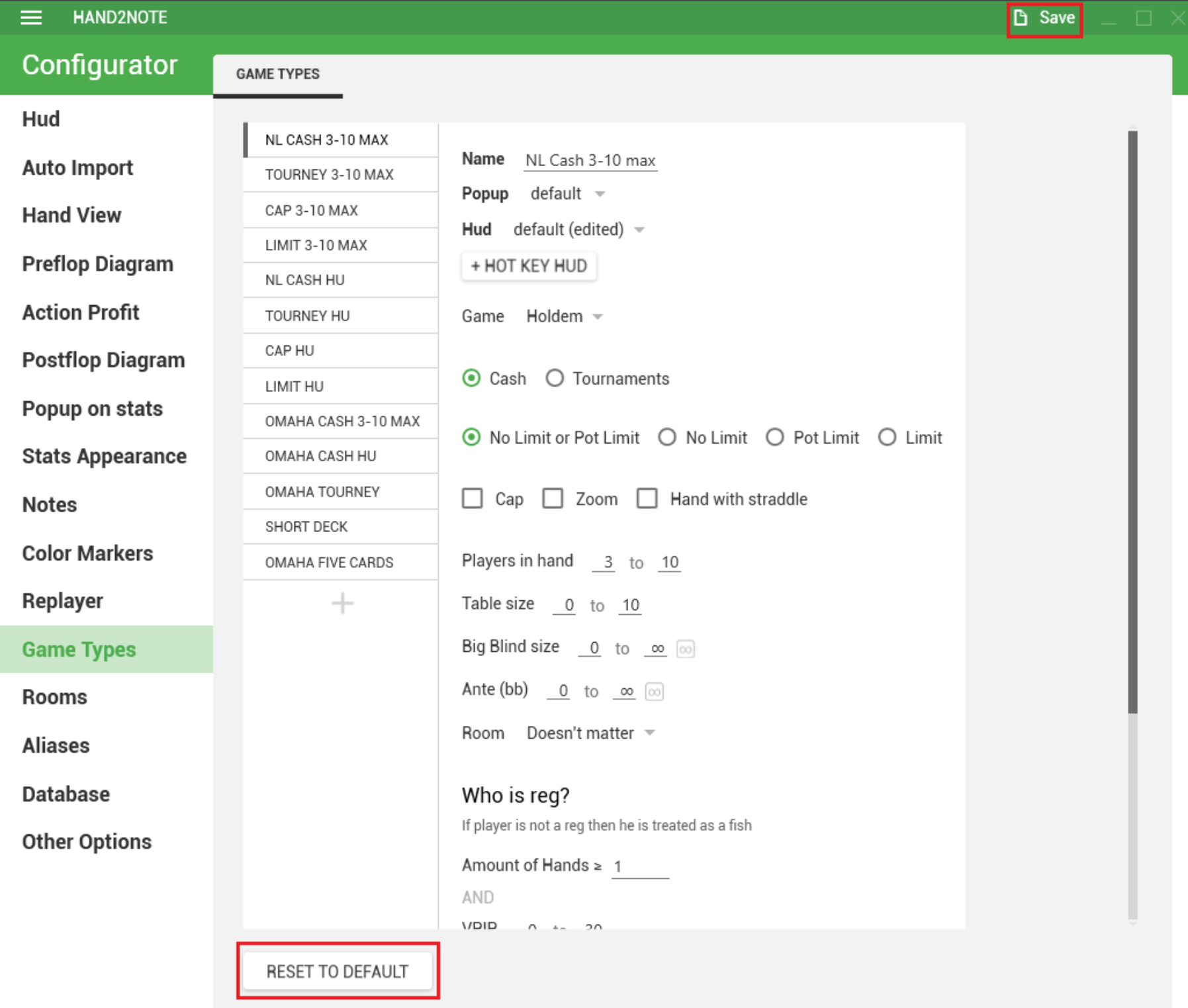
4. Rebuild your statistics (click "Clear stats", then "Build stats" in the main window):
5. Open tables again and check if HUD works normally.


