[PokerStars] Software Improvement Thread

Scott said to make a new thread for this.
The main advantage at playing at Tilt is players get to sit right in middle of
I went to add/remove programs and uninstalled stars. I went back to stars site and downloaded stars. It showed the file as pokerstars.exe2 or something like that. The reason it shows that 2 is because my old install exe file is still there from a while back when I downloaded stars in my download folder. I then installed stars. It seems to be the same issues? Everytime I close stars software, it shows Pokerstars Lobby (Not Responding) for a bit before it closes.
I even noticed when stars opened, my username was already saved. Shouldn't it wipe everything? The other thing is I noticed all my settings are exactly the same as before? I had thought if I remove stars and installed it again, well everything is erased and I have to either manually edit all my settings or copy and paste those files into it. So that means when I uninstalled stars, lot of stars files are still there? So I need to download revo uninstaller then to do a clean uninstall of stars before I install stars again?

Why did they make all midstakes basically zoom where you cant even choose your own table to sit down
Are trying to scare away loyal players?
They are doing a great job running players away, I always like to watch a table for a while before playing to see if there is any bots about or colluding pricks at a table but Stars says no "**** you and get onto a table regardless".
Only had an account in case I decide to play there in future but that ain't happening any time soon now.
I invite you to visit my website:
a g a i n s t b o o k m a k e r s . c o m
I’m dropping a killer MLB trivia challenge! The first 20 people to answer correctly will get the chance to purchase a full-year subscription + 50 fixes for just $700 (normally $3,000). Crazy deal!
Which MLB team has a bear cub as its mascot?
Send correct answer to my email.
Unlock 12 months of VIP Zone access and 50 fixes
You have 12 hours to complete the payment (after that, the offer becomes inactive)*
Today I’m throwing also soccer fix for free! Trust me, go BIG on this one – it’s free money!
*If payment isn’t made within the given time, the offer will expire and the spot will go to the next person on the waiting list (i.e., the next correct entries — 21st, 22nd, etc.). Those on the list will be notified right away when a spot opens and will have 12 hours to complete their payment.
Is anyone else having problems with the Flutter Embedded Browser Client Software?
I keep on getting multiple error message pop-ups whilst playing, maybe twice a minute, or seemingly randomly every couple of minutes.
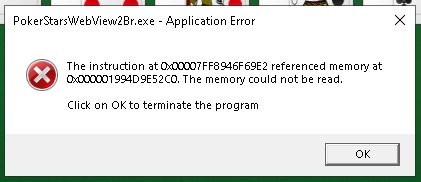
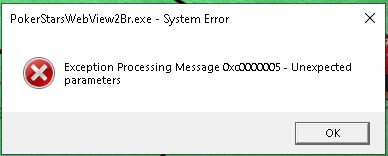
If unattended, the Flutter Embedded Browser Client Software will open up several instances during a session, all pushing the CPU at a high rate.
I spotted somewhere that the Flutter Embedded Browser Client Software may try to use Microsoft Edge shitware, rather than my chosen Firefox browser. As Edge is disabled using software policy restrictions, for security reasons, is this the cause of my problems or something else?

In the marble halls of the charm school
How flair is punished
Is anyone else having problems with the Flutter Embedded Browser Client Software?
Yeap. Last 2 month. Flutter eat 30% of cpu if I cick it from taskmgr it's get back with couple more after some minutes so I need kill it again.
It's very anoing.
After killing it's start to run windows error report every minute.
If I blocked Flutter via firewall everything fine. But doesn't working tasks chests cashier.
Edge blocked too. Firefox default too.

A script has been launched on Stars: those who "jump" too much are prevented by the Reg from landing on a new table, so indoor players can breathe a sigh of relief.
P.S. Now it's possible to play on 6 tables, you didn't know? Now you do.
6 tables is better than 4
But i dont like that up to 1/2 has basically become zoom with a shared pool you have to join and you cant pick a table anymore
100nl 6max right now has 5 active players!! Thats 1 table of 100nl.... stars stars stars what have you done?
btw, what do you mean with players who "jump" too much? switching from 1 table to another?
Does anyone have this glitch that shows up on the left corner of their screen sometimes? Like a rectangle box? Seemed to have happened a while back after a software update.
I still am getting the same issue of everytime I try to close the stars software, it freezes for a bit and shows on the top right (Not Responding) and takes a while before the software closes. Nobody here has this issue?
I had tried to remove the software and then download the software and reinstall it. When I did this, I don't think I did it the right way because all my settings are still there and my username was saved. Is the only way to properly uninstall and reinstall to download that revo uninstaller program? When you go to remove programs in windows 11 pro and remove stars, it doesn't remove everything? So what is the proper way to do this? I'm assuming that is why I'm having all these software issues and glitches?
Does anyone have this glitch that shows up on the left corner of their screen sometimes? Like a rectangle box? Seemed to have happened a while back after a software update.I still am getting the same issue of everytime I try to close the stars software, it freezes for a bit and shows on the top right (Not Responding) and takes a while before the software closes. Nobody here
I am guessing you get a "System 32" box. I dont know exactly what it's for,but i believe it's use on ggpoker too. When i tried to deactivate from windows tools,the client was shut down instantly.I believe they use a program for monitorizing players
What is this system 32 box you mean and where did you get that term from? I just know that it flashes really fast on the left side of my monitor and it's like a vertical rectangle and immediately goes away. I can't even tell what it is because it flashes fast and goes away. Is that what you have as well? So you have it on stars and gg? I know this flash is from the stars software. I have tons of issues with the software such as it shows (Not Responding) and it freezes every single time for a bit before the software closes.
How exactly did you go to system 32 box and try to deactivate it? Go to task manager and shut it down or close it or how? Do you have any other glitches on stars? My fold button always keeps disappearing at many of my tables.
I googled system 32 box and that is like a a command prompt box that is black that shows up? If so, that isn't what I'm talking about.
Latest update made chips blurry for me, kind of annoying, anyone else see the same?
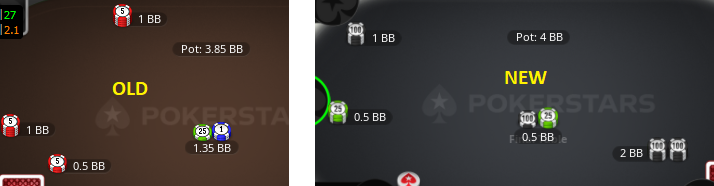
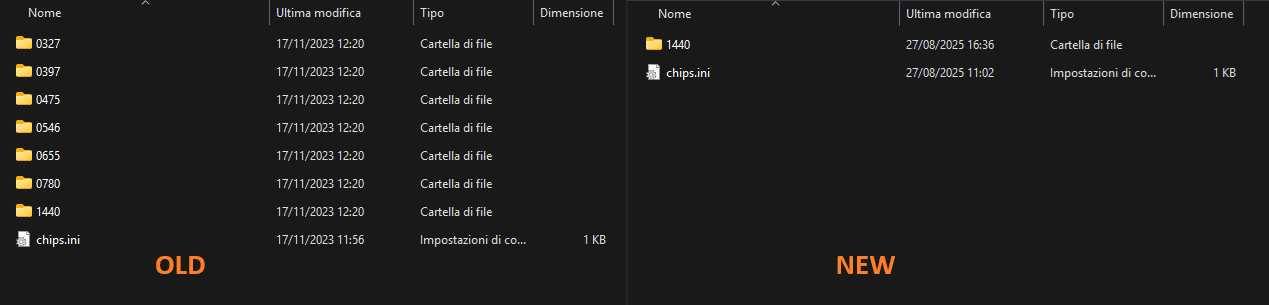
0iq poker, yes, actually after the latest update several folders were removed.
Now only the 1440 one is left, and when the table is scaled down it doesn’t look sharp anymore because the other folders that were available before are missing.
path: C:\Program Files (x86) \ PokerStars \ Gx \ table-view \ chips \ default
I suddenly can´t play anymore, the ``Play Now´´ buttons don´t work. Last time I played was Saturday with no issues.
Site wide issues currently being looked into
Now it works again.

been away a while..
how much modding is possible on stars?
can i just replace the cached images in gx/table-view/cards/.../1440/cache
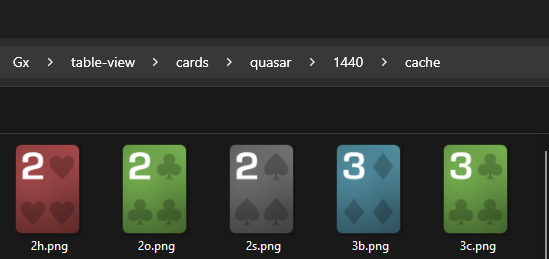
and then just redirect the launch shortcut to not update the client?
I'm wanting to start using my old chips and decks again in client and PT4
are themes still moddable in aurora? i may have to dig out my old .ini decoder if i can find it in a storage device i have somewhere.
if someone is still actively modding, drop me a PM, would love to get up to speed.
What is the correct way to uninstall poker stars so that I can download it again where there is no issues with it. I already mentioned the software has tons of issues. The main one being the moment I close the stars software, it always freezes for a good bit before it closes. It happens every time. Then there is the issue of the fold button disappearing at many of my tables. So only way to fold is to use the fold hotkey to fold, otherwise I can't fold unless I time out at that table. There is the lagging issue that happens but that happens usually when a lot of tables. I did the add/remove programs on windows 11 and when I downloaded stars again, username still there and same lag and glitch issues.
I went and downloaded Revo uninstaller. I then went to delete pokerstars. After doing it, there is option to scan for checking if there are any pokerstars files. I did that.
There are a ton of folders and subfolders. That means pokerstars files are still on my laptop then right?
I restarted laptop. Went to pokerstars website and downloaded it. When software opens up, it still shows my stars username. That means I didn't remove everything off pokerstars right? How am I suppose to completely remove everything then? I notice right when I went to close pokerstars client, same exact issue where it freezes a bit before the software closes. This has happened for a long time.
How am I suppose to delete the entire pokerstars client so that when I download it again, then it wouldn't show username and thus it would then not have these glitches? Every single time I close the software, it takes a while and freezes and then closes.
tbf, your history of posts ITT makes me think you are better off buying a brand new pc
Something tells me it's a waste of time buying a new PC, first thing that will be done is install all the unnecessary **** that is probably causing the issue in the first place.

What is the correct way to uninstall poker stars so that I can download it again where there is no issues with it. I already mentioned the software has tons of issues. The main one being the moment I close the stars software, it always freezes for a good bit before it closes. It happens every time. Then there is the issue of the fold button disappearing at many of my tables
To uninstall Pokerstars completely, you need to delete Appdata/Local/Pokerstars -folder.
I bought a new laptop a few years ago. I had a dell xps 15 9550 and it had tons of issues when playing on stars and 888. This was of course due to the new 888 and stars software. Previously there was no issue or lagging on any of those sites even when lot of tables.Processor was i5-6300hq and it had 32gb ram. Video card I believe was Nvidea Geforce 960M. It had the other regular graphics card which is the intel hd graphics 530. The thing is the sites ran the intel graphics card.
I then bought a dell xps 15 9520. It has i7-12700h processor and 32gb ram. Graphics card is intel iris xe graphics and nvidia rtx 3050. I even set stars to use the nvidia rtx 3050. I can't seem to that with 888 software? I noticed the lag issues were not as bad anymore on stars. However, if lot of tables, still some issues but wasn't as bad as the older laptop. On 888, it still had the same issues and this is due to the 888 software. So it doesn't matter how fast your laptop is for 888. I use HEM3 and caption with these sites. I do know that 888 has these issues even if I don't use HEM3 and caption when lot of tables. Lot of people mention these issues with 888 software.
The thing here is on stars, I keep having these glitches. Everytime I open stars, it takes a bit to load. Sometimes it shows not responding as well. Now during play, some tables would have the fold button display disappear at the table. This would happen at some tables and then appear back later on. I have a hotkey for folding. If I didn't, I can't even fold unless I time out. Then there is the lag issue of when a lot of tables. It doesn't matter if I press the hotkey to fold or call or raise if it freezes a lot at a lot of the tables. So I have to press it many times otherwise it would fold. Issue is when this happens, my timebank at tables are low so it would just fold even if I want to do something else. Then there is this issue of everytime when I close stars... it never closes fast. It always freezes and shows messing of Not Responding and freezing before the client closes every single time. Then there is this popup that shows up on my top left corner of monitor randomly with the stars software which I have no clue what it is.
So because of this, I want to uninstall stars and download it again as that might fix these issues. I have add/remove stars from windows but when I download it again, it opens up and my username appears which means not everything was uninstalled correctly before I installed again. I still have the same glitches and issues when playing on it. Anytime I open stars and there is an update, I let it update as it does.
I then went to revo uninstaller and downloaded it. I then removed stars this way. After doing it, it ask me if I want to scan or not. I did that and it showed tons of stars folders and subfolders. Is that normal? It seemed like I could manually delete each of them but not sure if I should or not so I didn't. I then restart laptop. Then downloaded stars again and as I mentioned, same issues. It shows username saved when it shouldn't when it's a new download. So that means I did not delete all stars files completely during the uninstall. Would this have to do with stars log files or other files? How can I find these files and delete all of them? So I like to know if someone can tell me how do I uninstall all stars files completely before I install it again. I do not see many posts about people mentioning all these glitches. Some users do report 1 of these glitches but not all like these. My laptop is fast enough so shouldn't it not have these issues? I can't imagine you need like a fast graphics card like those 4060 or 4070 or 4080 or 5060 or 5070 or 5080 for lag to not happen? Are there people that plays a lot of tables on stars and zero lagging at all while running HEM3 and caption? If so, what is your processor and graphics card? The xps 15 9520 I bought a while back was because it had a nvidia rtx 3050. I did read that is very basic one but I wanted a dedicated graphics card. But it isn't fast enough? I know people mention fast graphics cards for gaming on their computer but I do not play any games on the laptop at all besides these online poker sites.
I have a basic desktop that is nine years old and run Party, Bet365, Pokerstars and 888 and never had any performance issues. The graphics on my PC are AMD Radeon R5(1012MB), not exactly elite gaming level and yet I never had issues.


