DriveHUD - Poker HUD & Database Software [-10% Discount]

[URL="http://drivehud.com/?t=22cs"]
[/URL]
- Track all poker hands you play online.
- Run a HUD overlay on all of your opponents as you play.
- Re-play every session, and every hand you ever played.
- Graph and analyze how unlucky or lucky you’ve been running.
- Filter for any situation you can think of and analyze it.
- Player profile your opponents with ease so you know who the fish or sharks are.
- Provide and easy and intuitive poker database experience.
[UR
DriveHUD 3 Beta Update v3.0.0.16100
Fix for the ClubGG update (multiple instances, beta)
https://drivehud.com/poker-hud/DriveHUD3...
Multi-instance via the launcher in AHC.
DriveHUD 2 Beta update v2.0.17.13636
Fixed an issue where ClubGG tournaments weren't detected in some cases
Fixed "ClubGG not found" issue in ClubGG launcher
DriveHUD 3 Beta update v3.0.0.16112
Fixed an issue where ClubGG tournaments weren't detected in some cases
Fixed "ClubGG not found" issue in ClubGG launcher
Fixed rakeback and bonus stats

in DH2 you were able to hide the "gauges"/"money won" in the Cash settings... is that possible in DH3? maybe so, and I'm just not seeing it
in DH2 you were able to hide the "gauges"/"money won" in the Cash settings... is that possible in DH3? maybe so, and I'm just not seeing it
No. You can resize, obviously, but there's not a button to just hide all of it. This was already requested and on the dev list, so they should implement it soon.
+1, and a refresher on how to export DH2 HUDs please. Last time I tried I couldn't find the folder it was sent to
If you install DH3, it will automatically import your DH2 HUDs. But as far as exporting them in DH2, you just go to your HUD tab, select the HUD you want to export from the 2 pull down menus and then click export at the bottom left. When you do that, you get a location pop-up, so you can select where you want to export to.
As a long time user of Drivehud. I just wanted to drop in to say drivehud 3 is seriously impressive. You can really see how much development and refinement has gone into the platform over the years. It feels faster, smarter, and far more polished, while still staying focused on what players actually need. Really well done guys!

First things first, I totally agree with the post above. An impressive upgrade to an already customer-oriented product. Kudos to all who put the brilliant work!
There were couple of freshly played pre-river AI hands where All-in Equity% and $EV Diff slots are 'empty' in my reports. Any idea why that might happen? Seems like software treated them as 'already finished' hands when AI happened.

FYI the Facebook ads for D3 are using the D2 logo.
First things first, very impressive update to an already customer-friendly product. Kudos!
One thing I noticed is that couple of freshly played and pre-river finished AI hands don't have All-in Equity% and $EV Diff on the report. Those slots are empty. Any idea why that might happened? Or maybe similar things reported?
First things first, very impressive update to an already customer-friendly product. Kudos!
One thing I noticed is that couple of freshly played and pre-river finished AI hands don't have All-in Equity% and $EV Diff on the report. Those slots are empty. Any idea why that might happened? Or maybe similar things reported?
Are you talking about in the hand viewer itself?

Ty for the kind words also. Appreciate it and the support!It should show both of those. Do you see the column in your reports, and are the amounts empty, or do you not see the columns at all?
Column is there, values are not (for some, not all AI spots). I think it's when more than 2 players contest the post preflop but one or two fold on flop or turn, other two go AI. In those spots, it's empty.
DriveHUD 3 Beta Update v3.0.0.16166
Added new dynamic positional stats PFR/RFI/VPIP IP/OOP
Added legend for pie charts
Added font family, size, style, and foreground settings for all charts
Added configurable number of items to show on line chart axis
Added suggestion text on PLO5 Preflop Archetype Layer heatmaps
Improved rebuild cache performance
Improved rebuild cache process to prevent degradation over time
Improved MDA tab switching performance
Improved database query performance by utilizing all CPU cores
Fixed crash in HUD on closing window
Fixed crashes in bootstrapper
Fixed locale bugs in player type classification
Fixed orphaned player hand rows in database
Fixed tournament reports displaying incorrectly for non-numeric tournament IDs
Fixed chart import from GTOX/HRC/PIO
Fixed combo color for hand chart selection mode
Fixed heatmap text size
Fixed blank MDA S&G widgets
Fixed blank PLO4 MTT archetype heatmaps
Fixed MDA S&G flop EV chart crash
Fixed custom stats GUID conflicts
Hi,
I am a new user testing DriveHUD 3, having downloaded the trial version today. Unfortunately, I’ve encountered a couple of issues that are preventing me from setting up the software:
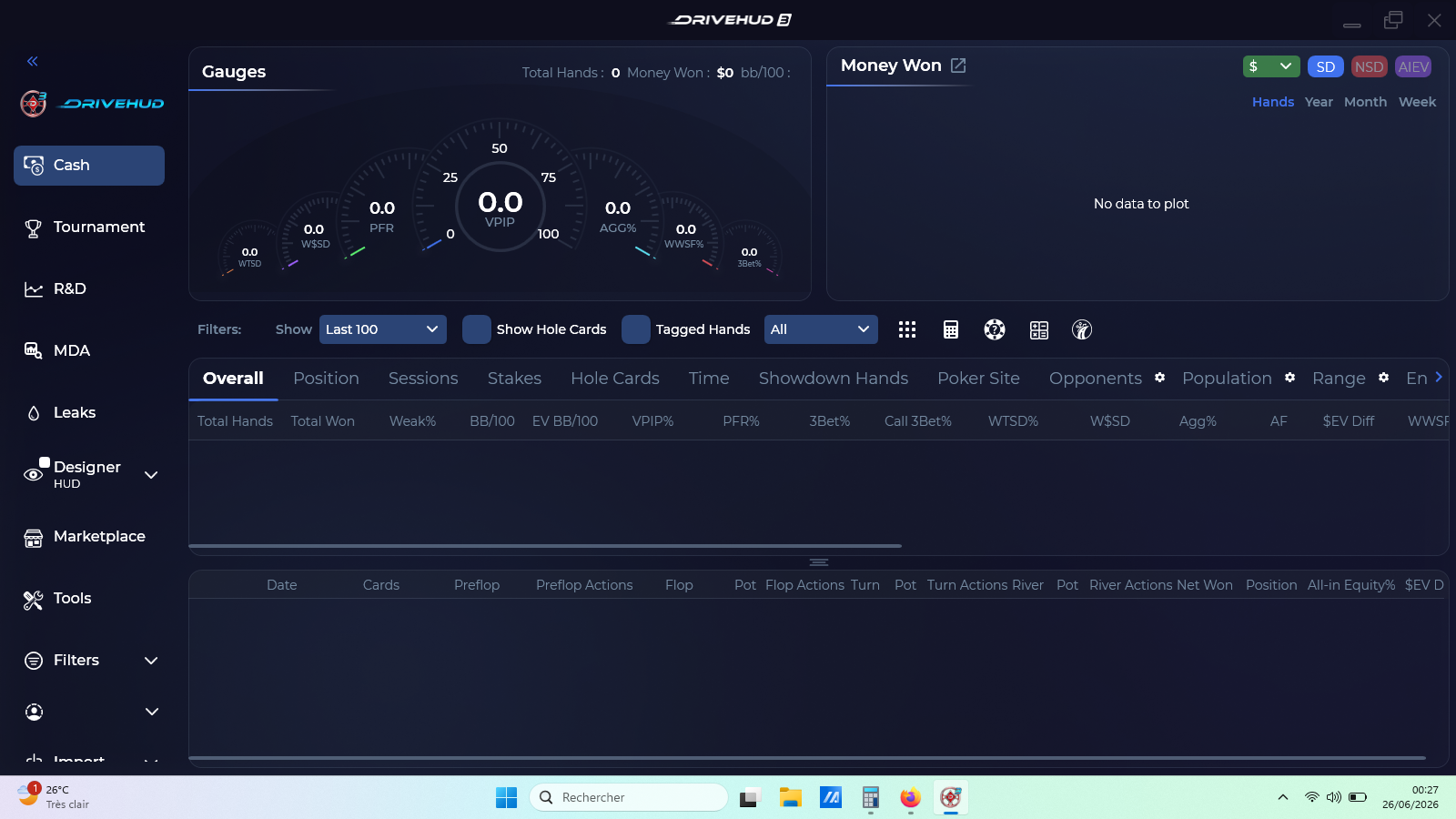
1: UI Display Issue: The application interface appears to be "cut off" on my screen (resolution 1600x900). The sidebar on the left does not scroll, and the "Settings" option is completely missing/ hidden at the bottom of the menu. I have already verified that my Windows display scaling is set to 100%.
2: Update Error: Upon launching the software, I am prompted to perform an update. However, when I click "OK," it consistently fails with an "Internal Error."
Here's below a screenshot showing the interface layout where the menu is cut off. Could you please advise on how to resolve the display issue so I can access the Settings?
Thanks in advance for your help.
there are so many problem when transfer my data from DH2 to DH3
it has single click buttom,
But on my DH3.
1. Total hands excatly same, but results are different from DH2
2. can not use custom data range, it show empty page and error dates.
3. my front page are empty. there is nothing there. I have to click this month to have some results show up.
4. click last month but show up this mont + last month results combine.
5. this month results are way different than what I have on DH2.
Column is there, values are not (for some, not all AI spots). I think it's when more than 2 players contest the post preflop but one or two fold on flop or turn, other two go AI. In those spots, it's empty.
Can you send some of those hands to support? Nothing was changed about this from dh2, so maybe it's something site specific.
Hi,I am a new user testing DriveHUD 3, having downloaded the trial version today. Unfortunately, I’ve encountered a couple of issues that are preventing me from setting up the software: 1: UI Display Issue: The application interface appears to be "cut off" on my screen (resolution 1600x900). The sidebar on the left does not scroll, and the "Settings" option is completely miss
Do you have your windows set at zoom of 125%+? Additional scrollbars were added to address this. If you're getting a prompt to update, then you probably don't have the latest w/ those added. Try and download and install the version I posted above:
there are so many problem when transfer my data from DH2 to DH3it has single click buttom,But on my DH3.1. Total hands excatly same, but results are different from DH22. can not use custom data range, it show empty page and error dates.3. my front page are empty. there is nothing there. I have to click this month to have some results show up.4. click last month but show up this
Just based on what you're saying, it sounds like some kind of filter issue. If the hand totals are the same, and you're not getting data to show, it must be something related to that. Can you make sure you have filters cleared in DH2 and DH3?
Probably best to send a log from the support icon in DH3 (bottom left), because I'm just guessing what the issue might be. That will be the clearest way to know what happened and how to get your data transfered properly.
Can you send some of those hands to support? Nothing was changed about this from dh2, so maybe it's something site specific.
Yes, it seems that we have this problem on PokerBros. I checked my ClubGG HH's (which is on another computer) and did not encounter such a case. Will try to send problematic HH's to support.
Do you have your windows set at zoom of 125%+? Additional scrollbars were added to address this. If you're getting a prompt to update, then you probably don't have the latest w/ those added. Try and download and install the version I posted above:
Hi FreakDaddy,
Thanks for your reply, it' s ok with the new version installed.
I’m reaching out again to share some feedback regarding how DriveHUD 3 is currently tracking my IPoker sessions, as I noticed a couple of inaccuracies, and I have also a problem with the filters.
Specifically:
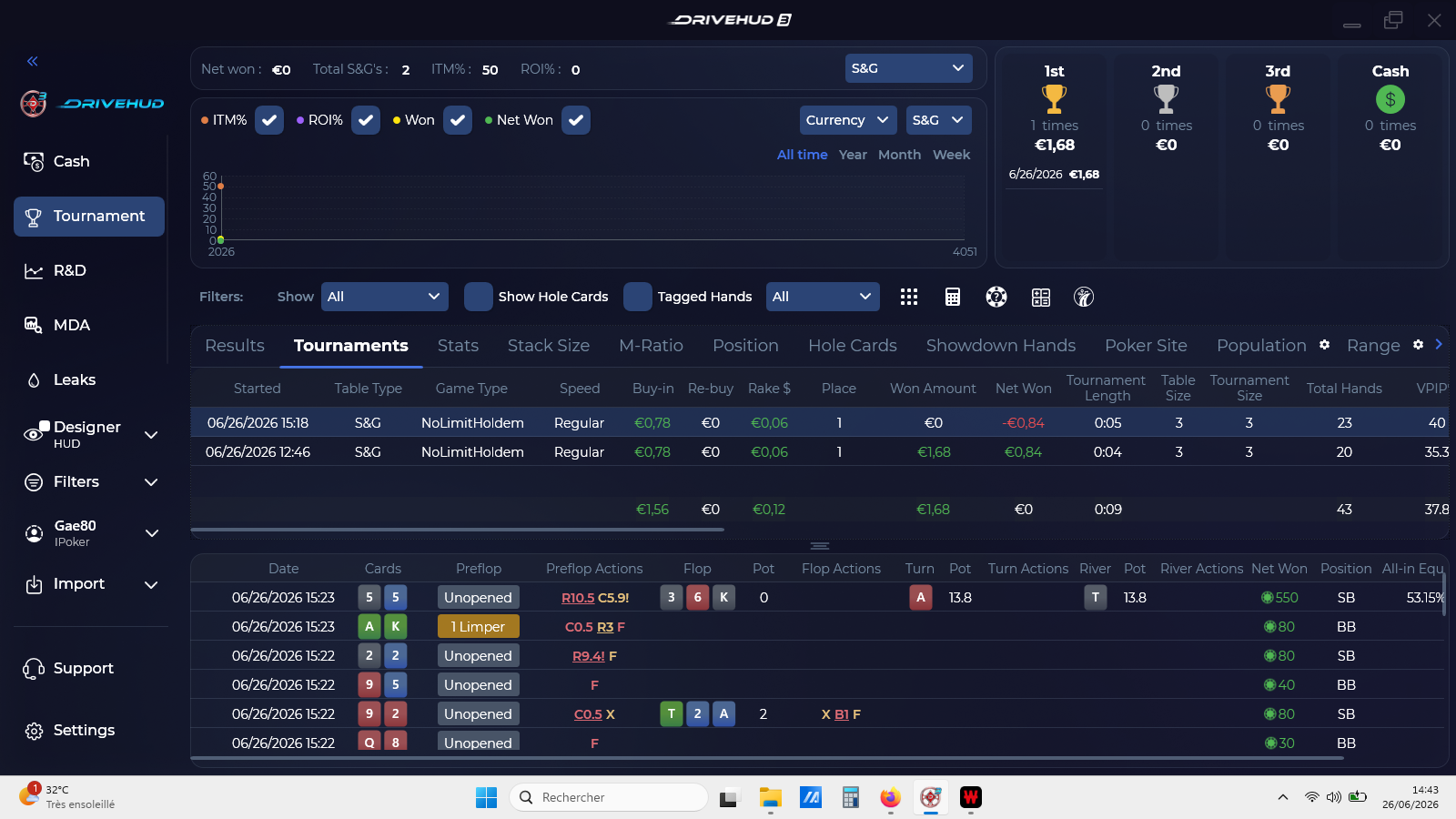
Buy-in amount: The software records the buy-in as €0.84, while the actual amount is €1.00. I have already correctly set the currency to Euro in the software settings.
Tournament results: In one twister sit and go the software correctly identifies my 1st place finish, but the net winnings are recorded as a loss.
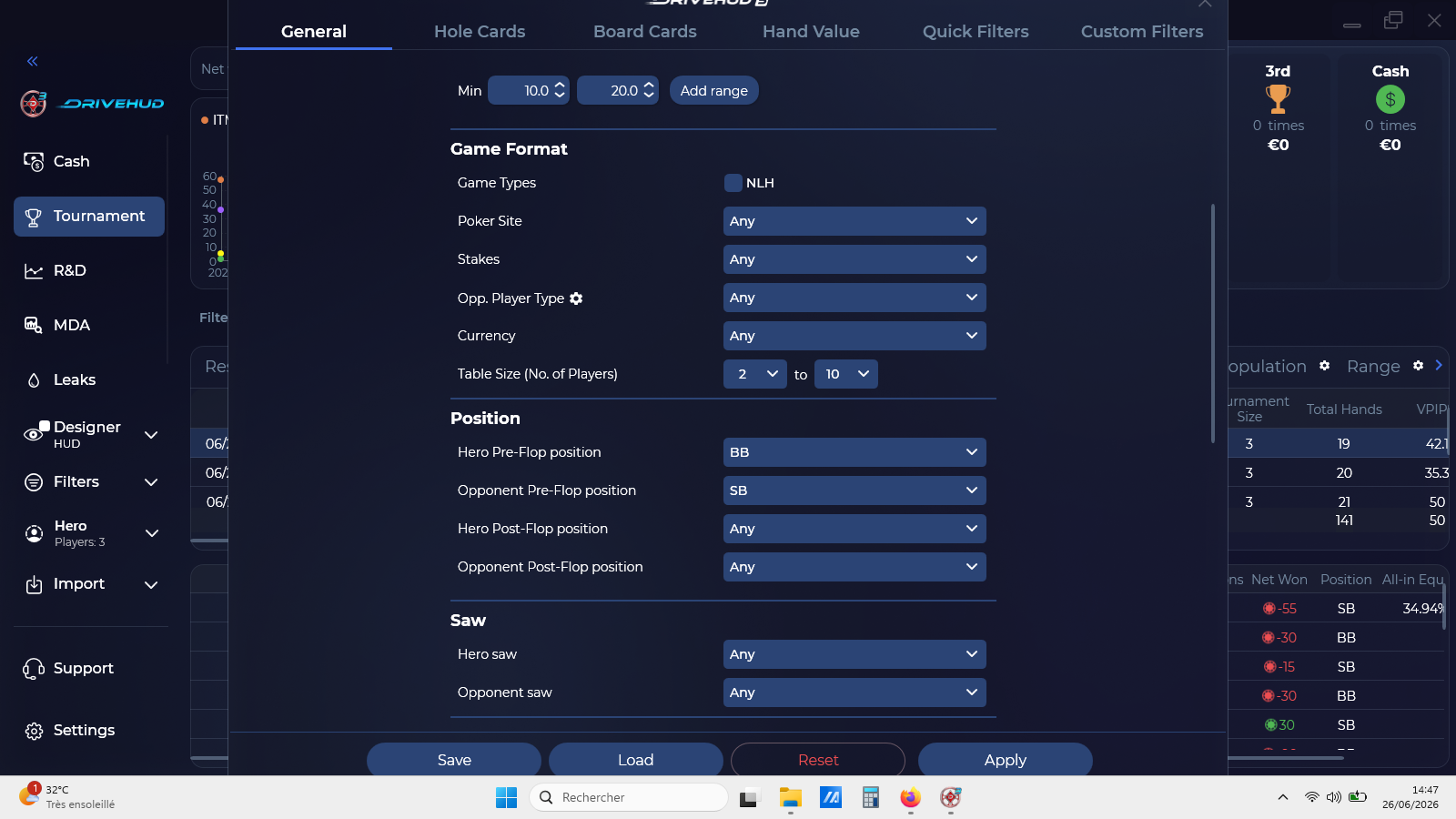
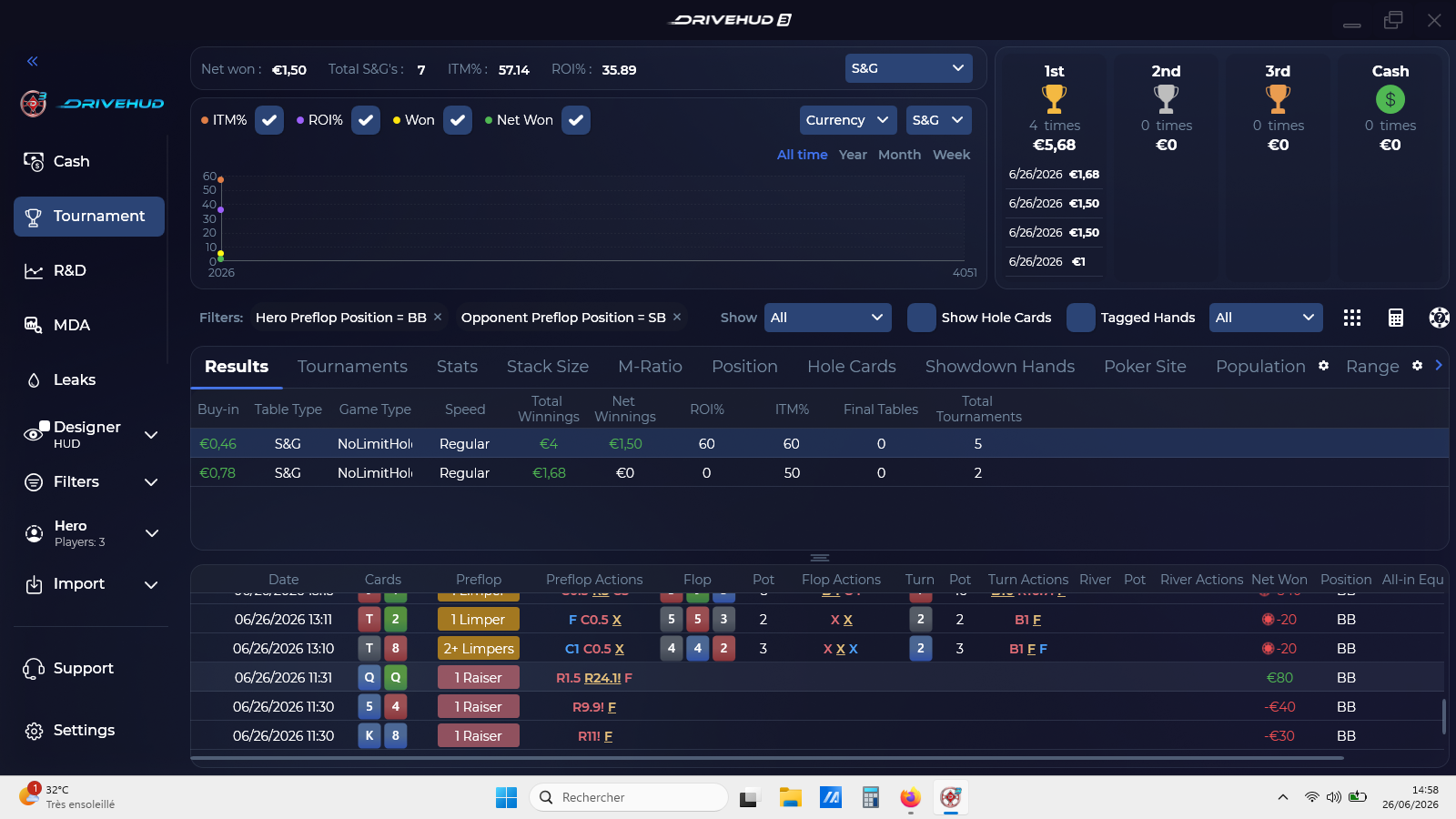
Filter behavior: When I set "Hero Pre-flop position" to BB and "Opponent Pre-flop position" to SB, the filter appears to be applied in the top bar. However, as shown in the attached screenshots, the hand list below still includes hands with multiple limpers. Furthermore, if I click "Apply" and then re-open the filter menu, the opponent position automatically resets to "Any".
I'm sharing the attached screenshots to help illustrate what I'm seeing. Could you please let me know if there’s a way to resolve these settings, or if this is something you are currently working on for a future update?
Thanks again for your time and support.

If you install DH3, it will automatically import your DH2 HUDs. But as far as exporting them in DH2, you just go to your HUD tab, select the HUD you want to export from the 2 pull down menus and then click export at the bottom left. When you do that, you get a location pop-up, so you can select where you want to export to.
I installed a trial and they didn't. Does it need to be fully purchased?


