Holdem Manager Support
[IMG]https://forumserver.twoplustwo.com/...
[IMG]https://forumserver.twoplustwo.com/...
[IMG]https://forumserver.twoplustwo.com/...
[IMG]https://forumserver.twoplustwo.com/...
[IMG]https://forumserver.twoplustwo.com/...
[IMG]https://forumserver.twoplustwo.com/...
[IMG]https://forumserver.twoplustwo.com/...
[IMG]https://forumserver.twoplustwo.com/...
[IMG]https://forumserver.twoplustwo.com/...
[IMG]https://forumserver.twoplustwo.com/...
[IMG]https://forumserver.twoplustwo.com/...
[IMG]https://forumserver.twoplustwo.com/...
[IMG]https://forumserver.twoplustwo.com/...
[IMG]https://forumserver.twoplustwo.com/...
Hey Fozzy,
Yesterday earlier in the day I used HM3; after that session I didn't close the PC or update anything. I closed HM3 and later during the day I wanted to open HM3 again but it didn't even load. It almost seems like the .exe doesn't even function. As far as I know it's the only .exe that refuses to load, anything else I tried worked. In Task Manager it also doesn't show up in background processes either. I tried today again after rebooting the PC; it still doesn't work.
Is this an issue you know about? And how to fix?

Hey Fozzy, Yesterday earlier in the day I used HM3; after that session I didn't close the PC or update anything. I closed HM3 and later during the day I wanted to open HM3 again but it didn't even load. It almost seems like the .exe doesn't even function. As far as I know it's the only .exe that refuses to load, anything else I tried worked. In Task Manager it also doesn't show
We have a new pre-release beta version of HM3 with changes from our developers to address Windows Update-related startup issues that you and a handful of other customers have been experiencing recently. This update has already solved the startup problems for multiple customers facing these same issues.
- Close your poker clients, close HM3, and right-click - 'Exit' the HM3 Server icon in the Windows Notification Tray.
- Please update to our latest beta version of HM3 from this link - https://www.holdemmanager.com/download/i...
- Restart HM3 and ensure HM3 and the HM3 Server (Auto Import/HUD) are fully started.
- Launch your poker client(s).
If you continue to have problems:
Please reproduce the issue, take a screenshot of the Desktop and any visible error message, and your Task Manager. Then send us both your Windows Event Viewer application logs and your \Desktop\HM3logs\ folder of files, as instructed below, along with a detailed description of what you were doing and what problems you experienced.
Step 1: Windows Event Viewer Logs
* Open Windows Event Viewer (Search 'Event Viewer' in your Start menu).
* Go to Windows Logs > Application.
* Right-click Application and select "Save All Events As..."
* Compress (Zip) this file.
Step 2: HM3 Log Files
1. Close your poker clients, HM3, and right-click 'Exit' the HM3 Server icon in the Windows Notification Tray.
2. (Optional) Open Task Manager and ensure `Holdem Manager 3`, `HM3 HUD`, and `HoldemManager.Server` are fully closed.
3. Go to Start > Holdem Manager 3 > 'Copy HM3 Log Files to Desktop'.
* *Note: If the `Copy HM3 Log Files to Desktop` shortcut fails, please zip this folder manually:* `C:\Users\{UserName}\AppData\Roaming\Max Value Software\Holdem Manager\3.0`. If you can't see the `AppData` folder, open File Explorer from the taskbar and Select View > Show, then select `Hidden items` to view hidden files and folders.
Next, create a support ticket on our support site and send us the logs and event viewer log - https://support.holdemmanager.com/suppor...
* Note: If the zip attachments are larger than 10MB, please upload them to a file-hosting site (like Dropbox or Google Drive) and paste the download link in your reply.
Best regards,
Fozzy71
Customer Support
Hold'em Manager
ty, the update seemed to do the trick

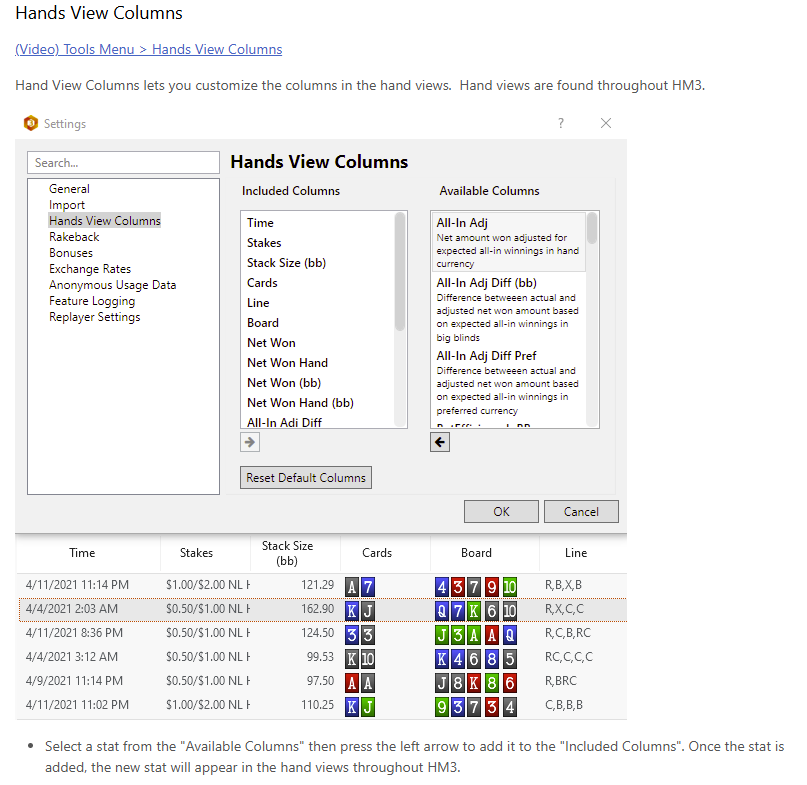
Is there a way to change the stats on the lower display?
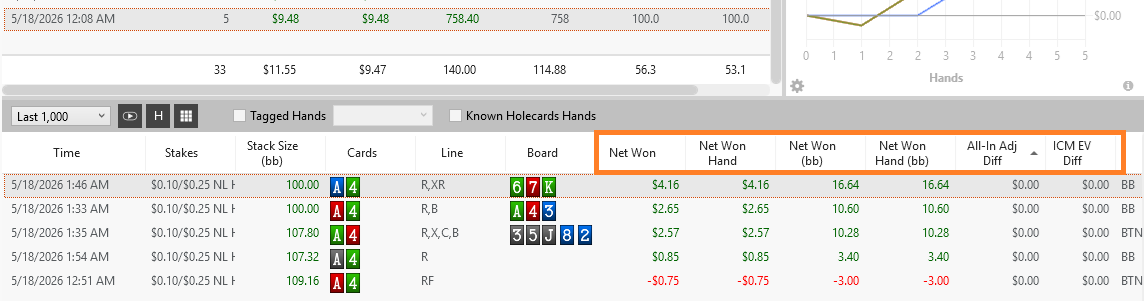
Those are changed via the HM3 - Tools - 'Hands View Columns' menu.
Best regards,
Fozzy71
Customer Support
Hold'em Manager
Thank you Fozzy, I appreciate you. You are a big reason why I have been a HEM user for almost 20 years now.
Hey there. Have downloaded a HH text file from coinpoker and tried importing into HM3. Unfortunately, getting a lot of errors. When I search in 'select player,' I am seeing that all coinpoker players only have 1 hand available to see. These players don't display their screen names but rather 'dfc26bbc ,20cc17f6' type names. Any help with this?
Hey there. Have downloaded a HH text file from coinpoker and tried importing into HM3. Unfortunately, getting a lot of errors. When I search in 'select player,' I am seeing that all coinpoker players only have 1 hand available to see. These players don't display their screen names but rather 'dfc26bbc ,20cc17f6' type names. Any help with this?
CoinPoker changed its hand history format recently, so you need our latest beta version 3.1.46.7, which you can download from this link.
That should reduce the number of errors you see significantly. Any remaining errors should be reported to us using the HM3 - Help 'Send Feedback' feature with screenshots/details of the errors, and copies of the hand history files, as
.
The reason you don't see screen names for yourself or opponents is that the site anonymizes the hand history files by design.
Best regards,
Fozzy71
Customer Support
Hold'em Manager
Good morning—I have a question: why can't I see the multipliers expresso on Winamax? Is this an issue with HH, or do I need to adjust a setting? Thanks.
Good morning—I have a question: why can't I see the multipliers expresso on Winamax? Is this an issue with HH, or do I need to adjust a setting? Thanks.
Hello,
We do not currently have any open bug reports regarding Winamax Expresso tournament multipliers. Please update to our latest beta release and force a reimport of your original files.
Step 1: Update to the Latest Beta
1. Close your poker clients, close HM3, and right-click the HM3 Server icon in the Windows Notification Tray and select Exit.
2. Download and install the latest HM3 beta from this link - https://www.holdemmanager.com/download/i...
3. Restart HM3 and ensure both the main program and the HM3 Server (Auto Import/HUD) are fully initialized.
4. Launch your poker client(s).
Step 2: Force Reimport Hand Histories & Summaries
1. Navigate to Tools > Settings > Import and enable [x] Allow reimport of hand histories. Click OK.
2. Go to File > Import Folder (or Import Files) and manually reimport the recent files from your archive folder, typically located at: `C:\HM3Archive`
If the multipliers are still missing after following these steps, please send us the raw files for testing:
1. Zip and email the original hand history and tournament summary files to us by following the instructions at the bottom of this FAQ -
2. Include screenshots of your reports/filters.
3. Provide a detailed description of the specific errors we need to test (including tournament numbers, specific sessions, hole cards, or stats).
Best regards,
Fozzy71
Customer Support
Hold'em Manager
Hey Fozzy,
Twelve days ago, a few posts up, I posted this
"Yesterday earlier in the day I used HM3; after that session I didn't close the PC or update anything. I closed HM3 and later during the day I wanted to open HM3 again but it didn't even load. It almost seems like the .exe doesn't even function. As far as I know it's the only .exe that refuses to load, anything else I tried worked. In Task Manager it also doesn't show up in background processes either. I tried today again after rebooting the PC; it still doesn't work.
Is this an issue you know about? And how to fix?"
The link from your response to the latest beta version of HM3 fixed the issue. Today I open HM3 to get the identical bug of Hm3 not loading, exactly like described above. It seems it might've been a Windows update issue causing this.
Do you have the link for the latest beta version of HM3 that fixes the current issue?
Or any other way to deal with it?
Hey Fozzy, Twelve days ago, a few posts up, I posted this "Yesterday earlier in the day I used HM3; after that session I didn't close the PC or update anything. I closed HM3 and later during the day I wanted to open HM3 again but it didn't even load. It almost seems like the .exe doesn't even function. As far as I know it's the only .exe that refuses to load, anything else I tr
Our latest public beta version 3.1.46.7 can be downloaded from this link - https://www.holdemmanager.com/download/i...
If you continue to have problems, please reproduce and screenshot any visible error messages and your Task Manager Processes tab, then send us your log files, along with the screenshots and details of what steps preceded the error, to a support ticket - https://kb.holdemmanager.com/knowledge-b...
Best regards,
Fozzy71
Customer Support
Hold'em Manager
How do you view the raw HH in sessions?
You can right-click and 'View' the file to see the hand in our Hand History Viewer. If you want to see the raw original text version, then you can right-click and 'Export' the hand to a file on your computer. If you want to review the original file written by your site, then you can look for it in your C:\HM3Archive folder.
Best regards,
Fozzy71
Customer Support
Hold'em Manager
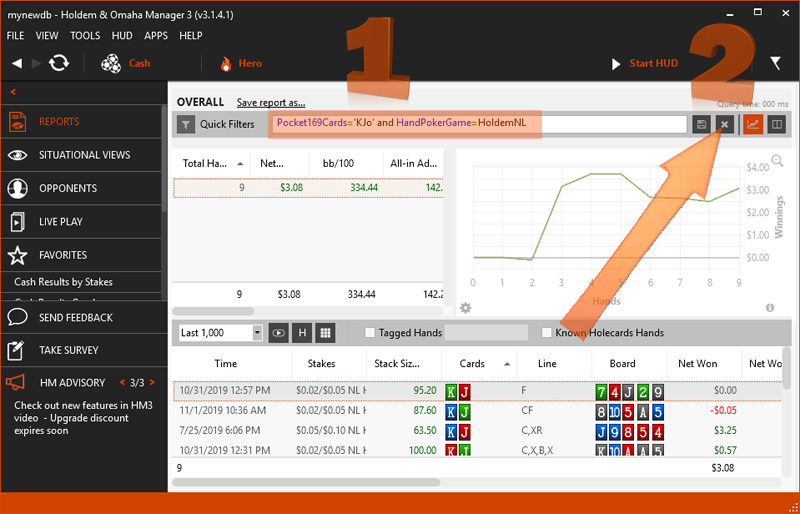
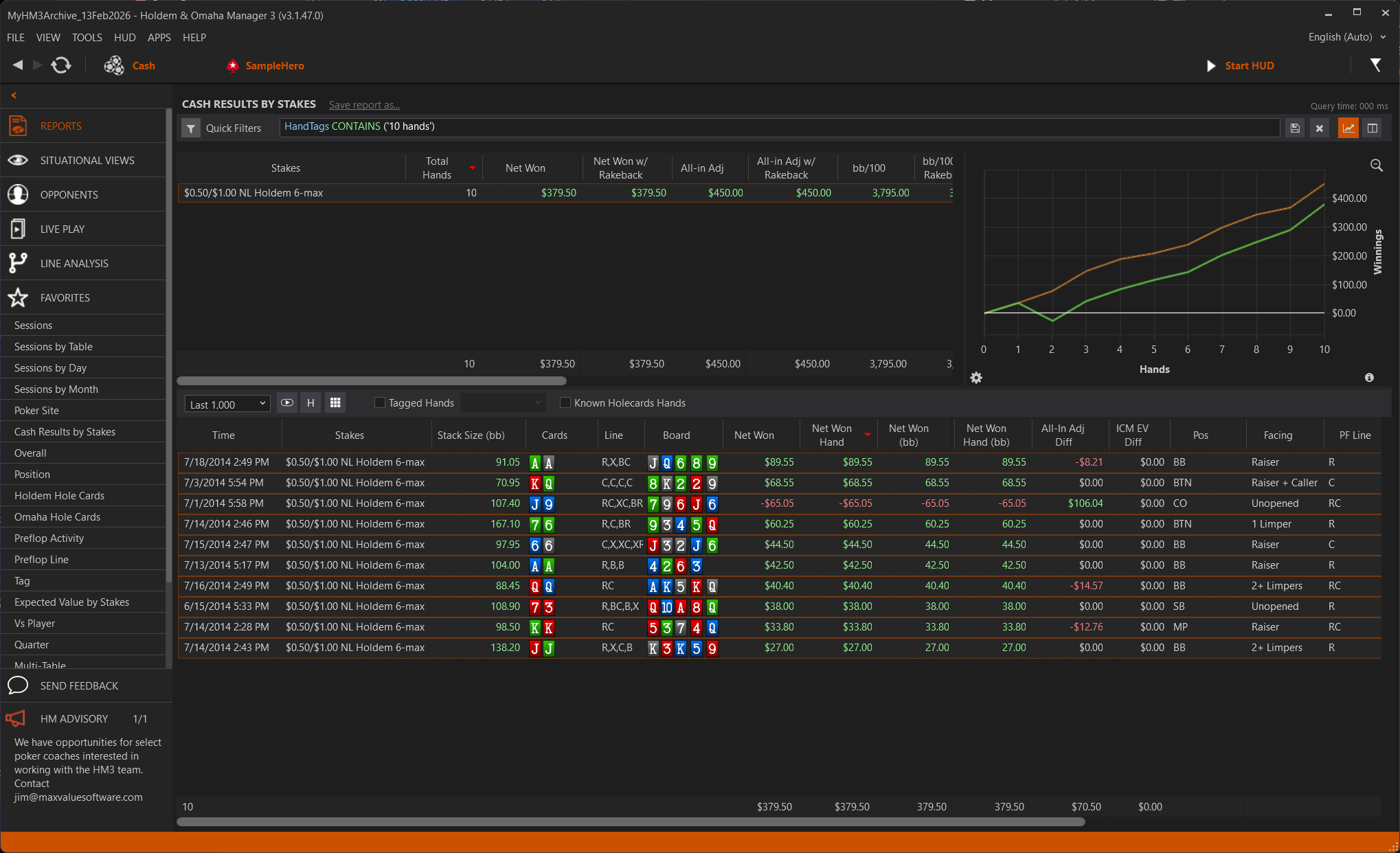
Is there a way to group and graph specific hands. I am trying a new strategy today. I want to tag 10 hands, isolate them, and see how they did. Graphing these 10 hands would be useful.
Is there a way to group and graph specific hands. I am trying a new strategy today. I want to tag 10 hands, isolate them, and see how they did. Graphing these 10 hands would be useful.
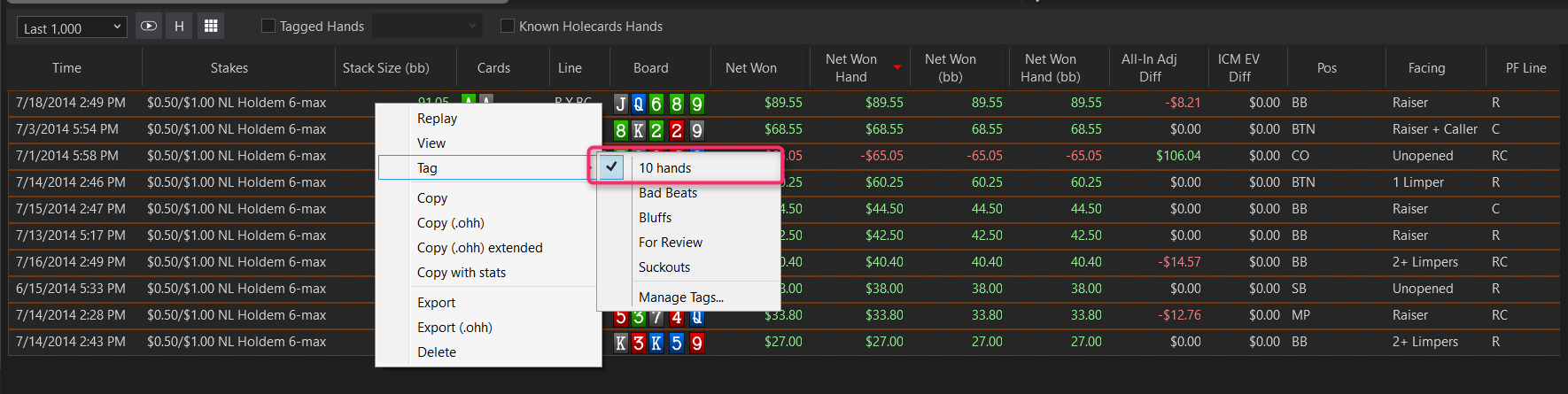
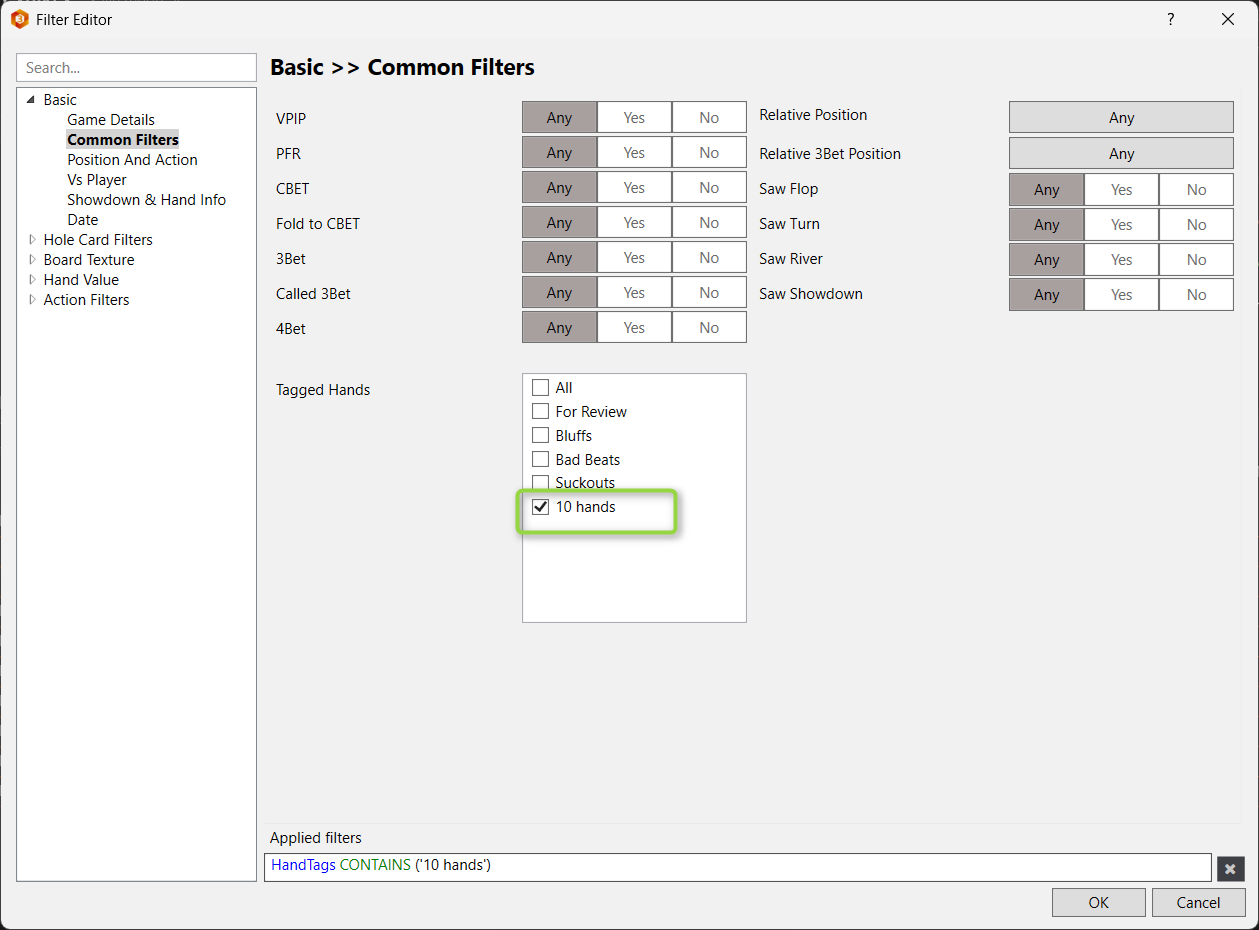
You can create a new tag using the 'Manage Tags...' feature, then assign that tag to the 10 hands you want to review/graph, then use the Filter Editor - Basic - Common Filters - 'Tagged Hands' filter to filter the graph or your preferred report with the mini graph open as shown in the attached example images.
Best regards,
Fozzy71
Customer Support
Hold'em Manager
Nice, thanks

Problem with the pop-ups in my HUD.
I had the hud filter to last 6 months but changed it to 3 months.
I noticed my hud stats were all slightly different (as you would expect)
But all the numbers in my various popups didnt change at all. Also the number between (..) indicating how the sample of that stat didnt change.
So no matter if I set the hud threshold to 3 or 6 months, all the pop-up stats and sample remain exactly the same. Which of course cant be true so there is something going wrong.
If I want all my pop-up stats to be over the last 3 months just like hud stats, how do I do this?
PS: I toggled with "stats for up to the day of hand" to see if this was the culprit but it wasnt.
Problem with the pop-ups in my HUD.I had the hud filter to last 6 months but changed it to 3 months.I noticed my hud stats were all slightly different (as you would expect)But all the numbers in my various popups didnt change at all. Also the number between (..) indicating how the sample of that stat didnt change.So no matter if I set the hud threshold to 3 or 6 months, all the
There isn't a last X months filter; did you change it from last 24 weeks to 12 weeks? What are all of the other filters set to? i.e., the last X hands, bet type, cash stake, number of players, stacks? You might have some other filters enabled that are conflicting with or overriding the last X weeks filter.
If that doesn't help, please reproduce the problem and attach a screenshot showing the HUD/Popups diferences, the Cash Results By Stakes Report (or Tournaments Overall report if you don't play cash games) for one of the selected players with the problems, and pictures of the HUD Options Filters, and attach your \HM3logs files in a support ticket as explained in this FAQ - https://support.holdemmanager.com/suppor...
Best regards,
Fozzy71
Customer Support
Hold'em Manager


