888/Party/StarsCaption

This is the support thread for 888/Party/StarsCaption, multi-purpose utilities for the 888, bwin.party, Poker Stars site
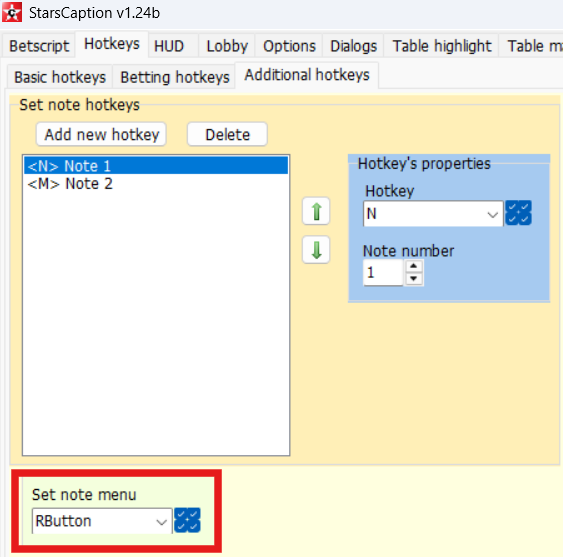
In Pokerstars.com, The StarsCaption custom player note menu (which assigns labels to players) stopped working after the last update. The only way to bring it up is to open the notes tab in the chat and click the "label" icon.Can you please bring it back when right clicking a player? I.e. when right clicking a player's pod, I want the StarsCaption's Custom player note menu to s
Try this version and let me know how it works:
[URL="https://pokercaption.com/p/StarsCaption%20v1.24b.exe"]
StarsCaption v1.24b[/URL]
Another subtle, not so much annoying thing... When a table is in the "Activated slot", I win the hand (Hero don't fold), table stay in the Activated slot. Maybe a "Hero Folded or Win" option to deactivate the table should be nice.
But overall, good job !
Hi
Please try this version and let me know if Table manager 2 works correctly for you now:

StarsCaption has the feature 'sitout next hand at zoom tables while typing in note editor' which is a good stress reliever. Can we please have the same option for when opening replayer?
Hi,
in starscaption when I am near the bobble I am using ITM zone factor ≤ 1.1 with the frame blinking. Is there a way to just leave the frame but stop the blinking when I am already in ITM? I have tried dozen things but nothing seems to work.
Thanks.
Hi,
in starscaption when I am near the bobble I am using ITM zone factor ≤ 1.1 with the frame blinking. Is there a way to just leave the frame but stop the blinking when I am already in ITM? I have tried dozen things but nothing seems to work.
Thanks.
Hi
Yes it is possible
Put a line with ITM zone factor ≤ 1 rule higher than this line in Table highlight list and turn off blinking for it
StarsCaption has the feature 'sitout next hand at zoom tables while typing in note editor' which is a good stress reliever. Can we please have the same option for when opening replayer?
Implemented in this version:
[URL="https://pokercaption.com/p/StarsCaption%20v1.24c.exe"]StarsCaption v1.24c
[/URL]
Hi
Please try this version and let me know if Table manager 2 works correctly for you now:
I will test it soon. Maybe around sept 21th. I'm travelling.
The Custom note menu (which assigns player labels) only shows 10 labels when clicking on a player. Can you fix it so all the labels are shown? Eg. 15 labels
Ps. when going to the Notes tab in the chat window, if clicking the label icon, all the list of labels appears.
Thanks in advance
The Custom note menu (which assigns player labels) only shows 10 labels when clicking on a player. Can you fix it so all the labels are shown? Eg. 15 labels
Ps. when going to the Notes tab in the chat window, if clicking the label icon, all the list of labels appears.
Thanks in advance
Hi
Unfortunately, this is not very easy to implement when handling a dialog box by left mouse button, so I implemented an alternative option for such cases.
There is a new version of StarsCaption, I published it yesterday evening:
[URL="https://pokercaption.com/p/StarsCaption%20v1.24d.exe"]StarsCaption v1.24d
[/URL]
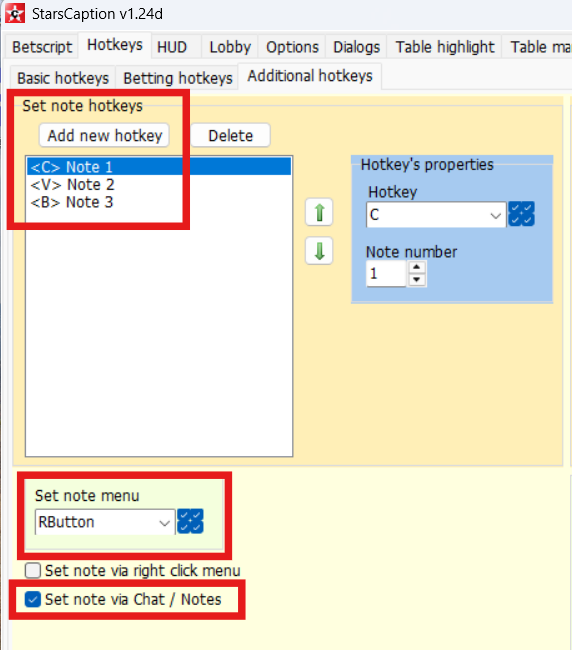
Turn on Hotkeys / Additional hotkeys / Set note via Chat/Notes there
With it, Set note menu and Set note hotkeys will use that way via Notes tab to assign a note. If you don't use RButton as any other hotkey, you can configure it to Set note menu and use it to set any of your 15 labels (by left click with Custom player note menu enabled you still be able to set first 10 labels and you can use both of these methods)
Or you can configure to MButton/XButton1/XButton2 or any other key you want
This option also affects Set note hotkeys, so you can configure individual hotkeys for any (or all) of your 15 labels
Works like a charm, thank you!
Hey sorry I'm just wondering about using Starscaption with other sites, mostly Party in the UK. Can I use the one software and license for multiple sites on the one monitor ? I'm also just having trouble understanding a few of the instructions, are there any good instyructional videos ?
Cheers
Hey sorry I'm just wondering about using Starscaption with other sites, mostly Party in the UK. Can I use the one software and license for multiple sites on the one monitor I'm also just having trouble understanding a few of the instructions, are there any good instyructional videos
Cheers
Hi
Most of StarsCaption options are work for PokerStars only, although you can use to arrange tables of any poker client (and partypoker too), this option can be used for free for any poker client (and there you can customise the arrangement of any windows, not just poker tables)
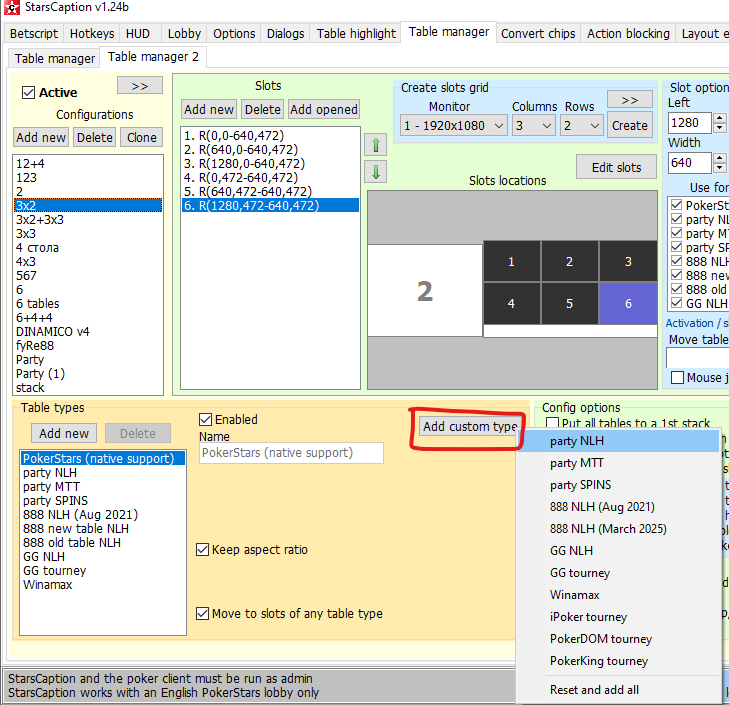
To add party table types to Table manager 2, use this button:
But if you need full-featured software for partypoker, then use PartyCaption (you will need separate license for this)
Hey sorry I'm just wondering about using Starscaption with other sites, mostly Party in the UK. Can I use the one software and license for multiple sites on the one monitor I'm also just having trouble understanding a few of the instructions, are there any good instyructional videos Cheers
HiMost of StarsCaption options are work for PokerStars only, although you can use to arra
If you buy a separate license for Party will they work together ?
A couple of questions. If you manage tables in Party, can you make it so the BB number is not stretched or other elements, just the table is stretched and not anything else ?
Need a separate license for 888 or ACR ?
Starscaption seems to be involved in opening new table because if I press S and not ctrl S the open new table pops up ?
Sorry but to get lines played, like x / c etc is that possible ?
If you buy a separate license for Party will they work together A couple of questions. If you manage tables in Party, can you make it so the BB number is not stretched or other elements, just the table is stretched and not anything else Need a separate license for 888 or ACR Starscaption seems to be involved in opening new table because if I press S and not ctrl S the open new
1. Yes you can use StarsCaption and PartyCaption together (and also 888Caption, WinamaxCaption and CoinCaption if you want to use any of them)
2. "can you make it so the BB number is not stretched or other elements, just the table is stretched and not anything else"
Sorry, but I didn't understand what exactly you want.
Does this have anything to do with font scaling on a table?
Or something in HUD?
Or do you need something else?
3. You will need a license for 888Caption if you want to use it
I don't have any software for ACR
4. You may have set a hotkey for S key (Hotkeys / Register to similar tourney, in fact it can open cash/zoom tables too)
5. Yes it's possible
You need [actions] tag in HUD / Player panels, see here how it works (video for 888Caption, but In all my programs it works pretty much the same way):
CoinCaption
Working better and better between versions. Good job.
2 others bugs founded.
#1 - In Table manager, Activate table on "new hand" bring tables in wrong slots. Often, they stay in regular slot. Or move in "Wait for BB".
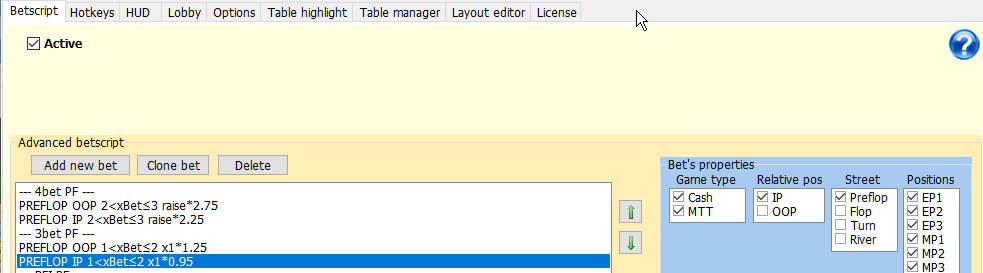
#2 - Sometime, 3bet IP use the size OOP. Tough to say exactly what position vs what position.
Too, add "Sit out next bb all tables" and "Sit out next hand all tables" hotkeys would be nice.
Hi, I wanted to ask about the [actions] tag.
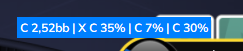
As you can see from the image above, it shows me all the sizings in the actions on each street, while I've noticed that for some players, it only shows the size for the street they're playing (for example, if you bet on the turn, it shows the turn size, but the flop size is hidden and only appears if you hover over it).
These are my settings.
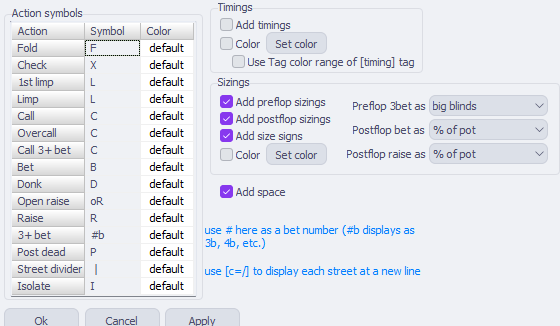
How can i do this?
CoinCaptionWorking better and better between versions. Good job. 2 others bugs founded. #1 - In Table manager, Activate table on "new hand" bring tables in wrong slots. Often, they stay in regular slot. Or move in "Wait for BB".#2 - Sometime, 3bet IP use the size OOP. Tough to say exactly what position vs what position. Too, add "Sit out next bb all tables" and "Sit out next
Hi
1. Ok I'll try to check it. I just looked to code and it looks like the new hand is really processed incorrectly there
2. Ok, I'll try to look at this too. But if you can show me screenshots of specific situations in which this happens, that would help
3. I've added this to the plan and will try to add it in future versions
Hi, I wanted to ask about the [actions] tag. As you can see from the image above, it shows me all the sizings in the actions on each street, while I've noticed that for some players, it only shows the size for the street they're playing (for example, if you bet on the turn, it shows the turn size, but the flop size is hidden and only appears if you hover over it).These are my
Hi
Most likely they use a such settings:
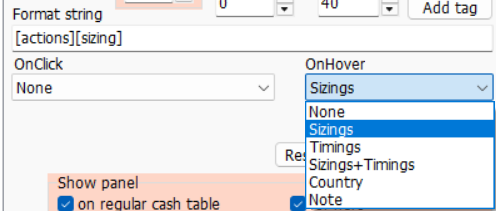
1. There are two tags in this panel, [actions][sizing]
2. Both preflop and posflop sizings are disabled in [actions] tag config
3. This option is disabled:
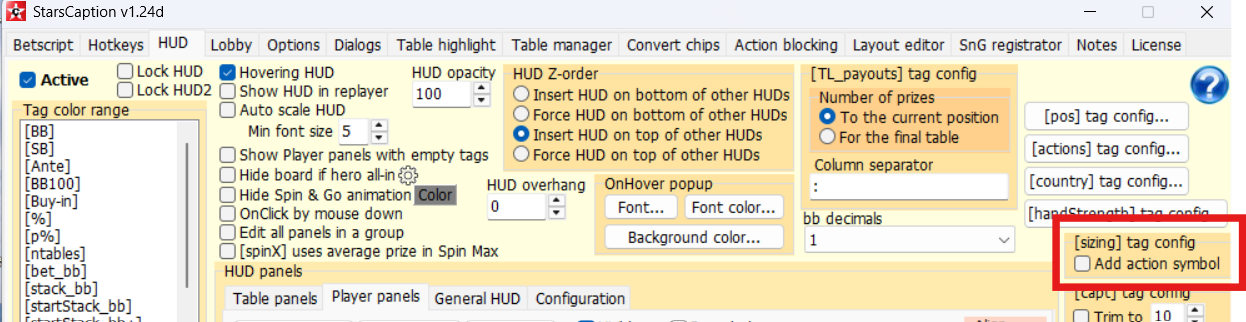
With such settings, you have two tags - [actions] displays all actions without sizings, and [sizing] displays a sizing of the last action (with 'Add action symbol' enabled you will see the last action twice)
To see sizings in popup, choose Sizings (or maybe Sizings+Timings if you want to see timings too) in OnHover for this panel
Hi
1. Ok I'll try to check it. I just looked to code and it looks like the new hand is really processed incorrectly there
2. Ok, I'll try to look at this too. But if you can show me screenshots of specific situations in which this happens, that would help
3. I've added this to the plan and will try to add it in future versions
Here's some print screens for #2. When EP1 or EP2 positions are involved as RFI, it's seems in this situation.
I suspect 4bet are in the same situation.
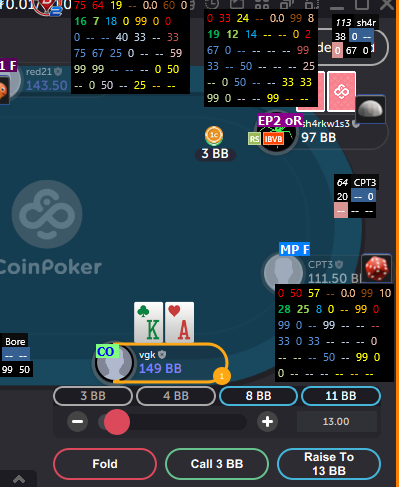
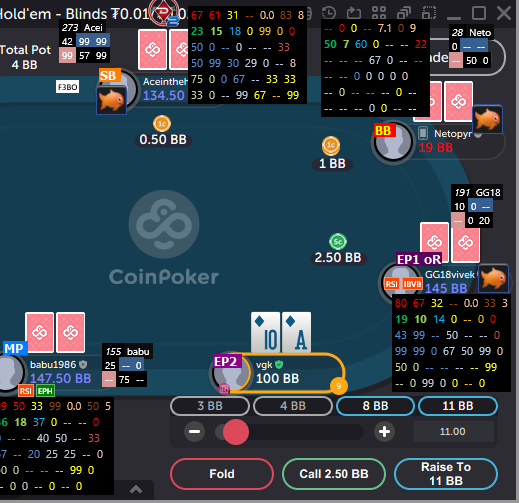
Just as reminder, my rules are x1*0.95 IP and x1*1.25 OOP.
Another bug founded in CoinCaption.
Tag [timeBank] don't show CoinPoker Time bank properly.
(And [timeToAct] should include this [timeBank] too, which in not included.)


