PokerTracker 4 for Windows & Mac OS X - 2+2 Support Thread


Hi Rob,
I am hoping you can help me figure out why I am suddenly having some weird currency related glitch.
I am playing in the Ontario pool in CAD, and when it started I opened an Ontario only DB. I recently switched to GG poker and created a new hero for that.
However, thus far everything has been fine in CAD.
But now after a recent session. I am noticing that there is a discrepancy between $won and $ My currency won. For example in the screeenshot, the correct amount from the session is the $-386 amount, yet the graphs are showing $-557. It should be just the $-386 everywhere.
Do you know why this may be? I tried to make sure it was correct with the currency in CAD and 1:1. I even tried making the CAD to USD at 1:1 and no difference.
Any advice?
Thanks
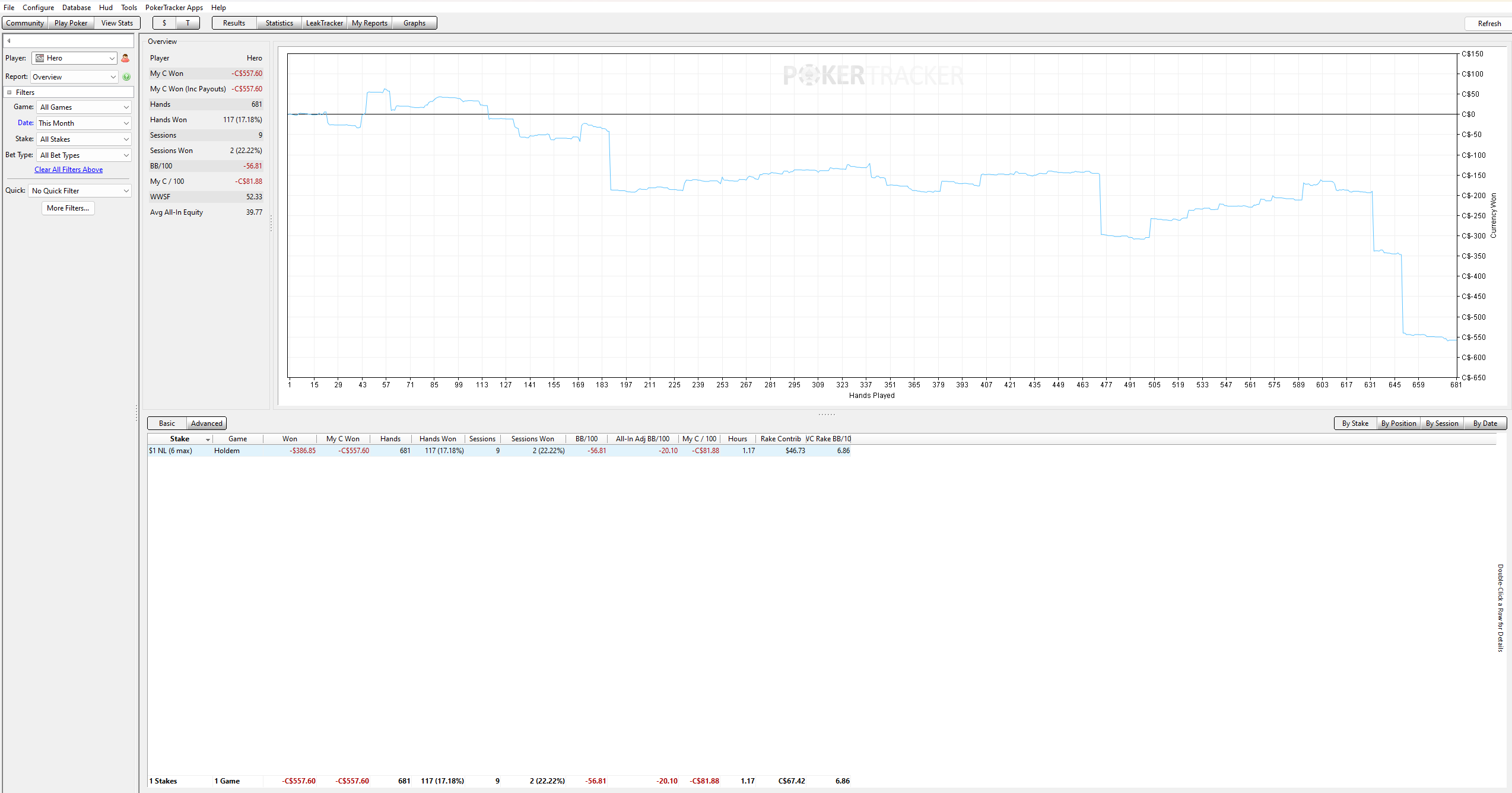
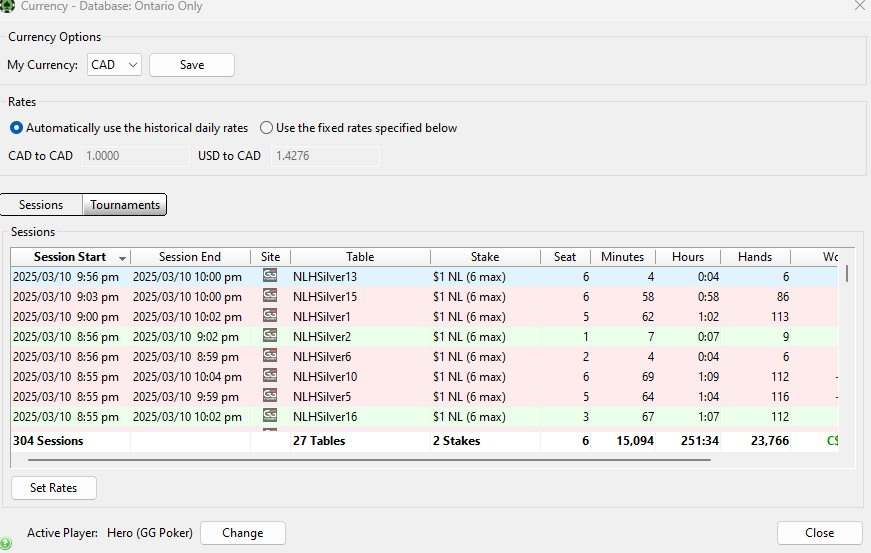
But now after a recent session. I am noticing that there is a discrepancy between $won and $ My currency won. For example in the screeenshot, the correct amount from the session is the $-386 amount, yet the graphs are showing $-557. It should be just the $-386 everywhere.
Unfortunately GGPoker hand histories do not specify the currency so those hands will import as $USD. It's possible GGPoker may update their hand histories to reflect this but if not and you want to be notified of any future workaround then you can open a Support Ticket quoting reference #7574.
- Rob
Is the website completely ****ed? It's not letting me access my order history, registration codes, etc. Tells me access is denied despite being logged into my account. Can't even get to the sign-up page on the support.xxxxx.com sub-domain
Is the website completely ****ed? It's not letting me access my order history, registration codes, etc. Tells me access is denied despite being logged into my account. Can't even get to the sign-up page on the support.xxxxx.com sub-domain
Try logging out of your PokerTracker.com account here which will clear your site cookies:
https://www.pokertracker.com/logout
and then login again:
https://www.pokertracker.com/user/login
- Rob

Hi. I'm using Asian Hand Converter to get hands from CoinPoker. The hands don't show up until I convert them after the session, but the bigger issue is they never show hole cards. So I can see the full hand play out, but no hole cards despite the hole cards showing up in the text file. Appreciate any help on this. I am running latest PT4.
Hi. I'm using Asian Hand Converter to get hands from CoinPoker. The hands don't show up until I convert them after the session, but the bigger issue is they never show hole cards. So I can see the full hand play out, but no hole cards despite the hole cards showing up in the text file. Appreciate any help on this. I am running latest PT4.
So we can take a look at that please zip/compress this hand history sample and attach that to a Support Ticket. Thank you.
- Rob

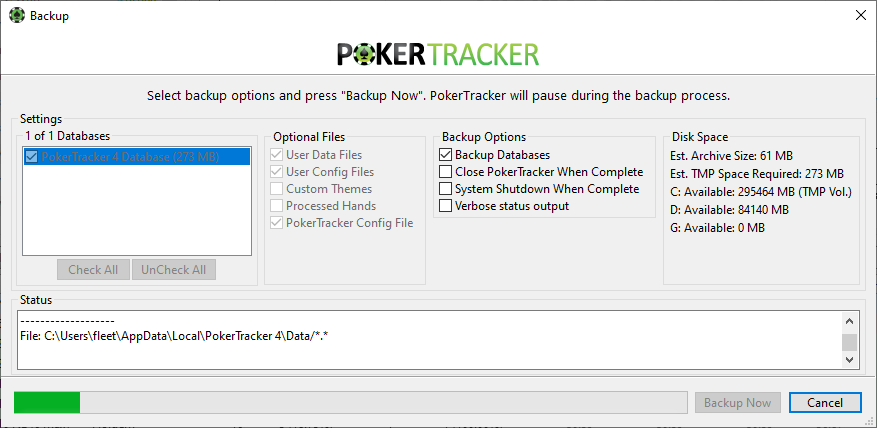
I have followed the instructions here: (https://www.pokertracker.com/guides/PT4/...), but it keeps getting hung up on this prompt (screen shot provided). I've let it sit for 30+ minutes and it just keep cycling. I don't have a huge datebase (4k hands), so I don't THINK it's the database size? any info is appreciated. It will says "success" but then goes to the prompt below, never saying it's complete

Hello,
I am noticing that there are two days this week where my PT4 is showing that I am more profitable than what my actual Pokerstars balance is showing. I don't know where the difference is coming from.
Is there some sort of error that others have been experiencing that I'm not aware of? I am awaiting Pokerstars to get back to me. Please let me know if there is some sort of PT4 issue that I can resolve or need to be aware of.
Thanks.
Hello,I am noticing that there are two days this week where my PT4 is showing that I am more profitable than what my actual Pokerstars balance is showing. I don't know where the difference is coming from. Is there some sort of error that others have been experiencing that I'm not aware of? I am awaiting Pokerstars to get back to me. Please let me know if there is some sort of P
Hi Rob,
Just to follow up on this, I did some investigating with the PT4 numbers and the files from Pokerstars. It looks like PT4 is not picking up my re-entries into tournaments, so it is showing a higher profit than actual. Is there a way to correct this in PT4? Thanks.
I have followed the instructions here: (https://www.pokertracker.com/guides/PT4/...), but it keeps getting hung up on this prompt (screen shot provided). I've let it sit for 30+ minutes and it just keep cycling. I don't have a huge datebase (4k hands), so I don't THINK it's the database size? any info is appreciated.
Please try again with everything under 'Optional Files' turned off. Those files can be manually backed up if you want to transfer PokerTracker settings to another computer.
Just to follow up on this, I did some investigating with the PT4 numbers and the files from Pokerstars. It looks like PT4 is not picking up my re-entries into tournaments, so it is showing a higher profit than actual. Is there a way to correct this in PT4? Thanks.
Please make sure you are saving PokerStars tournament summaries and importing them into PokerTracker 4 in addition to the hand histories:
PokerStars Configuration Guide - Tournam...
For any tournaments with incorrect data you can update the information manually:
Guide: Updating Tournament Information M...
- Rob
Could PT4 add support and converter for coinpoker? I see a lot of interest on this site
even if it's a payed updrade or addon, people would appreciate it, better than 3rd party softwares, and it's not against ToS of Coinpoker
Could PT4 add support and converter for coinpoker? I see a lot of interest on this site
even if it's a payed updrade or addon, people would appreciate it, better than 3rd party softwares, and it's not against ToS of Coinpoker
You can register your interest and be automatically notified should support be added in a future update via a Support Ticket.
- Rob
i have a 200gb DB after importing HHs
hud is not showing on table after i did the complete housekeeping
any solution? i have 64 gb ram btw
Please try again with everything under 'Optional Files' turned off. Those files can be manually backed up if you want to transfer PokerTracker settings to another computer.Please make sure you are saving PokerStars tournament summaries and importing them into PokerTracker 4 in addition to the hand histories:PokerStars Configuration Guide - Tournam...For any tournament
Hi Rob, thanks for your reply. I seem to have the tournament summaries configured properly, but PT4 still is not picking up re-entries into tournaments. I am waiting a minute or two before re-entering or closing games that end just to make sure all files are being generated. The past few days, I have had to manually edit my tournaments to make sure the re-entry was being captured.
Is there anything else I can do to fix this issue?
i have a 200gb DB after importing HHs
hud is not showing on table after i did the complete housekeeping
any solution? i have 64 gb ram btw
So we can see what's going on here please turn on 'Enable Logging' in PokerTracker 4 via 'Configure -> Options' and then restart PokerTracker 4. Next reproduce this issue and then create a support bundle via the 'File -> Create Support Bundle' menu option in PokerTracker 4. When that file has been saved attach your support bundle to a Support Ticket where a technician can review your logs and advise you accordingly.
Hi Rob, thanks for your reply. I seem to have the tournament summaries configured properly, but PT4 still is not picking up re-entries into tournaments. I am waiting a minute or two before re-entering or closing games that end just to make sure all files are being generated. The past few days, I have had to manually edit my tournaments to make sure the re-entry was being captur
Please attach a sample of these hand histories and summa... to a Support Ticket and we can follow up with you on this. Thank you.
- Rob
So we can see what's going on here please turn on 'Enable Logging' in PokerTracker 4 via 'Configure -> Options' and then restart PokerTracker 4. Next reproduce this issue and then create a support bundle via the 'File -> Create Support Bundle' menu option in PokerTracker 4. When that file has been saved attach your support bundle to a Support Ticket where a technician can revie
Thank you Rob. I've submitted a ticket and attached two files for proof of the issue.
Hi Rob,
I am seeking some clarification on my account state.
I originally purchased PT4 in 2016 when I started playing poker on an old, now discarded laptop. I used it until I built my current desktop PC and then used the other license on my current PC.
Due to some issues on my current PC, a few days ago I reinstalled windows. While I remembered to backup my PT4 databases before reinstalling windows, I forgot to check what would happen to my license on this PC.
I have now downloaded PT4 again, and it is requesting a new license.
Is it possible for you to reset my license for my current PC at no charge so I don't have to purchase another license? If there is information in my PC settings that I can provide to allow you to verify it is the same machine, please let me know!
I am seeking some clarification on my account state. I originally purchased PT4 in 2016 when I started playing poker on an old, now discarded laptop. I used it until I built my current desktop PC and then used the other license on my current PC.Due to some issues on my current PC, a few days ago I reinstalled windows. While I remembered to backup my PT4 databases before reinsta
To register PokerTracker 4 again after your Windows reinstall you will need to use the same PokerTracker 4 registration code that was initially provided to you. If you don't have a copy of the code but have a PokerTracker account then please sign into your PokerTracker.com account and check your My Account -> Registration Codes page. If you have any futher queries regarding your account and/or license then please open a Support Ticket since I don't know the relevant PokerTracker account/purchase details from a 2+2 account and personal account/license details shouldn't be posted on a public forum. Thank you.
- Rob
To register PokerTracker 4 again after your Windows reinstall you will need to use the same PokerTracker 4 registration code that was initially provided to you. If you don't have a copy of the code but have a PokerTracker account then please sign into your PokerTracker.com account and check your My Account -> Registration Codes page. If you have any futher queries regarding
Thank you Rob for your excellent support as always.
I will give that a shot and if the unsuccessful I will open a support ticket.
Sent from my Pixel 8 using Tapatalk
Hi, what postgres version do I need to install for pt4 to work?
PokerTracker v4.18+ supports PostgreSQL v16:
- Rob
Is there any link you could give me to download postgre 9.3.9 pokertracker support?
I need to restore and old database of mine but i think it has to compatible
Is there any link you could give me to download postgre 9.3.9 pokertracker support?
I need to restore and old database of mine but i think it has to compatible
If you are restoring from a backup file created by PokerTracker 4 then you don't need to use the same PostgreSQL version.
- Rob
Thanks rob I upgraded to postgre 13 as something went wrong with the postgre 16 version and was successfully able to restore my data however im still experiencing the same issue of tremendous lag and not responding issue, ive tuned vaccumed and reindex however no fixes. Im worried about recache as my database is 25 gb and think it will take too long. Hands are not being imported.
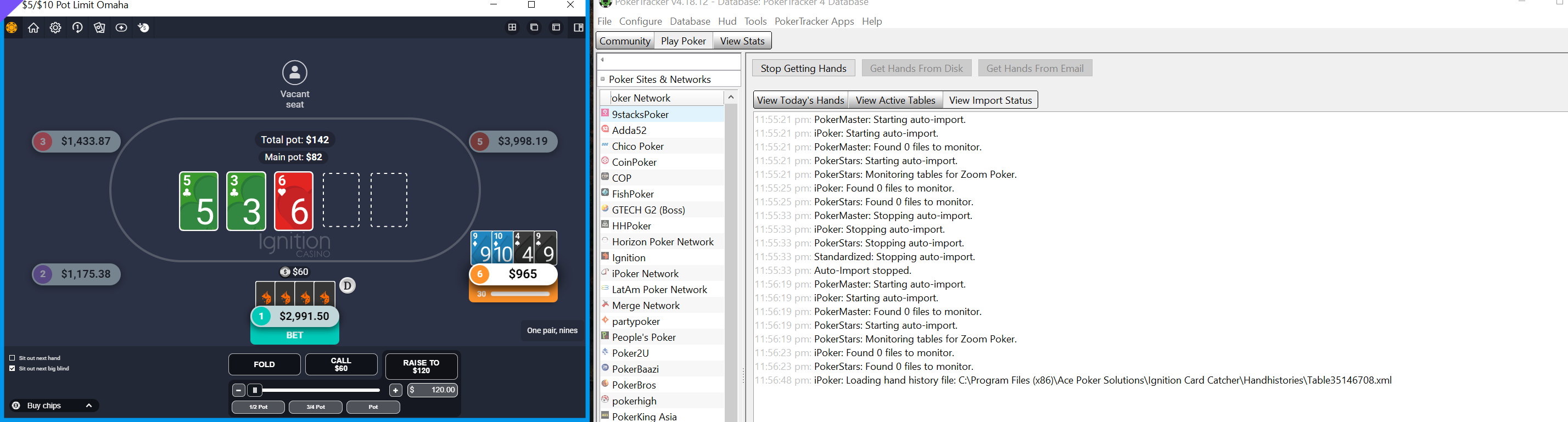
My hud does not appear as I think something is wrong with my database which i dont how to fix. If I open a new database the hands and hud start to appear instantly.


