GTO+/CardRunnersEV?

This is the support thread for CardRunnersEV, which is hand EV analysis software.

I don't believe that we have had a request for this feature before, but we'll consider adding it to the interface.
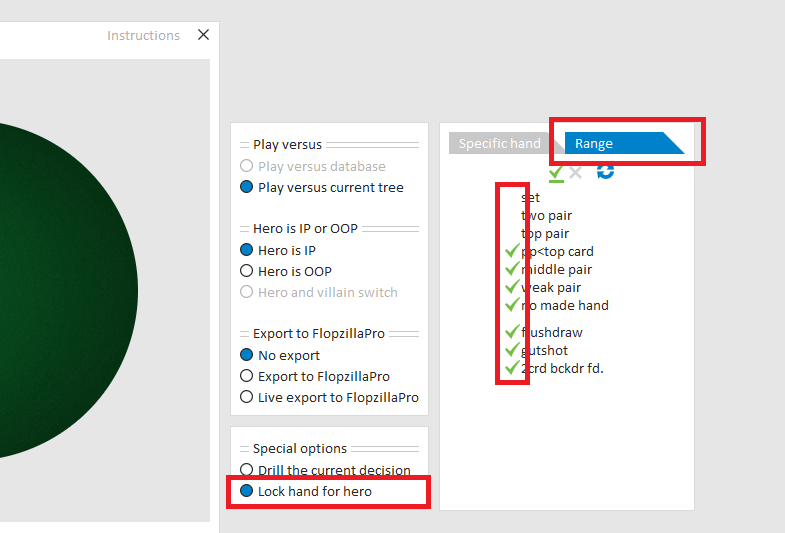
For the moment, what you can do, when drilling versus a single tree, is to select hand types that you want to drill.
For this, select "Lock hand for hero" and select the tab "Range".
See the screenshot below.
Didnt know about this, its nice basically what Im asking for. However being able to do this for drilling an entire database would be unbelievably goated
Didnt know about this, its nice basically what Im asking for. However being able to do this for drilling an entire database would be unbelievably goated
Yes, we’ll take your feature request into consideration.
In the meantime, this option should give you something fairly close to what you’re looking for.
Hi scylla,
Love your work in here. Amazing how many years you have been helping the GTO+ community.
I'm a recent purchaser of GTO+ - got my head around it reasonably well.
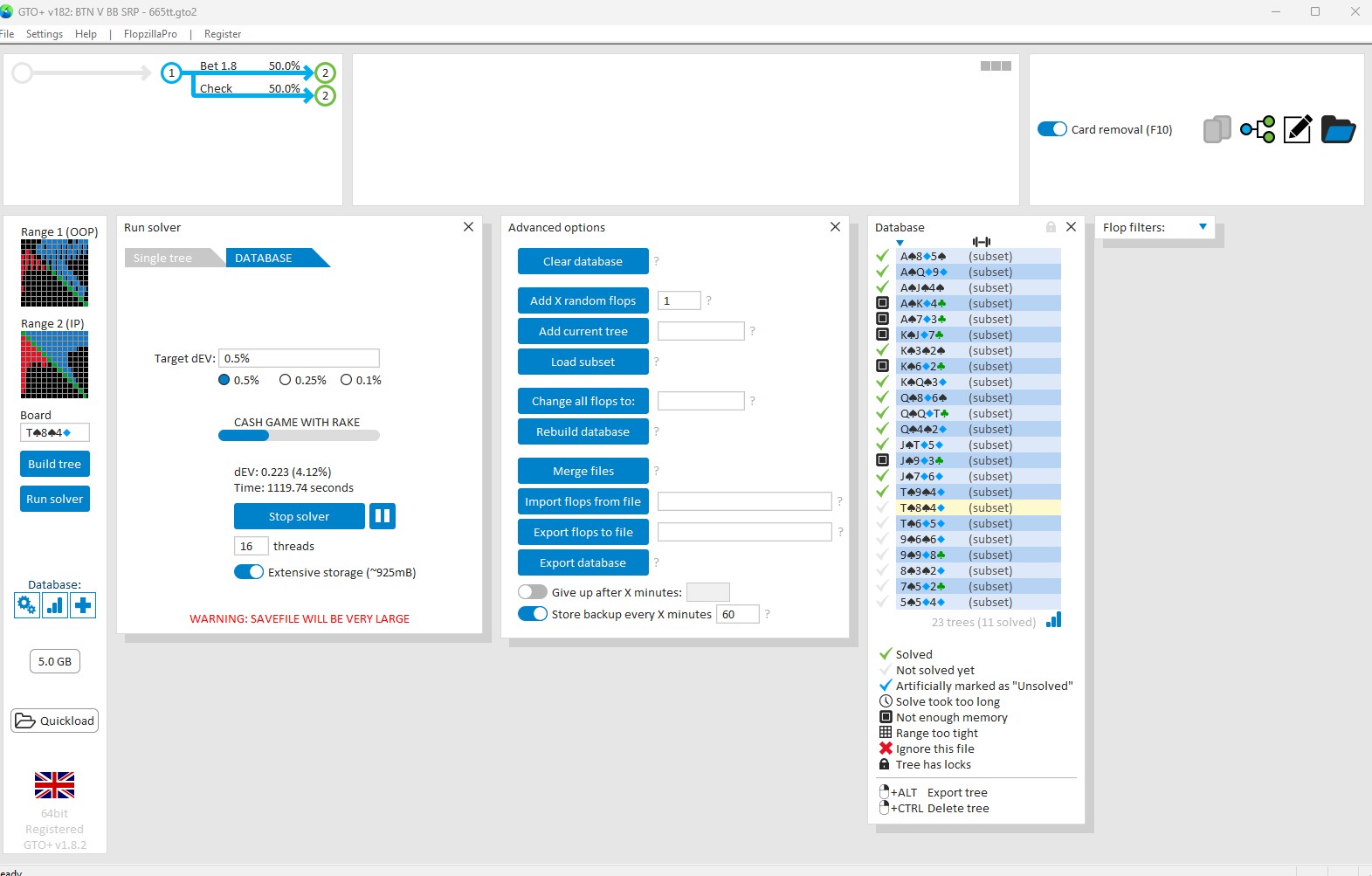
I'm currently running a solve of the 23 subset.
Was just wondering why some slops are being fully solved and others are coming back not enough memory?
What's the best way to overcome this? Solve the problem flops individually at the end?
Hi scylla,Love your work in here. Amazing how many years you have been helping the GTO+ community.I'm a recent purchaser of GTO+ - got my head around it reasonably well.I'm currently running a solve of the 23 subset.Was just wondering why some slops are being fully solved and others are coming back not enough memory?What's the best way to overcome this? Solve the problem flops
Some flops require more RAM than others, with rainbow flops needing the most.
This is because on rainbow flops, hands can’t be grouped (or “bucketed”😉 together as easily as they can on 2-flush or monotone flops.
Most likely, the rainbow flops are demanding more RAM than what is available on your system.
The main solutions would be to either increase your RAM (or free some up by closing other programs), or simplify your trees so the rainbow flops require less memory.
In particular, if you’re using multiple bet sizes on the turn or river, reducing the number of bet sizes usually has little effect on the quality of the solution, while saving a considerable amount of RAM. On the other hand, since RAM is relatively inexpensive and easy to upgrade, adding more (if you have free slots available) can be a straightforward alternative.
Some flops require more RAM than others, with rainbow flops needing the most.This is because on rainbow flops, hands can’t be grouped (or “bucketed”) together as easily as they can on 2-flush or monotone flops.Most likely, the rainbow flops are demanding more RAM than what is available on your system. The main solutions would be to either increase your RAM (or free some up by c
Appreciate your response, mate.
Thanks heaps.
Dear Scylla,
How can I view the detailed calculation of a decision tree model in CardRunnersEV?
I created a simple model that I also calculated manually on paper, but the results don’t match what the program shows. Therefore, I’d like to understand how the model performs its calculations.
Thank you in advance!
Dear Scylla,
How can I view the detailed calculation of a decision tree model in CardRunnersEV?
I created a simple model that I also calculated manually on paper, but the results don’t match what the program shows. Therefore, I’d like to understand how the model performs its calculations.
Thank you in advance!
If there's any value for which you'd like a more detailed explanation, then please just contact support.
When doing so, include a savefile of the spot in question.
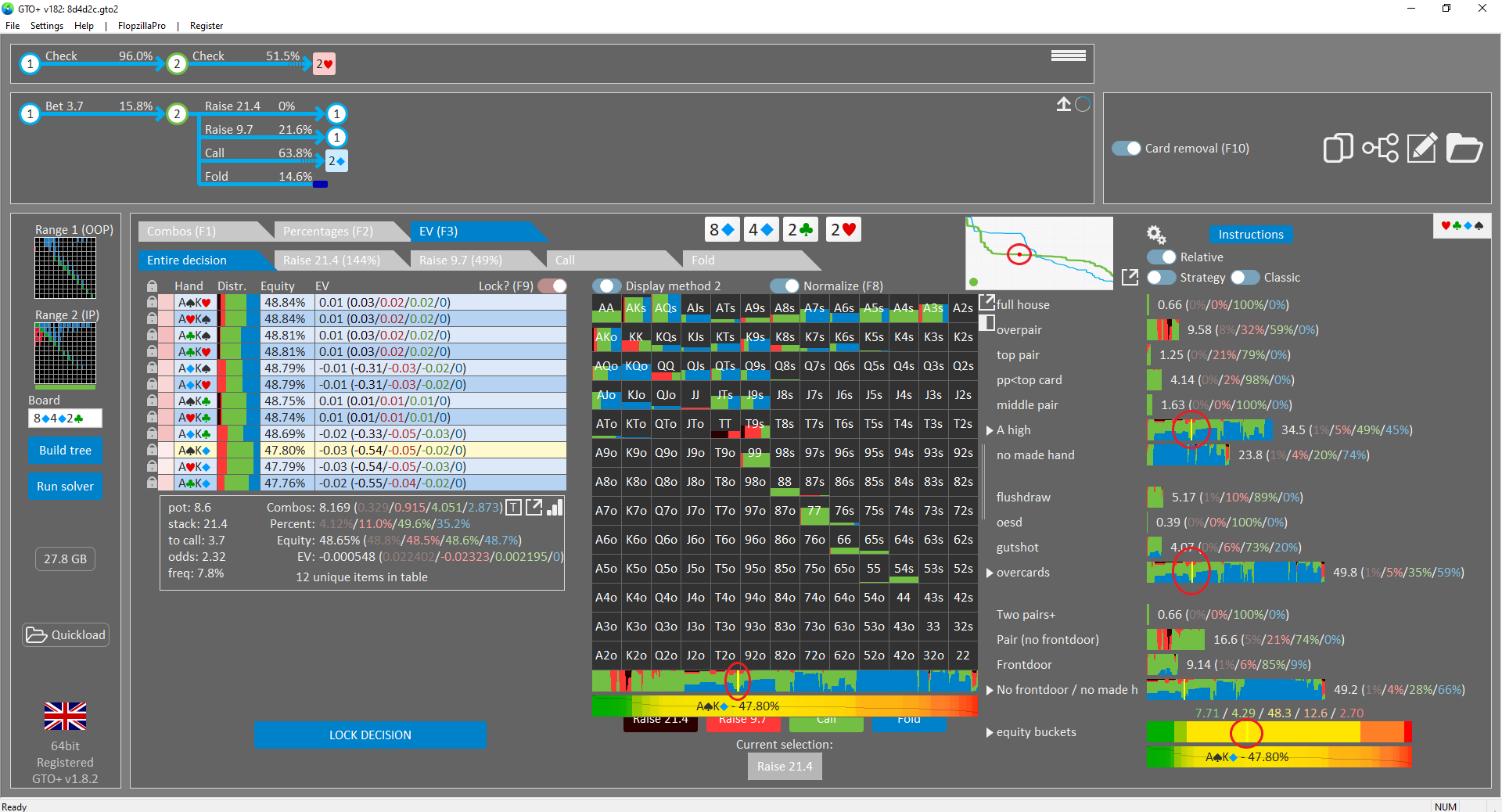
Hi! In a future update, would it be possible to consider adding a way to highlight specific hands? For example, right now, if I'm looking at a solution, and want to know the whereabouts of a specific hand within a range (for example AsKd), I have to 1) hover over it in the hand grid (AKo), 2) press F9, and 3) hover over it on the left column, to get the infos I'm looking for (the ones circled in red). It would be nice if we could just, say, tick a box to have those red dots and yellow lines remain on the screen.
Hi! In a future update, would it be possible to consider adding a way to highlight specific hands? For example, right now, if I'm looking at a solution, and want to know the whereabouts of a specific hand within a range (for example AsKd), I have to 1) hover over it in the hand grid (AKo), 2) press F9, and 3) hover over it on the left column, to get the infos I'm looking for (t
Ok, I'll make a note of your request, and we'll see if we can work this into the interface somehow.
Hi scylla,
I have some UI improving suggestions and I hope they will sound efficient and applicable to you:
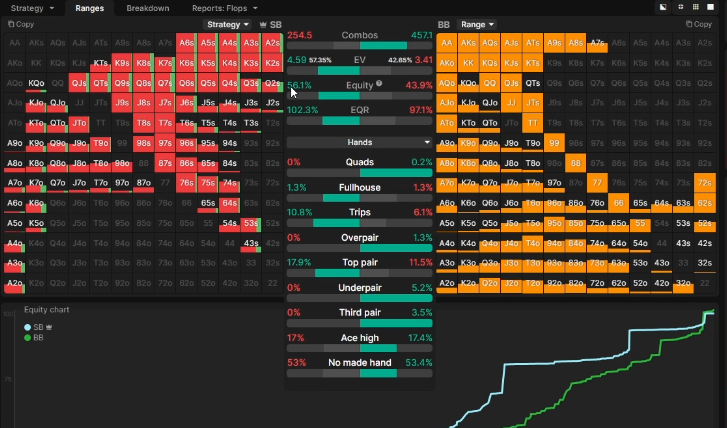
1. when using range comparison OOP VS IP is it possible to show the actual strategy for the player in the active node instead only blue grids for OOP and green grids for IP? it will save a lot of toggling time and will make the comparison more helpful, for example:
2. when looking at the entire range we can right click on specific group and lock it, is it possible to extend this feature when looking on specific ranges like call
aise\etc. ? for example locking here would be more convenient:
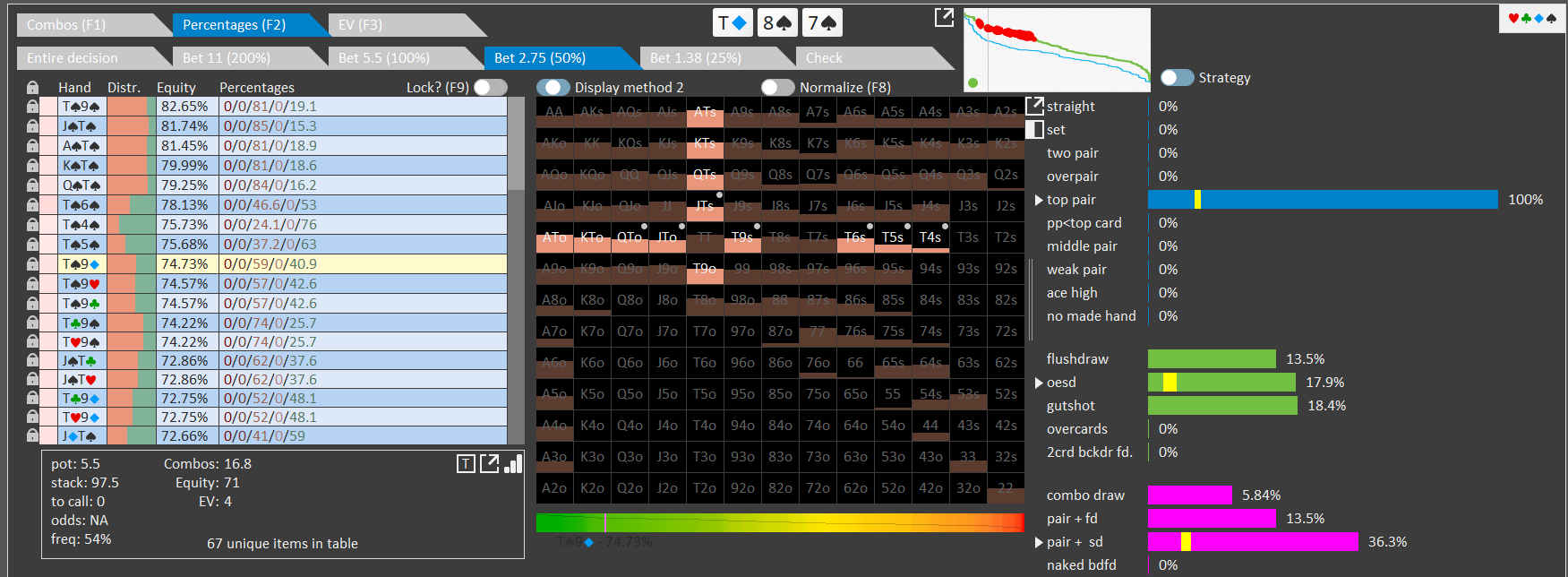
3. I know there was a suggestion about blocker feature at the past and even though you stated they are not in your backlog because you find blockers have marginal importance on the game I still find myself wasting a lot of time trying to construct a "blockers heatmap" at spots where the solver himself constructing his ranges over this removal effect, so I think finding a way to integrate this feature alongside with EV and equity heatmaps is still useable beyond measure and since you said the implementation of this feature is easy and the only thing that makes it complicated is the UI I thought mention this, I can't think of more useable feature than this one that I miss.
https://youtu.be/vKMourfrar0?si=g2pXxAEn...
Thanks as always for your patience and hard work on the software!
Hi scylla, I have some UI improving suggestions and I hope they will sound efficient and applicable to you:1. when using range comparison OOP VS IP is it possible to show the actual strategy for the player in the active node instead only blue grids for OOP and green grids for IP it will save a lot of toggling time and will make the comparison more helpful, for example: 2. when
First of all, my apologies for the somewhat late response.
I read your message on Sunday and noted your requests, but I neglected to reply and confirm at the time.
1.
I don’t think this will be difficult to implement.
I’ve made a note for us to review the code.
As far as I can tell, this would mainly be a visual change for displaying the different actions.
2.
I’m not entirely sure how complex this will be technically, but I’ve also noted it for us to check the code.
3.
Ok, I’ve recorded your request.
Quick GTO+ functionality question for anyone.
The Rounding feature in Play Against The Solution.
I get that it's supposed to make lower frequencies be 'incorrect' but how does each setting work?
For example, what's the difference in Round for 1 up to Round for 6 etc?
An explanation for a noob would be great 😀
Quick GTO+ functionality question for anyone.
The Rounding feature in Play Against The Solution.
I get that it's supposed to make lower frequencies be 'incorrect' but how does each setting work?
For example, what's the difference in Round for 1 up to Round for 6 etc?
An explanation for a noob would be great 😀
Let’s say the exact solution for raise/check/fold is 45% / 35% / 20%.
Round for 1: 45% / 35% / 20% → 100% / 0% / 0%
Round for 2: 45% / 35% / 20% → 50% / 50% / 0%
Round for 3: 45% / 35% / 20% → 33% / 33% / 33%
Round for 4: 45% / 35% / 20% → 50% / 25% / 25%
Round for 5: 45% / 35% / 20% → 40% / 40% / 20%
Rounding is mostly useful for removing actions that are almost never taken.
By rounding them out, these actions will be considered incorrect, even though they may occur a fraction of the time.
It’s not necessary to round to a very low value.
For example, rounding to 10 already ensures that very low-frequency actions are treated as incorrect:
Round for 10: 62% / 4% / 28% / 10% → 60% / 0% / 30% / 10%
https://gyazo.com/69fd13fc8b1b9152428353...
Hi Scy, how are you?
In the video I just uploaded, you can see that when separating the “OOP vs IP” section, there’s a bit of lag. I’d like to mention that my PC is quite powerful (Ryzen 9 5950X, 16 cores, 64 GB RAM), so it shouldn’t be a hardware issue.
I also agree with what my colleague mentioned in previous posts — having the ability to view the strategy directly in that window would be fantastic.
Lastly, you can also notice in the video that in the main view, the letters “T” and “R” display incorrectly in dark mode. Please take a look when you have a chance.
Thanks!
https://gyazo.com/69fd13fc8b1b9152428353...Hi Scy, how are you?In the video I just uploaded, you can see that when separating the “OOP vs IP” section, there’s a bit of lag. I’d like to mention that my PC is quite powerful (Ryzen 9 5950X, 16 cores, 64 GB RAM), so it shouldn’t be a hardware issue.I also agree with what my colleague mentioned i
I'm not noticing a lag in the video.
Can you point out in some more detail what you're referring to?
In regards to the T and R display issue, we'll have that fixed for the next release - I've never noticed it before, so we may have inadvertently added this in a more recent release.
Hi,
Is the superb function "Max exploit tool" in CREV is now integrated in GTO+?
Thanks
In GTO, a Max-Exploit strategy is identical to the GTO strategy — there are no flaws to exploit.
For that reason, the Max-Exploit tool has limited practical use in pure GTO analysis.
The tool is more useful in CREV, where the user supplies the strategies for both players.
In that case, the provided strategies can contain exploitable holes, and the Max-Exploit analysis can highlight where those weaknesses are.
In GTO, a Max-Exploit strategy is identical to the GTO strategy — there are no flaws to exploit. For that reason, the Max-Exploit tool has limited practical use in pure GTO analysis.The tool is more useful in CREV, where the user supplies the strategies for both players. In that case, the provided strategies can contain exploitable holes, and the Max-Exploit analysis can highli
OK, I'm agree.
But suppose this sequence.
1- I run the GTO solve in GTO+
2- On one specific situation, I adjust frequency of villain with "special options" : Lock by frequencies (suppose here my villain overfold to a River Probe Bet)
3- I locked ALL nodes of the sims except my check or bet options on the river OOP.
4- I rerun the sim to get the answer that the specific studied node.
If I made no understanding mistake of GTO, I think that if I rerun sim after a frequency lock, all tree is recalculated. So villain begin to adjust to my "too much frequent bet" I use on river because he fold too much on one node only. I want reach the river with a GTO range hypothesis for both player.
Is this sequence possible or make sense ?
OK, I'm agree.But suppose this sequence. 1- I run the GTO solve in GTO+2- On one specific situation, I adjust frequency of villain with "special options" : Lock by frequencies (suppose here my villain overfold to a River Probe Bet)3- I locked ALL nodes of the sims except my check or bet options on the river OOP. 4- I rerun the sim to get the answer that the specific studied nod
If I understand you correctly, then you can export the river scenario into a separate window.
There, lock any decisions you want fixed, and then run the solver again.
See the screenshot below for how to export a turn/river line:

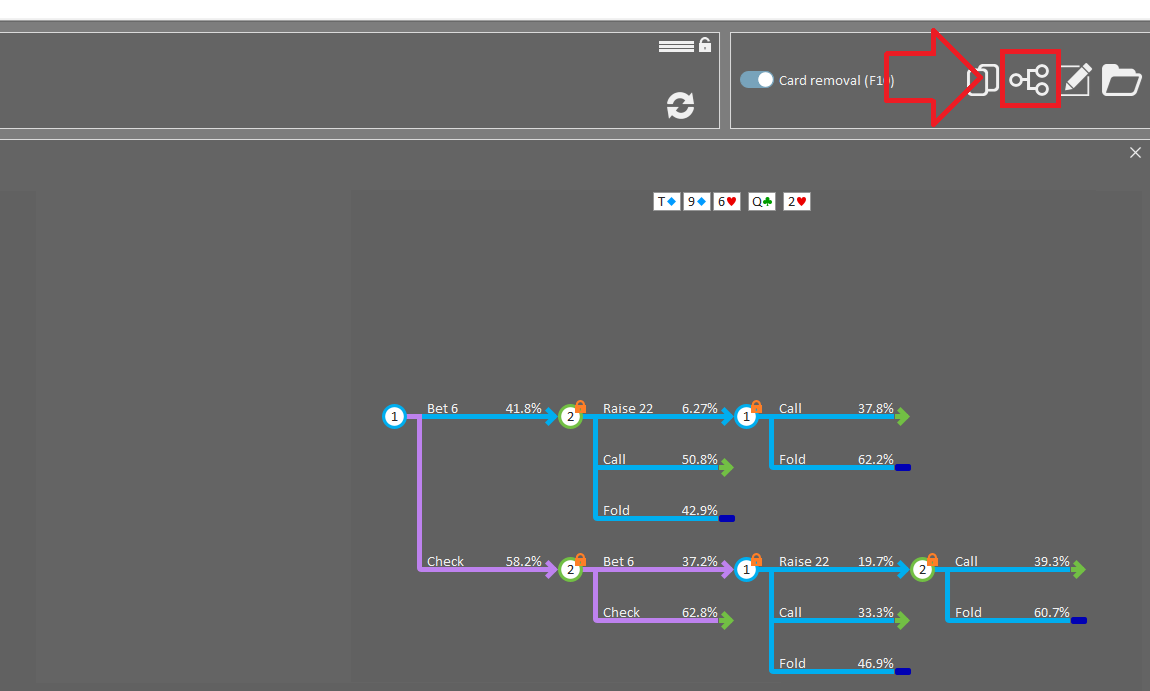
If you need a quick overview of which decisions have been locked and which are still unlocked, use the 2D navigator:
It's however not possible for us to offer a dedicated Max Exploit tool. This is because we don’t store river data in our trees. This design choice dramatically reduces RAM usage and disk storage. Some features (Max Exploit being the main one) can’t be supported without river data. When we designed the software, we accepted this as a trade-off, since Max Exploit has limited applicability in GTO solving. In a fully solved tree, the GTO strategy already represents the optimal response, so there’s little practical need for a separate Max Exploit calculation next to that.
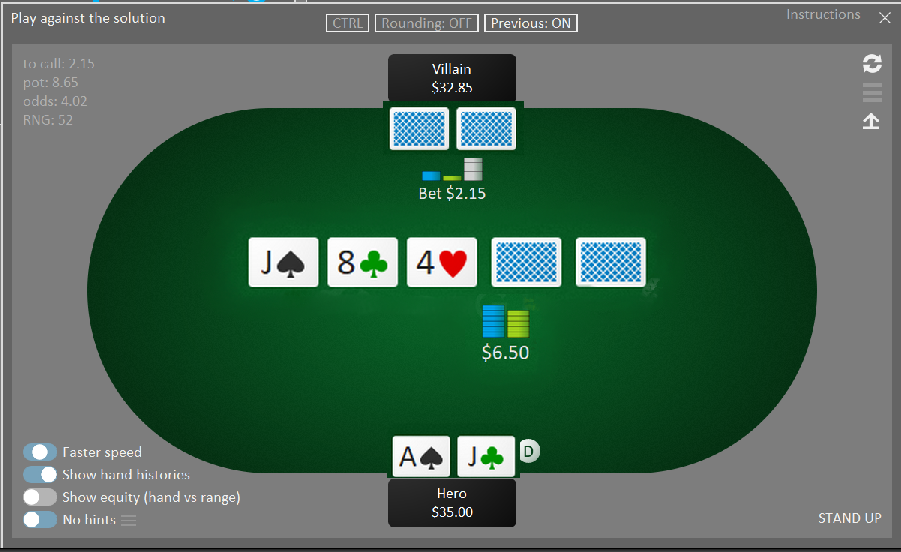
Would it be possible to enlarge the coach's images (cards, stacks...)?
Another feature that I (and a lot of players) would really like to have is a pre-flop situation trainer (according to the ranges you've saved within certain categories: open raise, flat call, squeeze, 3bet, call 3bet, and others).
Please consider my request.
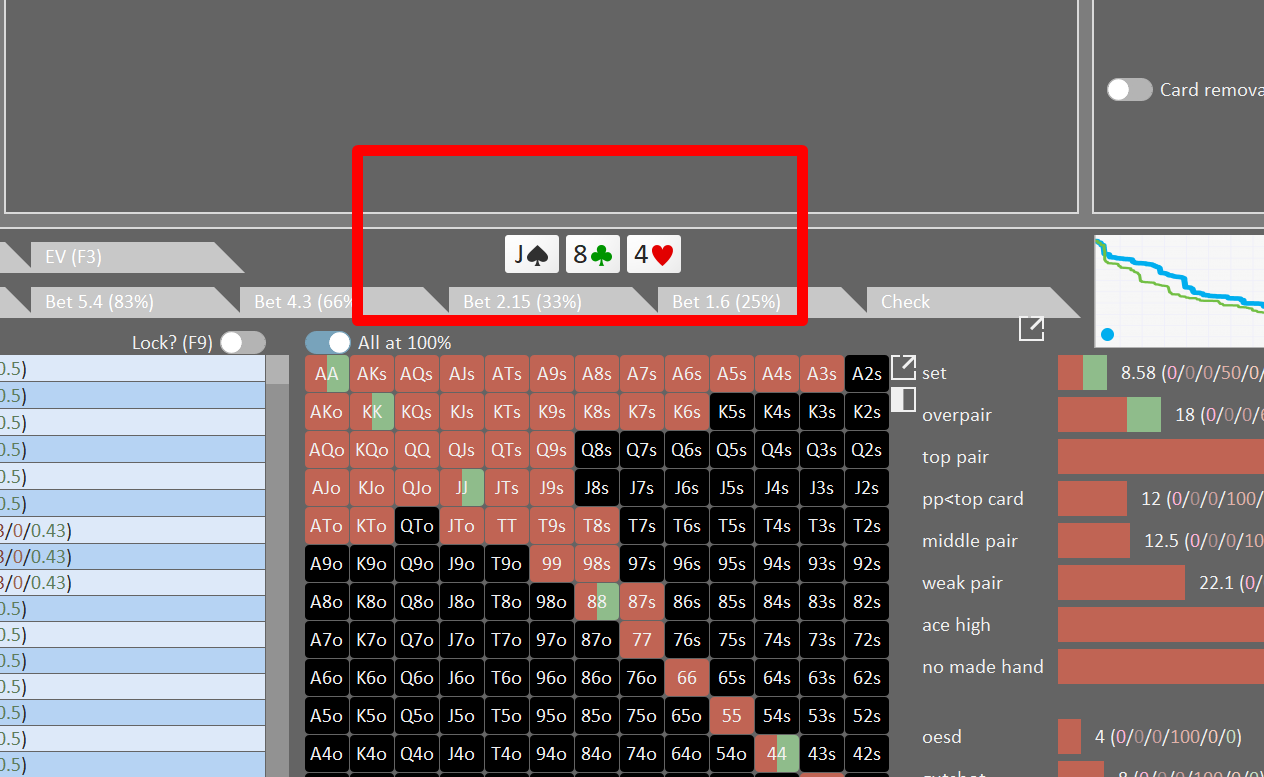
I was very happy when you implemented that idea I had given you back then. :-D
Ok, we'll consider adding some optimization here.
Another feature that I (and a lot of players) would really like to have is a pre-flop situation trainer (according to the ranges you've saved within certain categories: open raise, flat call, squeeze, 3bet, call 3bet, and others).
This would essentially require developing an entirely new and separate application.
I don’t think we could include this as part of GTO+, as it would effectively amount to creating an app within an app.
It's however not possible for us to offer a dedicated Max Exploit tool. This is because we don’t store river data in our trees. This design choice dramatically reduces RAM usage and disk storage. Some features (Max Exploit being the main one) can’t be supported without river data. When we designed the software, we accepted this as a trade-off, since Max Exploit has limited appl
Ok, nice. I figure it out how to do it. Your screenshots help me to understand where and how to lock villain range. Thank Scylla!
Hello,
I was wondering if there was a way to drill the same decision repeatedly in Play against the solution mode. Right now, you can use Drill the Current Decision, but it then takes you along the rest of the tree after you make a decision. For example, is it possible to drill only a response vs Cbet repeatedly, without going down the rest of the tree afterwards.
If not, a future update would be very helpful for studying. Thanks for all the updates over the years.
Hello,I was wondering if there was a way to drill the same decision repeatedly in Play against the solution mode. Right now, you can use Drill the Current Decision, but it then takes you along the rest of the tree after you make a decision. For example, is it possible to drill only a response vs Cbet repeatedly, without going down the rest of the tree afterwards. If not, a futu
You can press F1 at any time to move to the next hand.
We do, however, expect to offer additional options and customization for this in future releases.
Hi scylla,
I have couple of suggestion that in my opinion will improve GTO+ by huge margin and will be really useful. I'll try to make it as short as possible.
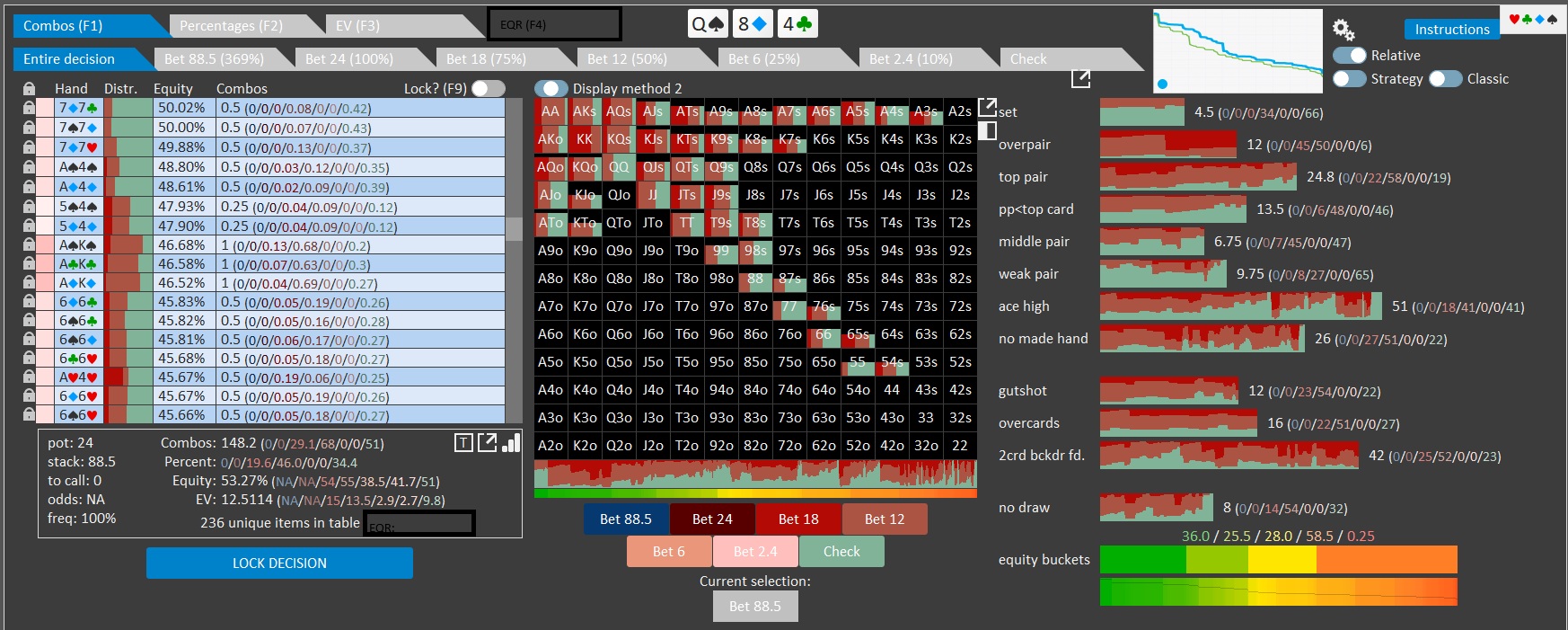
1. I searched for EQR in this topic and found out that alot of people have already asked for the display of this stat and I think it's really crucial and easy to implement, I know I can plot the range in EV and equity linear regression but it's not answering the need to quantify this data, i'm always calculating this stat manually for specifc combo or for overall range and it's really time consuming, considering the fact that the calculation is just EV / (Pot * Equity) which are stats that already presented I think it's a mandatory addition because of the importance of having this data while using the solver.
I'm not a UI designer but I suggest to add a tab for EQR and also present it in the bottom box under EV (I know F4 is already using for dark mode but I assume it can be changed):
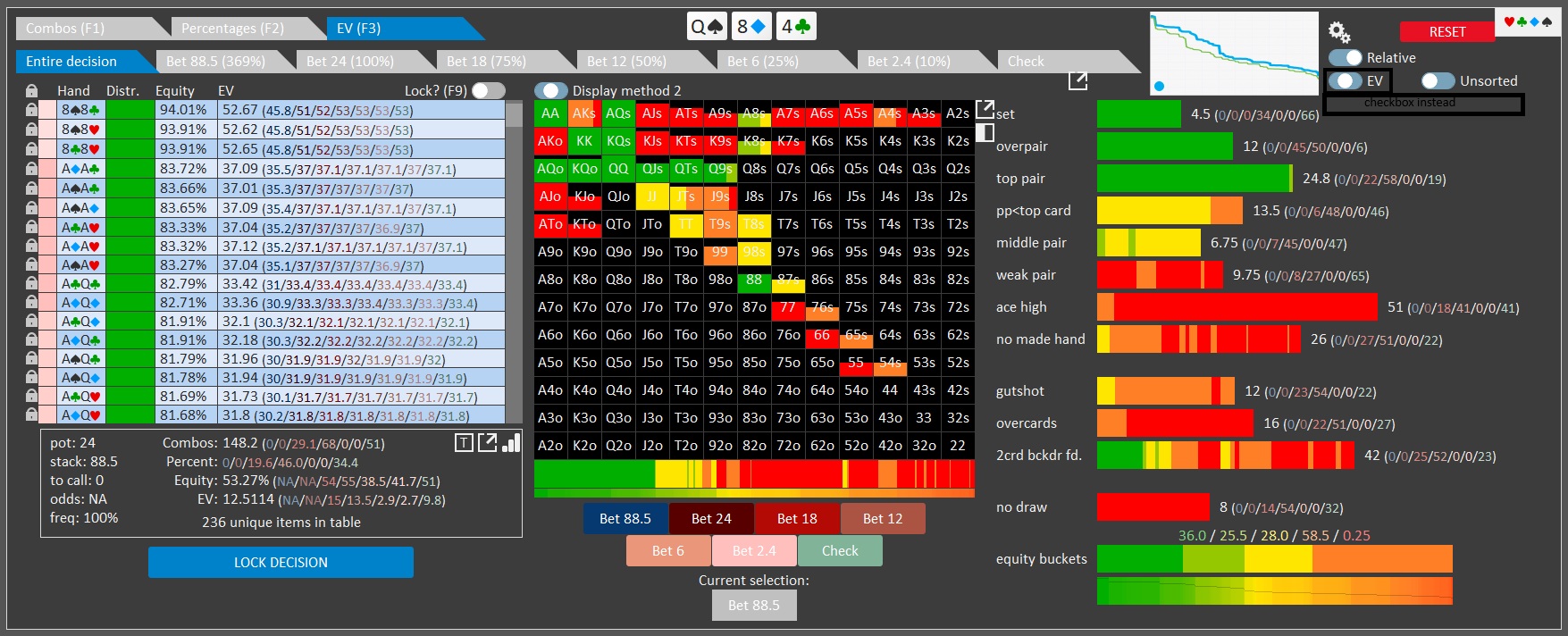
2. While the toggle buttons are very useful and UI friendly it makes it very clumsy when there are more than two options, for example when I'm looking for EV heatmap and want to go back to strategy I need to toggle another time to skip to the equity heatmap and another time to go back to strategy, beyond the fact this is inefficient this is also limits you in the number of data presentations that you can present in the matrix, so keeping all the other toggle buttons and for this specifc button using checkbox or other similar component for easy and faster switch which can also allow to add another heatmaps like EQR heatmap and blockers heatmap which also suggested in this topic without the need to skip manually over presentations is ideal in my opinion.
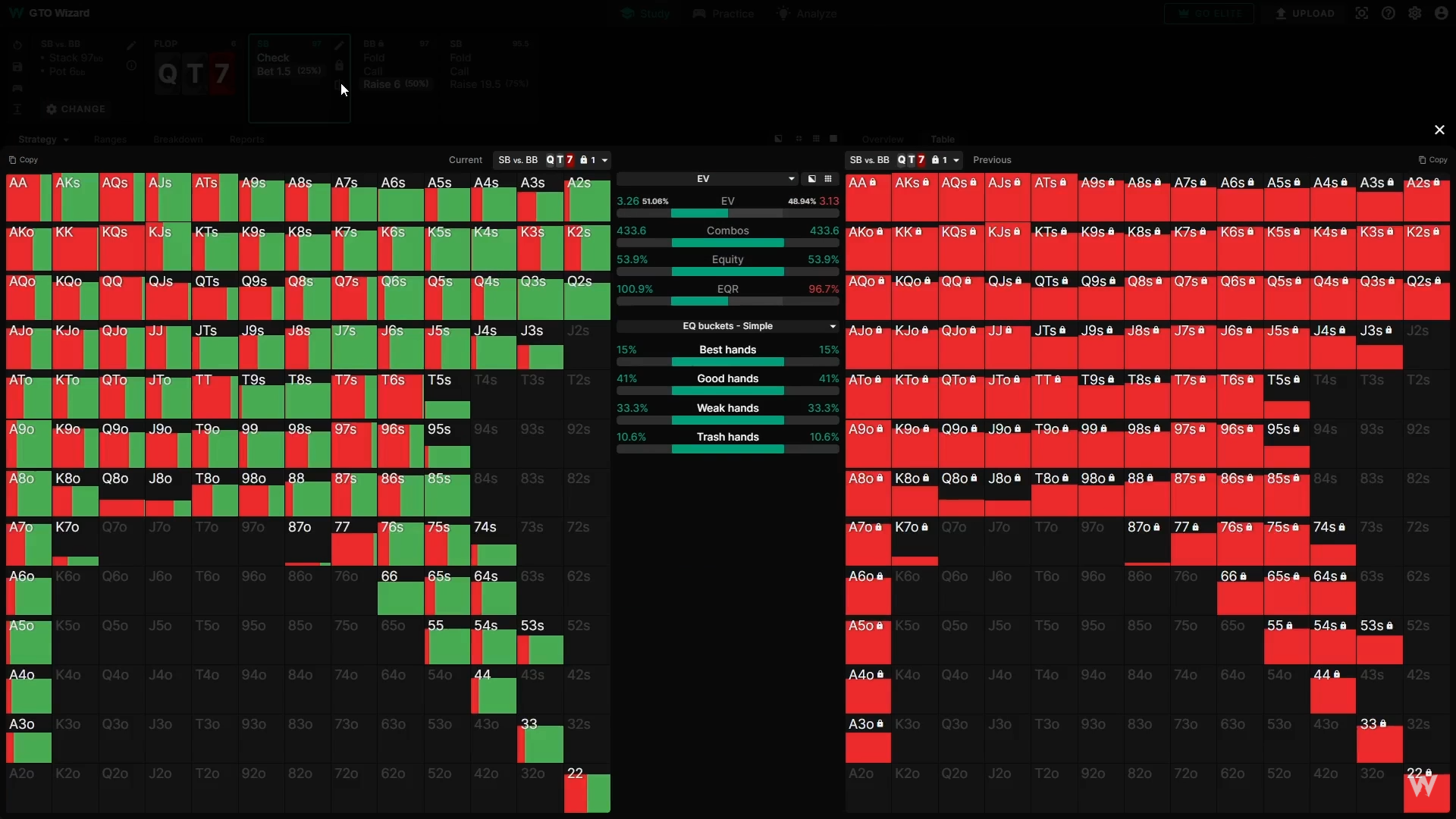
3. When I nodelock a certain node in the sim and want to examine the differences in strategy between GTO and the nodelocked sim I'm snapping the matrix before the nodelock and than compare, this is really inefficient and I know GTOW has a node comparison feature doing exactly that and I think it will be amazing to have:
Sorry for this being too long, and sorry if it's too much to ask for as my knowledge in software architecture is very limited but as a heavy user of GTO+ that find those features crucial for my analysis I hope you will find them useful as much as I do and also not too hard to apply.
As always, thanks alot for your attention to the customers and hard work!


