888/Party/StarsCaption

This is the support thread for 888/Party/StarsCaption, multi-purpose utilities for the 888, bwin.party, Poker Stars site



Upgraded to Windows 11.
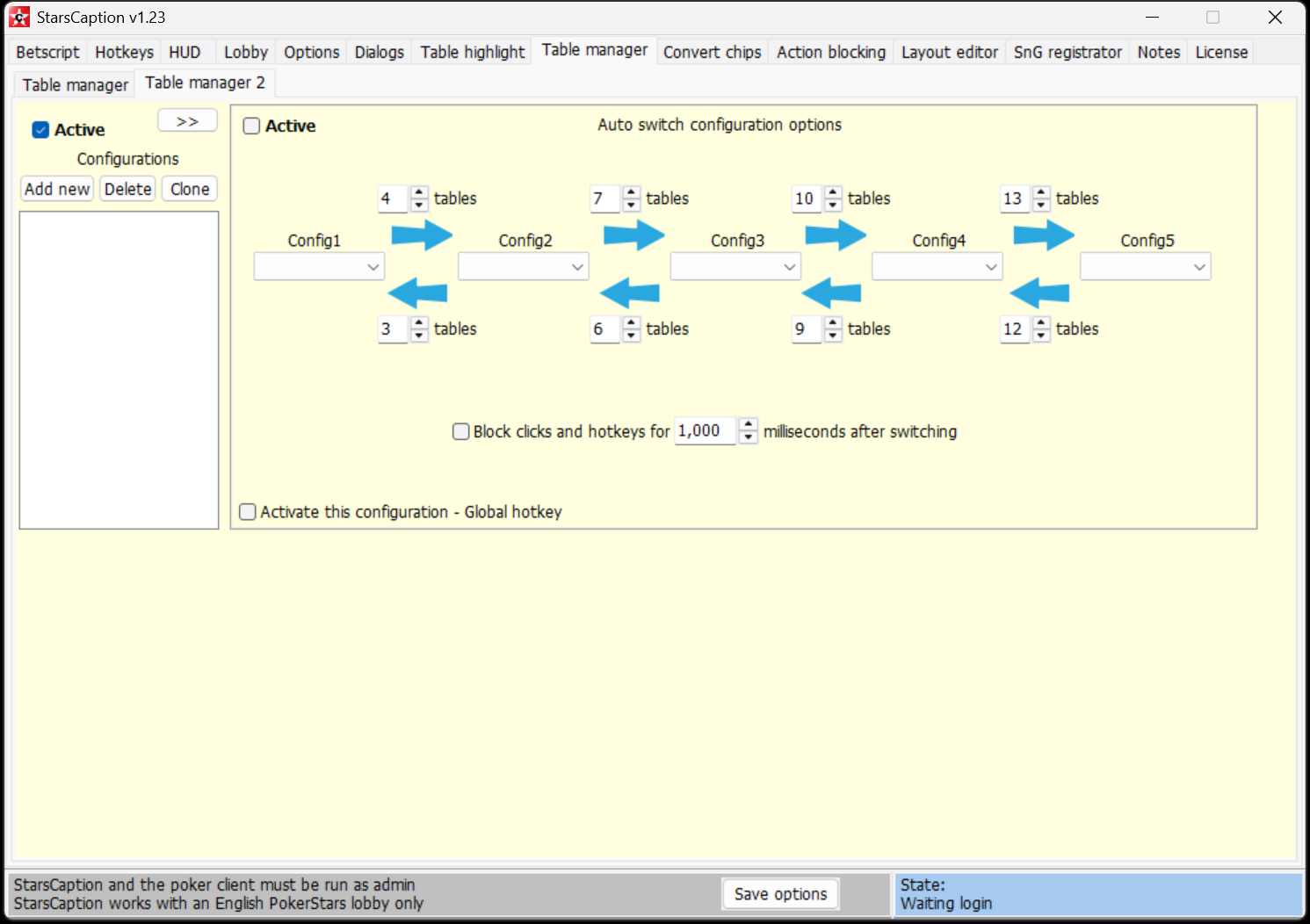
Imported my settings from old computer. All works fine expect for table manager.
Table layout configs didn't get imported
Running as admin and problem is there in older versions as well
Upgraded to Windows 11.Imported my settings from old computer. All works fine expect for table manager.Table layout configs didn't get importedRunning as admin and problem is there in older versions as well
Table manager 2 configs are not saved in the main settings and in backup, they are in separate files in this folder:
c:\StarsCaption\TableManagerConfigs2
You can copy this folder manually if you need to move them too.

Hello LikeAA, is there a version of your soft in the making for "coinpoker" ?
Please consider BetRivers, I'm so used to your great products that it's hard to play without them now.
GrandChamp21, ok
Hi, I am using starscaption.
I don´t know if I can do this but I am trying to create a grid with 3,4 slots in my secondary monitor.
I just want to put there MTTs that i am going to play when late reg in coming to an end.
So I want to have a big panel there telling me the time till the end of late registration. This would be usefull to me cause I would stop looking to the looby all the time. Of course that this panel is not going to appear in the tables I am playing, only in those specific MTTs. Is there a way to do this or a better way with starscaption?
Thanks!
Hi, I am using starscaption.I don´t know if I can do this but I am trying to create a grid with 3,4 slots in my secondary monitor.I just want to put there MTTs that i am going to play when late reg in coming to an end.So I want to have a big panel there telling me the time till the end of late registration. This would be usefull to me cause I would stop looking to the looby all
Hi
You can use [TL_lateReg] tag in HUD / Table panels for this
If you don't add anything else to this panel, it won't show up on the table after late registration ends.
If you want also to add some text, then you can use a formula with @H operator to hide it, like this:
LateReg: [TL_lateReg]{[TL_lateReg]=0@H}
You will need to enable Options / Autorefresh [TL_...] tags to use this tag, see here how it works if you haven't used it before
HiYou can use [TL_lateReg] tag in HUD / Table panels for thisIf you don't add anything else to this panel, it won't show up on the table after late registration ends.If you want also to add some text, then you can use a formula with @H operator to hide it, like this:LateReg: [TL_lateReg]{[TL_lateReg]=0@H}You will need to enable Options / Autorefresh [TL_...] tags to use this ta
Hi.
The problem is that the panel is still appearing on the tables I am currently playing and the purpose is not to appear on them, only in those I want to late register later.
Hi.
The problem is that the panel is still appearing on the tables I am currently playing and the purpose is not to appear on them, only in those I want to late register later.
Hi
You can use this way, for example:
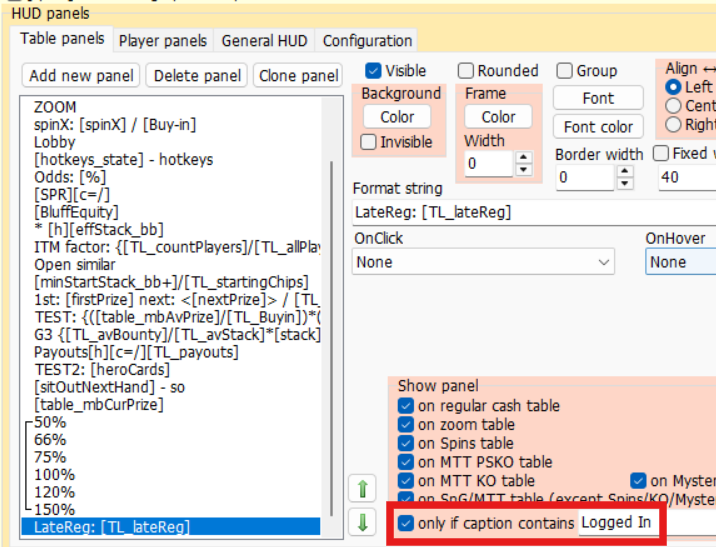
('Logged In' is present in a title of a table with hero only)
In this case is still not possible cause you don´t have any word different from the tables you are logged in. Remember that I only want to appear in the observed tables.
Ok I was wrong again
Try to add this formula to a panel:
{[onTableTime]@H}
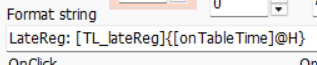
This will only show up on observed tables with this setting
I am using starscaption and recently it showed there was an update available after opening starscaption and I updated it like with previous starscaption updates. During that process or after it was done, I got a message from windows security/defender that it detected something like this below
Trojan:Win32/Bearfoos.A!ml
I think the options showing was to either quarantine or remove it and I don't think I did it before the message went away. So I didn't remove it at least I don't think. I then did a full scan for virus protection and it shows nothing with the windows defender.
However, when I go to my protection history, it shows
Remediation incomplete
Detected: Trojan:Win32/Bearfoos.A!ml
Status: Quarantine failed
This threat or app might not be completely remediated.
Details: This program is dangerous and executes commands from an attacker.
Affected items:
files: C/Starscaption/StarsCaption.exe
It shows severe to the far right of it as well. Is this bearfoos a false positive with starscaption? I know this message showed up on the bottom right with windows defender during or after I updated starscaption. Do I ignore this or I have to remove it somehow?
julianramble, yes it's false positive
I check each new version on virustotal.com before publishing, and remove false positives from Microsoft Defender through their form on the site, if any.
However, in a small percentage of cases, a false positive appears some time after publication, and I cannot always notice it.
But when I notice it, I try to resubmit it for review through this Microsoft form. Actually you can also use this form if you have any doubts or you can install any other version of StarsCaption manually.

Hi there,
Still using WinamaxCaption for all my sessions and is working nicely. Operating a stack and tile approach with 1 regular stack and multiple activated table slots.
1 current bug - "Deactivate if hero all-in" hasn't been working for a fair while (but was a few weeks ago), would be great if you'd look into this
1 general issue - it would be great if my stack would be able to cycle to "next urgent table in stack" independently - say I want to tank a little on an activated table, and it is the most urgent table, the next urgent table will not appear in my stack until I have completed this action, so I wind up with a queue of tables I could potentially have been acting on whilst tanking my activated table.
Another thing for my wish list would be if there was a way for tables to activate/lock-in place when i get heads-up without me manually having to do it each time. I appreciate it is unlikely for you to be able to build this in, but the following would help me with this:
Activate all tables functionality/hotkey
Lock all tables in slot functionality/hotkey
Thanks as always
Hi there,Still using WinamaxCaption for all my sessions and is working nicely. Operating a stack and tile approach with 1 regular stack and multiple activated table slots.1 current bug - "Deactivate if hero all-in" hasn't been working for a fair while (but was a few weeks ago), would be great if you'd look into this1 general issue - it would be great if my stack would be able t
Hi
1. I just checked and "Deactivate if hero all-in" works for me
Can you please show me your current config? Perhaps it depends on some other options that I haven't taken into account.
2, 3 - I'll think about it
Hi, I recently switched from Stars to Winamax.
I tried WinamaxCaption trial, but it does not seem to work, it does count number of hands and tournaments but I would really like to get the HUD to work.
Am I doing something wrong? Is WinamaxCaption still supported? I used StarsCaption before and had no problems
Hi, I recently switched from Stars to Winamax.
I tried WinamaxCaption trial, but it does not seem to work, it does count number of hands and tournaments but I would really like to get the HUD to work.
Am I doing something wrong? Is WinamaxCaption still supported? I used StarsCaption before and had no problems
Hi
Yes it is supported
Try to check this:
1. WinamaxCaption is configured to run as admin as it described

2. You have English Winamax lobby
3. If you use playground in Winamax - please read this
Hi
Yes it is supported
Try to check this:
1. WinamaxCaption is configured to run as admin as it described

2. You have English Winamax lobby
3. If you use playground in Winamax - please read this
Hi, thanks for your reply, just one question:
So in order for the HUD to work, I don't need any other featuers really, just what's in the hud tab, I need to disable playground in Winamax? Did I understand that correctly?
Hi, thanks for your reply, just one question:
So in order for the HUD to work, I don't need any other featuers really, just what's in the hud tab, I need to disable playground in Winamax? Did I understand that correctly?
It depends on what type of playground you use.
If you use a stack playground mode, then you can turn on Options / Process playgrounds in WinamaxCaption and it will work.
If you use a tile mode, then it will not work, so you have to turn a playground off.
Hi, is there a way to disable the hotkeys when writing a note on Starscaption? I see that I already have the "disable keyboard hotkey if note editor has a focus" flag checked, but I think this refers to the note editor that can be activated in Starscaption. I actually want to disable them when I write a note in the PokerStars notes tab.


