GTO+/CardRunnersEV?

This is the support thread for CardRunnersEV, which is hand EV analysis software.
Thanks
You can do it not by hand categories, but by the amount of equity, if this simplifies the task. It seems to me that this would be a breakthrough: calculating an exploit for three streets. As far as I know, solvers now consider adjustment to only one street
Our incentives feature on the turn and river works for all board runouts, so we already have this covered. A feature allowing users to define custom dependence on equity is technically possible, but it would require considerable programming effort, as well as interface changes that most users would likely find challenging to work with.
Our incentives feature on the turn and river works for all board runouts, so we already have this covered. A feature allowing users to define custom dependence on equity is technically possible, but it would require considerable programming effort, as well as interface changes that most users would likely find challenging to work with.
I understand that this is a labor-intensive process and not all users need this tool. There may be an option to release a separate version for an additional fee with advanced features or by subscription. The extensive labor will be paid for by users who need this feature. I think many people are interested in this function
Hello!!, I have a question when I nodlock a tree how can I return to the version without nodlocking? When I click on the unlock decision button the tree does not change, but it also does not allow me to process the tree again, it appears with the green check mark, how do I solve it?
Hello!!, I have a question when I nodlock a tree how can I return to the version without nodlocking? When I click on the unlock decision button the tree does not change, but it also does not allow me to process the tree again, it appears with the green check mark, how do I solve it?
There are two ways to accomplish this:
Approach 1: Make any edit to the tree
- Lock any decision in the tree.
- Make any edit whatsoever.
- Unlock the decision again.
Once the tree has been edited, it will no longer be considered to be solved.
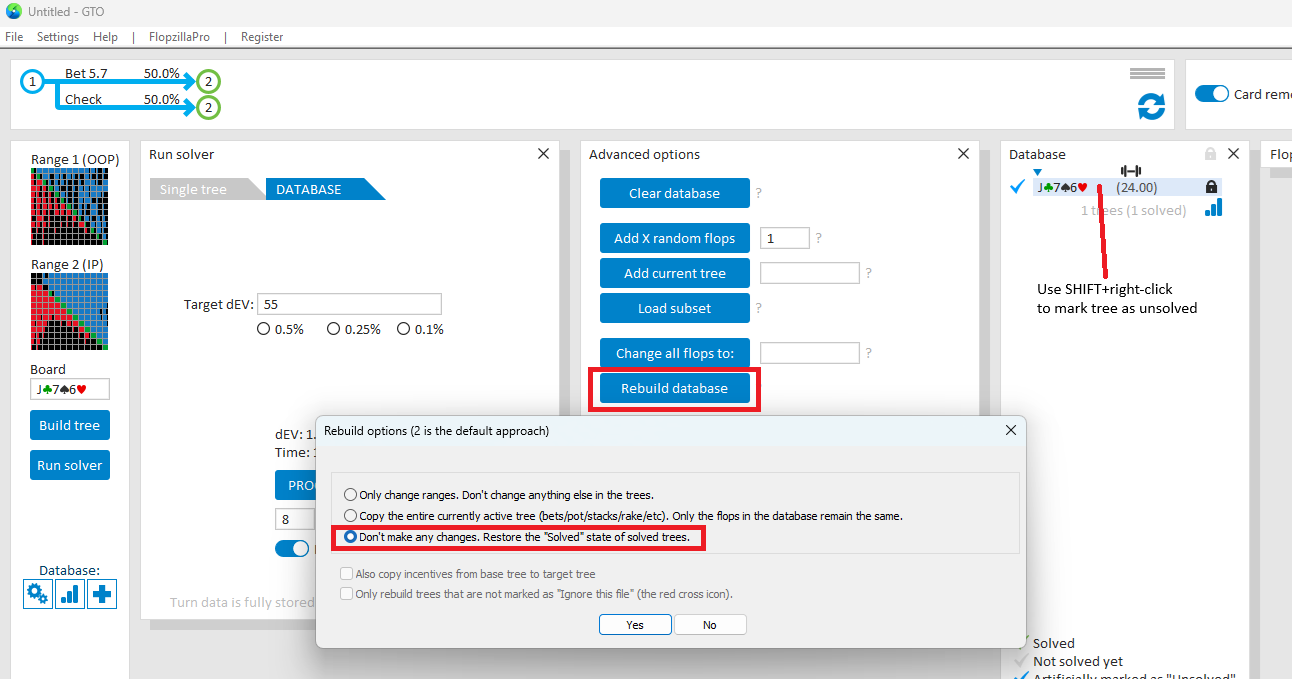
Approach 2: Mark as unsolved
- Go to Run solver
- Hold SHIFT and right-click the tree in the database.
- The checkmark will turn blue, and the tree will be artificially marked as Unsolved.
To mark all trees in your database as Unsolved, go to Rebuild database and select Don’t make any changes to the trees. Only mark trees as ‘Unsolved’.
Te lo agradezco saludos desde Perú. Translate it, my friend, this comes from inside my heart, that's in my language.
Hi,
I'm trying to compare a multisize cbet strategy with a single size flop strategy, while being able to navigate lines in the database results tab.
My first tree has many cbet sizings. If my second tree has only one betsizing, then I can't navigate in the database results tab because it hasn't the same tree structure.
So I tried using "incentives" to artificially remove other sizings (-10000 EV for every sizing I don't want), while keeping the same multisizes structure. Now I can navigate, but the solver is really really slow and even fails to converge sometimes, whereas if I really remove the sizings I don't want the solver converges quickly and nicely.
Is there any way to keep the same solving speed while being able to keep the same tree structure ?
Thanks in advance
Hi,I'm trying to compare a multisize cbet strategy with a single size flop strategy, while being able to navigate lines in the database results tab.My first tree has many cbet sizings. If my second tree has only one betsizing, then I can't navigate in the database results tab because it hasn't the same tree structure. So I tried using "incentives" to artificially remove other s
Ok, can you send a savefile to support?
I can imagine that using an extremely large negative incentive can cause some issue that we overlooked - depending on the settings for the tree.
For the moment, can you check if the issue also occurs if you set a positive incentive to the bets you dó want to remain?
For example, giving them each a positive incentive that's equal to the current pot?
I sent you a file. Yes it is an issue with extremely large incentives, with a +pot for bet I want to keep or -pot incentive for bet I want to prune it works fine.
Thanks for your help.

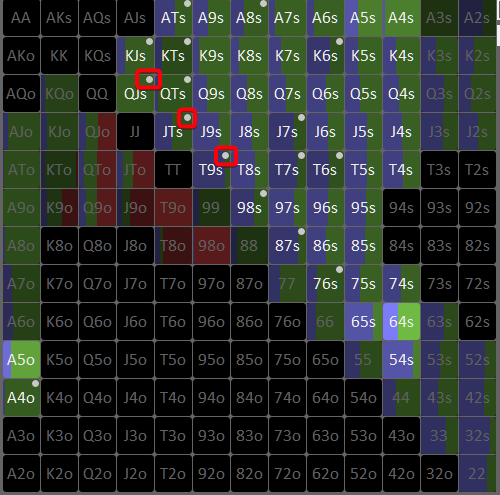
I searched, but didn't find the answer. So here's a dumb question. What are those dots on the matrix?
TY
Hi scylla, can I ask you to think about two options?!
1. Move the number of hands played to the table window
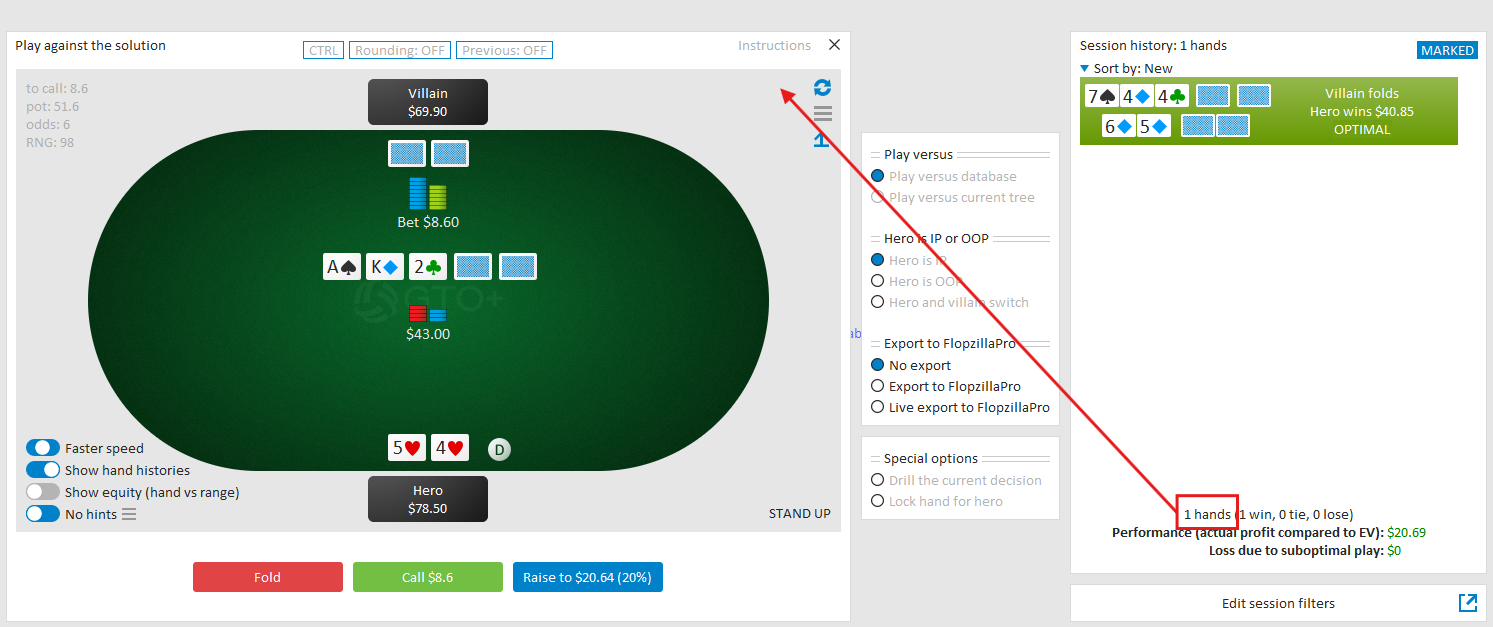
2. Make the table window larger, ideally so that it opens in a separate window.
Thanks
Hi scylla, can I ask you to think about two options?!1. Move the number of hands played to the table window 2. Make the table window larger, ideally so that it opens in a separate window.Thanks
Ok, I've made a note of your request.
We’ll take it under consideration the next time we circle back to the trainer.
Hi guys,it would be amazing if we could make a “Spaced repetition mode” for the Trainer, I think it can be a great addition, probably easy to do.And it could even be a selling point, I myself have DTO practically just for this perk.
Basically, we enter in “spaced repetition mode” in which if the mistake X loses some% of the pot is repeated an after X days until we get it right X times in a row.
When you come back you enter “spaced repetition mode” you get to see and train ONLY those mistakes, but not only that, it will categorize them and feed you only the ones you still have to train.
Example:
You made five 3% of the pot mistakes and two 5% or more.
The spaced repetition mode will make you grind the mistakes this way:
3%of the pot mistakes: three times with a space of at least 1 day between each correct answer.
5% of the pot or more mistakes: Same as the 3%, but we add a four time answer that has to be answered 3 days after the third correct answer.
Note: I know it could be possible to manually do something like this with the “marked hands” feature. But the automation is worth it, I pay for a whole product just for this.
Hi guys,it would be amazing if we could make a “Spaced repetition mode” for the Trainer, I think it can be a great addition, probably easy to do.And it could even be a selling point, I myself have DTO practically just for this perk.Basically, we enter in “spaced repetition mode” in which if the mistake X loses some% of the pot is repeated an after X days
Ok, thank you for the suggestion.
I’ve added it to the list of potential features for when we next revisit the trainer.
Ok, thank you for the suggestion.
I’ve added it to the list of potential features for when we next revisit the trainer.
Scy... please...
The current "replay model" is incredibly annoying, as is not being able to quickly select the lane you want to review the error that occurred.
This should be fixed, as it makes the trainer very difficult to use for error review.
Scy... please...
The current "replay model" is incredibly annoying, as is not being able to quickly select the lane you want to review the error that occurred.
This should be fixed, as it makes the trainer very difficult to use for error review.
Ok, I’ve added your feedback to our list.
We gather and sort all requests by subject, and when we return to a certain part of the interface, we’ll review all suggestions together, and prioritize from there.
Hello.
How do i get access to the Turn aggregated report?
They used to be right there.
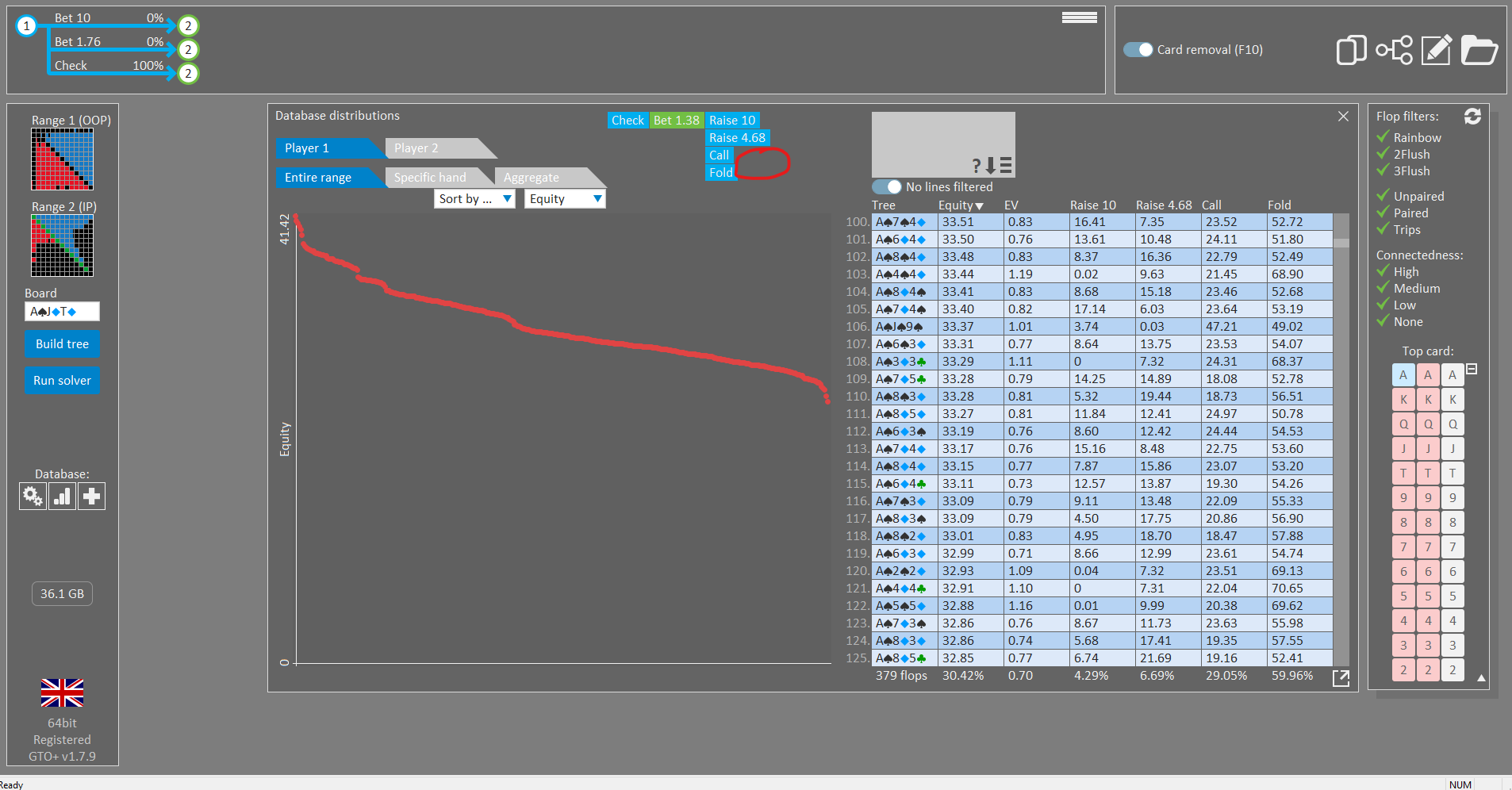
The option should be there - and I can't immediately tell from the screenshot what the problem is.
Is it possible for you to send a savefile to support?
If you need to bring down its size, then store it with "File->Save: Convert to basic storage".
Also, we won't need the entire database.
If you delete most trees, and only leave a few, that should still be sufficient.
Thank you in advance - if we have access to the file, we should be able to figure out why the option is not being displayed.
Hi Scylla,
Thank you for always working to improve the software!
I really appreciate the tree saving feature in v180, as it saves me from the time‑consuming work of editing the tree (deleting or adding specific sizings, etc.).
However, with new stacks I can’t find a way to keep my edited tree. It seems I need to rebuild the tree so the software takes the stack changes into account, which delete tree edits.
This means I have to redo all the tree edits, which can really take a while.
Is there a way to keep the tree edits when using new stacks?
Or maybe a way to manually edit the quick‑load tree file to add new stacks?
Thank you !
Hi Scylla, Thank you for always working to improve the software! I really appreciate the tree saving feature in v180, as it saves me from the time‑consuming work of editing the tree (deleting or adding specific sizings, etc.). However, with new stacks I can’t find a way to keep my edited tree. It seems I need to rebuild the tree so the software takes the stack ch
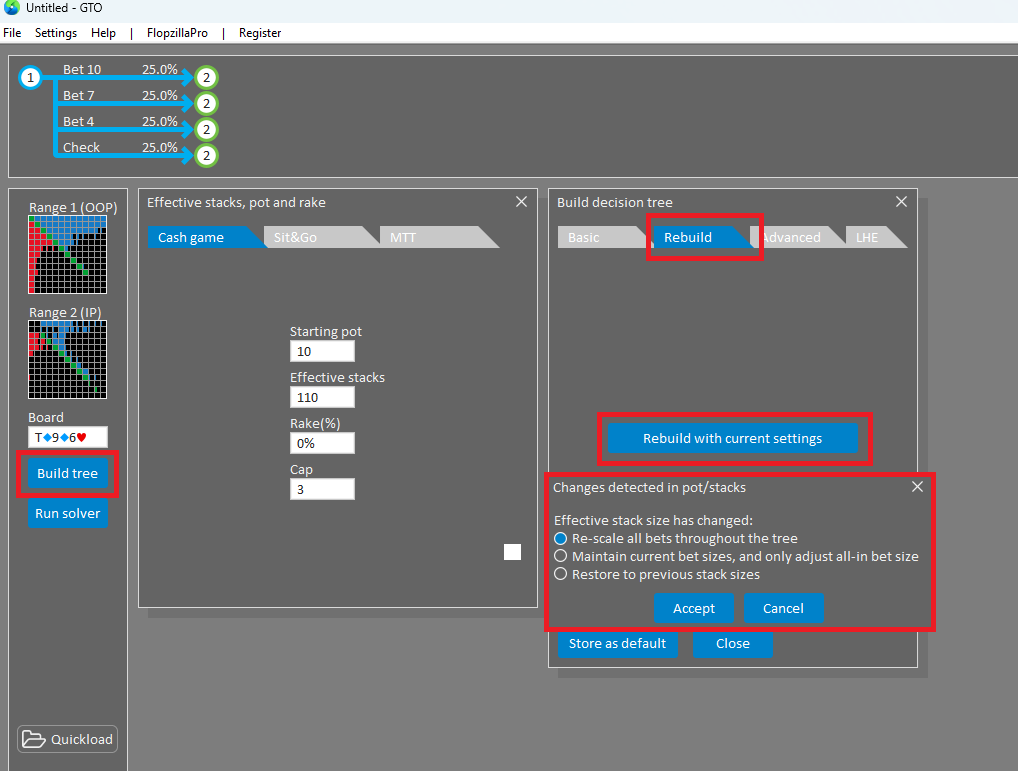
For this, you can load your tree from the quick-load menu.
Then, go to "Build tree" and enter the desired stack sizes.
Go to the tab "Rebuild" and click on "Rebuild with current settings".
GTO+ will offer to either:
a) Keep the bet sizes the same, and only alter the all-in values
b) Scale all bets within the tree so that they match up with the adjusted stack sizes
Amazing,
Thank you !
is 16gb ram enough to solve a spot where
BB vs BN wide ranges
OOP allowed to donk %33 on flop and turn
OOP allowed to XR 3x or allin
IP allowed to bet %33 %75 %150 on flop
IP allowed to bet %75 %150 on turn
IP allowed to bet %75 %150 on river
going allin is allowed if spr is certain treshold, usual sensible stuff
if not how much ram needed for this spot?
what about CO vs BB ranges
is 16gb ram enough to solve a spot where
BB vs BN wide ranges
OOP allowed to donk %33 on flop and turn
OOP allowed to XR 3x or allin
IP allowed to bet %33 %75 %150 on flop
IP allowed to bet %75 %150 on turn
IP allowed to bet %75 %150 on river
going allin is allowed if spr is certain treshold, usual sensible stuff
if not how much ram needed for this spot?
what about CO vs BB ranges
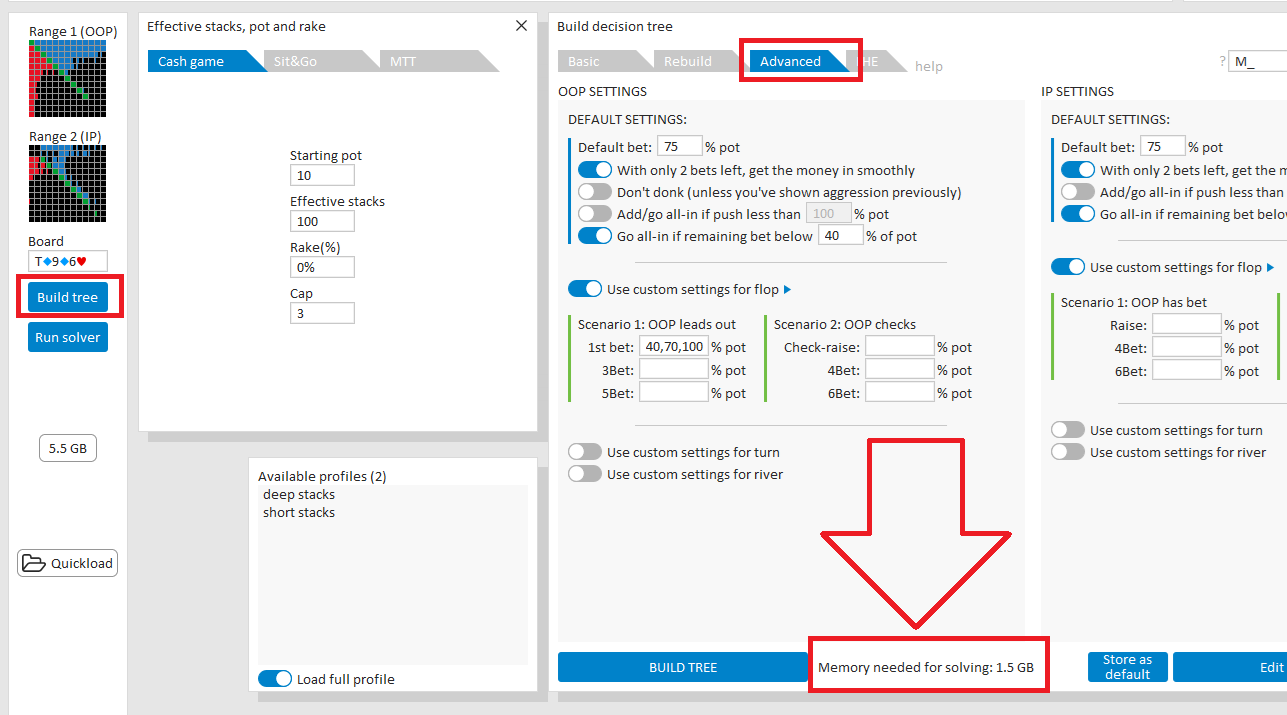
This depends on the exact ranges, stack depth, and some other settings in the Advanced tree builder.
You can check the required RAM by entering your building instructions in the Advanced tree builder (under Build tree).
The estimated RAM usage will be displayed at the bottom of the menu.
When entering the settings, it’s usually a good idea to activate “Go all-in if remaining bet below X% of pot” and set it to around 40%.
This allows players to go all-in once they are effectively committed, resulting in slightly smaller trees and more human-like play.

Hello do you have yet the ability to pick an ev range say -0.5 to 0.5 and have solver only show those specific combos while drilling? I discovered an Omaha solver has this function and its the most brilliant addition to any solver ive seen IMO. Never have to again waste time defending Top pairs or nut flush draws or pure trash - only "borderline defense" combos that make u think a bit more
Hello do you have yet the ability to pick an ev range say -0.5 to 0.5 and have solver only show those specific combos while drilling? I discovered an Omaha solver has this function and its the most brilliant addition to any solver ive seen IMO. Never have to again waste time defending Top pairs or nut flush draws or pure trash - only "borderline defense" combos that make u th
I don't believe that we have had a request for this feature before, but we'll consider adding it to the interface.
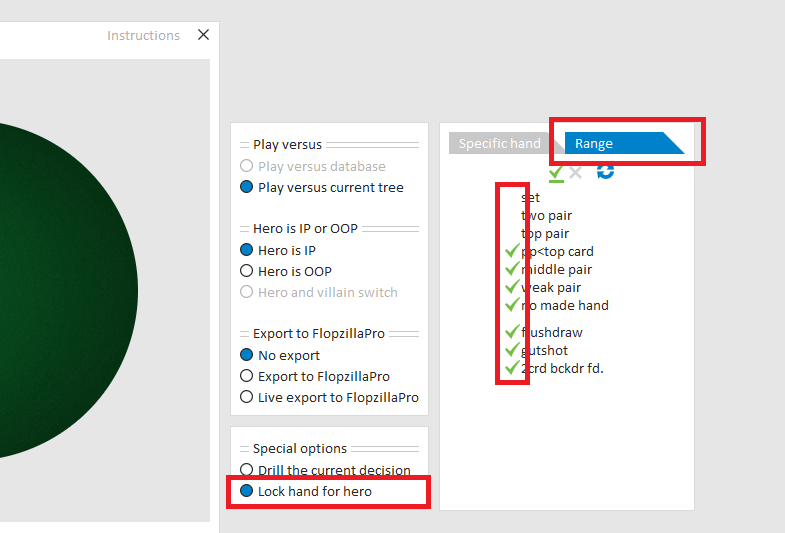
For the moment, what you can do, when drilling versus a single tree, is to select hand types that you want to drill.
For this, select "Lock hand for hero" and select the tab "Range".
See the screenshot below.