888/Party/StarsCaption

This is the support thread for 888/Party/StarsCaption, multi-purpose utilities for the 888, bwin.party, Poker Stars site

HiStarsCaption reads a set of tags from this dialog box, and unfortunately, I can't read more than 10 tags from there at a time.There is a way to set all colors, but it's a little more complicated Turn on Set note via Chat / Notes option here, and use Set note menu to set notes.Set note hotkeys from the list above also can be used with 10+ labels in this mode
Worked perfect this way, thanks a lot
Hi,
Got this new image in the bottom of the pokerstars.pt lobby. Is there a way to take this off from the lobby with starscaption? Really annoying, already missclicked twice. Can´t get it off in the pokerstars software.

Thanks.
Hi,Got this new image in the bottom of the pokerstars.pt lobby. Is there a way to take this off from the lobby with starscaption? Really annoying, already missclicked twice. Can´t get it off in the pokerstars software. Thanks.
Hi
There is no option specifically for this banner, but you can use Lobby / Lobby cropping option for this
If you play cash games, you can rearrange columns in lobby and crop lobby quite a bit. Here is an example screenshot of one of my users:
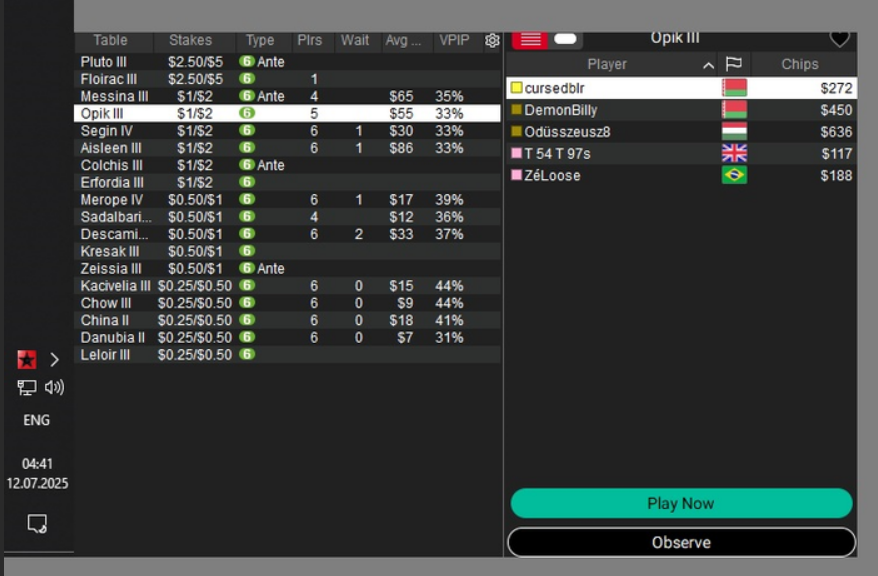
Here the lobby is reduced to a very small size and takes up little space on the screen
You can use Lobby / Global hotkeys / Toggle lobby cropping if you need to see a full lobby at some point
Custom cash lobby filter is available in CoinCaption now
With it you can display only stakes you need:
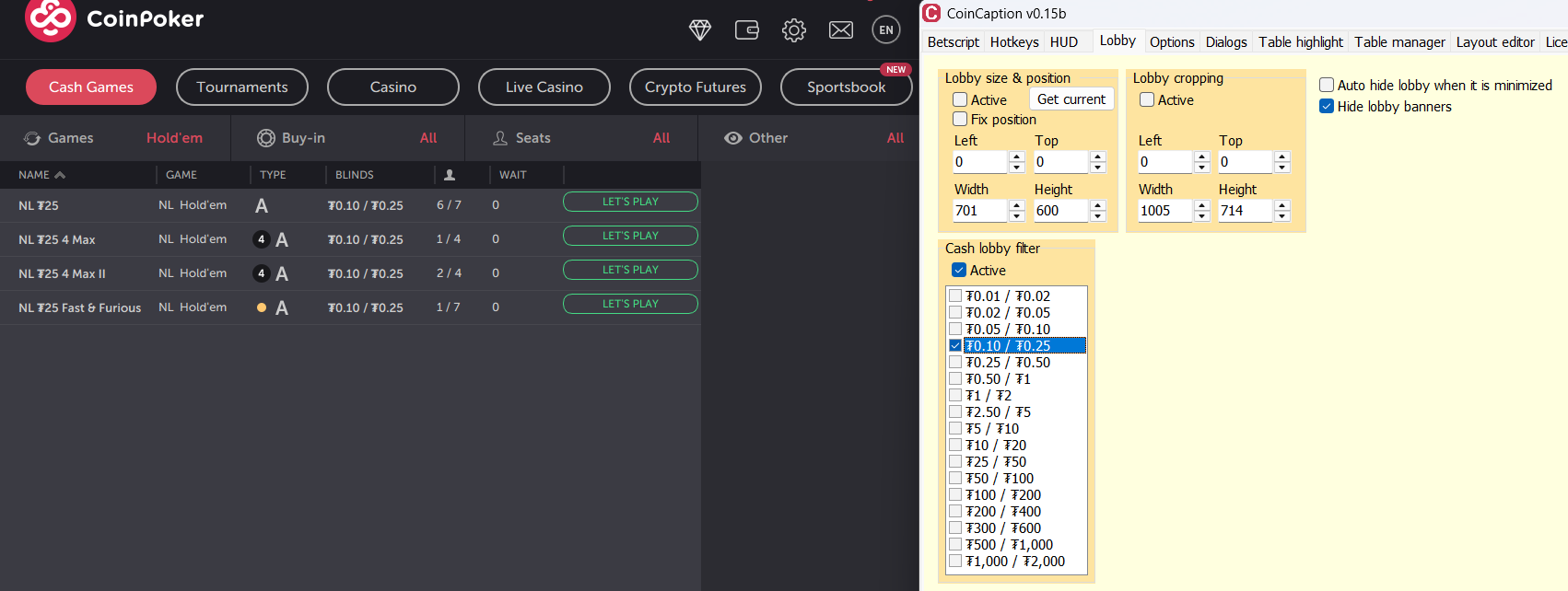
Also there is an option to hide lobby banners

On coincaption, why does "use enlarged color notes" work on plo tables but not nlhe?
Hi
I don't know why this might be, it works on all tables for me
Do you have CoinCaption configured to run as admin as it described
?
Do any other option work for you on these tables?
Have you tried different tables (cash, tournament, 7-max, 4-max, etc.) and it doesn't work anywhere?
Hi!
I have a doubt: I am using stars caption for years and now I am going to start playing on Winamax too.
I have to create slots in Winamax caption and slots for Stars caption and place them in diferent parts of my screen? I can´t use the same slots for both and have all funcionalities? If is it possible would the tables pop correctly?
Thanks!
Hi!
I have a doubt: I am using stars caption for years and now I am going to start playing on Winamax too.
I have to create slots in Winamax caption and slots for Stars caption and place them in diferent parts of my screen? I can´t use the same slots for both and have all funcionalities? If is it possible would the tables pop correctly?
Thanks!
Hi
It depends on how complex the config is that you are going to use.
If you want to use simple grid without stacks and with Regular slots only, then you can use only one Table manager (you can use any of them, from StarsCaption or WinamaxCaption - both of them can handle both Stars and Winamax tables)
If you need something more complex - please let me know what exactly and I'll try to give some advice
You can show me your current TM2 config as an example
HiIt depends on how complex the config is that you are going to use.If you want to use simple grid without stacks and with Regular slots only, then you can use only one Table manager (you can use any of them, from StarsCaption or WinamaxCaption - both of them can handle both Stars and Winamax tables)If you need something more complex - please let me know what exactly and I'll t
What I want is having 12 slots working with both sites, and if i´ll have let´s say a 13 table it will multystack and pops correctly. Is this possible?
I just don´t want to have like 6 slots only for winamax and 6 slots only for pokerstars.
I´ll buy Winamax caption, of course to have hotkeys and preset bets.
Thanks.
What I want is having 12 slots working with both sites, and if i´ll have let´s say a 13 table it will multystack and pops correctly. Is this possible?
I just don´t want to have like 6 slots only for winamax and 6 slots only for pokerstars.
I´ll buy Winamax caption, of course to have hotkeys and preset bets.
Thanks.
If you want to use multi-stack mode, then there is only one way - you can configure some slots for Stars tables in StarsCaption, and some slots for Winamax tables (elsewhere on the screen) in WinamaxCaption
There is no way to create multi-room stacks to work correctly, so you have to configure separate stacks for each room
What I want is having 12 slots working with both sites, and if i´ll have let´s say a 13 table it will multystack and pops correctly. Is this possible?
I just don´t want to have like 6 slots only for winamax and 6 slots only for pokerstars.
Sorry, but there is no way to configure it with StarsCaption+WinamaxCaption

Trying a new layout in Winamax Caption where I have a stack of regular slots in the middle, and manually move tables that I deem important out to my outer regular slots
Is working well but would be great if there were a single hotkey solution to move them to next available regular slot. Right now I think it's only possible to set different hotkeys to different slots?
Trying a new layout in Winamax Caption where I have a stack of regular slots in the middle, and manually move tables that I deem important out to my outer regular slots
Is working well but would be great if there were a single hotkey solution to move them to next available regular slot. Right now I think it's only possible to set different hotkeys to different slots?
Hi
It's possible by this way:
1. Change these outer slots type to Activated
2. Configure activation and deactivation by hotkey:
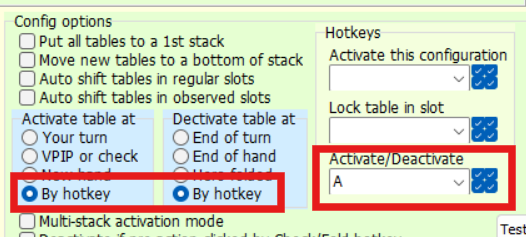
3. Use this hotkey to move a table to a first empty slot and back to the stack
Ah yes, thank you
My problem with this is I lose the "multi-stack activation mode" - without this the most urgent table in my main stack often doesn't pop to front until I've acted on outer tables.
Would it be very nice to have TM2 to work with shortcuts to move tables between slots.
Like windows, with Win+Arrows we can move a window up/down/left/right. Would be very handy to be able to do this with ctrl+alt+arrows, or something like that
Hi,
I know this is asking to much but is there a way in the future you could add a "change font size" feature at least just for the blinds in Winamax Caption?
I struggle a lot even when I increase the size of the tables and when multysiting is worse cause the tables has to be smaller.
Thanks.
Hi,
I know this is asking to much but is there a way in the future you could add a "change font size" feature at least just for the blinds in Winamax Caption?
I struggle a lot even when I increase the size of the tables and when multysiting is worse cause the tables has to be smaller.
Thanks.
Hi
Do you need to see the big blind size in a tournament or something else?
You can display blinds and other information in HUD in any font size.
If you need just a bb value, then [BB]
Although you also can use [SB] and [Ante] if you need them
Thanks!
I have another problem. I have a table doesn´t work nothing! I have to do it all manually! Winamax caption was not able to attach it to the grip and I have to click bottons! Even if I reboot winamax caption he don´t add the table to the grid! How I solve this cause it´s like the third time this week?

Ok no worries. I managed to make an AHK script to handle this 😀
Would it be possible to make it so "Enable Hotkeys" can be assigned a hotkey - having some issues with being my keys getting pressed for me - don't think it's WC related, perhaps H2N is causing it when I have too many tables or something, but would be nice to set this to the Escape key or something whilst I try and resolve this (I realise I can have it as a clickable HUD stat but would still be good if it could be a hotkey)
No bro, is not the BB value, it doesn´t help that. It´s the font of the BB itself that is too small even with large tables. I missclick a lot.
What you're showing is a particular case of bet. All of these are bets:
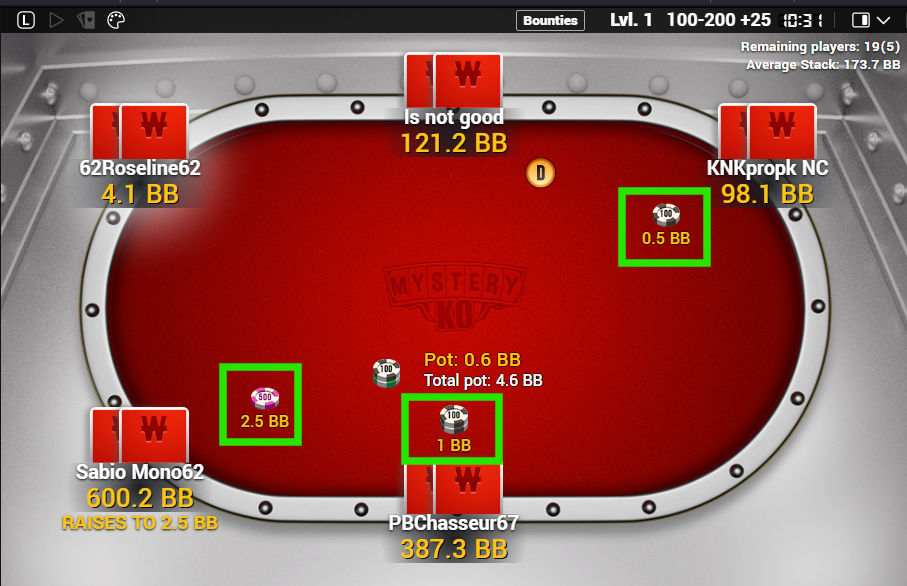
BB value here is 200
Sorry, but I can't change font of bets on Winamax and any other table fonts too.
You can use [bet_bb] tag in Player panels to display them, although it won't look as convenient as replacing the original fonts: