Holdem Manager Support
[IMG]https://forumserver.twoplustwo.com/...
[IMG]https://forumserver.twoplustwo.com/...
[IMG]https://forumserver.twoplustwo.com/...
[IMG]https://forumserver.twoplustwo.com/...
[IMG]https://forumserver.twoplustwo.com/...
[IMG]https://forumserver.twoplustwo.com/...
[IMG]https://forumserver.twoplustwo.com/...
[IMG]https://forumserver.twoplustwo.com/...
[IMG]https://forumserver.twoplustwo.com/...
[IMG]https://forumserver.twoplustwo.com/...
[IMG]https://forumserver.twoplustwo.com/...
[IMG]https://forumserver.twoplustwo.com/...
[IMG]https://forumserver.twoplustwo.com/...
[IMG]https://forumserver.twoplustwo.com/...

I'm currently using the updated HEM3 version. It's v3.1.38.0. When I check updates, it says I'm using tatest stable version of HEM. Where is the option to check beta prompt for updates? Is that necessary? I only update HEM3 when I open HEM3 and there is message of an update and then I just update it. After playing a few sessions, it still has a few issues. Either the amo
a) Version 3.1.38.0 is the current latest version. You will receive a prompt to update HM3 any time there is an update available as long as you have enabled the Tools - Settings - General - [x] 'Check for Updates' and [x] 'Prompt for beta updates' options. You can check for new updates via the HM3 - Help - 'Check for updates...' option. You can also check for updates and release notes in our HM3 Releases forum or in our Release Notes FAQ.
b) For your tournament results issues regarding finish place or prizes:
Please try all the steps in this FAQ.
If you continue to have problems please zip and email the problem original hand histories and tournament summaries to us as instructed with a link to this thread and your forum name. Ensure you also include screenshots of your reports/filters and a detailed description by tournament number, session, hole cards, filter, stat, etc. of some of the errors we need to test.
*Note: Unfortunately, HM3 is not able to determine the value of a 'silver' or 'bronze' pass that you won based on the information in the tournament summaries that Pokerstars writes. You will need to manually edit the results for those tour... via the Reports - Tournaments - Tournaments - right-click a tournament in the upper half of the report grid - Edit - Tournament Editor, then edit as needed and click 'OK' to save the edits.
Regards,
Fozzy71
Customer Support
Hold'em Manager
I went to tools and settings and general and check for updates is checked. Prompt for bet updates is not checked. Is it necessary to have that checked though? Isn't beta updates not the full update so it's best to update HEM3 only when there is a regular update? I am using the current version of HEM3 that you listed.
I checked the FAQ. When I click on overall, it shows nothing at the moment as it filters for today only. If I did this yesterday, it would show a lot of things. My quick filter is today and I always have it that way. So if I don't play a session, it will be empty. After a session, there will be a lot there.
I went to
Inside of Holdem Manager 3 toggle on the HM3 > Tools > Settings... > Import > [x] 'Allow reimport of hand histories' and click 'OK' then import the files via the HM3 - File > Import Files... or File > Import Folder...
It's already checked and a lot of those are checked.
For the default player, I recall you said use a random player as default that you have little recording on as that would make HEM3 faster. That is true right? So when I start a session, I click on start hud and then play. When my session is done, I click on stop hud. Then I change that random username to my username. I then click on file, import files, then it goes to
PC/OS/HM3Archive/Stars/Current Date
Then I copy all the text document results for the session and click open. Then it would import and take from 1 to 3 minutes or so. Then I would click on tournaments to look at overall results for the tournament. That is the correct way to do this right?
This time it was similar and different. The total wins/losses were correct except one tournament. That one tournament was a mystery bounty tournament that I did not cash in nor got any mystery bounty but for some reason it showed a profit of xx amount mystery bounty which is incorrect. Is this normal? I believe this happened with previous mystery bounty tournaments as well. If I was to subtract that mystery bounty bounty amount, it showed my correct win/loss for the sesison. It still has the same issue where several tournaments, it would show me finishing 102th out of 200 players when I finish 12th and things like that. This seems to happen with a few tournaments after every session no matter what.
So based on this what do I do now? Do you want me to send you some files or could I just create a new database and that would fix the issue? How exactly do I create a new database? If I do this, would I need to import my current old database to this new one or that isn't necessary or recommended? I have about 1.3 million hands or so it seems in my database. Now if I do that, would that mean all the hud stats for players I play against would revert back to zero?
I went to tools and settings and general and check for updates is checked. Prompt for bet updates is not checked. Is it necessary to have that checked though? Isn't beta updates not the full update so it's best to update HEM3 only when there is a regular update? I am using the current version of HEM3 that you listed.
Either is fine.
For the default player, I recall you said use a random player as default that you have little recording on as that would make HEM3 faster. That is true right?
So when I start a session, I click on start hud and then play. When my session is done, I click on stop hud. Then I change that random username to my username.
You should only have to do that, if you are having live play performance issues with your own hero name selected.
I then click on file, import files, then it goes to
PC/OS/HM3Archive/Stars/Current Date
Then I copy all the text document results for the session and click open. Then it would import and take from 1 to 3 minutes or so. Then I would click on tournaments to look at overall results for the tournament. That is the correct way to do this right?
You should not have to do this every single session. You only do this if you are following that FAQ I linked above.
This time it was similar and different. The total wins/losses were correct except one tournament. That one tournament was a mystery bounty tournament that I did not cash in nor got any mystery bounty but for some reason it showed a profit of xx amount mystery bounty which is incorrect. Is this normal? I believe this happened with previous mystery bounty tournaments as well.
You should finish the instructions in that FAQ.
Please try to create a new small/test database: File - 'New Database...' then manually import some hands to the new database via File - 'Import Folder...' - from C:\HM2Archive and/or C:\HM3Archive - https://kb.holdemmanager.com/knowledge-b...
If you continue to have problems with the tournament results, you should send me the recent hand history files and tournament results files, with screenshots/details of a few specific tournament 'Numbers' which are incorrect, and what the correct results should be if you know.
Please zip and email the original problem hand histories and tournament summaries to us as instructed
with a link to this thread and your forum name. Ensure you also include screenshots of your reports/filters and a detailed description by tournament number, session, hole cards, filter, stat, etc. of some of the errors we need to test.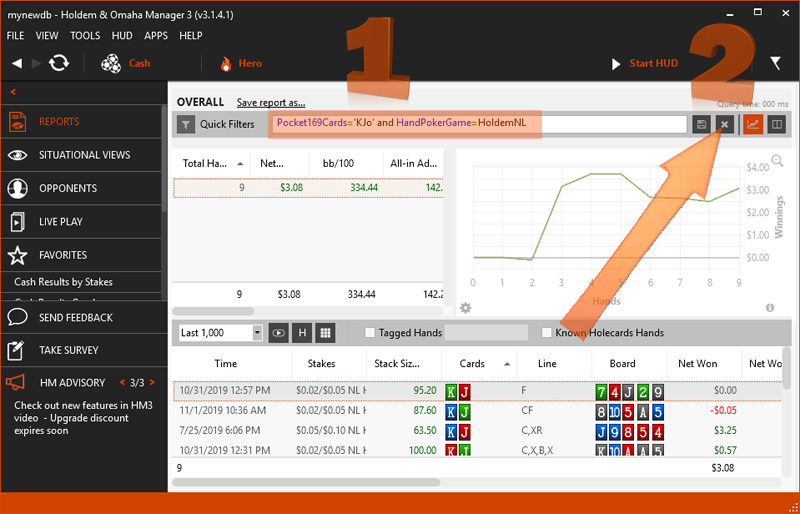
Regards,
Fozzy71
Customer Support
Hold'em Manager
I am going to create a new database. When I click on file and then new database, a popup shows
MYHM3Database that is dated today
MYHM3Database that seems to be dated a month ago
Am I suppose to click of one of these and then click open? I am confused here as I am creating a new database so why does this popup show up?
So I have to import from my old database to the new one? How much do I import? I have 1.3 million hands in my HEM3 database I believe. If I start new, that means I would have nothing though right? Thus no stats on any players with my hud if I don't import anything?
I want to still have hud stats on players. I don't mind having tournament results recorded correctly starting now.
I can't make it where all my tournament results would be recorded correctly right from the start unless I manually input tournament results which would take way too long? This had to do with me using the old HEM3 version from when I was using the outdated one right?
I am going to create a new database. When I click on file and then new database, a popup showsMYHM3Database that is dated todayMYHM3Database that seems to be dated a month agoAm I suppose to click of one of these and then click open? I am confused here as I am creating a new database so why does this popup show up?So I have to import from my old database to the new one? How
What you are seeing are your existing databases, which already have hands in them. If you have 2, one with a date in the file name, it means that your database may have been corrupted and recreated in the past.
You are NOT supposed to click one of the existing databases, you have to create a new/empty database and then import some of your previously played hands from the archive.
Please try to create a new small/test database: File - 'New Database...' and type a new database 'File name' to create an empty database as instructed in the FAQ I linked previously - https://kb.holdemmanager.com/knowledge-b...
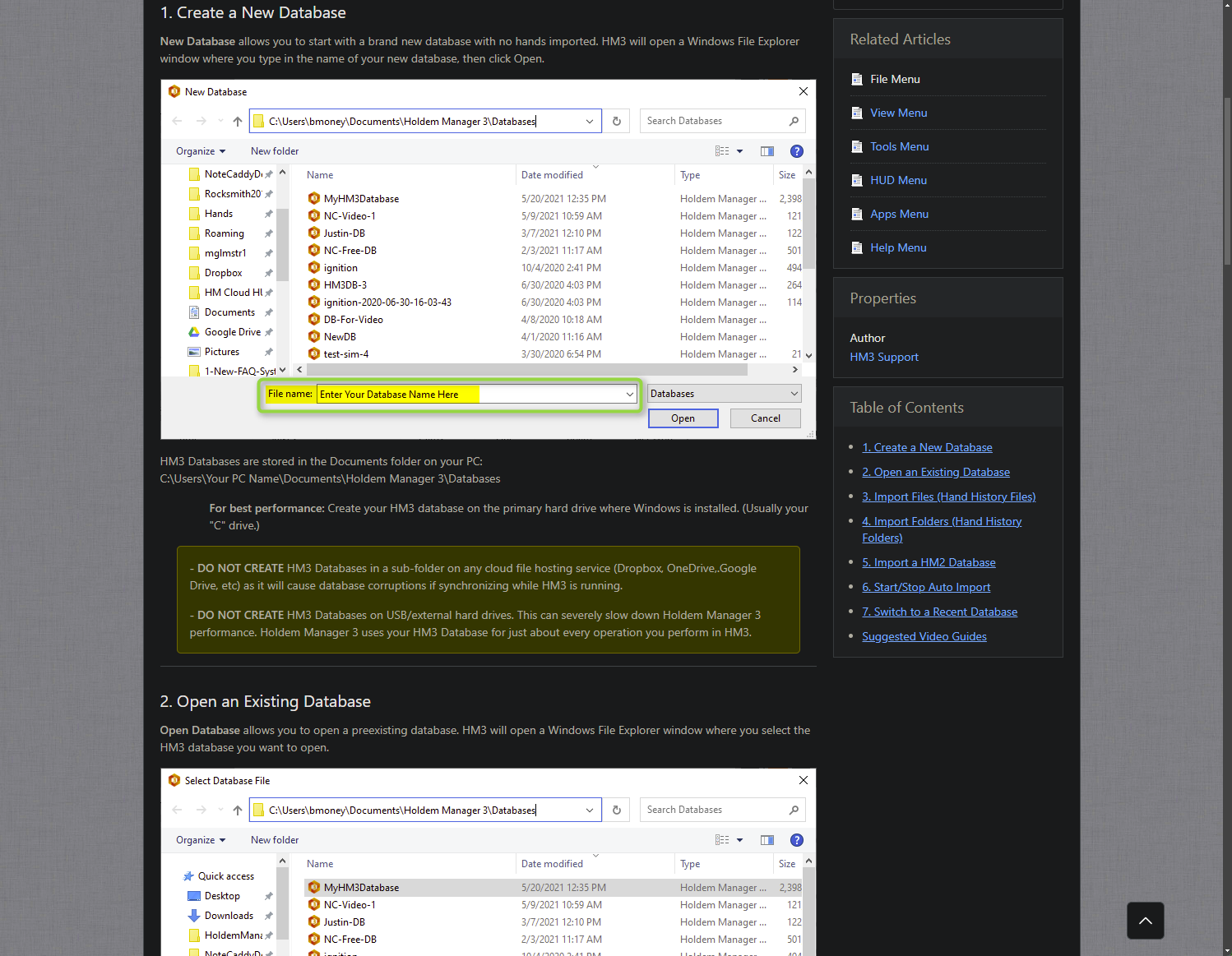
Then manually import some hands to the new database via File - 'Import Folder...' - from C:\HM2Archive and/or C:\HM3Archive as instructed here - https://kb.holdemmanager.com/knowledge-b...
Regards,
Fozzy71
Customer Support
Hold'em Manager
I didn't create a database yet. I played a session on stars. I then clicked on tournaments and noticed the win/loss amount is incorrect. Not only that, a ton of the same errors like tournaments with a $12 buyin which isn't possible and things like that. Basically like how it was back then before I renewed HEM3 and was using an old version of HEM3. I then went to file and import files and copied all the tournament results files for the session. That takes a few minutes to import. I mentioned I do this after every session.
I then noticed the win/loss was still off but it wasn't by a lot. The reason is because it recorded a mystery bounty profit incorrectly. I recalled for one specific mystery bounty, I got a certain amount and that amount was incorrect in the tournament results. However, there was none of that error with the $12 buying for tournaments.
Yes my database has been corrupted before most likely. Several times when I did the import files, it shows import errors and a few of them. That happened a ton when I was using the outdated HEM3 version. I might have had this happen when using the updated HEM3 version but not sure.
When I go and click on file and new database, it opens up what I mentioned earlier. You say below means the database is corrupted.
MYHM3Database that is dated today
MYHM3Database that seems to be dated a month ago
How do I create a new/empty database? I checked the FAQ and confused on this. When I click on new database, there is that popup with the 2 files above and only thing you can do would be click on either and click open. How do I create a new database if that shows up?
..
How do I create a new/empty database? I checked the FAQ and confused on this. When I click on new database, there is that popup with the 2 files above and only thing you can do would be click on either and click open. How do I create a new database if that shows up?
File - 'New Database...' then type a new database name in the 'File name:' box at the bottom of the 'New Database' window.
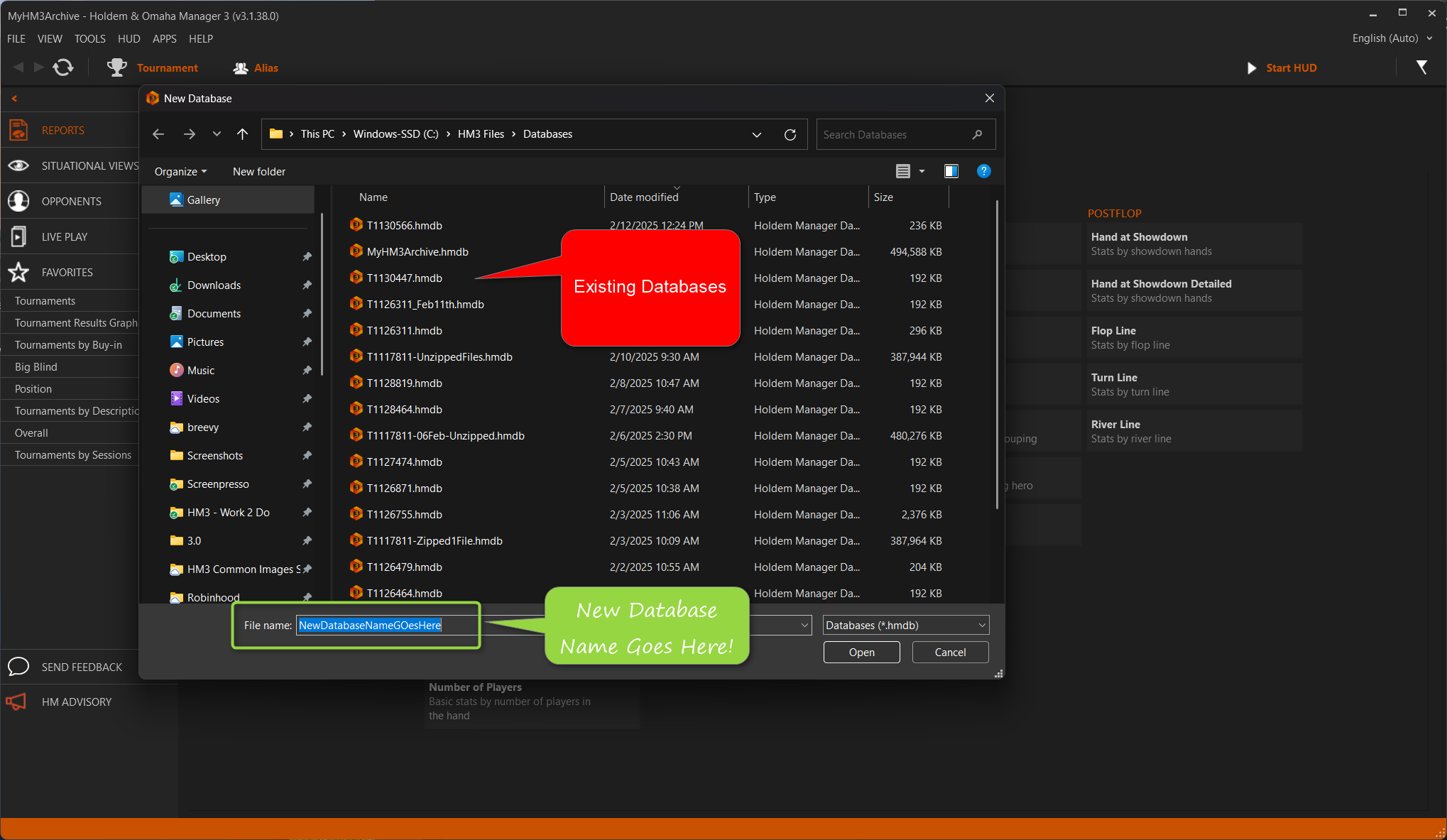
I clicked on file and new database. Then I typed in New HEM3 Database and then clicked enter. When I click on new database or open database now... there are 3 databases. Is that how it's supposed to work?
I then played a session but did go back to my old database as I wasn't sure if I make the new database by default... the HUD would show old stats of players? So I went back to whichever was my default database. I played a session on stars and then did the import files and the win/loss was off by a bit and the placed finish in several tournaments are not correct.
So you want me to make below my default database?
New HEM3 Database
You mentioned to import a bit. How exactly do I do this? I have like 1.3 million hands in my database. How many files do I have to import into this new database? Do I start from a certain date? So if I don't do any importing, what happens? Does that mean if I use a new database and then start playing... the HUD stats would show nothing on any players because you are starting new? But if you import all the 1.3 million hands, it would have everything? But lot of files as you mentioned are corrupted.
This is how it looks below if you click on new database or open database.
MYHM3Database that is dated today - 9,400,000 kb
MYHM3Database that seems to be dated a month ago - 8,600,000 kb
New HEM3 Database that was created today - 192 kb
I clicked on file and new database. Then I typed in New HEM3 Database and then clicked enter. When I click on new database or open database now... there are 3 databases. Is that how it's supposed to work?
Yes. You had 2 databases and created a new/third database.
I then played a session but did go back to my old database as I wasn't sure if I make the new database by default... the HUD would show old stats of players? So I went back to whichever was my default database. I played a session on stars and then did the import files and the win/loss was off by a bit and the placed finish in several tournaments are not correct.
For the HUD to show stats in the new database you need to import some old hands from your archive older.
That is up to you. If you are having performance issues due to your existing databases having over a million hands then I would recommend it. If you import only the last 3 X months of hands, instead of all 1.4 million hands you have ever played, the new database/HUD should perform better when playing.
You mentioned to import a bit. How exactly do I do this? I have like 1.3 million hands in my database. How many files do I have to import into this new database? Do I start from a certain date? So if I don't do any importing, what happens? Does that mean if I use a new database and then start playing... the HUD stats would show nothing on any players because you are start
HM3 - File - 'Import Folder...' and select the folders you want to import. I would recommend you start with the perhaps just this year, and last year, and see how that goes.
If you don't manually import any hands and use this new database the HUDs of all players will start with 0 hands, as they don't have any old hands in the database.
Your old archived hands are not corrupted. I said your previous database might have had a corruption at one point, as HM3 created a duplicate with a date in the name. It also might not have been corrupted, and it could have just been a bug where HM3 created a duplicate database by mistake. I think we had a bug briefly where that happened but I don't recall the specifics of what caused that to happen.
This is how it looks below if you click on new database or open database.
MYHM3Database that is dated today - 9,400,000 kb
MYHM3Database that seems to be dated a month ago - 8,600,000 kb
New HEM3 Database that was created today - 192 kb
The new database is still empty and does not have any hands in it yet.
All I wanted you to try doing was to create a new database (which you have now finally done) and then manually import your hand history files and tournament summary files from your most recent session, or import them all from this month or this year, and see if you have the same tournament detection issues when manually importing the hands.
Then try playing a new live play session with the new database using the Auto Import process and see if you also have tournament detection issues.
If you have the same tournament detection issues with the new database then you should [URL="https://kb.holdemmanager.com/knowl...[/URL] so that we can make sure the tournament detection bugs are written up for our developers.
If the new database has the same tournament detection problems as your existing database then there is no reason to bother importing more hands to the new database to use that, unless your exisating large database causes performance/lag issues when playing.
Regards,
Fozzy71
Customer Support
Hold'em Manager
There doesn't appear to be performance issues with HEM3. However, after every session of importing files, sometimes it would show in bottom left corner import errors though.
Would you recommend me to start importing from the date I renewed my HEM3 subscription? Or is it fine to just import the last 3 months? But don't go that far back? My HEM3 database is over 2 years and has 1.3 million hands. The thing is I want to go as far back as I can where the HEM3 would now start recording tournament results correctly. It always show incorrect placed finished in a few tournaments every single time.
The thing is if I only record the last 3 months, wouldn't that mean players that I have say 5k hands on will show much less than that? I did recall you mentioned a while back it's not good for a huge database because players change their style so their overall stats after say 10k hands from a long time is going to be different than compared to recent? So say I want to record for much longer than 3 months. If there are issues with it recording results incorrectly, then just create a new database then and now make it 3 months importing?
There doesn't appear to be performance issues with HEM3. However, after every session of importing files, sometimes it would show in bottom left corner import errors though.Would you recommend me to start importing from the date I renewed my HEM3 subscription? Or is it fine to just import the last 3 months? But don't go that far back? My HEM3 database is over 2 years and ha
Just import the hands from this month or this year to test if the import results are correct in the new database or not. If the new database has the same problems then send us the hands/summaries, and screenshots in a support ticket for us to test, and then switch back to your larger/lifetime database when you play live so that you have all your opponent data. If the new database has the same problems with tournament results, there is no need for you to import all the rest of your hands to the new database.
Regards,
Fozzy71
Customer Support
Hold'em Manager
Okay so this is what I did. I played another session with the older database. Then I did the file and import files. When I checked tournament results, the net won/loss was correct. However, same issue with several tournaments where the finished place is not correct.
I then went to the new database I created. I went to import only this month. When I do this, you have to manually do it daily right? You can't like have it import the entire month? What I did previously was file, import files, then copy and paste all the text document for the entire day. Then it would take a short while to import and then finished. I did that. I then noticed you could instead just click on file, import folder and then click on select folder and it imports the same exact way? The only difference is a bit faster since you aren't like copy and pasting and scrolling down right? So I then did that for every single day of the month.
When I went to check my last session tournament results, I noticed the net won/loss was off by $109. I then checked the tournament results and noticed it was the $55 Power Path Tournament where I cashed for a Bronze which is worth $109. It showed as -$55 Net Loss for that tournament even though I cashed for a Bronze. You had mentioned HEM3 does not record whatever winnings you have corrected for only this specific tournament right? So if you win a bronze or silver or gold, it would always record it as -$55 Net Loss? But what if you cash for like a cash prize? If it does pay cash for this tournament, it's always one player before the next prize is the on Bronze.
My older database would record the $55 Power Path tournament correctly only if you cash in Bronze or if you don't make the money. Is there a reason why it does that?
I then checked the other tournaments for the session and it seems correct with net amount won or loss and reentry amount and most importantly the place finished.
Would you suggest I import last month as well to it or just keep it the way it is now? It was last month that I renewed my HEM3 subscripton. The thing is if I import say before I renewed HEM3, there is a chance that there would errors and it would carry onto the new database? Or there isn't?
Okay so you are suggesting when I play, just go to the older database. Then file, import for the current session for the older database that I do after session since I mentioned I always did this because the older database was always incorrect with net amount won or loss. I don't need to do that for the new database as it should record it correctly? So the only tournament that HEM3 does not record correctly is that $55 Power Path Tournament so you have to manually edit your winnings if you do cash in it right? Do you know if HEM3 records results for mystery bounty tournaments correctly? I know that it never did with my older database for mystery bounties.
So I went through the new database and besides the $55 Power Path Tournaments that showed an incorrect net win or loss on some tournaments, there were 1 or 2 tournaments the place finished was incorrect. This is after doing the importing. Like it showed me finishing 2200 out of 2500 players when the finish was like 12th or something like that.
Would that affect anything moving forward or not?
Thanks.
For some reason, you make things far more complicated than they need to be. Just send me the hands/summaries of any tournaments with errors, with screenshots/details of the errors, for testing, please.
Okay so this is what I did. I played another session with the older database. Then I did the file and import files.
There is no reason for you to have to do this.
- Close your poker clients, close HM3, and right-click - 'Exit' the HM3 Server icon in the Windows Notification Tray.
- Restart HM3 and ensure HM3 and the HM3 Server (Auto Import/HUD) are fully started.
- Launch your poker client(s).
Play poker and the HUD will show, and the hands and summaries will auto import.
When I checked tournament results, the net won/loss was correct. However, same issue with several tournaments where the finished place is not correct.
IF the results are incorrect after you play and auto import during a session just send mem the hands/summaries with screenshots/details of the errors as instructed here -
I then went to the new database I created. I went to import only this month. When I do this, you have to manually do it daily right? You can't like have it import the entire month?
- If you choose the 'Import Folder...' option in HM3 you can import an entire month, or entire year.
- If you choose the 'Import Files...' option you will be limited to importing only files from a single folder/day.
When I went to check my last session tournament results, I noticed the net won/loss was off by $109. I then checked the tournament results and noticed it was the $55 Power Path Tournament where I cashed for a Bronze which is worth $109. It showed as -$55 Net Loss for that tournament even though I cashed for a Bronze. You had mentioned HEM3 does not record whatever winnings y
It depends what the summary file writes. If the summary file says that you won a ticket, we can't know the value of the ticket, so you will have to manually right-click -b Edit' the results in the 'Tournaments' report. If the summary file writes that you won a USD or EUR prize, HM3 should be able to detect it.
My older database would record the $55 Power Path tournament correctly only if you cash in Bronze or if you don't make the money. Is there a reason why it does that?
Please send us the original hand history file, and tournament summary file, for this tournament 'Number' with screenshots/details of the errors as instructed here -
Would you suggest I import last month as well to it or just keep it the way it is now? It was last month that I renewed my HEM3 subscripton. The thing is if I import say before I renewed HEM3, there is a chance that there would errors and it would carry onto the new database? Or there isn't?
Importing the previous months/years to the new database should show better overall results for many of the older tournaments, but I can't say for sure which ones or how many it will correctly update.
Okay so you are suggesting when I play, just go to the older database. Then file, import for the current session for the older database that I do after session since I mentioned I always did this because the older database was always incorrect with net amount won or loss. I don't need to do that for the new database as it should record it correctly? So the only tournament tha
I suggest that you stop using the old databases, and use the new database going forward. There should not be any reason to have to manually import the archived hands after every session any longer. That was a bug, that has been fixed in the new version of HM3 that you are now able to update to.
For every session going forward:
- Close your poker clients, close HM3, and right-click - 'Exit' the HM3 Server icon in the Windows Notification Tray.
- Restart HM3 and ensure HM3 and the HM3 Server (Auto Import/HUD) are fully started.
- Launch your poker client(s).
Play poker and the HUD will show, and the hands and summaries will auto import.
If you have issues with tournament results detection after the session, simply zip the hands/summaries from the archive folder and send them to us via the HM3 'Send Feedback' with screenshots/details of the errors in the Tournaments report.
So I went through the new database and besides the $55 Power Path Tournaments that showed an incorrect net win or loss on some tournaments, there were 1 or 2 tournaments the place finished was incorrect. This is after doing the importing. Like it showed me finishing 2200 out of 2500 players when the finish was like 12th or something like that.Would that affect anything moving
Please zip the hands/summaries for that tournament from the archive folder and send them to us via the HM3 'Send Feedback' with screenshots/details of the errors in the Tournaments report.
Regards,
Fozzy71
Customer Support
Hold'em Manager
I will some send of the stars ones to you on this.
Does HEM3 not record 888 tournaments correctly at all? When playing on 888 with HEM3 and 888caption64, there is a ton of lag when playing lot of tables. The client freezes and then I have to close it and log back in. This happens multiple times to where it's almost unplayable. I did notice however when during a freeze, if I stopped the HEM3 hud, it sometimes would get back to normal. I know their software isn't that good but the HEM3 hud is causing this issues right? I do have a lot of HEM3 hud stats and I believe you said the more stats you have showing on hud, it more chance it would lag?
I was using my old database while playing on 888 and when I didn't import folder after the session and just checked my tournaments, it did not show any rebuys or add ons at all. Thus the net won/loss is completely incorrect as it counted every tournament as no rebuy or addon. Now when I did the importing folder, it did showed lot of errors though. Is that why? But when I played just a few 888 tournaments in an older sesion, it had the same issue? It doesn't seem to record any rebuys or addons. This was when playing say just a few 888 tournaments while playing on stars as well so no lag at all or client freezing on 888. When I import the folder to the old database, I think it did show 1 or 2 errors. So that is why? I am not sure if it ever showed 0 errors though.
I didn't want to import the folder to the new database I created as I figure problems would then be on the new folder? Or that wouldn't have any effect? I have a feeling that even if I play on 888 with my new database and then import folder after the session, it isn't going to record results correctly in that it doesn't record any rebuys or addons?
By default, HEM3 shows the average vpip and pfr with the last 2 hands with table averages right? Is there a way to not have that show on the table? Is there a way to like make it invisible and make it visible with a hotkey or that isn't possible? My hud has lot of stats so I kind of want to have that not on the table but sometimes want it on the table.
I will some send of the stars ones to you on this.Does HEM3 not record 888 tournaments correctly at all? When playing on 888 with HEM3 and 888caption64, there is a ton of lag when playing lot of tables. The client freezes and then I have to close it and log back in. This happens multiple times to where it's almost unplayable. I did notice however when during a freeze, if I
a) If you are having issues with the 888 tournament results detection, please send us some hands and summaries with screenshots/details of specific tournament numbers with errors (and what the proper results should be, if you know) as instructed here -
b) Do you have the same lag if you play without 888caption64? Or with a smaller database? Or with a less complex HUD?
Do you have the same HUD Lag if you use the HM3 'Standard' HUD profile? Try to remove any unused or extra popups from your custom HM3 HUD profile. With HM3 it loads the stats for all the associated popups even if you are not using them. This should help speed up the overall HUD and popups performance.
- HM3 - HUD - HUD Editor - 'Profile:' = select the profile you want to edit.
- Options - 'Export' or 'Duplicate' the profile so you have a backup copy before you make any edits.
- Click the 'Popup Groups' button in the upper right corner.
- In the upper left under 'Groups' you can select then 'Delete' any unused popups.
If you continue to have problems:
- Does it help if you open the HM3 - Apps - NoteCaddy menu and 'Disable NoteCaddy'?
- Try disabling the HM3 - Live Play - [ ] 'Automatically refresh' option
- If you have an 'Alias' selected as the active player try selecting a specific site screen name with fewer hands and exit HM3, close the HM3 server, and restart HM3.
- Try to remove positional stats directly in the hud (stats using position item property in the Hud Editor)
- Try to reduce the number of stats in the HUD
- Try to disable session stats in tooltips (HM3 - HUD - HUD Options)
- Try to set the max number of hands limit lower in HUD Options
- Try to reduce the number of hands in the database (new database and import only a small portion of the hands)
- For popup loading speeds: reduce the number of popups and complexity of the popups
By default, HEM3 shows the average vpip and pfr with the last 2 hands with table averages right? Is there a way to not have that show on the table? Is there a way to like make it invisible and make it visible with a hotkey or that isn't possible? My hud has lot of stats so I kind of want to have that not on the table but sometimes want it on the table.
You can remove that part of the HUD display if you do not want to see it. Open the HUD - 'HUD Editor...' and select the HM3 HUD 'Profile' that you want to remove it from. In the upper left 'Group' window select the 'Table Averages' group and click the 'Delete' button. Then click the Apply or OK button to save the changes.
If you want it available, but less visible, you can reduce the opacity until it is moused over:
HUD - HUD Editor - Select the profile you want to edit then select the 'Group' (i.e. the 'Table Averages' group) you want to modify to behave this way - Display = 'Lower Opacity Until Mouse Over' - 'OK' as shown in this image - https://www.dropbox.com/s/gwohv8e8k7zicr...
The amount of opacity is controlled in the HUD Options - Advanced menu - https://www.dropbox.com/s/h7o16dn1rve2by...
Regards,
Fozzy71
Customer Support
Hold'em Manager
I will send the 888 tournament results. The thing is this time, I was playing on 888 while having the new database opened instead. So there is no 888 history on it and only stars. Once I started playing on 888 with HEM3 and hud and 888caption, the moment I have say 10 tables, the client freezes and lags and I have to force close the client. Then log back in again. The issue this time is it didn't seem like I could even log back in. I kept getting this message from 888 client of can't connect to the server. This was while I stopped the hud. I even closed HEM3 and 888caption and after many tries, I could log in. Once I logged in again, I only opened 888caption while playing. I did open HEM3 but did not turn on the hud. That means HEM3 is still running right but no hud? I notice there wasn't as much lag and freezing with the hud turned off but still lag.
Then after a while where I had less than 10 tables, I went bakc to turning on the HEM3 hud and played the rest of the session with it as it was under 10 tables or so.
Now after playing, I went to tournament overall results and clicked import folder for 888 files. When I did this, it showed at least 10 import errors. That is obvious because of how many times the 888 client frozed and I had to open it many times. However, it took so many open and close client of 888 for it even allow me to log in. Now once I imported the 888 tournament folder for the session, it didn't show any rebuys or add ons correctly yet again. The strange thing was the net win/loss for the sesion was off but it wasn't that far off. I am confused how that even happens when it shows 0 for all 888 tournaments with no rebuy amounts? Many tournaments I rebought multiple times.
The thing is did I corrupt my new database by importing this last session's 888 tournaments? I would be able to delete these tournaments if I wanted to form the new database?
Now the previous 888 session I played, it was similar with the software issues. I was playing while using the old database. When I did the folder import of 888 tournaments to the old database, it had the same import errors but it wasn't as much. Now when you check overall for tournaments, it didn't show any rebuys or add ons and was off by a lot for the net win/loss. So I could send you the 888 tournament results for the previous session and the one for the last session I played and you can check that out?
The Lower Pacity Until Mouse Over works. That is nice. You can't do that with hud stats right or you can? I believe you said you could but it isn't the main hud but that extra hud?
I believe you mentioned last time when all in, you can't have the hud disappear tempoarily right? The reason is because since my HUD has lot of stats, it blocks other playrs cards when shown whether regulary or all in so wanted to know if it was possible.
I will send the 888 tournament results. The thing is this time, I was playing on 888 while having the new database opened instead. So there is no 888 history on it and only stars. Once I started playing on 888 with HEM3 and hud and 888caption, the moment I have say 10 tables, the client freezes and lags and I have to force close the client. Then log back in again. The issu
If you are having these issues when 10-tabling with a new/small database, all I can suggest is to try the steps I posted above. It sounds like the 888 client + Stars Caption + HM3 HUD is using too many resources for your computer resources. A simpler, less complex HUD might help.
Now after playing, I went to tournament overall results and clicked import folder for 888 files. When I did this, it showed at least 10 import errors. That is obvious because of how many times the 888 client frozed and I had to open it many times. However, it took so many open and close client of 888 for it even allow me to log in. Now once I imported the 888 tournament fol
The hand history files likely have some incomplete hand histories within them causing the errors. The separate tournament summary files contain the results in terms of your finish place and prize.
Now the previous 888 session I played, it was similar with the software issues. I was playing while using the old database. When I did the folder import of 888 tournaments to the old database, it had the same import errors but it wasn't as much. Now when you check overall for tournaments, it didn't show any rebuys or add ons and was off by a lot for the net win/loss. So I c
Send us the hand history files, and tournament summary files, with screenshots and details of specific errors by each tournament 'Number' variable.
The Lower Pacity Until Mouse Over works. That is nice. You can't do that with hud stats right or you can? I believe you said you could but it isn't the main hud but that extra hud?
You can do that with the other panels in the HUD as well.
I believe you mentioned last time when all in, you can't have the hud disappear tempoarily right? The reason is because since my HUD has lot of stats, it blocks other playrs cards when shown whether regulary or all in so wanted to know if it was possible.
No, HM3 has no way to know if you are suddenly shoving all-in. All you can do is try to make the HUD smaller by reducing the number of stats, or by reducing the stat font size. Reducing the number of stats in the HUD and/or popups would also help improve overall performance.
Regards,
Fozzy71
Customer Support
Hold'em Manager
For 888, I played a few sessions there recently. Not once has it ever recorded the rebuys correctly... it never recorded any rebuys. This is with my old database which as lot of errors and even my new database. I did one session where I had the new database opened as default while playing on 888. So do I just send that folder from a few of the 888 sessions for that and you can tell by it?
On stars, it doesn't matter if I'm on the old or new database anymore now. After every session, I would import the folder. I know you said that shouldn't even be necessary but if not, it would show wrong buyin amounts for tournaments that doesn't exist... like $12 buyin. For some reason, the results many times is not the same with the old database and new one. What has been the same thing is it keeps adding amounts won for mystery bounty tournaments where it is incorrect.
Now on days where I didn't play a mystery bounty tournament on stars, the net win/loss with the new database is wrong as well but not by much. Previoulsy a few a sessions, the net win/loss was exactly correct. Right after this stars session, I imported the folder for each database... and the results on both are the same but incorrect. The new database now shows incorrect place finished like 12 out of 22 players when there are like 200 players. It would show obviously mistakes like in the money which is correct in a tournament but then showed finished 222 out of 450 which is obviously not correct.'
How do I send this specific folder history for today's session to you? I will tell exactly the errors on today's tournaments.
* When sending any files please zip them (select all files with CTRL+A > right-click > send to > compressed folder) before attaching them to an email.
This is what you posted above.
Can you tell me exactly how I do this step by step? I did this a while back when sending you files a while back but forgot how to do this now. You have to compress it into a folder right and have it saved in desktop right? I use windows 11 pro. So type in file explorer, then this PC and click on HM3Archive? It then shows 888poker, Pacific Poker folder, Stars Folder and WPN Folder. So click on Stars folder. Then it shows the years so click on this year. Then when it shows the months of this year. So you want me to send like several days right? Say 2 sessions of me playing on 888 with the tournament results and 3 sessions of me playing on stars with the tournament results and then mention what are the errors? If I click on this month, then on the specific day folder, then it show all the tournament results for one day.
So click on control and letter A which highlights all the tournament results files, then send to compressed (zipped) folder which would have this folder show on my desktop right? Then when sending the email, select that folder? So do this with say a few 888 sessions and stars sessions from the new database right? I only played a few sessions on stars where I have the new database as the selected one because the older one has more information. Then after each session, I would do the import folder into each of these databases.
Only a few times did the new database showed a stars session correct in terms of net win and loss. Recently it has not been correct even once.
If you need to send more than one day of hands you can use the use the Ctrl key plus the Left Mouse Button to highlight multiple days of folders before you right-click and compress them:
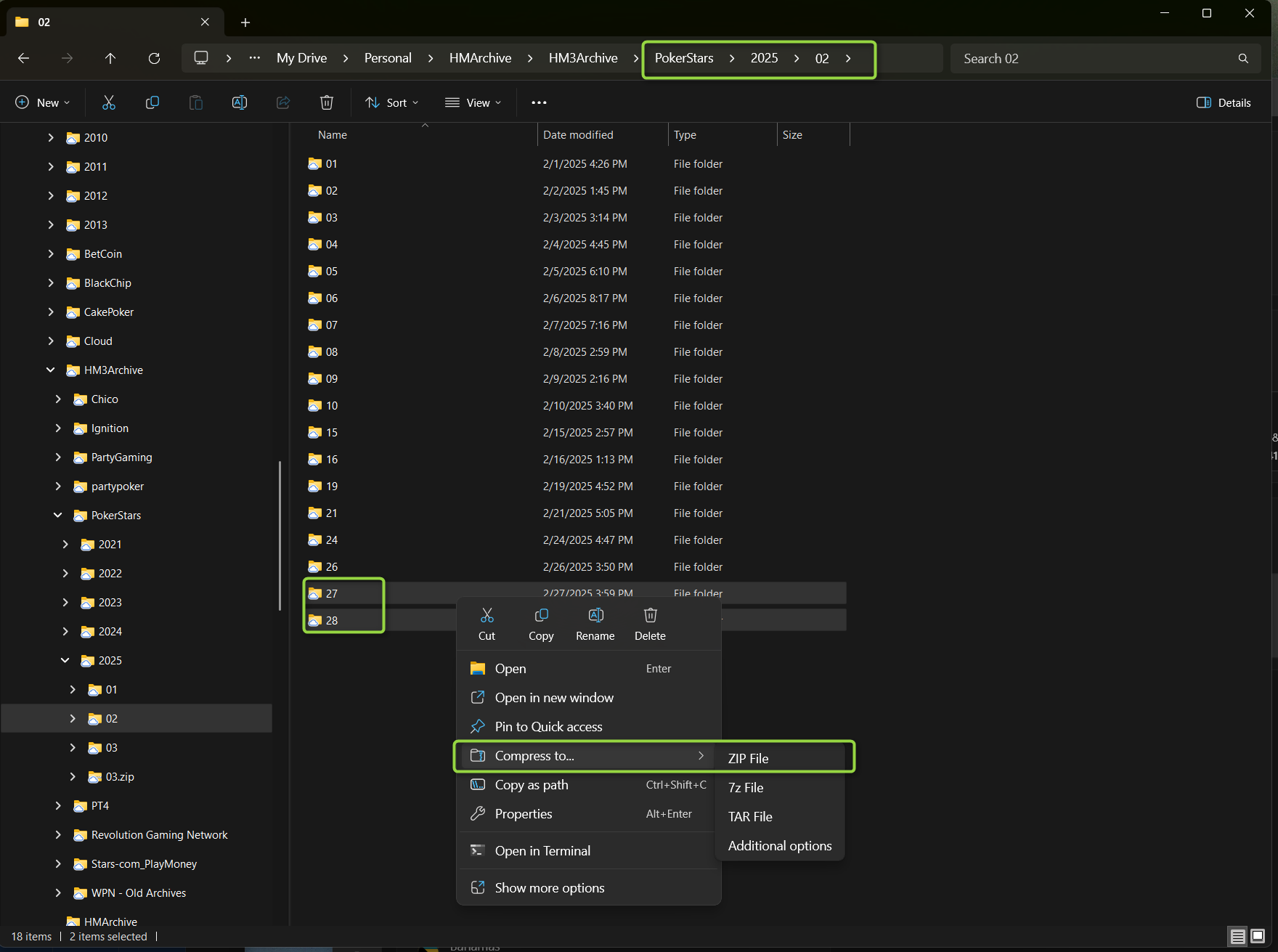
Or, you can just compress the entire month of hands if that is easier and tell us via text and screenshots which days from that month had the errors and what specific tournament 'Number' had errors you had on those days.
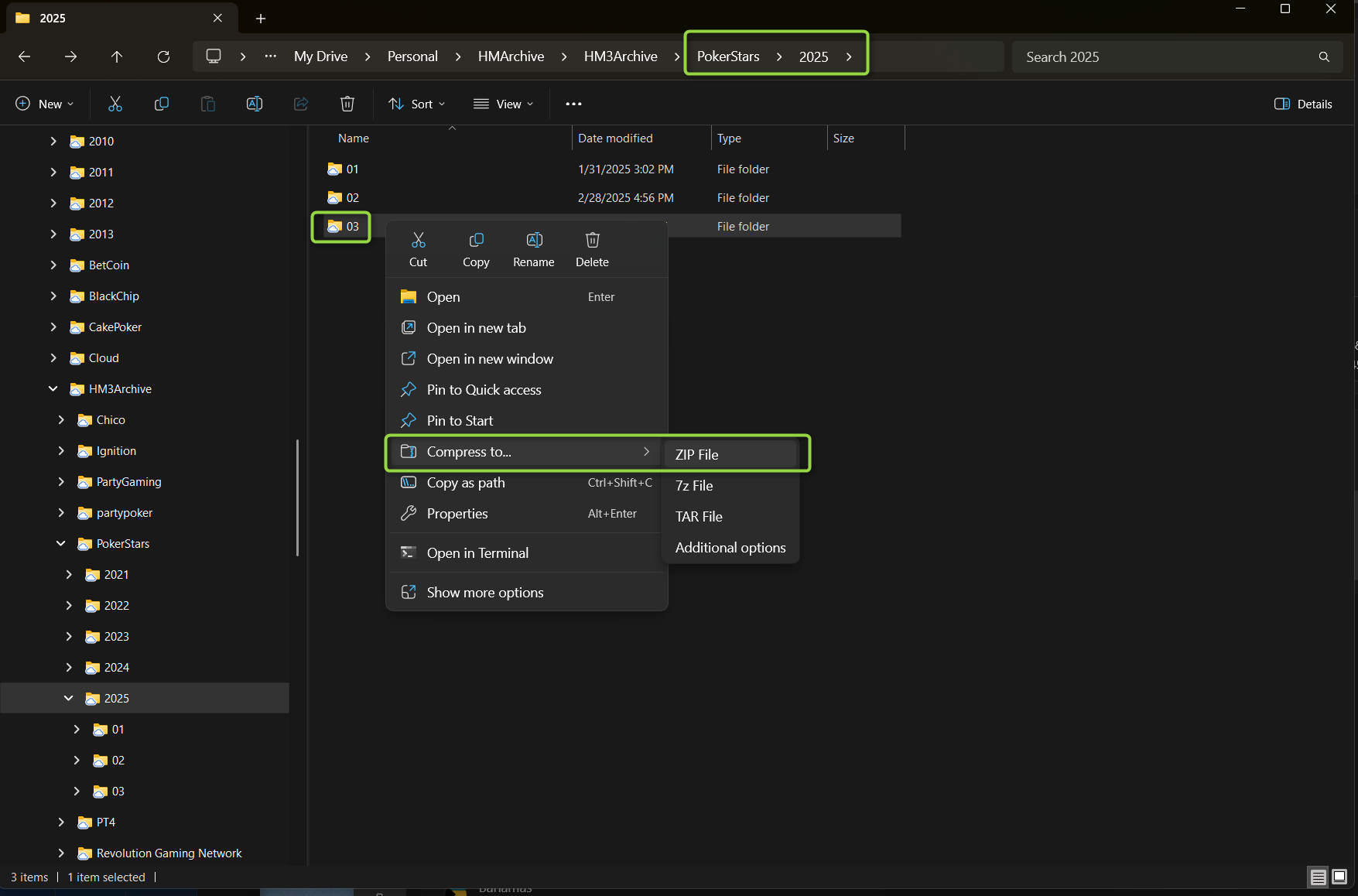
Note: The compressed *.zip file gets saved to that same folder, not the desktop.
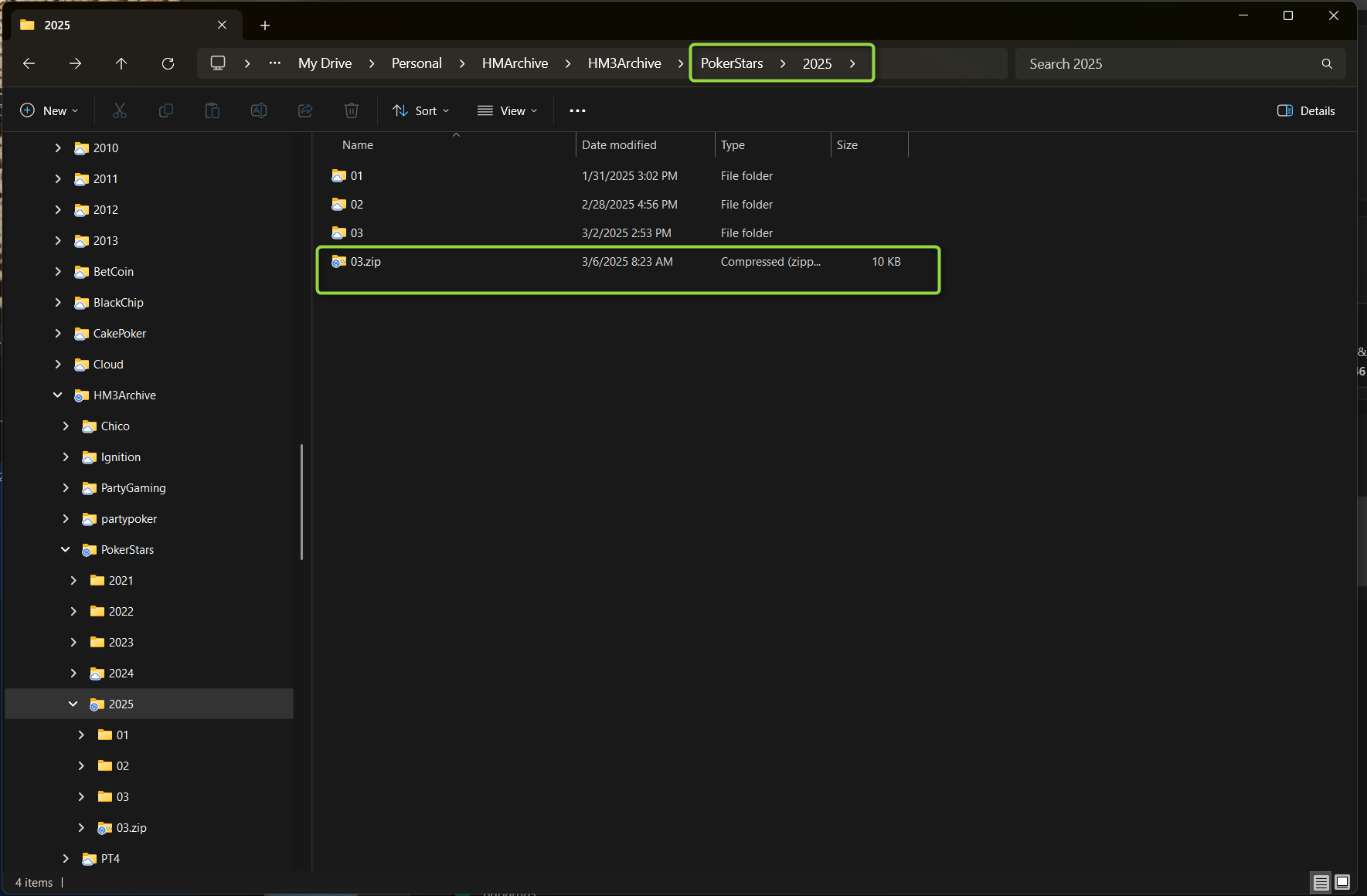
Regards,
Fozzy71
Customer Support
Hold'em Manager
Playing on Ignition, I often get this error pop up and then it stops importing and my hud disappears, what could it be?
https://gyazo.com/b7cd7bbb84193e455a193d...
Playing on Ignition, I often get this error pop up and then it stops importing and my hud disappears, what could it be?
https://gyazo.com/b7cd7bbb84193e455a193d...
Unfortunately, you are experiencing a known issue awaiting a fix from our developers:
* IGN-273: IHG fails to connect at all if PT4 restarted after a table has been open
- "If I have both PT4 (with the Ignition Hand Grabber) and Ignition running but do not open any tables then I can close and re-open PT4 and the IHG reconnects. If I open a table before closing PT4 (and close the table before restarting) then when I restart PT4 the IHG does not reconnect. It displays the message that there is an out of date file."
The only solution for this issue is to restart your computer fully, restart HM3, and then restart the Ignition poker client.
- Close your poker clients, close HM3, and right-click - 'Exit' the HM3 Server icon in the Windows Notification Tray.
- Restart your computer.
- Start HM3 and wait for the HM3 server to start. You will know it has started when the 'Start HUD' button switches to say 'Stop HUD'. If that doesn't happen then you can start it via the HM3 - File - 'Start Auto Import' option.
- Once the HM3 HUD/Server is fully running you can then start the Ignition client.
Take a seat at one table, allow the HUD to appear before you open a second table, and wait for the HUD to appear there before opening a third, etc.
Regards,
Fozzy71
Customer Support
Hold'em Manager
Hi Fozzy,
I am new to HEM3, and have been using the software for a few weeks. I encountered a small number of issues and have some questions.
Best to post them here?
Submit a support ticket on the website?
Thx!
Hi Fozzy,
I am new to HEM3, and have been using the software for a few weeks. I encountered a small number of issues and have some questions.
Best to post them here
Submit a support ticket on the website
Thx!
Please send your questions with any relevant screenshots and your logs/configs in a support ticket using the HM3 - Help - 'Send Feedback...' interface.
*Edit: We also have a
that you can use for quick/easy questions that you aren't concerned about privacy for.
Regards,
Fozzy71
Customer Support
Hold'em Manager


