888/Party/StarsCaption

This is the support thread for 888/Party/StarsCaption, multi-purpose utilities for the 888, bwin.party, Poker Stars site
1. IP/OOP filter fix in Betscript
2. Prize tags fix before ITM
3. Table manager 2 / Activate table at / New hand fix
4. Layout editor / Hide elements / Total pot
5. Layout editor / Fonts / Take seat
6. Hotkeys / Sit out next big bet at all tables, Sit out next hand at all tables
7. [timeBank], [timeToAct], [itm], [!itm] tags fix
When we have selected "Move table just by Left button" + "Work with all TM2 tables", is there a way to cancel the "click" after we starting to move a table?
Thinking about times where we click an action (fold/check/bet/call/raise) and then change our mind.
Without this feature, we move the mouse (while left button pressed down) out of the button and it "cancels" out click.
However, if when we move the mouse the table moves with it, this trick to cancel doesn't work since we never leave the top of the button
When we have selected "Move table just by Left button" + "Work with all TM2 tables", is there a way to cancel the "click" after we starting to move a table Thinking about times where we click an action (fold/check/bet/call/raise) and then change our mind.Without this feature, we move the mouse (while left button pressed down) out of the button and it "cancels" out click.However
Hi
No, but I can try to add a such option.
Do you need it in StarsCaption? (or maybe in WinamaxCaption or CoinCaption)
It's starscaption, TM2, yeah
I'm don't even have ideas of how it could work and still be somewhat user friendly, but thought I'd mention it cause it is a little annoying / prone to missclicks when using this feature
EDIT: maybe it could work just on the table background itself, or at least not in the bottom 33% of the window (where buttons are generally speaking)
It's starscaption, TM2, yeah
I'm don't even have ideas of how it could work and still be somewhat user friendly, but thought I'd mention it cause it is a little annoying / prone to missclicks when using this feature
EDIT: maybe it could work just on the table background itself, or at least not in the bottom 33% of the window (where buttons are generally speaking)
I could try implementing a fixed key option - for example, pressing Ctrl would cancel a table movement and you could move the mouse. Would that work for you?
I can also think about 33% of the table height
CoinCaption.
Nice version 0.08. Lots of Table manager things corrected.
After I ajust some parameters to use these new things corrected, I found that "Desactivate if pre-action clicked by Check/Fold hotkey" doesn't work. (Table manager)
See you on 0.09 ! :-)
CoinCaption.
Nice version 0.08. Lots of Table manager things corrected.
After I ajust some parameters to use these new things corrected, I found that "Desactivate if pre-action clicked by Check/Fold hotkey" doesn't work. (Table manager)
See you on 0.09 ! :-)
Hi
Ok, try CoinCaption v0.09

Hi, having an issue with the Fold hotkey occasionally needing a couple of clicks to work. The native Stars Fold hotkey works fine but then Starscaption doesn't recognise when the pre-action button has been clicked (for moving table out of an action slot in TM2).
"Force action button focus" seems to help a bit, are there any other settings I can try tweaking?
Thanks.
Hi, having an issue with the Fold hotkey occasionally needing a couple of clicks to work. The native Stars Fold hotkey works fine but then Starscaption doesn't recognise when the pre-action button has been clicked (for moving table out of an action slot in TM2).
"Force action button focus" seems to help a bit, are there any other settings I can try tweaking?
Thanks.
Hi
I don't know, but I can try to research it.
What table theme are you using?
Does this only happen when hotkey click the Fold button? Or with Check button and pre-action buttons it happens too?
Hi again, the option "process right click on other huds" fixed my issue. It was the HM3 mucked cards display preventing the click registering.

Hi
1. I just checked and "Deactivate if hero all-in" works for me
Can you please show me your current config? Perhaps it depends on some other options that I haven't taken into account.
Hi, sorry i took a long time to get back to this - i reverted to pure tiling but would like to see if I can get this stack and tile config optimized
You were going to help me identify why "deactivate if hero all in" isn't working in my config, would be great if you take a look please:
please note that i pasted the relevant table manager config at the bottom of the backup file:
https://limewire dot com/d/k6AjL#zLXZpIMw4Z
Hi, sorry i took a long time to get back to this - i reverted to pure tiling but would like to see if I can get this stack and tile config optimizedYou were going to help me identify why "deactivate if hero all in" isn't working in my config, would be great if you take a look please:please note that i pasted the relevant table manager config at the bottom of the backup file:
Hi
I found the problem, try this version:
Hi, I have a suggestion about the StarsCaption table elements (buttons) to make appear responsive to clicks.
This can be done by having an option to change the appearance the moment a button is clicked.
This clicking feedback would be not only visual but also functional so we know that we actually clicked the button.
Let me know if you plan to implement this, and if you need any testing.
Thank you!
Hi, I have a suggestion about the StarsCaption table elements (buttons) to make appear responsive to clicks.This can be done by having an option to change the appearance the moment a button is clicked.This clicking feedback would be not only visual but also functional so we know that we actually clicked the button.Let me know if you plan to implement this, and if you need any t
Hi
Do you mean HUD betting buttons or something else?
Can you describe in more detail what this should look like and what functional feedback is?
Yes, the HUD betting buttons.
During a click, the background color and/or the color of the text will change according to user's liking.
The 'functionality' lies in the fact that we know we have clicked a button once this happens (currently there is no visual way to tell if we have clicked it)
If you want I can demonstrate how this can be done in CSS
Yes, the HUD betting buttons.
During a click, the background color and/or the color of the text will change according to user's liking.
The 'functionality' lies in the fact that we know we have clicked a button once this happens (currently there is no visual way to tell if we have clicked it)
If you want I can demonstrate how this can be done in CSS
Ok I'll think about it
In CoinCaption, can we have an option to hide the betting buttons?
I rather use CC betting buttons and having the native clients buttons behind is very annoying - the client currently does not allow to hide them
In CoinCaption, can we have an option to hide the betting buttons
I rather use CC betting buttons and having the native clients buttons behind is very annoying - the client currently does not allow to hide them
Hi
Ok I'll try to add it
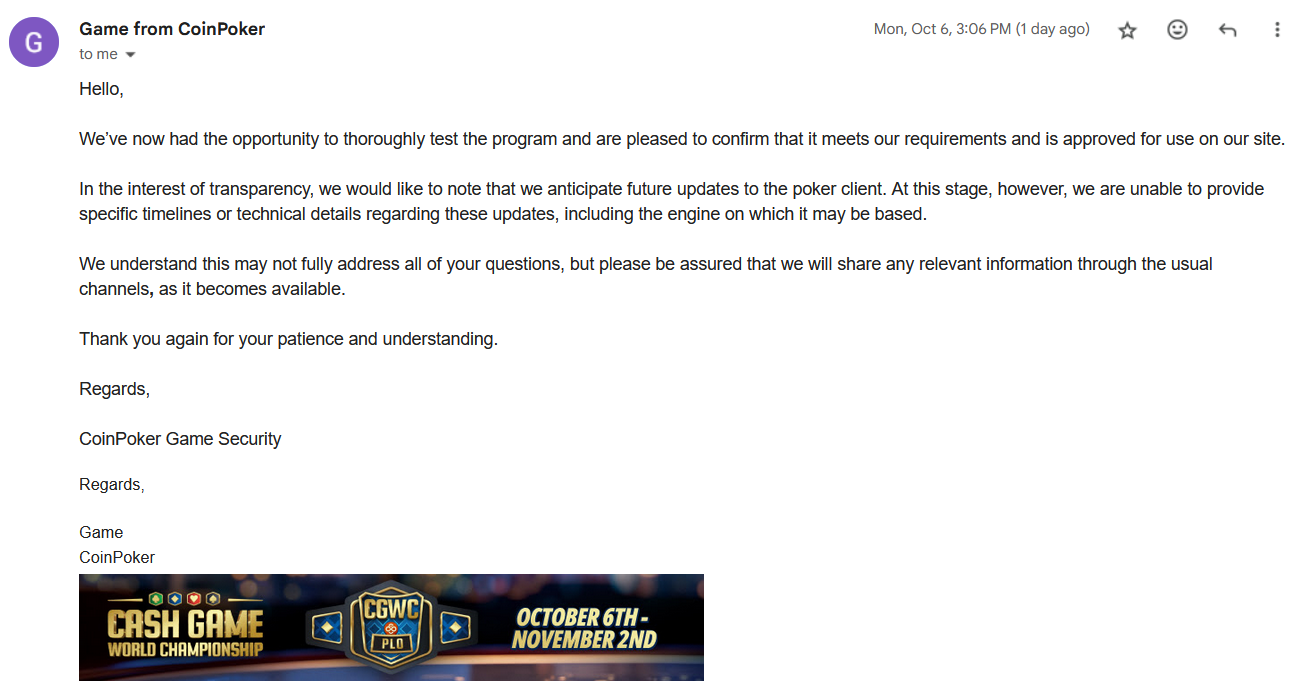
I also received a second email from CoinPoker yesterday, and they confirmed that CoinCaption can be used with their poker client (I also asked a question about the new poker client, but unfortunately they didn't say anything about it):