888/Party/StarsCaption

This is the support thread for 888/Party/StarsCaption, multi-purpose utilities for the 888, bwin.party, Poker Stars site
hello Like AA,when I log into stars (pokerstars.it) it just repeated says:09:26:30 Starting StarsCaption Ok09:26:31 Settings loaded09:26:33 PokerStars.com client detected (build 78769)09:26:33 PokerStars.com client detected (build 78769)09:26:33 PokerStars.com client detected (build 78769)09:26:34 PokerStars.com client detected (build 78769)09:26:34 PokerStars.com client
Hi
Try to check this:
1. You have the latest version of StarsCaption (StarsCaption v1.24e)
2. You have English PokerStars lobby
If it so and you still have the same issue, then try to reinstall PokerStars.it client (download the installer from the site and install it again without uninstalling of a current version - I hope it helps to fix the issue. Please let me know if it doesn't)
HiTry to check this:1. You have the latest version of StarsCaption (StarsCaption v1.24e)2. You have English PokerStars lobbyIf it so and you still have the same issue, then try to reinstall PokerStars.it client (download the installer from the site and install it again without uninstalling of a current version - I hope it helps to fix the issue. Please let me know if it doesn't
Many thanks Like AA! (after reinstallation it works)
Hi,
I have a suggestion for StarsCaption and I hope you can make it work because it can be very useful.
At onclick options for a HUD element (e.g. betting button), there should be an option to simply run/simulate a hotkey combination of user's choosing (e.g Alt+5). This way we can run native Pokerstars hotkeys with the click of a button.
The difference would be that this would be instant! "Bet with autobet" does the job, but it's not instant (as it has to set the bet amount first) and it kinda makes the game feel glitchy.
This would make the game feel much smoother 😀
Hi,I have a suggestion for StarsCaption and I hope you can make it work because it can be very useful.At onclick options for a HUD element (e.g. betting button), there should be an option to simply run/simulate a hotkey combination of user's choosing (e.g Alt+5). This way we can run native Pokerstars hotkeys with the click of a button.The difference would be that this would be
Hi
Ok I'll think about it

Me again ��
Trying to trial a "double stack" system with WinamaxCaption - so 8 "stacks" with the idea being each has 2 tables.
However I can't seem to get "multi-stack activation mode" to work. The literature says to disable "popup table whenever action is required" in "options", but if I do this then the tables at the back just stay at the back. Using only regular slots as the guide suggests.
Me again ��Trying to trial a "double stack" system with WinamaxCaption - so 8 "stacks" with the idea being each has 2 tables.However I can't seem to get "multi-stack activation mode" to work. The literature says to disable "popup table whenever action is required" in "options", but if I do this then the tables at the back just stay at the back. Using only regular
Hi
Can you please send me your main WinamaxCaption settings (you can export them via Options / Save settings backup) and TM2 config you use (you can find it in c:\WinamaxCaption\TableManagerConfigs2 folder)?
Hi
Can you please send me your main WinamaxCaption settings (you can export them via Options / Save settings backup) and TM2 config you use (you can find it in c:\WinamaxCaption\TableManagerConfigs2 folder)?
Thanks! limewire dot com/d/48S1E#W7OQR2Jjuo
"Double Stacked" is the relevant one - also stuck in my tile layout and stack and tile layout.
Thanks! limewire dot com/d/48S1E#W7OQR2Jjuo
"Double Stacked" is the relevant one - also stuck in my tile layout and stack and tile layout.
Hi
As I can see, you have activation and deactivation by hotkey configured in Double Stacked S config:
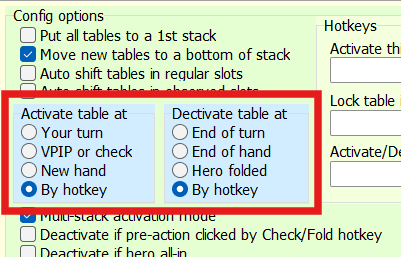
It will not work by this way (you don't even have an activation hotkey configured there, and this hotkey can't be used on a hidden table)
Try to choose Your turn / End of turn there, I hope it will work for you in this mode (at least it works for me in this case)
HiAs I can see, you have activation and deactivation by hotkey configured in Double Stacked S config: It will not work by this way (you don't even have an activation hotkey configured there, and this hotkey can't be used on a hidden table)Try to choose Your turn / End of turn there, I hope it will work for you in this mode (at least it works for me in this case)
Ah i see! Thank you - i thought these fields just related to tables using activated slots
Hi guys, I'm having a problem with the custom player notes menu.
If I click on a person who doesn't have any labels, it doesn't show them all. Furthermore, if I want to change a label a person has, it incorrectly indicates that it's currently selected.
This problem doesn't occur when I click on the item you see in the screenshot.
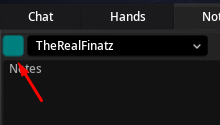
I hope this can help you fix it.
Hi guys, I'm having a problem with the custom player notes menu. If I click on a person who doesn't have any labels, it doesn't show them all. Furthermore, if I want to change a label a person has, it incorrectly indicates that it's currently selected.This problem doesn't occur when I click on the item you see in the screenshot. I hope this can help you fix it.
Hi
Sorry, but I don't understand what exactly is going on.
You have Notes / Custom player note menu enabled, you left-click on a player and this menu doesn't appear?
Or the menu appears, but you can't set a label through it?
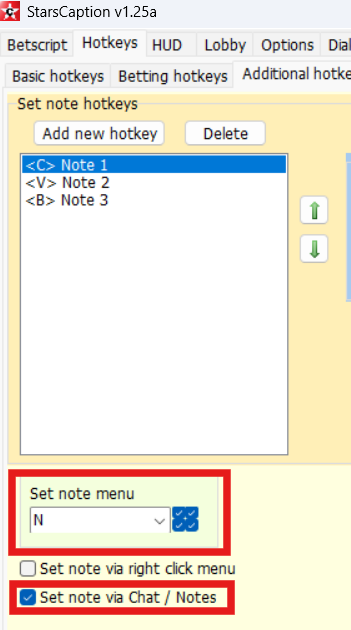
Can you also check if Set note menu hotkey work for you with this option enabled in the same situation?
Sorry it's me yet again - now I have multi-stack activation mode working I'm fiddling with it.
Will auto-shift not work with stacked tables?
Example.
slot 1 - regular (use in auto shift ticked)
slot 2 - regular (use in auto shift ticked)
slot 3 - regular (stack ticked, use in auto shift ticked)
auto shift tables in regular slots also selected
slot 2 will jump to slot 1, but the slot 3s all stay put
HiSorry, but I don't understand what exactly is going on.You have Notes / Custom player note menu enabled, you left-click on a player and this menu doesn't appear?Or the menu appears, but you can't set a label through it? Can you also check if Set note menu hotkey work for you with this option enabled in the same situation?
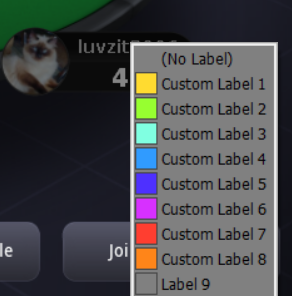
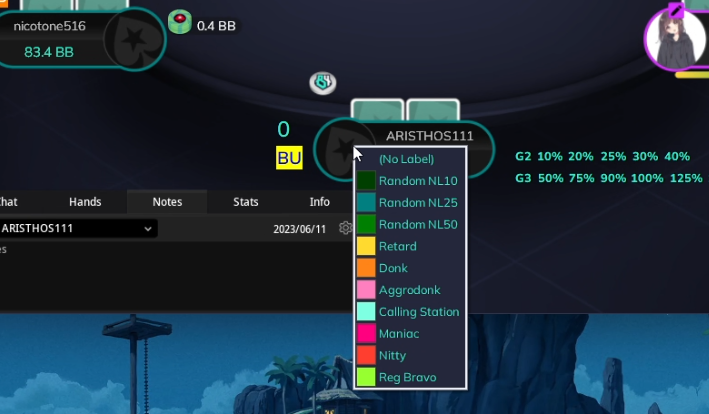
This is the screenshot when i click on a person to assign a label
This is the screenshot when i click above the chat to assign a label
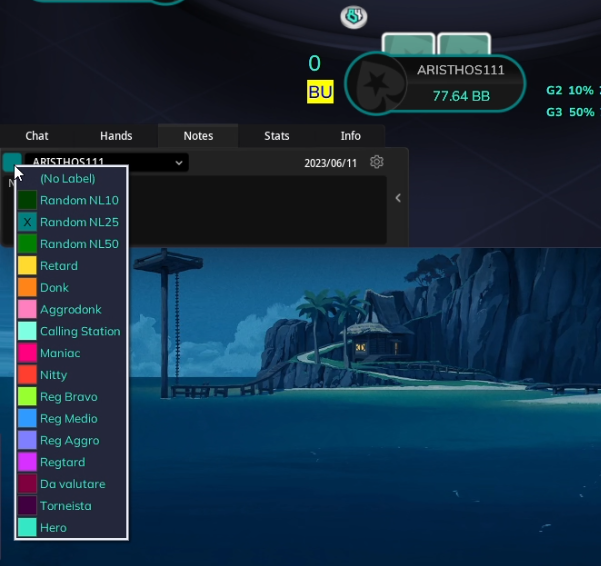
As you can see when I click on a person I see less labels as if they were limited in number and it does not show them all to me
Furthermore, in the first screen the already selected label "random NL25" is not assigned while in the last screen it is
I hope I explained myself 😃
Sorry for my English, but it's not my native language 😀
Sorry it's me yet again - now I have multi-stack activation mode working I'm fiddling with it.Will auto-shift not work with stacked tables?Example.slot 1 - regular (use in auto shift ticked)slot 2 - regular (use in auto shift ticked)slot 3 - regular (stack ticked, use in auto shift ticked)auto shift tables in regular slots also selectedslot 2 will jump to slot 1, but the slot 3
Auto-shift doesn't work with slots with Stack option enabled
As you can see when I click on a person I see less labels as if they were limited in number and it does not show them all to me
Furthermore, in the first screen the already selected label "random NL25" is not assigned while in the last screen it is
I hope I explained myself 😃
Sorry for my English, but it's not my native language 😀
Sorry, but Custom player note menu supports only 10 labels.
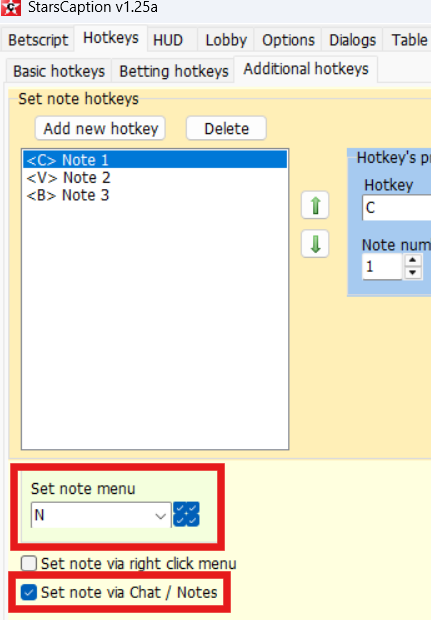
You can use this hotkey with this option enabled, via it you can set any of your labels
Hi, I'm your biggest fan. Thanks for the amazing software for a fair price!
Question:
-How do I activate a color range by stack on winamax caption?
-Where do I select the auto time bank / avoid sitting out button on Winamax Caption?
Thanks, I hope you will be a millionaire and have an amazing life!
Hi, I'm your biggest fan. Thanks for the amazing software for a fair price!
Question:
-How do I activate a color range by stack on winamax caption?
-Where do I select the auto time bank / avoid sitting out button on Winamax Caption?
Thanks, I hope you will be a millionaire and have an amazing life!
Hi, thanks
1. WinamaxCaption can't change color of native stacks, so you can do it only via HUD - display [stack_bb] tag instead (or with) original stack and configure Color tag range for it. One of possible configurations you can see here (left screenshot).
2. There are no such options in WinamaxCaption
They already present in Winamax settings and AFAIK they work fine:
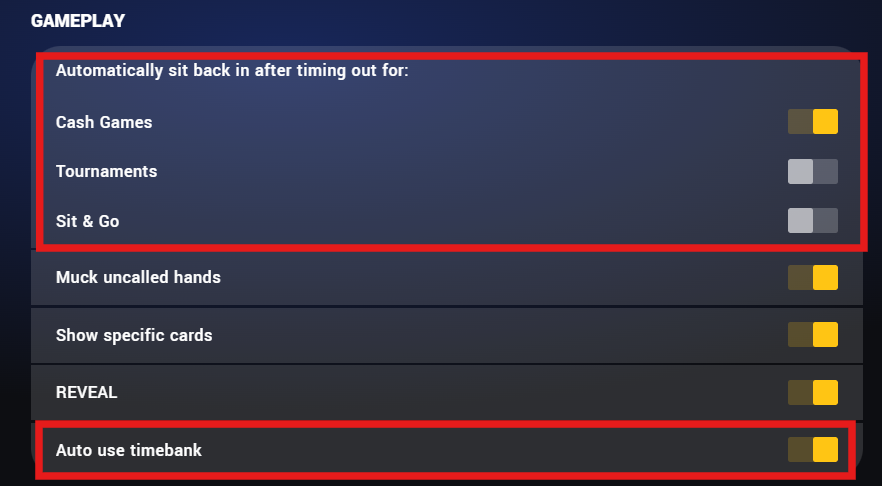
For this reason, I did not implement them in the program (I probably could have done them too, but most likely they would have worked a little worse than the original ones)
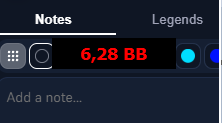
Thanks, I tried it but It blocks the tags when I want to add a tag to a player. Any way to circumvent this? It would be great if winamax caption had this feature, I could finally get rid of jurojin lol. Thanks in advance
Thanks, I tried it but It blocks the tags when I want to add a tag to a player. Any way to circumvent this? It would be great if winamax caption had this feature, I could finally get rid of jurojin lol. Thanks in advance
Hi
You can add [*] tag to this panel (so it will be [stack_bb][*]). In this case, the panel will hide when you hover over it with the mouse, and it will not block a dialog.
Or you can configure OnClick / Click table under the panel for this panel, as it show here:
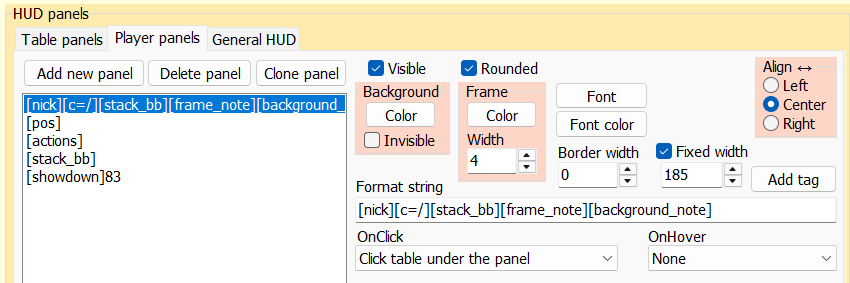
With it, panel will not be hidden when you hover, but you can click through it (this may not be as convenient because you need to know where exactly to click through the panel)
Starscaption suggestion:
For HUD betting buttons, you can add an option which will display the betting amount in BB on hover.
This can be especially useful for using with "bet with autobet" so we can know exactly how much we're betting before clicking.
Also please reconsider adding the feature to invoke native hotkey onclick.
Thanks 😀
Or better yet, you can create a new tag [presskey_MODIFIER_KEY]
When when a HUD button is clicked, it will simulate the hotkey.
E.g.:
To simulate Alt + N:
[presskey_alt_n]
To simulate Shift + 1:
[presskey_shift_1]
I think this would be much easier for you to implement 😀
smartfish, ok I'll try to implement it
Popup for HUD betting buttons can be implemented relatively quickly.
I need to think about the second one.


