888/Party/StarsCaption

This is the support thread for 888/Party/StarsCaption, multi-purpose utilities for the 888, bwin.party, Poker Stars site

Small bug in TM2 (StarsCaption), table doesn't activate if facing a limp on bb (also doesn't activate when I check, only when money goes into pot).
Ah, my bad, it seems we can indeed hide the betting buttons.
Just need to hide them one by one in the client's settings.
Hi, is it possible to use Starscaption to activate a different layout than the default PokerStars one to assign labels to different players and have, for example, the old list that was previously available on PokerStars?
HiOk I'll try to add itI also received a second email from CoinPoker yesterday, and they confirmed that CoinCaption can be used with their poker client (I also asked a question about the new poker client, but unfortunately they didn't say anything about it):
what new poker client? Are they planning a big new version at some point?
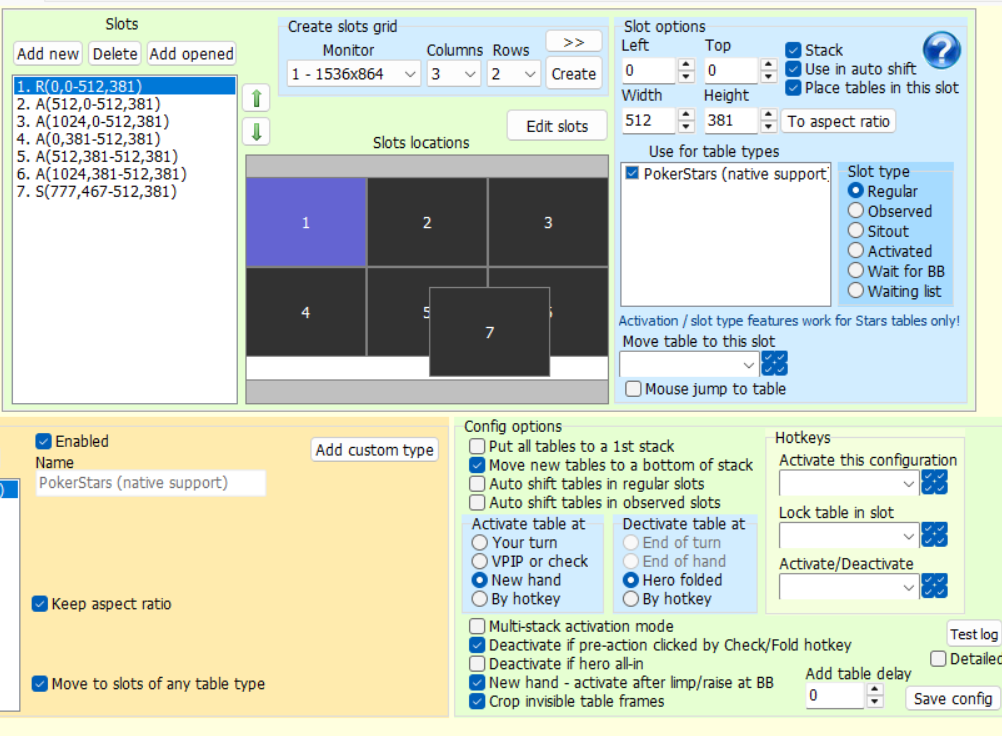
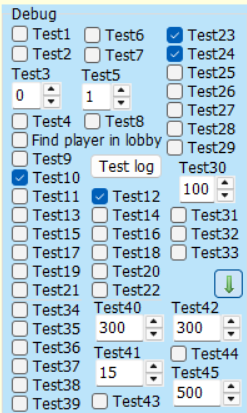
1 = Stack2-6 = Activated7 = SitoutEdit: Also, out of curiosity is there a list of what these test options do?
1. Ok I'll try to check it out
2. These are undocumented functions and you should not touch them unless I ask you to.
For the most part, they allow to revert to older implementations for some functions.
There is some annoying flickering going on with the StarsCaption HUD when left/right clicking on a table. It doesn't happen every time when right/left clicking, but it happens frequently, especially when clicking fast and there are more than 2 active tables.
I'm using the latest version of StarCaption (v1.24e).
I'll send you a PM with the link of my settings file and a short video demonstrating the flickering.
There is some annoying flickering going on with the StarsCaption HUD when left/right clicking on a table. It doesn't happen every time when right/left clicking, but it happens frequently, especially when clicking fast and there are more than 2 active tables.I'm using the latest version of StarCaption (v1.24e).I'll send you a PM with the link of my settings file and a short vid
Hi
Try to turn on this option and let me know if it helps:
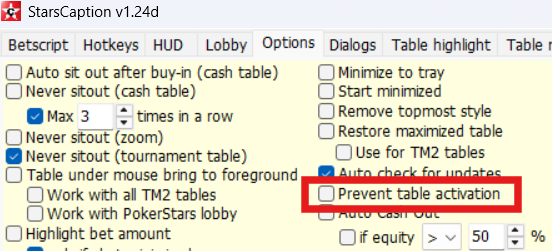
It helps, no flickering at all now. Thank you!
Is there any way to hide/remove the title tar from the table?

Small bug in TM2 (StarsCaption), table doesn't activate if facing a limp on bb (also doesn't activate when I check, only when money goes into pot).
Hi
I tested this with similar settings and couldn't find the issue
Can you write a log, please? To do it:
1. Turn on Options / Logging / Betscript log, and restart StarsCaption if it was disabled
2. Play
3. If you encounter such a situation, take a screenshot of the table
4. Send me the screenshot and StarsCaption.log file from StarsCaption folder
Hi
I tested this with similar settings and couldn't find the issue
Can you write a log, please? To do it:
1. Turn on Options / Logging / Betscript log, and restart StarsCaption if it was disabled
2. Play
3. If you encounter such a situation, take a screenshot of the table
4. Send me the screenshot and StarsCaption.log file from StarsCaption folder
OK I'll do that.

So I just made a recording to show you the focus stealing issues I am having with my stack and tile set up - only I realised I should turn H2N3 off for it, and what do you know, focus stealing issues are all gone with it closed.
Would you have any advice for what I can try to help with this. I really like my HUD :-D
So I just made a recording to show you the focus stealing issues I am having with my stack and tile set up - only I realised I should turn H2N3 off for it, and what do you know, focus stealing issues are all gone with it closed.
Would you have any advice for what I can try to help with this. I really like my HUD :-D
Hi
Do you have this option enabled?
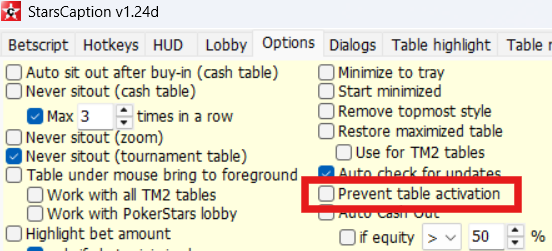
If no, then try to turn it on.
Also you can try different options here:
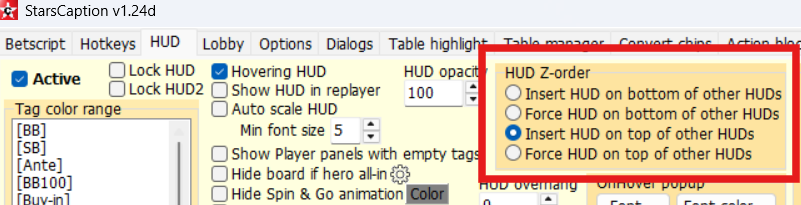
Let me know if it helps
HiDo you have this option enabled? If no, then try to turn it on.Also you can try different options here: Let me know if it helps
Thanks for this - have had a fiddle around and seem to have got it working well with HUD - taking table under mouse off perhaps did the trick.
Should have mentioned this is for WinamaxCaption - don't think the 1st option exists for this? Am seeing which of the HUD tickboxes works best so thanks for suggesthing that.
I wondered if there is a way to have a visual aid when I have no urgent tables? (I can think of some options with the HUD setting but was thinking more of like a highlight table option). I was curious for what I could put in the 'Formula' option in Highlight Tables, perhaps I can achieve via this? Also, is there any help guide for the new "configuration" tab in HUD?
nm, worked it out 😀 [actionTables] <= 0 works a treat
now I'm curious to know if there is a way to specifically highlight the most urgent table, or the one that is first in the queue. I'm currently using "table with minimum total time until the end of turn" but I guess that could change as tables become urgent.
My remaining focus issues are all a result of acting on one of my outer VPIP tiles, and the table that I can see at the front of my stack (requiring action) will often have a table move in front of it, which is troublesome as that's the one I might be ready to act on that table - I figure it's something to do with me not going in the correct order of tables in this case.

Hello Like AA,
Two questions/request for starscaption :
- You added an auto open cash table for regular tables and we already had the auto open for Zoom table. is it possible to prevent the opening of zoom tables when we have our mouse on the regular table line on the Lobby and vice versa.
To be clear here my auto open zoom open regular table, my auto open regular open zoom tables.
- is there an option to know when a table freeze (i play 6 tables and i regular have a freeze on one zoom table) and it takes some time for me to notice it.
Thank you for your overall great job for us
hello Like AA,
when I log into stars (pokerstars.it) it just repeated says:
09:26:30 Starting StarsCaption Ok
09:26:31 Settings loaded
09:26:33 PokerStars.com client detected (build 78769)
09:26:33 PokerStars.com client detected (build 78769)
09:26:33 PokerStars.com client detected (build 78769)
09:26:34 PokerStars.com client detected (build 78769)
09:26:34 PokerStars.com client detected (build 78769)
09:26:34 PokerStars.com client detected (build 78769)
09:26:34 PokerStars.com client detected (build 78769)
09:26:34 PokerStars.com client detected (build 78769)
09:26:34 PokerStars.com client detected (build 78769)
09:26:34 PokerStars.com client detected (build 78769)
09:26:34 PokerStars.com client detected (build 78769)
09:26:34 PokerStars.com client detected (build 78769)
09:26:35 PokerStars.com client detected (build 78769)
09:26:35 PokerStars.com client detected (build 78769)
09:26:35 PokerStars.com client detected (build 78769)
09:26:35 PokerStars.com client detected (build 78769)
09:26:35 PokerStars.com client detected (build 78769)
09:26:35 PokerStars.com client detected (build 78769)
09:26:35 PokerStars.com client detected (build 78769)
09:26:35 PokerStars.com client detected (build 78769)
09:26:35 PokerStars.com client detected (build 78769)
09:26:36 PokerStars.com client detected (build 78769)
09:26:36 PokerStars.com client detected (build 78769)
09:26:36 PokerStars.com client detected (build 78769)
09:26:36 PokerStars.com client detected (build 78769)
09:26:36 PokerStars.com client detected (build 78769)
in the diagnostic. Thanks for your advices
now I'm curious to know if there is a way to specifically highlight the most urgent table, or the one that is first in the queue. I'm currently using "table with minimum total time until the end of turn" but I guess that could change as tables become urgent.My remaining focus issues are all a result of acting on one of my outer VPIP tiles, and the table that I can see at the fr
Do you use this option to auto activate tables, or the auto activate option in a poker client settings?
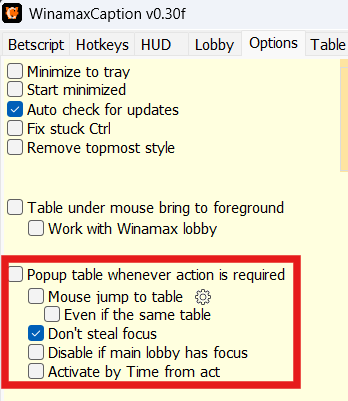
With this option you can use "table with minimum total time until the end of turn" rule and it will work correctly.
Or you can use "Table with maximum action time" and also turn on "Activate by Time from act" on screenshot above - with it the order of activation of tables will never change, and you can also use "Table with next maximum action time" rule to highlight next table in a line (this rule has a parameter, so you can highlight 2nd, 3rd, etc tables too with different colors if you want)
This rule don't take a time bank into account, so their order will not be changed
Hello Like AA,Two questions/request for starscaption :- You added an auto open cash table for regular tables and we already had the auto open for Zoom table. is it possible to prevent the opening of zoom tables when we have our mouse on the regular table line on the Lobby and vice versa.To be clear here my auto open zoom open regular table, my auto open regular open zoom tables
Hi
These options cannot be used simultaneously.
In fact, they don't check which tab is active in the main lobby, they both just click Play Now in active lobby tab and count tables (one option counts zoom tables and 2nd counts regular cash tables).
As you can see, this is a fairly simple implementation, so before you enable one of these options, make sure you have the correct tab selected in the lobby, otherwise the option will open tables of a wrong type and will not work correctly for this reason.
And for the same reason they cannot be used at the same time.


