Holdem Manager Support
[IMG]https://forumserver.twoplustwo.com/...
[IMG]https://forumserver.twoplustwo.com/...
[IMG]https://forumserver.twoplustwo.com/...
[IMG]https://forumserver.twoplustwo.com/...
[IMG]https://forumserver.twoplustwo.com/...
[IMG]https://forumserver.twoplustwo.com/...
[IMG]https://forumserver.twoplustwo.com/...
[IMG]https://forumserver.twoplustwo.com/...
[IMG]https://forumserver.twoplustwo.com/...
[IMG]https://forumserver.twoplustwo.com/...
[IMG]https://forumserver.twoplustwo.com/...
[IMG]https://forumserver.twoplustwo.com/...
[IMG]https://forumserver.twoplustwo.com/...
[IMG]https://forumserver.twoplustwo.com/...
That worked for MGM, but when I selected my custom HUD everything was off center again.
For Stars, (Ipoker,) my HUD isn't displaying. I played NL & PLO for 10 minutes. I have it set to Automatically detect my seat. Auto import folders are
C:\Users\(user name)\AppData\Local\PokerStars.USMI\HandHistory
C:\Users\(user name)\AppData\Local\PokerStars.USMI\TournSummary
I ran both as administrator w/ it set to auto detect and all is working on Fanduel. It doesn't remember to apply my custom HUD though at each table. How do I enable that?
the menu button for my HUD layout is missing after switching to ipoker for fan duel and i can't unlock the layout to move stuff around.

the menu button for my HUD layout is missing after switching to ipoker for fan duel and i can't unlock the layout to move stuff around.
I didn't have such a problem when setting up FanDuel in HM3 as an iPoker skin.
Make sure that you don't have the Graphical HUD enabled:
Open the HM3 - 'HUD' menu and switch to the [x] 'Standard HUD'.
If you continue to have problems:
Please reproduce and screenshot the error, then send us your log files, along with the screenshots and details of what steps preceded the error, to a support ticket - https://kb.holdemmanager.com/knowledge-b...
Best regards,
Fozzy71
Customer Support
Hold'em Manager
I ran both as administrator w/ it set to auto detect and all is working on Fanduel. It doesn't remember to apply my custom HUD though at each table. How do I enable that?
If you (1) left-click the Table 'HUD' panel, you can (2) choose the HUD that you want to use, then (3) open the menu again and 'Set Profile as Default for this Table Type'. You will need to do the same for each site/game you play. These HUD settings are saved and can be managed/created in the HUD - HUD Options: 'Profile Select' menu -

Best regards,
Fozzy71
Customer Support
Hold'em Manager

Hi Fozzy, I created a new DB and when I uploaded my hands it split out the sessions and had many sessions as being only 1 hand. This is a glitch I've dealt with in the software before, but I thought it had been fixed. I reloaded the hands in a new DB and it sorted my sessions correctly after that. HHs were from Bovada. Just wanted to inquire on that.
Hi Fozzy, I created a new DB and when I uploaded my hands it split out the sessions and had many sessions as being only 1 hand. This is a glitch I've dealt with in the software before, but I thought it had been fixed. I reloaded the hands in a new DB and it sorted my sessions correctly after that. HHs were from Bovada. Just wanted to inquire on that.
I haven't had reports of that issue in a long time. I am not sure why it occasionally happens, but the only solution is to reimport the hands to a new database, which you have already done.
Best regards,
Fozzy71
Customer Support
Hold'em Manager
I have 3 different names between Pokerstars, ipoker and betmgm poker. I want to view all my results at once combining all sites. How do I do that?
I have 3 different names between Pokerstars, ipoker and betmgm poker. I want to view all my results at once combining all sites. How do I do that?
You have to create an alias for those site/screen names, and select that alias as the active player in the reports -
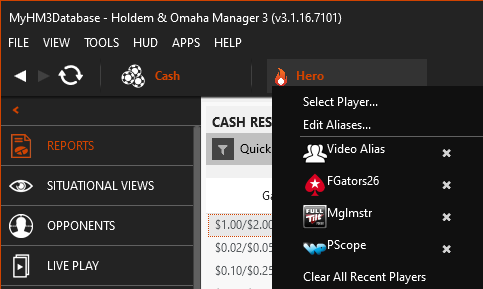
Best regards,
Fozzy71
Customer Support
Hold'em Manager
A while back I noticed there was a HEM3 update that showed it fixed the correct win/loss amounts for mystery bounty tournaments. I then noticed when I check the results for these mystery bounty tournaments, it was correct as it showed no bounties collected when busting out of a mystery tournament.
However, for a while now, it would show an amount won and it's always the same amount for these mystery bounty tournaments. Is this normal? The amount is always like a bit less than half the buyin for the mystery bounty tournament.
A while back I noticed there was a HEM3 update that showed it fixed the correct win/loss amounts for mystery bounty tournaments. I then noticed when I check the results for these mystery bounty tournaments, it was correct as it showed no bounties collected when busting out of a mystery tournament. However, for a while now, it would show an amount won and it's always the same
I can't say off the top of my head. I would need to see the hand history and tournament summary files for one of the tournaments, and screenshots/details of the issues, to be able to review, test, and discuss with my QA/Testing team.
Please zip and email the original problem hand history and tournament summary files to us as instructed at the bottom of this FAQ -
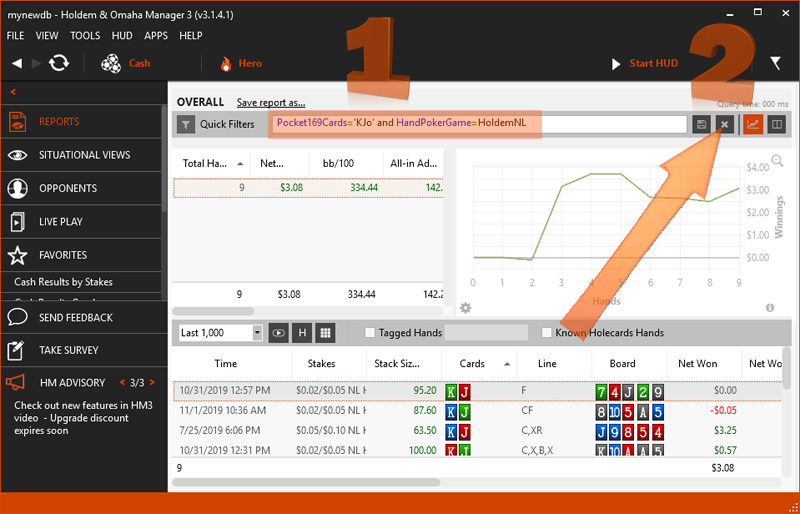
Ensure you also include screenshots of your reports/filters and a detailed description by tournament number, session, hole cards, filter, stat, etc., of some of the errors we need to test.
Best regards,
Fozzy71
Customer Support
Hold'em Manager

Hey Fozzy,
I've been having an issue on the new Pokerstars/Fanduel where its not recognizing my stats on the HUD during a session. I can see everyone else track through the session but not my own, it just keeps showing 0 for hands played.
Also HUD isn't working on any of the PLO tournaments even though I have the Omaha package as well.
Any thoughts?
Hey Fozzy,
I've been having an issue on the new Pokerstars/Fanduel where its not recognizing my stats on the HUD during a session. I can see everyone else track through the session but not my own, it just keeps showing 0 for hands played.
Also HUD isn't working on any of the PLO tournaments even though I have the Omaha package as well.
Any thoughts?
Please make sure that HM3 is configured properly to auto-import hands:
* In HM3, go to Tools > Site Settings > Add More Sites > Select [x] `iPoker Network` under `More Sites` and then click `Update Sites`.
* Select `iPoker Network` from the list on the left.
* Under Auto Import Folders, click the plus (+) icon and add:
- `C:\Users\{Your Windows Username}\AppData\Local\PokerStars on FanDuel\data\{Your Poker Screenname}\History\Data`
- If you can't see the `AppData` folder, open File Explorer from the taskbar and Select View > Show, then select `Hidden Items` to view hidden files and folders.
* Note: You might also need to edit the `Optional Settings` [x] setting for `Manual hand time adjustment (in hours) to -1` so that the hands match your local time.
To ensure the changes take effect and previous hands are imported:
* Close your poker client and HM3.
* Right-click the HM3 Server icon in the Windows Notification Tray (near the clock) and select Exit.
* Restart HM3 first and wait for the server to initialize.
* Launch the PokerStars on FanDuel client.
The Live Play view and HUD should now appear during your next session.
If you continue to have problems:
a) Please reproduce the problem and:
- Take a screenshot of the table/desktop before and after the problems
- Try to include the Live Play tab, your poker client lobby, and your Windows Clock Time visible in the screenshot.
- Also, include screenshots of your poker site hand history folder settings and the HM3 auto import folder settings, and screenshots of the folder contents.
b) Click the 'Send Feedback' button from the left sidebar or the 'Help' menu at the top and send your logs and config files with a detailed description of the problem.
- You can also attach screenshots or other files to the Send Feedback interface as long as they don't total over 10 MB (including logs).
- Attach a copy of the original Hand history files* for the table/session from your C:\HM3Archive folder.
*Note: All original hands that are auto-imported are moved to an archive for performance reasons. The archive is organized by \Network\Year\Month\DayOfMonth (e.g., C:\HM3Archive\PokerStars\2022\07\23) by default. By default, your HM3Archive is located in C:\HM3Archive, but you may have configured it differently in HM3 under Tools > Settings > Import (see: https://kb.holdemmanager.com/knowledge-b...).
*When sending any files, please zip them (select all files with CTRL+A > right-click > send to > compressed folder) before attaching them to an email. If the attachment is larger than 10 MB, please upload it to a file hosting site and copy/paste the download link directly into the support ticket email.
Best regards,
Fozzy71
Customer Support
Hold'em Manager
Please make sure that HM3 is configured properly to auto-import hands:* In HM3, go to Tools > Site Settings > Add More Sites > Select [x] `iPoker Network` under `More Sites` and then click `Update Sites`.* Select `iPoker Network` from the list on the left.* Under Auto Import Folders, click the plus (+) icon and add: - `C:\Users\{Your Windows Username}\AppData\Local\PokerStars
Thanks. I tested it out with a few cash games and its tracking both holdem and omaha. Thanks for the quick reply, cheers!
I just recently found out that coinpoker released a feature where you can download your entire hand history. I tried manually uploading it to HE3, and it didn't seem to support the format that coinpoker used. Are you guys aware of this, and is there any plans to support this new format?
I was just trying out HE3 on the trial since I'm starting to get a bit more serious, so I just wanted to know before I fully commit.
I just recently found out that coinpoker released a feature where you can download your entire hand history. I tried manually uploading it to HE3, and it didn't seem to support the format that coinpoker used. Are you guys aware of this, and is there any plans to support this new format?I was just trying out HE3 on the trial since I'm starting to get a bit more serious, so I jus
CoinPoker recently introduced a new hand history format that we have to add support for in a future HM3 update. If you want to be notified when support is added for the new hand history format, please send an email via the HM3 - Help - 'Send Feedback' feature and include "Notify Me When HMT-7768 Is Resolved" in the body of the feedback ticket.
Best regards,
Fozzy71
Customer Support
Hold'em Manager
Hi Fozzy, I am playing against some colluders and I have found a way to exploit them out of the blinds. Interestingly I have found that I am running WAY above EV out of the blinds as a result. My suspicion is that it is not pure run good. Is there a mechanism that would explain this?
Hi Fozzy, I am playing against some colluders and I have found a way to exploit them out of the blinds. Interestingly I have found that I am running WAY above EV out of the blinds as a result. My suspicion is that it is not pure run good. Is there a mechanism that would explain this?
From a technical standpoint, there isn't a "mechanism" in the software that would artificially inflate your EV specifically against colluders. It is likely a combination of your exploit working efficiently and the inherent limitations of how EV is calculated in multi-way or collusion-tainted pots.
Basically, the EV line only tracks all-in pots where cards are face-up. If your exploit involves forcing these guys to fold big equity hands before the showdown, that profit won't show up in your EV line; it’ll just look like you're "running hot" on your winnings line. It's likely just a mix of your strategy working well and the software not having a way to calculate the equity of hands that folded.
Best regards,
Fozzy71
Customer Support
Hold'em Manager
Basically, the EV line only tracks all-in pots where cards are face-up. If your exploit involves forcing these guys to fold big equity hands before the showdown, that profit won't show up in your EV line; it’ll just look like you're "running hot" on your winnings line. It's likely just a mix of your strategy working well and the software not having a way to calculate the equity
I think this is exactly what is happening.
I guess that begs the question, where does the EV show up for a player who just takes down alot of pots naturally and has a positive red and blue line. What is happening and is I think I am winning all my normal showdown hands and winning a disproportionate amount of non-showdown hands. Thus giving the appearance of running hot. Does this make sense?
I guess that begs the question, where does the EV show up for a player who just takes down alot of pots naturally and has a positive red and blue line. What is happening and is I think I am winning all my normal showdown hands and winning a disproportionate amount of non-showdown hands. Thus giving the appearance of running hot. Does this make sense?
Exactly. When you're winning a disproportionate amount of non-showdown hands (strong Red Line), that profit is added directly to your green line but doesn't touch the "All-In EV" line at all.
Best regards,
Fozzy71
Customer Support
Hold'em Manager
Is there a way to turn the HUD off for good?
The only way to disable the HUD for good is to configure HM3 to not auto-start the auto-importer on launch. This will, of course, mean that you won't be able to use the HM3 Live Play View and Reports for the current session as well. You can set the auto-import to NOT automatically run when you start HM3 via the Tools - Settings - General - [ ] 'Automatically start auto import' option, then click 'OK'.
If you still want to be able to track the hands in the Live Play View and Reports during the session without the HUD, you will have to turn off the HUD for each table manually during the session using the 'Live Play HUD' menu at the top of each table, as detailed in this FAQ.
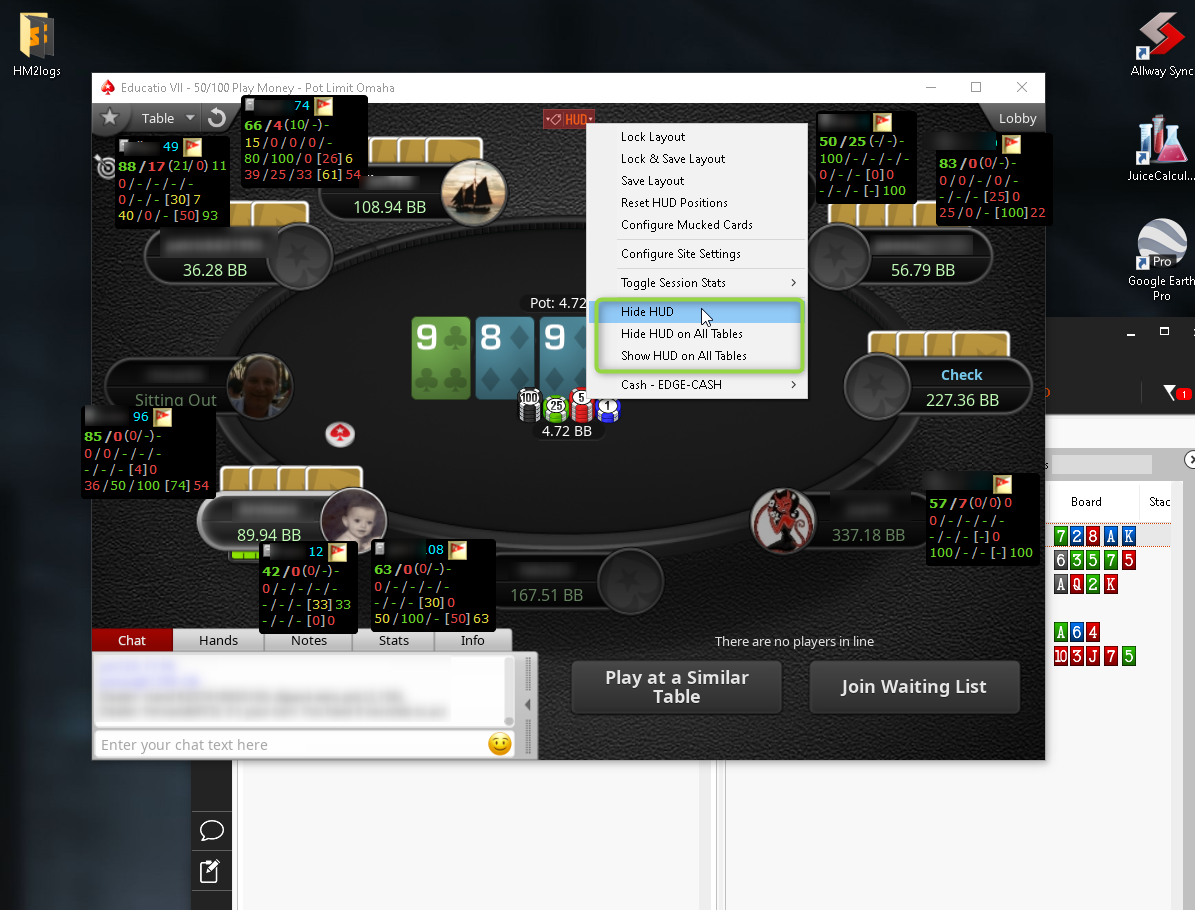
Best regards,
Fozzy71
Customer Support
Hold'em Manager
No, it is still an open ticket awaiting a fix from our developer for this new game type and newly supported site.
If you want to be notified when it is fixed, please send a ticket via the 'Send Feedback' feature in HM3 and include "Notify Me When IMP-1265 Is Resolved" in the body of the ticket.
Best regards,
Fozzy71
Customer Support
Hold'em Manager
Still nothing? 3 months behind all of your competitors??
Unfortunately, there have been some internal issues that have delayed our next public beta for the auto update system. It should be pushed live next week to all customers.
That being said, I have a pre-release beta version that I can share via the following link that includes the fix for the BetRivers Splash The Pot hands.
- Close your poker clients, close HM3, and right-click - 'Exit' the HM3 Server icon in the Windows Notification Tray.
- Please update to our latest internal beta version of HM3 from this link - https://www.holdemmanager.com/download/i...
- Restart HM3
Once you have version 3.1.46.6 installed, you will need to reimport the hands from your C:\HM3Archive folder as instructed in this guide.
Best regards,
Fozzy71
Customer Support
Hold'em Manager


