Holdem Manager Support
[IMG]https://forumserver.twoplustwo.com/...
[IMG]https://forumserver.twoplustwo.com/...
[IMG]https://forumserver.twoplustwo.com/...
[IMG]https://forumserver.twoplustwo.com/...
[IMG]https://forumserver.twoplustwo.com/...
[IMG]https://forumserver.twoplustwo.com/...
[IMG]https://forumserver.twoplustwo.com/...
[IMG]https://forumserver.twoplustwo.com/...
[IMG]https://forumserver.twoplustwo.com/...
[IMG]https://forumserver.twoplustwo.com/...
[IMG]https://forumserver.twoplustwo.com/...
[IMG]https://forumserver.twoplustwo.com/...
[IMG]https://forumserver.twoplustwo.com/...
[IMG]https://forumserver.twoplustwo.com/...
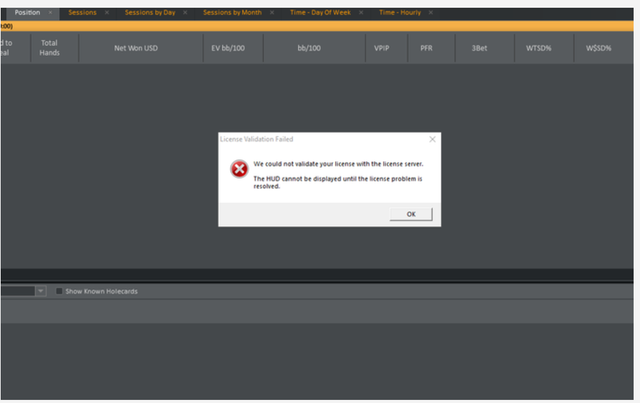
Holdem manager 2 license server stop working.
[url=https://ibb.co/cSNgVVm3]
[/url]
I have the same problem.

Our team has identified the issue and pushed a potential fix for the HM2 license server error. Another tester and I have confirmed that it works for us now. Please try reactivating your HM2 license and let us know if you're still experiencing any issues.
Regards,
Fozzy71
Customer Support
Hold'em Manager
Our team has identified the issue and pushed a potential fix for the HM2 license server error. Another tester and I have confirmed that it works for us now. Please try reactivating your HM2 license and let us know if you're still experiencing any issues.
Regards,
Fozzy71
Customer Support
Hold'em Manager
Can I use HM2 to play poker on 888 now, or do I have to buy HM3 with the latest version?
Can I use HM2 to play poker on 888 now, or do I have to buy HM3 with the latest version?
I can't say for certain, as HM2 is no longer supported. However, we had to update HM3 with a beta build to ensure compatibility with the latest 888 update, so it's likely that HM2 no longer functions there.
Regards,
Fozzy71
Customer Support
Hold'em Manager
I'm considering purchasing PT4 or HM3 around Black Friday.Are there Black Friday discounts available?
I know that updates for Holdem Manager 2 have been discontinued, but now I can't even log in? It won't accept my license code and keeps kicking me out, or has it been completely discontinued?
I know that updates for Holdem Manager 2 have been discontinued, but now I can't even log in? It won't accept my license code and keeps kicking me out, or has it been completely discontinued?
Your HM2 license is valid on two computers that you own. If you receive the message "there are no more activations available", you can reset your code.
- For the steps to reset your Holdem Manager code, please see this FAQ - http://hm2faq.holdemmanager.com/question...
- You can also reset your HM2 code on our new HM3 site under your Store Account - 'My HM2 Data' tab here - https://store.holdemmanager.com/account/...
- If you continue to have problems, please reproduce the problem and zip/attach your HM2Logs folder with a detailed description of what you were doing and what problems you were experiencing - http://hm2faq.holdemmanager.com/question...
Regards,
Fozzy71
Customer Support
Hold'em Manager
Using a non-admin account (on Windows11 Pro) doesn't install your browser (when installing HEM3) as it needs admin rights to install, and neither Windows nor your installation asks that permission.
I would (these days) need to marry Microsoft to put admin rights on my account, and I am not going to do that just because of HEM3's browser.
I am not using my admin account with Windows for security reasons.
Using a non-admin account (on Windows11 Pro) doesn't install your browser (when installing HEM3) as it needs admin rights to install, and neither Windows nor your installation asks that permission.I would (these days) need to marry Microsoft to put admin rights on my account, and I am not going to do that just because of HEM3's browser.I am not using my admin account with Windo
This is necessary because the software needs to integrate with poker clients at a system level to display real-time data.
- You can temporarily grant admin rights just for HM3 by right-clicking the installer and HM3 shortcuts and selecting "Run as administrator."
- If the browser component is the only issue, you can install the required dependencies manually after the main HEM3 application is installed - https://kb.holdemmanager.com/knowledge-b...

How can I create this border on the HUD (for player on top) for other players:
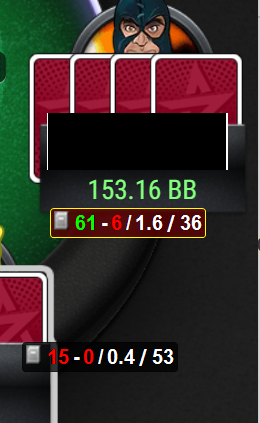
I'm not sure how I did this/what I clicked, or if it was automated.
How can I create this border on the HUD (for player on top) for other players: I'm not sure how I did this/what I clicked, or if it was automated.
You must have double-clicked that HUD panel to switch it to show 'Session' stats instead of lifetime stats. You can also right-click any HUD panel and toggle the 'Session Stats' on/off, or toggle the entire table to Session Stats from the main Table HUD menu display.
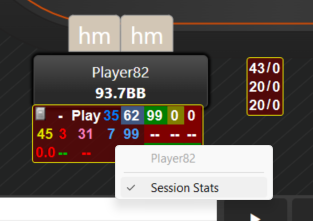
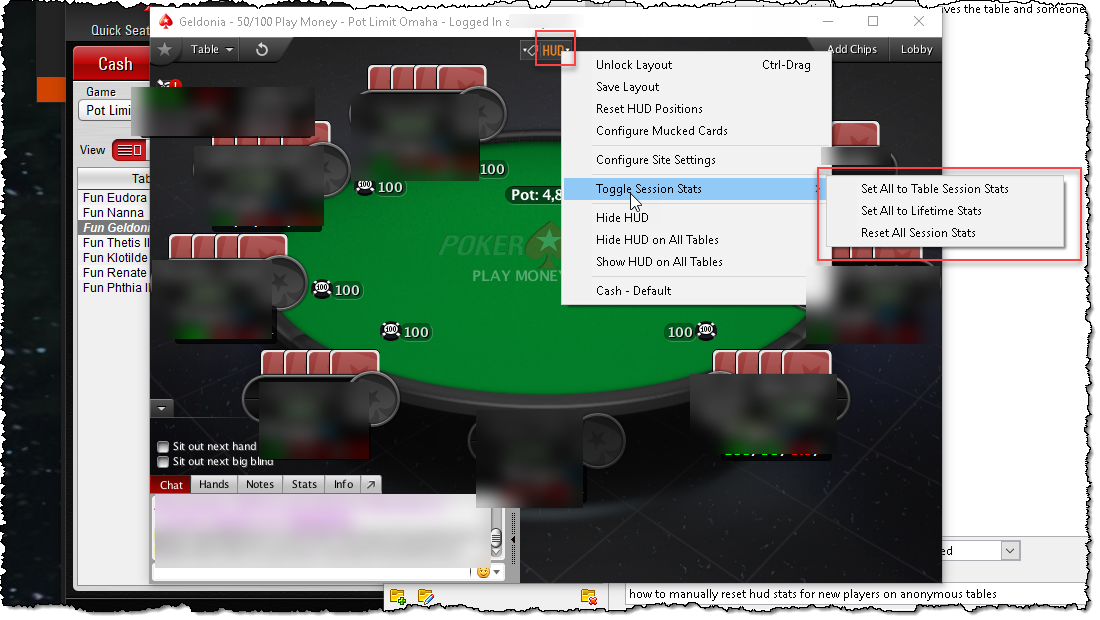
Oh nice, thx! I didn't know that.
As for just giving all of the HUD popups a border for the sake of design - I assume that is not possible?
Oh nice, thx! I didn't know that.
As for just giving all of the HUD popups a border for the sake of design - I assume that is not possible?
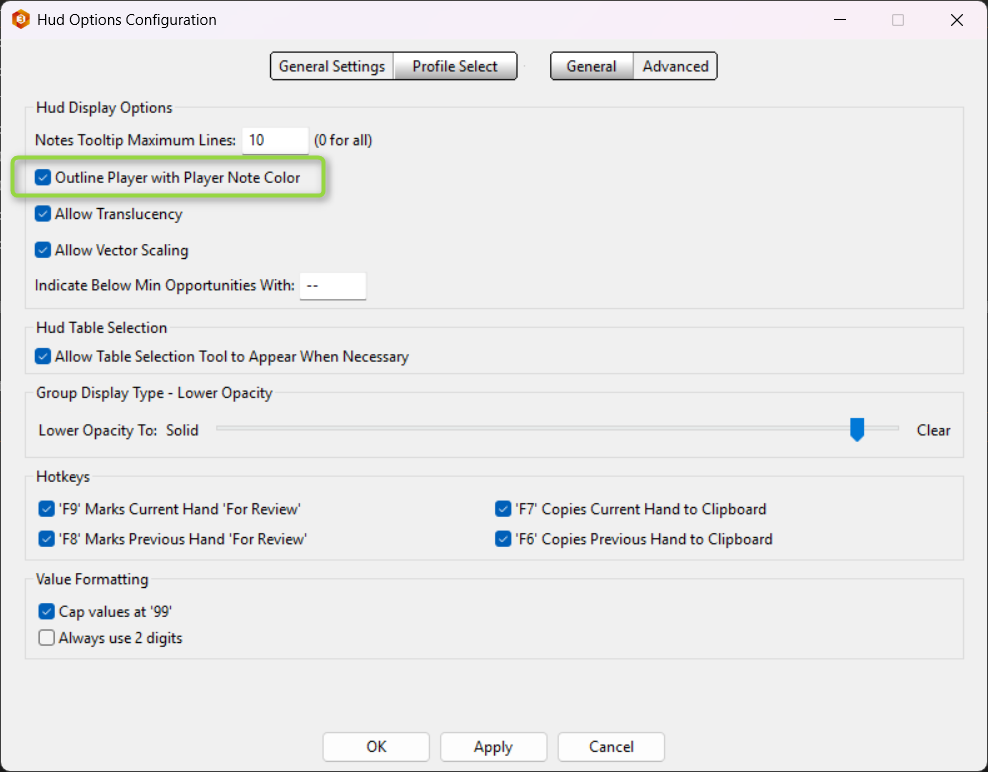
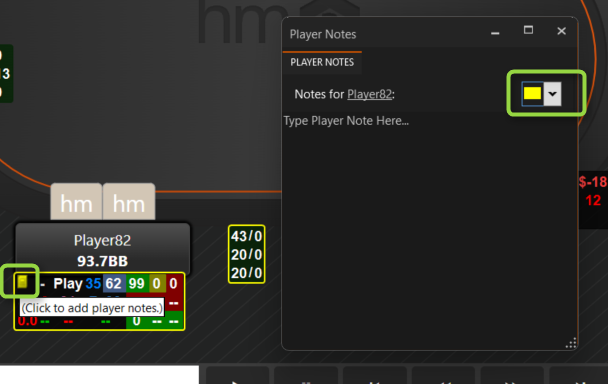
No, that is not possible. I personally use the player note outline color method to help me quickly recognize their player type. I rarely make an actual text note on a player, just a color.
Regards,
Fozzy71
Customer Support
Hold'em Manager
Awesome idea, I like it.
Thx for the assistance!
Hi, I have a bug on Pokerstars.it/Sisal.it.
HEM3 doesn't find the right seat - and on every table the mistake is different, as if it can't read the table position. I checked all the settings of poker client and HEM.
It worked fine till xmas. Maybe the last upgrade?
Hi, I have a bug on Pokerstars.it/Sisal.it.
HEM3 doesn't find the right seat - and on every table the mistake is different, as if it can't read the table position. I checked all the settings of poker client and HEM.
It worked fine till xmas. Maybe the last upgrade?
PokerStars Preferred Seating should be set to [x] 'Always Auto-Center Me' and HM3's - Tools - Site Settings... - PokerStars - My Seat should be set to [x] 'Automatically Detect'. Please see this FAQ for more details - https://kb.holdemmanager.com/knowledge-b...
- Open one Table and play at least one hand for HM3 to import and update the HUD to show your Hero data*.
- Manually adjust the positions for each player if necessary and save/lock the layout as instructed in this FAQ -
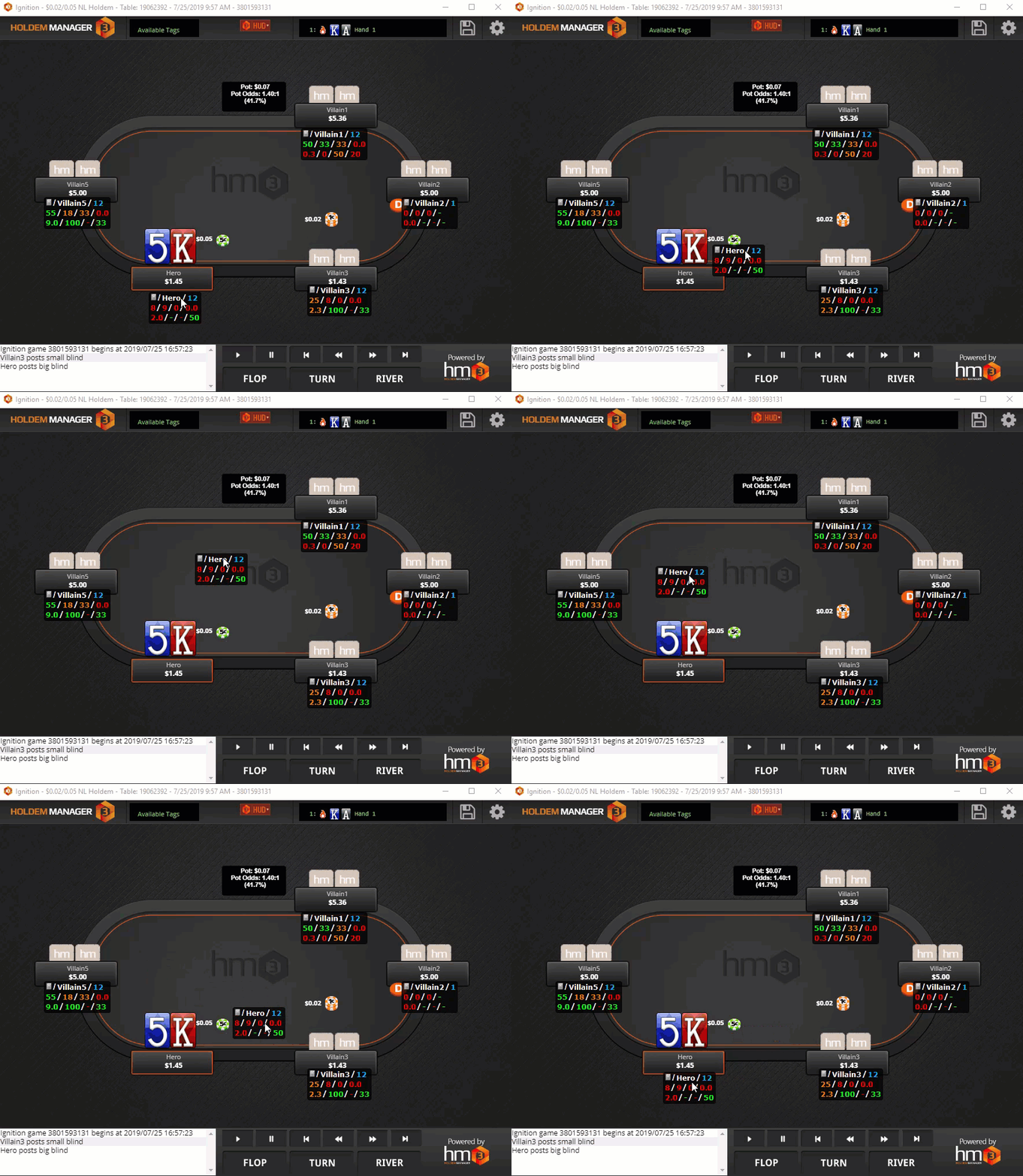
- Now you can open further tables, but you will always have to play at least one hand for the stats to be moved to the correct positions.
*Make sure you always wait until AFTER you have played a hand and see your own 'Hero' HUD before moving any HUD panels. By default, the HUD can show before you have played a hand to aid in table selection, but it might not align properly until after you have played your big blind hand if the table had to 'rotate' to auto-center you in your seat at that table. You can disable this pre-fetched HUD if you disable the HM3 - Tools - Site Settings... - PokerStars - Optional Settings menu -
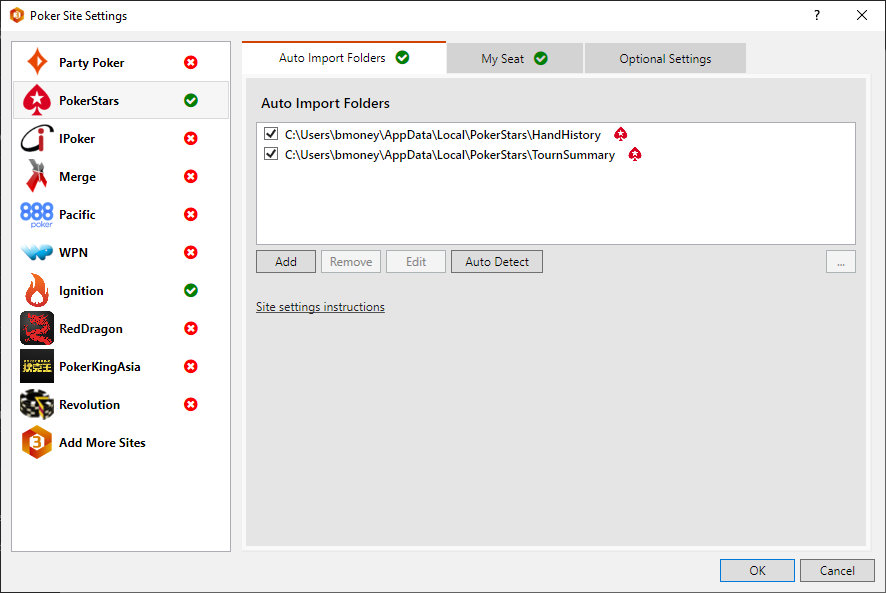
If you continue to have problems:
a) Please reproduce the problem and:
- Take a screenshot of the table/desktop before and after the problems
- Try to include the Live Play tab, your poker client lobby, and your Windows Clock Time visible in the screenshot.
- Also, include screenshots of your PokerStars preferred seating settings and HM3 - Tools - Site Settings... - PokerStars - 'My Seat' settings.
b) Click the 'Send Feedback' button from the left sidebar or the 'Help' menu at the top and send your logs and config files with a detailed description of the problem.
- You can also attach screenshots or other files to the Send Feedback interface as long as they don't total over 250 MB (including logs).
- Attach a copy of the original Hand history files for the table/session from your C:\HM3Archive folder.
Best regards,
Fozzy71
Customer Support
Hold'em Manager

So an opponent player changed his name but I know its the same one.
So first he was called Player1 and now he is called Player2.
How do I make it so that the hud shows both combined player stats?
I made an alias under which both names fall. If I choose that alias in Holdem Manager I get to see all his stats. But the HUD at the table only shows Player2 stats and not Player1 stats.
How do I make this work properly?
Answer here is fine but PM is also fine.
So an opponent player changed his name but I know its the same one.So first he was called Player1 and now he is called Player2.How do I make it so that the hud shows both combined player stats?I made an alias under which both names fall. If I choose that alias in Holdem Manager I get to see all his stats. But the HUD at the table only shows Player2 stats and not Player1 stats.H
Unfortunately, what you want to do is not possible currently.
This feature request has been documented in detail and provided to the developers for future consideration. If you want to be notified if/when it is added, please send an email via the 'Contact Support' ... and include "Notify Me When HMT-1091 Is Resolved" in the subject line and body of the email.
Best regards,
Fozzy71
Customer Support
Hold'em Manager
Oh so when sites allow name changes (and a lot do) you just basically lose all the hands you've played against that opponent in the HUD?
Seems like a major oversight
Oh so when sites allow name changes (and a lot do) you just basically lose all the hands you've played against that opponent in the HUD?
Seems like a major oversight
Yes, that is exactly why some sites offer name changes. My understanding is that it would be a very involved project for our developers to try to make the HUD Alias feature also work with Opponent data in the same way it works for your own Heroes. We would also run the risk of some sites banning such a feature after it was released if they feel it goes against the spirit of their name change rules.
Best regards,
Fozzy71
Customer Support
Hold'em Manager


